TrustRadius: an HG Insights company

N-able N-central

Score8.9 out of 10

88 Reviews and Ratings

What is N-able N-central?

MSPs and IT professionals use N-able™ N-central® to monitor and manage devices and complex networks remotely. N-central provides visibility and efficiency as the user's needs scale. N-central can help users:

1. Proactively monitor everything on a customer network—not just servers and workstations—and troubleshoot.

2. Stay on top of threats with features like MFA, antivirus, integrated endpoint detection and response, data backup, disk encryption, email protection, and password management .


3. Automate routine tasks using rules and filters to customize policies by customer, site, or device type to gain precision and control.

Media

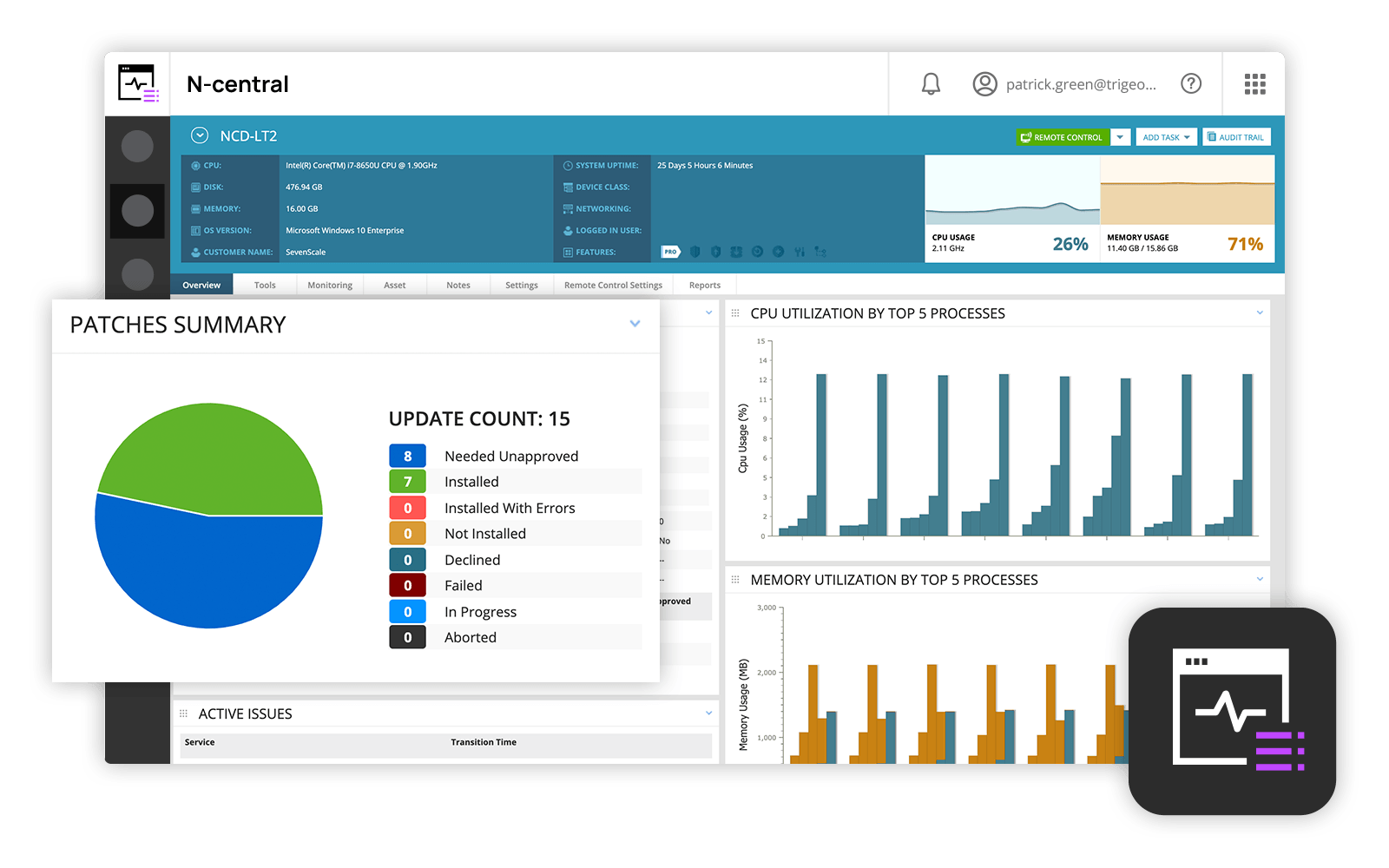
N-able N-central Dashboard
Remote desktop access with Take Control

1 / 2

Top Performing Features

  • Remote monitoring

    Monitoring of network operational activities through the use of remote devices known as monitors or probes

    Category average: 9

  • Patch Management

    Patch management involves acquiring, testing, and installing multiple patches (code changes) to an administered computer system.

    Category average: 8.7

  • Network device monitoring

    Monitor the real-time performance and health of devices on your network

    Category average: 8.5

Areas for Improvement

N-Able N-Central - A Worthwhile Investment.

Use Cases and Deployment Scope

All our customers have the N-central client installed, so we can connect remotely and perform consistent monitoring for workstations and servers. The majority also have the 'pro' features enabled, allowing us to patch and perform additional tasks easily. The majority also use EDR, which is built into the interface and allows us to see if there are any problems in a single pane of glass - very helpful when you are managing a large IT estate.

Pros

  • Remote Connection.
  • Patching
  • EDR
  • Scripts/Automations.
  • Monitoring
  • Critical Event Alerting.

Cons

  • Configuration of profiles and linking to customers.
  • Standardisation and compliance levels.
  • Speed of execution when running tasks and reporting back to inform where it's at, if it's stopped running, etc.

Return on Investment

  • Without N-Central, we wouldn't be able to manage the amount of customers we have.
  • It allows us to grow and onboard additional customers easily.
  • The licencing is reasonable and easy to cover within subscription costs.

Usability

Alternatives Considered

NinjaOne, Dragon RMM (ITarian / Comodo ONE) and Splashtop

Other Software Used

Sentinel, WatchGuard Network Security, Arcserve Backup

MSP Software that works for us

Use Cases and Deployment Scope

N-central is at the centre of our operation as it allows as to manage our client as MSP provider, automate tasks, assent inventory, remote access, patch management and so forth. Ease of management allows us to direct our resources elsewhere such as spend more interacting with customers, sales, project planning, etc.

Pros

  • Remote Access
  • Patch Management
  • Automated Tasks

Cons

  • Slow interface
  • Bad mobile app

Return on Investment

  • EDR implementation via N-able brought us over 100% ROI

Usability

Alternatives Considered

Atera

Other Software Used

Sage 50cloud Accounting, TeamViewer, AnyDesk

2024 N-able N-central Review

Use Cases and Deployment Scope

We used to employ N-Central MSP Manager for our corporate clients' IT asset and ticket management in conjunction with N-able N-central for monitoring, response, and remote operations.

We have since retained N-able N-central but moved to ZenDesk for our incident reposonse and ticket management.

A major pro to N-able N-central alone is its extensive functionality, monitoring, and remote control avalable for all endpoints. It's an extremely capable platform. Couple this with the native integration with other PSA services including their in-house MSP-Manager, and you havea very powerful, nearly all-in-one Managed Services technical platform.

We moved to ZenDesk for ticket tracking as it provided a smoother workflow overall for our clients and technicians.

Pros

  • remote control
  • remote monitoring and notification
  • remote configuration
  • remote installation
  • integration with SentinelOne EDR
  • integration with Microsoft 365

Cons

  • stability of some remote sessions
  • ad hock remote control (Enable Take Control app for Windows)
  • linking devices to particular client end users

Return on Investment

  • N-able N-central has provided our business a wealth of remote data to better provide our clients long term services.
  • N-able N-central continues to shine in day-to-day in providing my compnay's ability to remote control our client's endpoints in order to provide technical resolutions.

Usability

Other Software Used

Adobe Acrobat, Microsoft 365 Business Premium, Microsoft Teams, Adobe PhotoShop, Adobe Illustrator CC, Microsoft Visio, Windows Server, Zendesk Suite, GoodSync, SpamHero

Brilliant IT Management Portal

Use Cases and Deployment Scope

N-able N-central is used as a central Endpoint and individual PC

management tool that allows me a global company wide view of all IT

equipment within the company. It alerts me on non compliance of any

user\PC on AV policy as well as Hardware policies such as Disk Space,

overuse of memory or any other issues where thresholds are set

Pros

  • Remote Management of Multiple PC's in an organization
  • Scheduled AV Scan and Management of AV
  • Limits and Threshold alerts of specific requirements such as patch management or Disk space usage
  • Server Management

Cons

  • More Knowledge base articles
  • Lack of Online support

Most Important Features

  • Daily reporting of Threshold alerts
  • AV management
  • Inventory management for both Software and Hardware

Return on Investment

  • Time saving in managing PCs remotely
  • Effecient and ease of rollout
  • Less requirement on onsite technical assesment

Alternatives Considered

Eset Endpoint Encryption, AVG AntiVirus Business Edition and Kaspersky Endpoint Security

Other Software Used

Zoom, TestComplete, N-able Passportal

Good product

Use Cases and Deployment Scope

We use it as our RMM solution and to assist with automation. It helps with remote access and monitoring of client environments.

Pros

  • Overall GUI
  • Functionality and tools
  • Automation platform

Cons

  • Terrible support, in my opinion
  • Bugs in software with no real answers from N-able N-central I've found.
  • Listening to its end users

Most Important Features

  • automation
  • easy contracts

Return on Investment

  • neutral ROI
  • its a must have so checks the box

Alternatives Considered

Kaseya VSA and ConnectWise RMM

Other Software Used

ConnectWise Control, ConnectWise Manage, IT Glue, BrightGauge