TrustRadius: an HG Insights company

JAMS

Score8.2 out of 10

75 Reviews and Ratings

What is JAMS?

JAMS is a centralized workload automation and job scheduling solution that runs, monitors, and manages jobs and workflows. Reliably orchestrate the critical IT processes that run your business from a single pane of glass.

Categories & Use Cases

Media

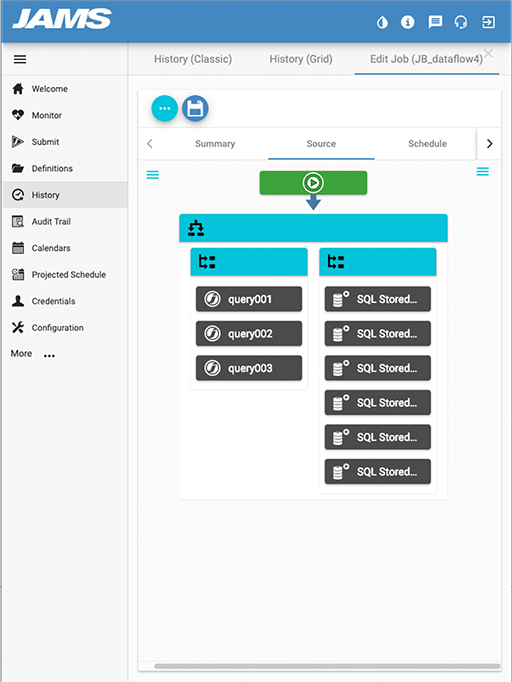
the Visual Job Editor - a drag and drop editor for tasks is used to build multistep workflows that include dependencies, user input, parallel processes, and triggers.
the Centralized Job Repository - here users store job definitions, schedules, and parameters in one central database.
the Job Monitor - this displays the status of jobs and workloads from one central monitoring console. Viewers can drill down on individual jobs to diagnose failures, dependencies, and expected completion times.
a Dashboard - Here, users can create data-rich visuals to monitor critical batch jobs and workflows running on various agents and on different business applications.
the Centralized Job Repository - Stores job definitions, schedules, and parameters in a central database.

1 / 5

Top Performing Features

  • Multi-platform scheduling

    Multi-platform scheduling is the ability to centrally manage a business process from end-to-end

    Category average: 9.2

  • Central monitoring

    A central monitoring dashboard provides data on trends and forecasts

    Category average: 9

  • Logging

    Logging and audit trails to ensure regulatory compliance

    Category average: 8.6

Areas for Improvement

  • Alerts and notifications

    Alerts and notifications enabling management by exception

    Category average: 8.6

  • Application integration

    Integration with a broad range of enterprise applications

    Category average: 8.4

  • Analysis and visualization

    Analysis and visualization tools provide clear understanding of critical errors and helps prioritize errors

    Category average: 8.3

Use JAMS for easy and reliable job scheduling.

Use Cases and Deployment Scope

JAMS is now our single platform for scheduling jobs. It replaced Windows Task Scheduler, SQL Agent jobs and a homegrown solution. It reliable runs job on schedule for various .Net executions, PowerShell scripts and SQL scripts. Before JAMS was implemented, there were times when it was unknown if a job actually ran or not.

Pros

  • Ease of scheduling new jobs
  • Ease of viewing job run history
  • Reliability of jobs running

Cons

  • Improve the web client and make a cell phone view for it.
  • Make the JAMS client open in the same window position it was in when last closed.
  • Add option to not have a recurrence when manually submitting a job.

Return on Investment

  • Increased reliability
  • Centralized system
  • Improved reporting

Other Software Used

Microsoft SQL Server, Microsoft Visual Studio Code

JAMS the best economical automation software you can find.

Use Cases and Deployment Scope

We use JAMS to automate all those repetitive processes and tasks that manually would take hours of our admin's time. We also use JAMS in our file processing for things like FTP, internal file moves, data cleanup, etc so it's become vital to getting things done in our business. The more we use it, the most use cases we're able to discover as word gets out through the business.

Pros

  • JAMS works well to organize jobs into logical folders with unique permissions for each folder
  • JAMS makes it easy to set up alerts for job failures and other notifications
  • Setting up scheduling times with normal human wording, such as Weekdays, or 2nd Tuesday of the month, etc.

Cons

  • The ability to edit workflow jobs in the web console.
  • The ability to move a job from one folder to another vs copy/paste/delete.
  • Security inheritance could be improved on items outside of the Definitions area.

Return on Investment

  • Being able to automate routine, repetitive, and mundane tasks has freed our admins up to focus on improving our environment and reduce task fatigue.
  • Being able to automate solutions for other departments has greatly enhanced their ability to accomplish their jobs and has eliminated the need to manually input or convert data to a usable format.

Alternatives Considered

ActiveBatch Workload Automation

Other Software Used

Veeam Data Platform, PDQ Deploy & Inventory

JAMS the best value for money software out there

Use Cases and Deployment Scope

JAMS brings all jobs under one roof triggering process across 5 different platforms besides doing its own direct calls via scripts and other file share processes.

It solves the business need of having access to near real time data, allowing jobs to be scheduled as often as needed since the business licensing model does not count triggers

Pros

  • easy to implement
  • outstanding support team
  • user friendly UI
  • easy to create workflow dependencies

Cons

  • Would love to see JAMS become a SaaS type of product instead of needing to be hosted by ourselves
  • having lots of jobs in the monitor area can lead to performance issues when running the client locally
  • dashboard and reporting tools could be more user friendly and provide more functionality to help monitoring teams spot recurring issues easily

Return on Investment

  • With better error handling, JAMS improved our infrastructure stability by 30% I would say and helping with the performance optimisation
  • Faster recovery having the ability to re-trigger jobs after timeouts or connectivity issues providing increased reliability and business continuity

Alternatives Considered

Control-M and ActiveBatch Workload Automation

Other Software Used

Azure Databricks, Jupyter Notebook, MongoDB Atlas, Oracle Database, Microsoft SQL Server

An Invaluable Program

Use Cases and Deployment Scope

We use JAMS primarily to support all our overnight batch processes, whilst it's true that many platforms like SQL or Windows can run their own internal scheduled jobs, they are inflexible and your flow in unreadable. JAMS allows us to keep track of all of these processes as it seamlessly switches between it's agents and inbuilt users. We have found the system itself to be robust with issues only ever arising from misconfiguration on the human end, indeed we're never actually had an issue with the software itself crashing or not doing what it was instructed. We have also found it incredibly easy to integrate it with many of the other services we use and in cases where there isn't an applicable agent type it has never been more complicated than throwing together a batch script. In terms of scope, our overnight processes total around 1,000 separate jobs so likely 50-100,000 lines of code, this fits entirely within a workflow that is itself comprised of other workflows and sequences.

Pros

  • Stability
  • Ease of use
  • Versatility
  • Reasonable licensing structure

Cons

  • Projected Schedule does not work within workflows, it would be useful to be able to produce a 'dummy run' of a workflow where it just ticks through all jobs and logic but runs none of the actual code.
  • Some kind of ability to notify a mobile phone by alarm, text or robot voice call, just like pagers used to be used.
  • A job that is part of a workflow will not have the workflow appear in it's 'references' tab.

Return on Investment

  • SOX auditing has been part automated saving days of work for the people involved.
  • The ability for jobs to react to different failure values has enabled us to do away with overnight human monitoring ultimately contributing to saving us in the 6 figures.

Other Software Used

Microsoft SQL Server, IBM Storage Protect, IBM WebSphere Hybrid Edition

JAMS Enterprise Scheduler

Use Cases and Deployment Scope

JAMS is used in 2 ways. One as an Enterprise Scheduler for all types of Jobs and the other type Jobs are specifically for Managed File Transfers using SFTP. The scope of standard Enterprise Scheduler Jobs are becoming more and more SAP centric, while standard MFT Jobs are slowly being replaced by other dedicated services.

Pros

  • The Activity Monitor clearly shows the Running Jobs, and Jobs that are to run soon. Successful Jobs can be viewed as well. The Refresh of this monitor is completely customizable to your liking.
  • Job Definitions are very well organized by use of Folders. This simplifies the structure of how to best Implement JAMS Jobs, including the ability to provide specific properties on each folder - whereby Jobs will inherit these properties.
  • Connectivity to servers is well thought out by having Shortcuts to include Credentials and Connection Store for server information.
  • JAMS Jobs can be controlled via System Resources. This is very powerful and is a very useful configuration found in JAMS.

Cons

  • Continued enhancements to the use of SAP Jobs, to include better Job dependencies from workflow information as viewed in the Diagram tab of a JAMS Job definition.
  • Allow the ability to Archive old and unused Jobs - which would then allow old, referenced resources to be removed.
  • The Report Designer needs much more documentation and example usage.

Return on Investment

  • Our company depends on the JAMS Scheduler in executing a large number of SAP Jobs. In never having had a true Enterprise Scheduler such as JAMS before now, we are very happy with the results.
  • There a number of features in JAMS for setting up schedules and dependencies on other jobs. This helps our company achieve the necessary workflows for Job execution. This optimization saves on system resources and keeps Jobs flowing smoothly.
  • We are very happy that JAMS is a robust solution with High Availability. This is necessary for Enterprise products, to reduce downtime, which we have not had as a result. This feature definitely saves our company money by reducing or eliminating unexpected downtime.

Alternatives Considered

IBM B2B Integrator

Other Software Used

IBM B2B Integrator