TrustRadius: an HG Insights company

Save this comparison

Save this comparison

Add Product

Recommended Comparisons

    Overview
    ProductRatingMost Used ByProduct SummaryStarting Price

    Salesforce Maps

    Score9 out of 10
    Small Businesses (1-50 employees)
    Salesforce Maps (formerly MapAnything) helps users map their CRM data. Users can: View customer, prospect, employee, partner, & competitor locations Build routes, call lists, campaigns, & event invite lists directly from the map Map wins & losses and visualize team activities & performance Maps is Salesforce-integrated & was built on Force.com. According to the vendor, the software has 1400+ customers so far. Use cases include: Field…

    $30

    per user / month

    Xactly AlignStar

    Score5.9 out of 10
    N/AXactly AlignStar® utilizes a map-based interface to enable territory planning that equips sales organizations to build and optimize balanced territories that align with company goals.N/A
    Pricing
    Salesforce MapsXactly AlignStar
    Editions & Modules
    Winter 2017 / 10.4.6
    $30
    per user / month
    No answers on this topic
    Offerings
    Pricing Offerings
    Salesforce MapsXactly AlignStar
    Free Trial
    YesYes
    Free/Freemium Version
    NoNo
    Premium Consulting/Integration Services
    NoNo
    Entry-level Setup FeeNo setup feeNo setup fee
    Additional DetailsContact Xactly for a demo and pricing.
    More Pricing Information
    Features
    Salesforce MapsXactly AlignStar
    Sales ICM
    Comparison of Sales ICM features of Salesforce Maps and Xactly AlignStar
    Feature
    Salesforce Maps
    1.0
    1 Ratings
    152% below category average
    Xactly AlignStar
    -
    Ratings
    Sales compensation plan creation1.01 Ratings00 Ratings
    Best Alternatives
    Salesforce MapsXactly AlignStar
    Small Businesses
    No answers on this topic
    No answers on this topic
    Medium-sized Companies
    Everstage
    Score9.5 out of 10
    Sales Performance Management solutions from SAP SuccessFactors
    Score9.2 out of 10
    Enterprises
    CaptivateIQ
    Score8 out of 10
    Sales Performance Management solutions from SAP SuccessFactors
    Score9.2 out of 10
    All AlternativesView all alternativesView all alternatives
    User Ratings
    Salesforce MapsXactly AlignStar
    Likelihood to Recommend
    7.7
    (3 ratings)
    6.0
    (9 ratings)
    Usability
    5.0
    (1 ratings)
    -
    (0 ratings)
    Support Rating
    1.0
    (1 ratings)
    -
    (0 ratings)
    User Testimonials
    Salesforce MapsXactly AlignStar
    Likelihood to Recommend
    Salesforce
    If you are a small business or have a small team in the field, anything Salesforce and its components should be avoided. Its price-point and ROI are overstated.
    Incentivized
    Read full review
    Xactly Corp
    If you have reps and need territories assigned geographically then AlignStar is a great option. While we do not have reps in the field, I can see how powerful it can be in aligning territories not only based on estimated revenue or some other metric but also with rep location and driving in mind.
    Incentivized
    Read full review
    Pros
    Salesforce
    • Color coding different accounts or data fields.
    • Ability to see travel time and not just distance.
    • Lots of data fields to pull from - big recent improvement.
    Incentivized
    Read full review
    Xactly Corp
    • Detailed label options by ZIP code. I know the immediate impact of moving a single ZIP code.
    • Territory Optimizer. If we are having trouble figuring out the correct configuration for a particular area, its helpful to see what the program suggests. It may come up with something we hadn't thought of yet.
    • Custom layers. I am able to mark the previous territory boundaries, so if we want to undo a change, I know exactly where we started from.
    Incentivized
    Read full review
    Cons
    Salesforce
    • Lots of glitches
    • Get signed out often, which interrupts the day
    • Could be more intuitive
    Incentivized
    Read full review
    Xactly Corp
    • Easier functionality to label the territories. We currently still use the desktop app and labels for any feature are rather small and not intuitive.
    • Speed of the application. The desktop version we currently use tends to be a bit slower and runs into the "application not responding" issue quite often.
    • Ability for the desktop version to automatically update Salesforce. It would be nice if I could have Alignstar update a field on an account record in Salesforce when I make updates in Alignstar.
    Incentivized
    Read full review
    Usability
    Salesforce
    Worked well once you figured it out. The 'help portal' was no 'help'. Once you get done self-teaching yourself enough of the terminology and workings, it is pretty quick and easy to use. But the learning curve, again, is not worth the time or effort
    Incentivized
    Read full review
    Xactly Corp
    No answers on this topic
    Support Rating
    Salesforce
    Support was comical. It was barely available and the few times I did get help the language barrier was extraordinarily problematic
    Incentivized
    Read full review
    Xactly Corp
    No answers on this topic
    Alternatives Considered
    Salesforce
    MapAnything is very easy to use but it appears that similar companies are too. Because of the new pricing structure, they are expensive.
    Incentivized
    Read full review
    Xactly Corp
    Javelin is another tool that we have used to assist us with territory alignment. Great tool. AlignStar is on par with Javelin.
    Incentivized
    Read full review
    Return on Investment
    Salesforce
    • Increased efficiency
    • Reduced labor time
    • Improved visibility
    Incentivized
    Read full review
    Xactly Corp
    • Easy to continuously plan forward for any potential changes by playing around with the optimization software. Able to more easily adapt our sales team and plan forward
    Incentivized
    Read full review
    ScreenShots

    Xactly AlignStar Screenshots

    Screenshot of Optimizer and "What If" Analysis
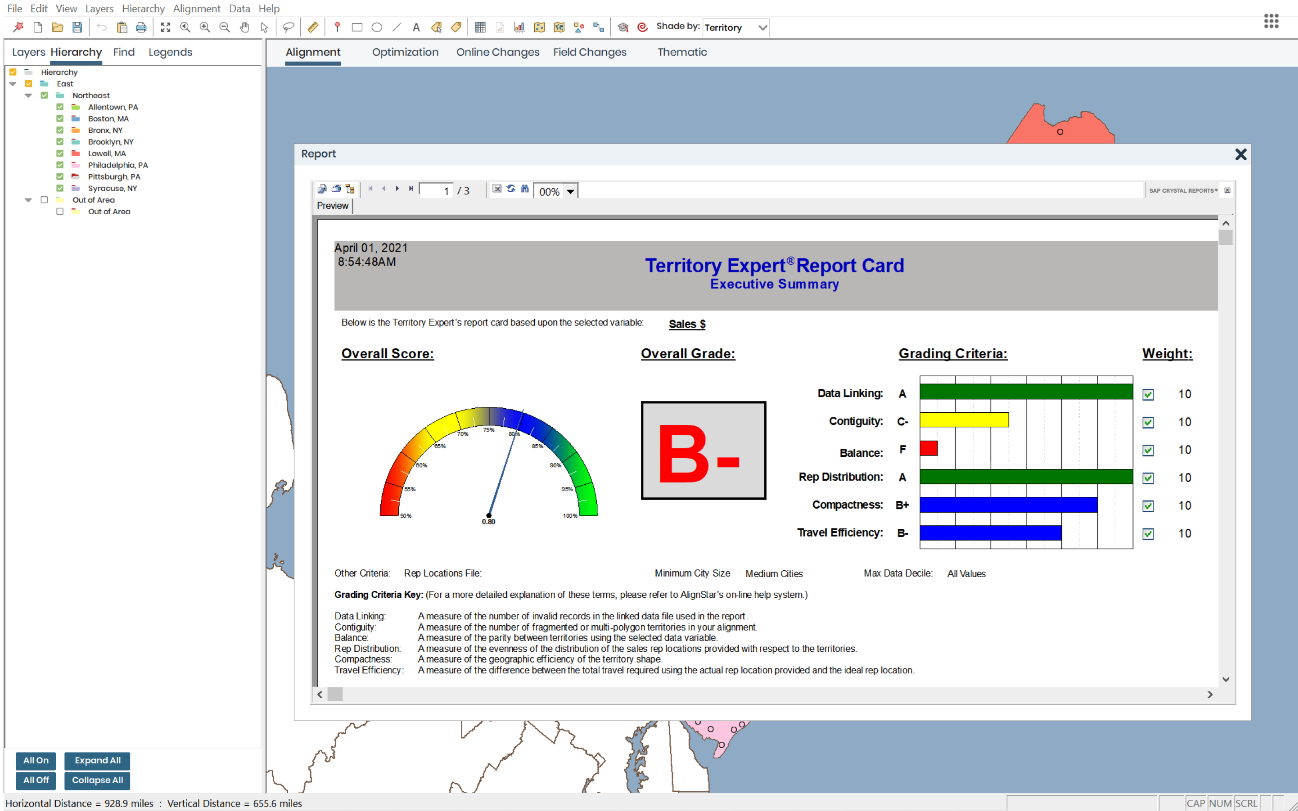
Visualize optimal sales territory alignment, leveraging securely uploaded data and "what if" scenarios.Screenshot of Alignment Report Card
View a grade of current sales territory alignment based on set metrics to see if current alignment is optimized for company goals.Screenshot of Interactive Map-Based Interface
Visualize customer and prospect potential in order to place sales reps in the highest concentration locations.