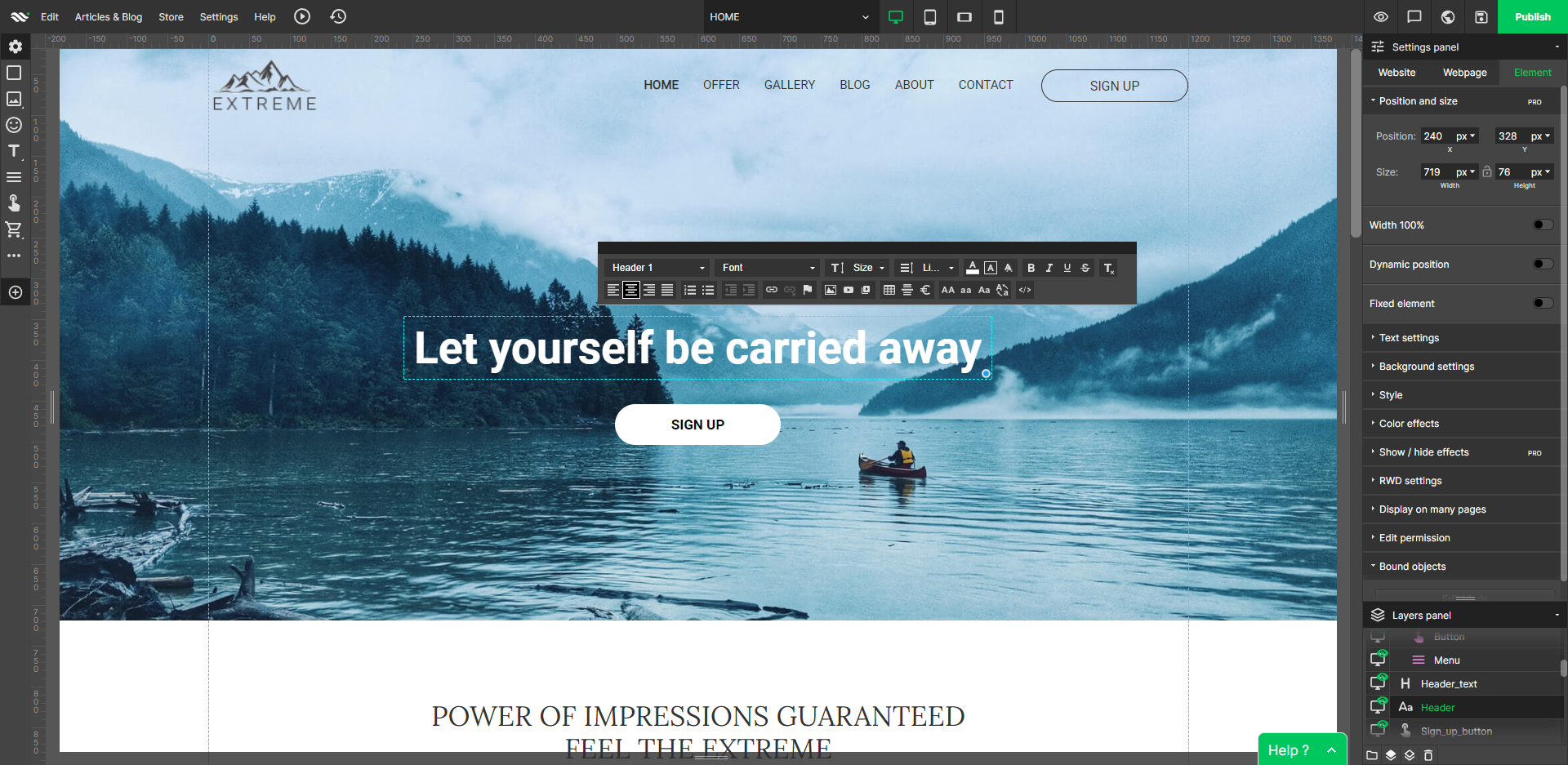
WebWave — an alternative for agencies and freelancers for creating custom websites for clients with the support of CMS. Using CMS with no sacrifices WebWave is a CMS platform that gives a designer precision up to 1 px in every single detail just like in more sophisticated graphic programs such as Photoshop while remaining a drag and drop software. This is to make creating websites much faster without loosing on details. Spend less time talking WebWave…
N/A
WYSIWYG Web Builder
Score10 out of 10
N/A
WYSIWYG Web Builder is a visual (drag & drop) web site design tool that helps create websites without having to learn HTML. Drag & drop objects or complete blocks on the page and the software will automatically generate all the HTML code and related files when the website is published. Besides standard HTML elements there are advanced tools like slideshows, photo galleries, carousels, navigation menus, and forms. Create the web layout you want Other web design…
$59.95
one-time fee per user
Pricing
WebWave
WYSIWYG Web Builder
Editions & Modules
No answers on this topic
WYSIWYG Web Builder
$59.95
one-time fee per user
WYSIWYG Web Builder Plus
$99.95
one-time fee per user
Offerings
Pricing Offerings
WebWave
WYSIWYG Web Builder
Free Trial
Yes
Yes
Free/Freemium Version
Yes
No
Premium Consulting/Integration Services
Yes
No
Entry-level Setup Fee
$7 per month
No setup fee
Additional Details
—
The plus bundle includes all paid extensions packs (approx. 100 extensions)
Well suited: Small businesses and entrepreneurs: WebWave is an excellent option for small businesses and entrepreneurs who need a professional-looking website without spending a lot of time and money. It's easy to use, customizable, and offers fast load times and responsive design. Less appropriate: Large e-commerce websites: If you're looking to create a large e-commerce website with a vast number of products and advanced features, WebWave may not be the best option. Its e-commerce functionality is limited compared to other website builders, and it may not be able to accommodate the needs of a large-scale online store. Also, if you need much coding, you would rather have it with something that is wordpress-based.
A de minimis incentive was given to thank the reviewer for their time. The incentive was not used to bias or drive a particular response, nor was the incentive contingent on a positive endorsement. More Info
If you prefer a PC/local development environment vs a fully online development tool, WYSIWYG Web Builder may be the best product available. If you are frustrated by bloated CMS systems that require constant updates and fixing of expired or conflicting plugins WYSIWYG Web Builder could be for you.
WebWave's site builder is the platform's truly innovative feature. I've never come across another service that deploys a layer-based approach in web design, as most of them usually deploy a grid-based system. This is an incredible alteration that ensures WebWave behaves much like a traditional graphic design tool, thereby resulting in an experience that is a lot more intuitive and instinctive. I believe this has the potential to radically change the way people approach no-code web design.
WebWave provides automatic, daily backups and a free SSL certificate for every website. This results in excellent security.
WebWave's support team is first-class! I had some teething-issues in the beginning, but the support team quickly got me back on track.
WebWave's community/forum is an excellent place to vote and request new features. This proves the development team is committed to making WebWave better by listening to their users.
Some scope for improvement in UX (colors are not very appealing). It is simple to use but design is a little dated. Especially in the builder section, I'd like to see modern design for buttons and maybe gradients also: as this is where visual motivation is also important
Some edits take effect only after pressing OK. That should be eliminated as it's an unnecessary addition. It's also kind of annoying to do that again and again, which can add up to a lot as we do so many small tweaks while building the website.
Few things (maybe glitches) in design. The rectangle below the footer was uneditable for me. I spent quite some time trying to figure it out so I'm convinced it's a glitch.
This is my fourth year using WYSIWYG Web Builder and as many new releases. Each new release brings a staggering number of new features and enhancements. But the updates, fixes and new features are not limited to a once a year update. The product is updated with interium releases every few months.
The one reason for a 9 instead of a 10 is not a ding to the product itself. When first starting out the available options and tools are a bit overwhelming. You might be able to achieve the same visual result in multiple ways. As a new user you will need to learn which options work best for you. The online tutorials are good and there are a number of very good videos available on YouTube. The support from the forum is great. New users are treated with respect and provided support and guidance. (That is certainly not the case in many support forums) After fours years and dozens of websites I am still learning new features and tools for enhancing my customer's sites.
1. The support person does not seem to understand the issues, and seems like they go off to talk to somebody and revert back every 5 to 10 minutes. It takes up a lot of time. 2. There is a lack of reading material to address simple issues like changing the website name in the dashboard, pasting a code, etc.
A de minimis incentive was given to thank the reviewer for their time. The incentive was not used to bias or drive a particular response, nor was the incentive contingent on a positive endorsement. More Info
The developer actively replies to post on the support forum. It is typical to get a reply in a few hours. The support for this product exceeds any other product I have used in the past 25 years. In addition to rapid replies from the developer the support community is very active on the forum along with several forum members providing excellent training videos.
WordPress is a more flexible and adaptive content management system than Webwave. In addition to the functionalities that are already built-in, I am unable to add any customizable plugins or add-ons. However, in the majority of cases, the inherent features of Webwave are sufficient for developing a website that serves its intended purpose. Webwave also makes it possible for you to add animations and the appearance of each of your design elements, whereas WordPress builders require additional plugins in order for users to access most of such capabilities. Webwave has several essential design features available internally, thus saving money and time.
I still use Xara for graphic design and image editing. But the web development in WYSIWYG Web Builder is far superior. Compared to online editors like Weebly, Wix, etc WYSIWYG Web Builder allows you to experiment with different options saved to different files. With the online builders you can't easily have 5 options to show a client. And you don't have backup copies in case the work you did, didn't work out.