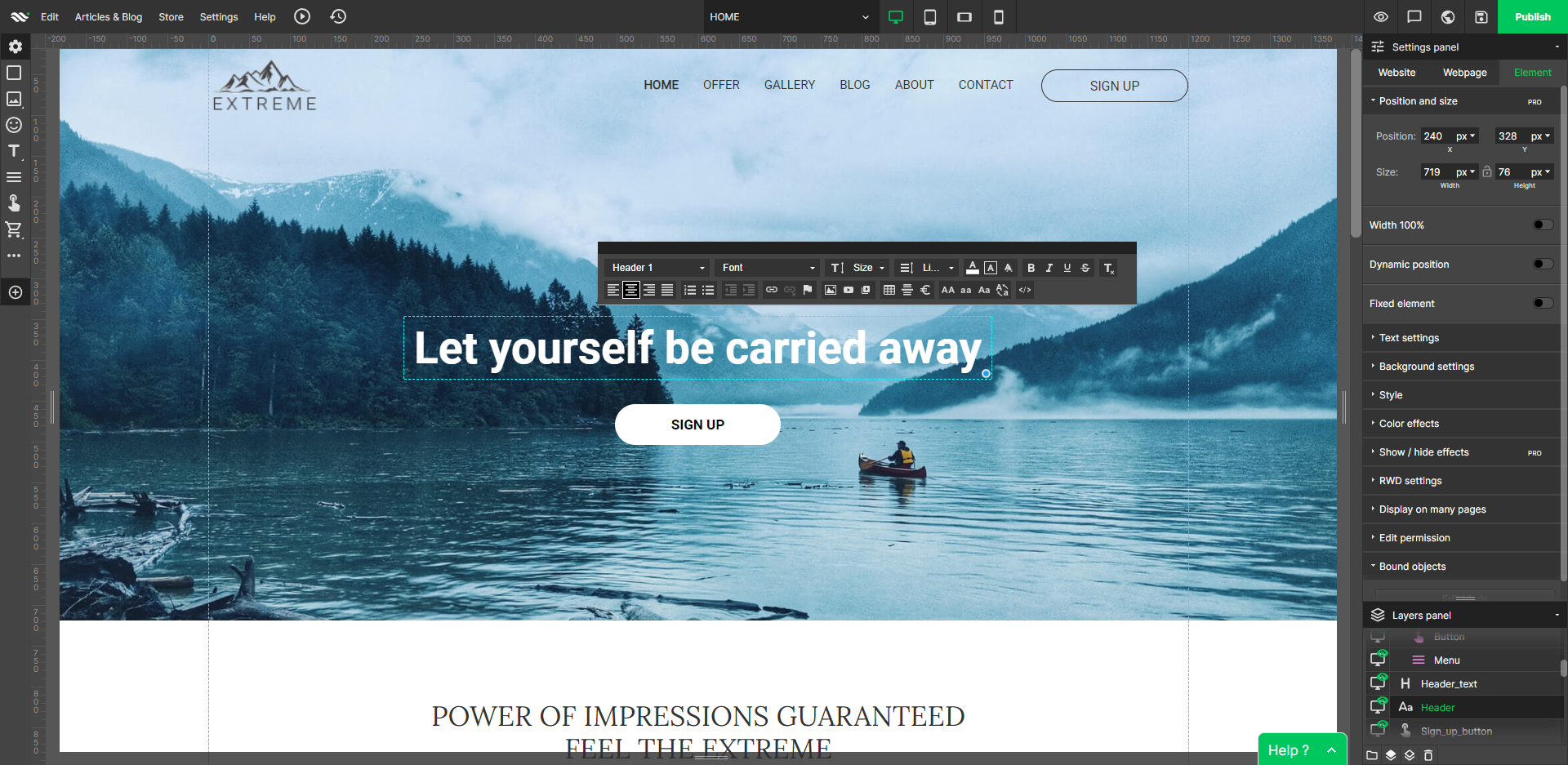
WebWave — an alternative for agencies and freelancers for creating custom websites for clients with the support of CMS. Using CMS with no sacrifices WebWave is a CMS platform that gives a designer precision up to 1 px in every single detail just like in more sophisticated graphic programs such as Photoshop while remaining a drag and drop software. This is to make creating websites much faster without loosing on details. Spend less time talking WebWave…
N/A
WP Engine
Score 8.9 out of 10
N/A
WP Engine is a website hosting service built to host WordPress for companies of any size, with features such as daily backups, firewall,SSL, and proprietary caching technology.
The WYSIWYG web builder marketspace is saturated, but there are not many solutions out there that eschew table-based design in favor of letting creators build sites where anything goes wherever you want. You’ll likely want to skip this product if you need a plug-and-play solution where everything is automatically responsively. However, if you have an eye for design, love creative control, and like to sweat the details until you have made the perfect website, WebWave is a must buy.
New users to WordPress can rejoice with a very hands-off hosting approach. If 100% uptime is not essential, you can get breakneck speeds with minimal tinkering using their platform. If you need to get up and running quickly and scale as required, the cost-benefit is here, although you need to pay a lot to get the most from it.
WebWave's site builder is the platform's truly innovative feature. I've never come across another service that deploys a layer-based approach in web design, as most of them usually deploy a grid-based system. This is an incredible alteration that ensures WebWave behaves much like a traditional graphic design tool, thereby resulting in an experience that is a lot more intuitive and instinctive. I believe this has the potential to radically change the way people approach no-code web design.
WebWave provides automatic, daily backups and a free SSL certificate for every website. This results in excellent security.
WebWave's support team is first-class! I had some teething-issues in the beginning, but the support team quickly got me back on track.
WebWave's community/forum is an excellent place to vote and request new features. This proves the development team is committed to making WebWave better by listening to their users.
I love the database backups and how quickly & easy it is to restore from an old backup point. This gives me & my clients confidence that any change can be rolled back.
The built in caching & CDN mean that I have to spend less time worrying about the speed of the server & site. The caching has some side-effects that take getting used to (on-page dynamic PHP code sometimes needs to be moved to API endpoints), but this is true for most caching systems.
They have really good support for multiple environments. It's very easy to have separate production & staging environments. It's also very simple to deploy from staging to production, making product launches and large scale website copy changes much easier to coordinate.
Some scope for improvement in UX (colors are not very appealing). It is simple to use but design is a little dated. Especially in the builder section, I'd like to see modern design for buttons and maybe gradients also: as this is where visual motivation is also important
Some edits take effect only after pressing OK. That should be eliminated as it's an unnecessary addition. It's also kind of annoying to do that again and again, which can add up to a lot as we do so many small tweaks while building the website.
Few things (maybe glitches) in design. The rectangle below the footer was uneditable for me. I spent quite some time trying to figure it out so I'm convinced it's a glitch.
The user interface is not very intuitive, which means new staff members require more training than I'd like.
The way they manage production/development servers and FTP access is somewhere between nebulous and tragically unique.
Their premium pricing is surely worthwhile, but it is significantly higher than virtually all of their competitors, without much obvious distinction in feature sets.
Some very basic features like spinning up a second instance require a PHONE CALL to their BILLING department to enable. What is this, 1990?
I was in a situation where I had to bolt Wordpress on to an existing infrastructure that could not support it. If I ever end up in that situation again, please kill me. Other than that reasonably common use case, I don't think it offers a lot of value over robust shared hosting, virtual private server (VPS) or dedicated servers.
It took very little time to learn their dashboard for managing WordPress sites. Their built-in tools are really well done, and the addition of security and CDN tools is great.
1. The support person does not seem to understand the issues, and seems like they go off to talk to somebody and revert back every 5 to 10 minutes. It takes up a lot of time. 2. There is a lack of reading material to address simple issues like changing the website name in the dashboard, pasting a code, etc.
Support is generally great. Enterprise support is fantastic, with little to no wait times. I find that chat support can almost always take care of the problem without escalating to a ticket for a higher level of troubleshooting. The chat support for many other hosting providers can only handle basic issues. This is a big bonus for us to get quick and helpful answers.
Fast load times: WebWave's websites have fast load times, which is critical for ensuring a positive user experience and better SEO performance. Responsive design: WebWave's websites are optimized for mobile devices, ensuring that they look great and function well on any screen size. Wix simply just doesn't have that and I was really struggling with this issue. Cost-effective: WebWave's pricing plans are affordable and provide excellent value for money, making it a cost-effective option for small businesses and entrepreneurs.
For Acquia and AEM the major differentiator was the cost for WPEngine was significantly lower and we could use the more common WordPress CMS. AEM is better for large marketing sites that integrate with the Abobe Marketing Cloud and we didn't feel we could support Drupal on Acquia. AWS EC2 is a viable option if you are going to self support and maintain your own WordPress experts. We felt that the value from WPEngine was they handled the support and the WordPress security patches and knowledge beyond simple theme usage. Pantheon was the closest in matching but we felt with our large installs that the hosting model for WPEngine was more cost-effective than the Container architecture for Pantheon