Mixpanel vs. WebEngage

Overview
ProductRatingMost Used ByProduct SummaryStarting Price
Mixpanel
Score 8.7 out of 10
N/A
Mixpanel helps companies measure what matters, make decisions fast, and build better products through data. With self-serve product analytics solution, teams can analyze how and why people engage, convert, and retain—in real-time, across devices—to improve their user experience. Mixpanel serves over 26,000 companies from different industries around the world, including Expedia, Uber, Ancestry, DocuSign, and Lemonade. Headquartered in San Francisco, Mixpanel has offices in New York,…
$0
per month
WebEngage
Score 8.0 out of 10
N/A
WebEngage calls itself a multi-channel user engagement platform. It automates communication across a user's lifecycle and helps companies send messages via these channels: Web Messages In-app Messages Push Notifications Web Push Notification Email Marketing SMS Marketing Facebook Remarketing According to the vendor, cross-device tracking helps keep communication coherent and contextual, making the…N/A
Pricing
MixpanelWebEngage
Editions & Modules
Free
$0
per month
Growth
$17
per month
Enterprise
Contact sales
No answers on this topic
Offerings
Pricing Offerings
MixpanelWebEngage
Free Trial
NoYes
Free/Freemium Version
YesYes
Premium Consulting/Integration Services
NoNo
Entry-level Setup FeeNo setup feeNo setup fee
Additional DetailsMixpanel uses MTU (Monthly Tracked User) pricing, which is designed to scale with your company. MTUs are roughly equivalent to the number of unique visitors on your product and each user is counted once per month, even if they use multiple devices. If Events based pricing makes more sense for your business, reach out to us and we can work with you!Pricing is customised according to the customer usage and requirement. Contact support@webengage.com to know more about pricing plans.
More Pricing Information
Community Pulse
MixpanelWebEngage
Features
MixpanelWebEngage
Email & Online Marketing
Comparison of Email & Online Marketing features of Product A and Product B
Mixpanel
-
Ratings
WebEngage
7.4
Ratings
3% below category average
Dynamic content00 Ratings7.30 Ratings
Ability to test dynamic content00 Ratings7.70 Ratings
Mobile optimization00 Ratings6.30 Ratings
Email deliverability reporting00 Ratings7.10 Ratings
List management00 Ratings7.80 Ratings
Triggered drip sequences00 Ratings8.20 Ratings
Lead Management
Comparison of Lead Management features of Product A and Product B
Mixpanel
-
Ratings
WebEngage
6.1
Ratings
24% below category average
Lead nurturing automation00 Ratings6.60 Ratings
Automated sales alerts and tasks00 Ratings5.60 Ratings
Campaign Management
Comparison of Campaign Management features of Product A and Product B
Mixpanel
-
Ratings
WebEngage
6.9
Ratings
7% below category average
Calendaring00 Ratings8.00 Ratings
Event/webinar marketing00 Ratings5.70 Ratings
Reporting & Analytics
Comparison of Reporting & Analytics features of Product A and Product B
Mixpanel
-
Ratings
WebEngage
7.2
Ratings
2% below category average
Dashboards00 Ratings7.50 Ratings
Standard reports00 Ratings7.50 Ratings
Custom reports00 Ratings6.70 Ratings
Platform & Infrastructure
Comparison of Platform & Infrastructure features of Product A and Product B
Mixpanel
-
Ratings
WebEngage
7.1
Ratings
5% below category average
API00 Ratings8.20 Ratings
Role-based workflow & approvals00 Ratings7.10 Ratings
Customizability00 Ratings6.80 Ratings
Integration with Salesforce.com00 Ratings6.10 Ratings
User Ratings
MixpanelWebEngage
Likelihood to Recommend
9.0
(0 ratings)
7.3
(0 ratings)
Likelihood to Renew
10.0
(0 ratings)
-
(0 ratings)
Usability
9.0
(0 ratings)
-
(0 ratings)
Support Rating
1.0
(0 ratings)
-
(0 ratings)
Online Training
8.0
(0 ratings)
-
(0 ratings)
Implementation Rating
8.9
(0 ratings)
-
(0 ratings)
User Testimonials
MixpanelWebEngage
Likelihood to Recommend
Mixpanel is a versatile platform that integrates features to connect every work team and get the best out of them in productivity and results. Moreover, it will improve the flow of information and interaction between all your company staff; it will unify and help promote collaboration between the different work areas. Without a doubt, I highly recommend this software
Read full review
When the business is expected to scale and expand, tools such as this proves very handy where it helps to target the correct segments or correct audiences with the right offerings, thereby increasing the chances of transaction or desired action from the user while saving pennies which could have been burnt if a blanket approach would have been used. Automation saves a lot of time and effort for the marketers and businesses boosted due to its operation.
Read full review
Pros
  • Mixpanel's ease of use is easily their best feature, allowing you to quickly create graphs with a few point and clicks. Their UI is also fairly snappy and well-designed.
  • Tying together events with user attributes allows you to properly segment users into cohorts which can then be tracked individually. Proper segmentation is where most analytics solutions earn their keep.
  • Live view is a nice perk that gives you a good feel for who's on your site and what they're doing at any single point in time. This can be further filtered to focus on particular events of interest.
  • Mixpanel has flexible plans that work for smaller startups as well.
  • Their documentation is top notch.
Read full review
  • Ease in creating user journeys.
  • Easy implementation of APIs.
  • Good reporting dashboard and scheduling features.
  • Segmentation of the users is easy.
Read full review
Cons
  • I didn't use the engagement features at all but it seems like they could have a better WYSIWYG editor for the emails for non-technical people using Mixpanel.
  • The custom reports feature seems to be really powerful but I wish they had more resources/templates for creating custom reports. I don't code so it was really hard for me to use this feature...BUT the reports I was able to get help with, were really powerful.
  • I wanted a dashboard area for all of my reports in one view. It seems like they were implementing this when I was moving jobs. If it's not available yet, they definitely need to add a master dashboard page for arranging saved reports.
Read full review
  • Relays
  • Onsite should have more options of templates.
  • Backend support for better reachability of the channels.
  • Cohort studies should be more customizable.
Read full review
Likelihood to Renew
It's not an all encompassing solution like Google Analytics tries to be, but MixPanel offers much easier to use and understandable data insights. That's valuable when juggling many responsibilities as startup life demands, so a renewal would be easily justified.
Read full review
No answers on this topic
Usability
Relativity easy to use. Once you get the hang of it, very easy to create dashboards for different use cases. I split my dashboards between customers or use cases
Read full review
No answers on this topic
Support Rating
There is no support at all for free-plan users. There used to be a good support but something changed. If everything had gone great we could've considered upgrading but it is so bad that we'll look for an alternative once we finish the current project. Given that the documentation is very poor, there are some aspects in which customer support could have helped a lot, but with no support, we are left with some needs unfulfilled.
Read full review
No answers on this topic
Online Training
Mixpanel has a great resource about their product, with videos on how to use it and real world examples from other companies on how they integrate Mixpanel into their business processes.
Read full review
No answers on this topic
Implementation Rating
Mixpanel is a simple JS script installation. For adding events to track, its simply a matter of adding the code where you want it. Their API and documentation are easy to understand and use.
Read full review
No answers on this topic
Alternatives Considered
Datanomix is an excellent tool, with similar characteristics; however, Mixpanel has been our preference for two main reasons: one, to have customization and to be able to adapt the interface and tools to our use, and two, to be able to count on reports that it automates the work of sales analysis and being able to evaluate progress.
Read full review
WebEngage's dashboard is relatively more intuitive and easy to understand. Further in terms of cost as well it is value to money as it delivers excellent ROI. The after-sales support is also better in terms of responsiveness and helps in case of issues with the execution of campaigns. The account managers also ideate and help in the optimization and creation of new user journeys.
Read full review
Return on Investment
  • User event data has helped us improve our product, which has increased subscriptions.
  • Being able to send helpful messages to some users who drop off after certain events has helped us reduce our churn.
  • We have been able to identify the Monthly super-active users, understand their usage of our product, which we use to conduct focus groups to help us shape the product.
Read full review
  • Helped in lowering cost of marketing.
  • Driving higher volume of Direct Sales.
  • Increasing conversion rate on the website.
  • Increasing lead to sale ratio.
Read full review
ScreenShots

Mixpanel Screenshots

Screenshot of Mixpanel's Insights report enables you to see how often users perform meaningful actions, monitor growth of key user cohorts, like power users, and slice and dice trends by any attribute.Screenshot of Mixpanel's powerful Flows report enables you to identify top user paths to see where people get stuck, and discover actions users take before, after, or between key events.Screenshot of Mixpanel's Retention report helps you understand how often users return and visualize feature stickiness. You can also slice and dice retention data to identify user groups that retain best and to find out what causes churn.

WebEngage Screenshots

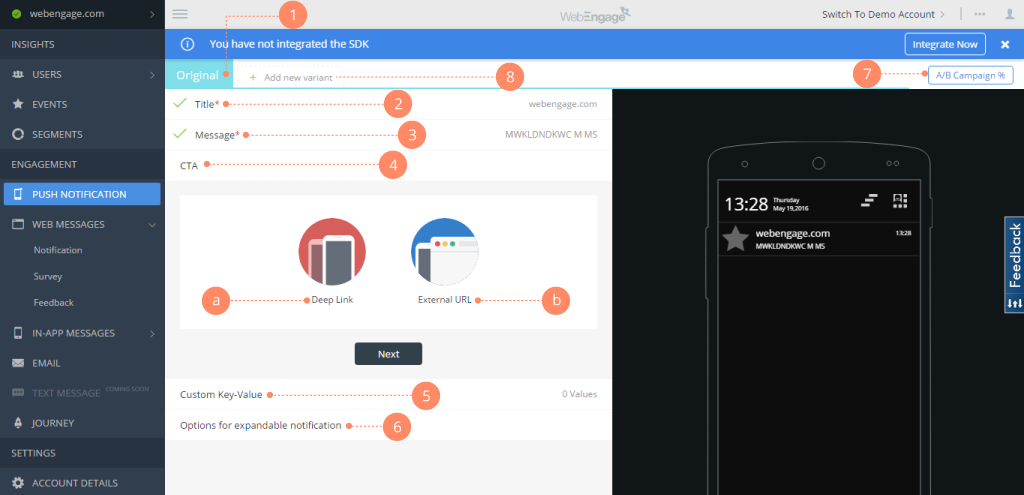
Screenshot of Webengage dashboard - User AnalyticsScreenshot of Webenagge dashboard - User DetailsScreenshot of Webengage dashboard - Creating Mobile notificationsScreenshot of Webengage dashboard - Creating EmailsScreenshot of Webengage Dashboard - Journey DesignerScreenshot of Webengage Dashboard - Journey Designer (2)