BeyondTrust Privileged Remote Access vs. RealVNC Connect

Overview
ProductRatingMost Used ByProduct SummaryStarting Price
BeyondTrust Privileged Remote Access
Score 8.8 out of 10
N/A
BeyondTrust Privileged Remote Access enables security professionals to control, monitor, and manage access to critical systems by privileged users and third-party vendors (e.g. authorized employees, contractors, etc). BeyondTrust's approach is designed to allow companies to quickly gain control of system access and protect themselves against cyberattacks without requiring time-consuming process changes. Features for secure access, vault credentials, and audit…N/A
RealVNC Connect
Score 7.0 out of 10
N/A
RealVNC® Connect is a secure remote access solution from RealVNC. It can be used to connect to a remote device anywhere in the world to view its desktop in real-time and take control as though sitting in front of it.
$8.25
per month (billed annually) per concurrent session
Pricing
BeyondTrust Privileged Remote AccessRealVNC Connect
Editions & Modules
No answers on this topic
Essentials
$8.25
per month (billed annually) per concurrent session
Plus
$16.50
per month (billed annually) per concurrent session (add up to 3)
Premium
$29.75
per month (billed annually) per concurrent session (add up to 5)
Enterprise
Custom Pricing
per year
Enterprise
Custom Pricing
Offerings
Pricing Offerings
BeyondTrust Privileged Remote AccessRealVNC Connect
Free Trial
YesYes
Free/Freemium Version
NoYes
Premium Consulting/Integration Services
NoNo
Entry-level Setup FeeNo setup feeNo setup fee
Additional DetailsPlans work on a Per Concurrent Session basis. Each plan gives access to a bundled number of devices, but limits apply to the amount of devices that can be connected at any given time. The Premium plan includes On-Demand Assist, a useful tool for providing just-in-time remote support to end-users without them needing RealVNC Connect installed on their device.
More Pricing Information
Community Pulse
BeyondTrust Privileged Remote AccessRealVNC Connect
Features
BeyondTrust Privileged Remote AccessRealVNC Connect
Remote Administration
Comparison of Remote Administration features of Product A and Product B
BeyondTrust Privileged Remote Access
9.7
Ratings
18% above category average
RealVNC Connect
7.3
Ratings
11% below category average
Screen sharing9.00 Ratings9.00 Ratings
Instant message9.00 Ratings6.10 Ratings
Over-the-Internet remote session10.00 Ratings9.00 Ratings
Initiate remote control from mobile9.00 Ratings9.00 Ratings
Remote management of servers & workstations10.00 Ratings4.70 Ratings
Remote Active Directory® management10.00 Ratings00 Ratings
Centralized management dashboard10.00 Ratings7.10 Ratings
Session record10.00 Ratings8.00 Ratings
Multi-platform remote control10.00 Ratings9.00 Ratings
File transfer00 Ratings8.00 Ratings
Secure remote access with Smart Card authentication00 Ratings7.00 Ratings
Access to sleeping/powered-off computers00 Ratings6.00 Ratings
Annotations00 Ratings5.30 Ratings
Monitoring and Alerts00 Ratings7.00 Ratings
User Ratings
BeyondTrust Privileged Remote AccessRealVNC Connect
Likelihood to Recommend
8.0
(0 ratings)
8.0
(0 ratings)
Likelihood to Renew
-
(0 ratings)
8.0
(0 ratings)
Usability
10.0
(0 ratings)
8.0
(0 ratings)
Support Rating
-
(0 ratings)
8.0
(0 ratings)
Online Training
-
(0 ratings)
7.0
(0 ratings)
Implementation Rating
-
(0 ratings)
8.0
(0 ratings)
User Testimonials
BeyondTrust Privileged Remote AccessRealVNC Connect
Likelihood to Recommend
BeyondTrust Privileged Remote Access is well suited to grand monitored privileged access to resources. It works in a proxy mode so end-users don't have direct access to servers. This can help prevent attacks on servers from users' machines since all the traffic to the servers goes through the Privileged Remote Access server which performs auth according to the policies. In cases where direct access to the servers/service from the end-user's machine is required, it is a little bit complicated to set up that kind of connection using protocol tunneling.
Read full review
It is very easy to use if the remote device is already set up to receive connections, so if you are setting up devices before deploying them, it is a great tool to have. It is well-suited to use when shadowing users or using it as a teaching tool. There are other products that are better if you are trying to help someone on a one-use basis.
Read full review
Pros
  • It's comprehensive, intelligent and easy to use.
  • It has lots of features i.e. it allows special commands to be used whereas the other programs don't allow them.
  • This tool is effective in allowing you to access all your applications through a single sign-on page.
  • Actively manage the ongoing operational use of network devices, hardware, and application access via Secure App.
  • Bomgar Privileged Access deploys on-premises via a hardened physical or virtual appliance, or through the Bomgar Secure Cloud.
Read full review
  • Allow remote connection to pc and servers that are located within our WAN. The connection is stable with fast response (no lag)
  • Allow remote connection to pc and servers that are located outside. The connection is stable with fast response (no lag)
  • It allows chat function with the user, and pasting capability from local desktop and mapped a drive to the remote system.
Read full review
Cons
  • questionnaire from technician for installation was difficult to follow
  • after purchase of a product, an initial audio discussion with an Engineer would be great for better understanding the installation phase
  • provide plans for on-premise and cloud strategies in different documents
Read full review
  • Some of the confusion of VNC upon installation is you need to be connected to the internet for it to function. This is not the case, but is unclear upon installation.
  • The licensing model is not ideal for locations that do not use the internet and function off of the grid.
Read full review
Likelihood to Renew
This review was originally written partially in Portuguese and those parts have been translated into English using a third-party translation tool. While we strive for accuracy, some nuances or meanings may not be perfectly captured.
Read full review
VNC is a solid product for the price. It simply works and its reliable across different platforms. Some products state they work well in the Mac environment but don't deliver. This one does what it says. Connections are reliable, but of course, this depends on internet connections. The product works well over wireless connections as well. It delivers on what a remote tool should deliver on. My technicians are happy with the product and customers appreciate the ease of use when letting us connect to their systems. Some also appreciate the remote support while they are multi-task.
Read full review
Usability
It accomplishes all of our remote access needs, our users require little to no training when being setup for remote access for the first time.
Read full review
It's a niche product and in that niche they try to cater to as many use cases as they can. Other as a TCO aspect i don't see many use cases where you can't use this product as the one tool for all remote session use cases in your company
Read full review
Support Rating
No answers on this topic
VNC Connect is a reliable product that has been around for a long time. It is reasonably priced and works well in the Mac & PC environment. When you have a small team that supports many users we need tools that we can rely upon and that will get the job done on the first try. Many customers appreciate the quick assistance and can multi-task while our team works on their computer issues remotely. From a customer service point of view, this tool gives us transparency and efficient effectiveness.
Read full review
Online Training
No answers on this topic
The training is very informative, quick and to the point. All of the details one would need are present so the user doesn't have to go searching for additional information just to use the application. The layout of the training was also neat and concise, some of the other training sessions for other companies I've done in the past were confusing and not well thought out, this one is much more superior
Read full review
Implementation Rating
No answers on this topic
No problem at all, love the product.
Read full review
Alternatives Considered
The main factor is the ease of implementation and also its use in everyday life.
Read full review
VNC Connect stacks up very well to other competitors. With this simple program, you can remotely connect and access other computers with the same VNC Connect agent installed. The only reason we're moving away from using this is that our current Ninja RMM Tools computer monitoring agent includes the TeamViewer tool for us to use.
Read full review
Return on Investment
  • Allows our users to work remotely or from home
  • Increase productivity by enabling users to work from anywhere
  • Satisfies IT Security requirements for a secure remote access solution
Read full review
  • I have just used the software for about 1 month and so far so god. I am saving time whenever I can access my client's computers from my desk as opposed to having to leave my office to go to their offices. Saves me time and the client money.
Read full review
ScreenShots

RealVNC Connect Screenshots

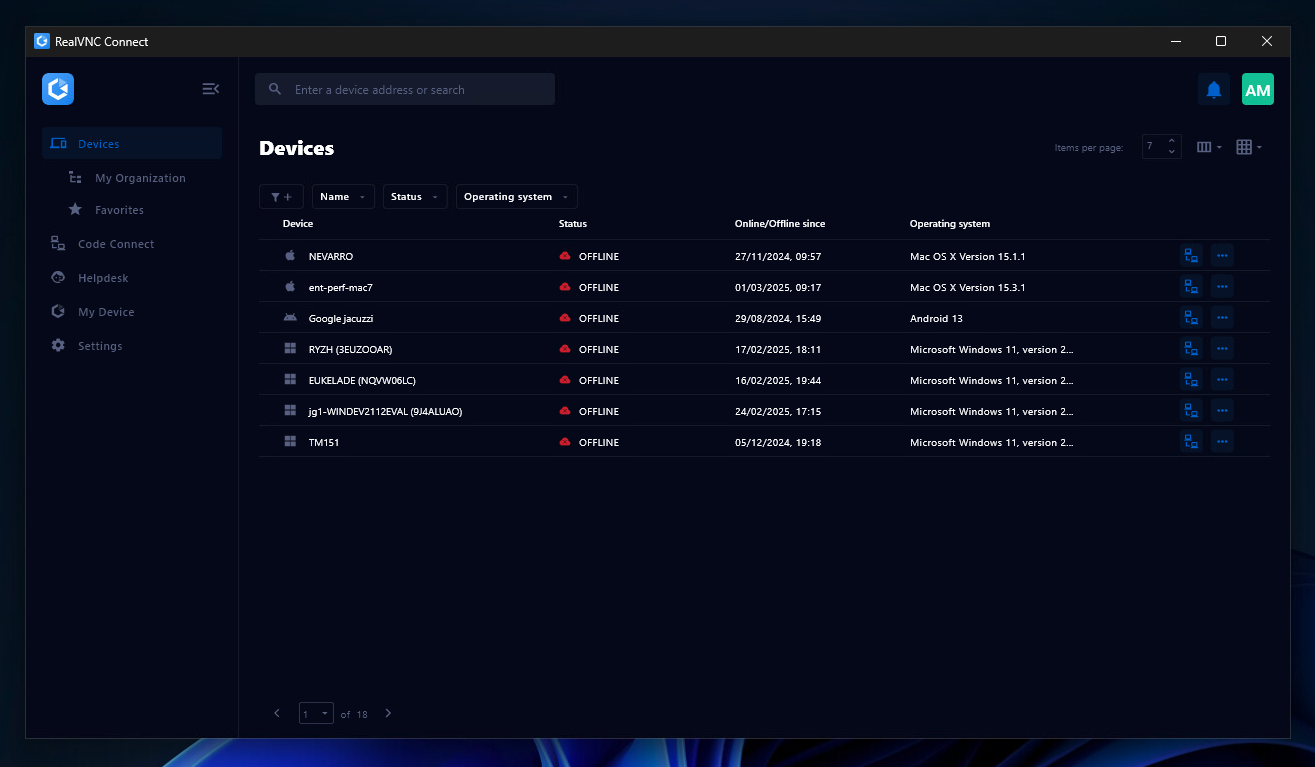
Screenshot of the Device List in the Connect v8 desktop appScreenshot of On-Demand Assist, which can be used to start a remote support session using a single-use code.