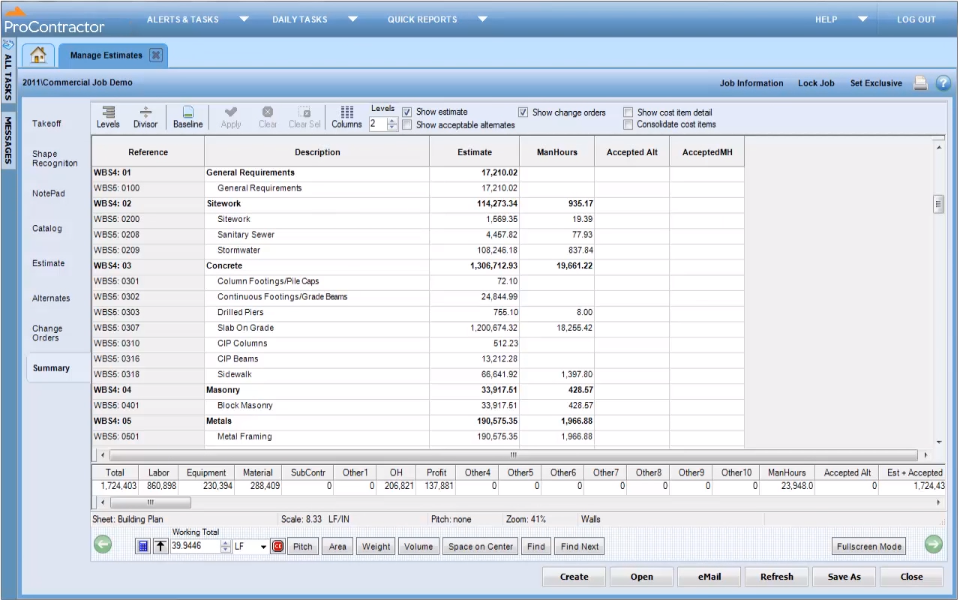
ProContractor is a Cloud-Based Solution for Estimating, Project Management, and Accounting. Designed to improve visibility and profitability across construction businesses, ProContractor™ by Viewpoint is a cloud-based software solution for estimating, project management, and accounting. The user can manage the entire project lifecycle from bid to cash in a single solution. Built to be flexible and scalable, ProContractor allows users to go all-in-one, or build a complete solution…
N/A
Zoho Projects
Score8.8 out of 10
N/A
Zoho Project is online project management and planning software that provides project teams with a web-based collaborative environment. Zoho Projects can also include a bug tracking module specifically design to support software development project. It is integrated with other Zoho products including Zoho CRM.
It is appropriate for the size and scale of my company - 150 projects a year that has a lot going on a multiple lines with each project. However there are many features and things that go unused with the software, because of how tinkery it can be. For example - our company needs a positive pay file, however we had to employ an outside service provide to create the file within the system. Same with a Backlog - the system kind of has a report but then again it has to be manipulated in order for it be of use. It gets the job done and has the reports needed to submit for certified payroll to the state, which was why we purchased Viewpoint ProContractor, however its ease of use is one of its biggest downfalls.
A de minimis incentive was given to thank the reviewer for their time. The incentive was not used to bias or drive a particular response, nor was the incentive contingent on a positive endorsement. More Info
My work involves projects of 5-15 people with numerous projects running simultaneously. Prior to Zoho, I did not have a central location from which to view all project statuses at once. Zoho looks to provide this and also looks like it will deliver. I am anxious to see how our organization's use of it develops. At this time, I feel I am likely to recommend Zoho Projects because my organization has made great software decisions in the past so I have a level of trust already that the research has been done that Zoho is the best solution for our line of work.
A de minimis incentive was given to thank the reviewer for their time. The incentive was not used to bias or drive a particular response, nor was the incentive contingent on a positive endorsement. More Info
A de minimis incentive was given to thank the reviewer for their time. The incentive was not used to bias or drive a particular response, nor was the incentive contingent on a positive endorsement. More Info
We use it to manage our sales orders as there are lots of moving parts which are necessary to get client orders done properly.
I use it anytime I have a new idea I want to put into motion. As I can create a list for brainstorming, feedback, specific actions necessary in order to test and or implement the idea.
Unrelated to business, it's a great way to plan travel in order to make sure you don't forget those important things like passport, flight arrangement, client meeting confirmation, and meeting prep as far as what specific documents or things do you need to bring with you.
And since everyone is on the go and expected to keep up with work, the mobile/tablet app makes it a breeze to keep up, work on, and create new projects.
A de minimis incentive was given to thank the reviewer for their time. The incentive was not used to bias or drive a particular response, nor was the incentive contingent on a positive endorsement. More Info
A de minimis incentive was given to thank the reviewer for their time. The incentive was not used to bias or drive a particular response, nor was the incentive contingent on a positive endorsement. More Info
I've reviewed about 8 other project management solutions and Zoho Projects is the best I've seen without being overly complicated. Zoho Projects keeps getting better! Recent new enhancements makes it even easier to navigate. There are new keyboard shortcuts that cut my time way down. The tools are very easy to use.
I give Viewpoint ProContractor a 10 out of 10. This system is user friendly to help keep me organized on a daily basis. I can find everything I need daily with this system. I am able to look up our subcontactors, vendors and clients I need to find quickly. I am able to see bills that I need to pay as well as invoices that I need to send out.
Zoho Projects is an easy project management tool to use. It provides all the functionality that we required for handling projects. We can easily create personal forms for projects and tasks, allowing us to add and report on our own desire. Apart from this we can create and edit documents in real time which saves our time. This allows us to share text docs, presentations, tables with the whole team and we can work on them together
A de minimis incentive was given to thank the reviewer for their time. The incentive was not used to bias or drive a particular response, nor was the incentive contingent on a positive endorsement. More Info
When something isn't working, you can contact support who will gladly remote into your system and try and work out a solution. Though several of the issues we encountered, they were not able to fix and had to submit for further review. While some were eventually rectified in updates, it takes time for these to be addressed and implemented.
A de minimis incentive was given to thank the reviewer for their time. The incentive was not used to bias or drive a particular response, nor was the incentive contingent on a positive endorsement. More Info
Although it might lack intuitiveness, once you get a hang of how Zoho Projects works, you can do a LOT. The impact good project management has on profitability is huge, and it has helped not only improve communication and coordination when working on a project, but more importantly have adequate tracking of time, due dates and potential bottle necks
A de minimis incentive was given to thank the reviewer for their time. The incentive was not used to bias or drive a particular response, nor was the incentive contingent on a positive endorsement. More Info
Procore beats Viewpoint hands down but can integrate well with Viewpoint Vista accounting software. I think that if the Viewpoint software was more flexible if they were more interested in patches, updates, and hearing customer feedback in the way the Procore does, that they would actually have the opportunity to corner the market.
A de minimis incentive was given to thank the reviewer for their time. The incentive was not used to bias or drive a particular response, nor was the incentive contingent on a positive endorsement. More Info
Zoho Projects provides a more limited set of functionality and customization options than other task/bug trackers on the market, but what it lacks in functionality it makes up for in ease of use. It probably has 80-90% of the features of its competitors but takes about a third of the time to get up and running and realizing value.
A de minimis incentive was given to thank the reviewer for their time. The incentive was not used to bias or drive a particular response, nor was the incentive contingent on a positive endorsement. More Info
Overall it allowed us to go electronic for certified payroll allowing us to be more accurate in reporting which was a giant win for the company
It's viewable pay estimates with dates and records of payment are crucial to a company like ours that relies on a general contractor and the state for payment of EADA quantites
Negatively training is not the easiest for the company and therefore onboarding new employees with no experience with the software is time consuming and difficult.
A de minimis incentive was given to thank the reviewer for their time. The incentive was not used to bias or drive a particular response, nor was the incentive contingent on a positive endorsement. More Info
We needed a system to organize our growing business, so anything was better than what we had, which was nothing.
Recording time spend is a huge reason for using project software. It has made me aware of the tasks that are taking too long and where we are not being profitable as a company.
It has kept our team accountable for what needs to get completed and when projects are not in motion or completed timely. It's helpful to know in order to get billing out faster.
A de minimis incentive was given to thank the reviewer for their time. The incentive was not used to bias or drive a particular response, nor was the incentive contingent on a positive endorsement. More Info