TrustRadius: an HG Insights company

Save this comparison

Save this comparison

Add Product

Recommended Comparisons

    Overview
    ProductRatingMost Used ByProduct SummaryStarting Price

    IBM Turbonomic

    Score9.3 out of 10
    Enterprise companies (1,001+ employees)
    IBM Turbonomic is a performance and cost optimization platform for public, private, and hybrid clouds used by cloud, infrastructure operations, and architecture to assure application performance while eliminating inefficiencies by dynamically resourcing applications through automated actions. One of the key features of IBM Turbonomic is its ability to continuously adjust application resources in real time. By monitoring resource utilization and application performance,…N/A

    Uptrends

    Score8.1 out of 10
    N/AUptrends is the eponymous product from the company in Massachusetts for monitoring a website's uptime, used as well for monitoring web apps' functioning, server monitoring with alerts and reporting, and general analysis of a website's performance, element-by-element.

    $16.21

    per month

    Pricing
    IBM TurbonomicUptrends
    Editions & Modules
    IBM® Turbonomic On-Prem
    Varies - Request a Quote
    per month IBM Turbonomic On-prem optimizes data center resources in real time, ensuring app performance at the lowest cost by aligning infrastructure supply with dynamic application demand.
    IBM® Turbonomic Cloud Standard
    Varies - Request a Quote
    per month For customers with more than USD 1.6 million in annual cloud spend or 50 Managed Virtual Servers (MVS) or greater
    IBM® Turbonomic Hybrid Standard
    Varies - Request a Quote
    per month Advanced hybrid cloud optimization capabilities for customers with 200 managed virtual servers (MVS) or more
    Starter
    $16.21
    per month
    Business
    $22.61
    per month
    Enterprise
    $54.04
    per month
    Offerings
    Pricing Offerings
    IBM TurbonomicUptrends
    Free Trial
    YesNo
    Free/Freemium Version
    NoNo
    Premium Consulting/Integration Services
    YesNo
    Entry-level Setup FeeOptionalNo setup fee
    Additional DetailsVolume discounting available.The basic plans (Starter, Premium, and Professional) come with a fixed amount of uptime monitors you can use for the price shown. The advanced plans (Business and Enterprise) are fully customizable, so you only pay for what you need. The price gets higher based on the number of monitors you add. You can calculate the exact fee in your account using our pricing configurator
    More Pricing Information
    Community Pulse
    IBM TurbonomicUptrends
    Considered Both Products
    IBM
    No answer on this topic
    Uptrends
    No answer on this topic
    Key User Insights
    Would buy again
    95%
    Would buy again
    40 Answers
    No answers on this topic
    Delivers good value for the price
    98%
    Delivers good value for the price
    40 Answers
    No answers on this topic
    Happy with the feature set
    95%
    Happy with the feature set
    40 Answers
    No answers on this topic
    Lived up to sales and marketing promises
    100%
    Lived up to sales and marketing promises
    33 Answers
    No answers on this topic
    Implementation went as expected
    91%
    Implementation went as expected
    32 Answers
    No answers on this topic
    Features
    IBM TurbonomicUptrends
    Cloud Management
    Comparison of Cloud Management features of IBM Turbonomic and Uptrends
    Feature
    IBM Turbonomic
    6.7
    6 Ratings
    25% below category average
    Uptrends
    -
    Ratings
    Cloud Management Security6.25 Ratings00 Ratings
    Automation and Orchestration6.25 Ratings00 Ratings
    Cost Management7.96 Ratings00 Ratings
    Cloud Management Performance Monitoring7.26 Ratings00 Ratings
    Governance and Compliance6.86 Ratings00 Ratings
    Resource Management7.35 Ratings00 Ratings
    Systems Integration5.65 Ratings00 Ratings
    Monitoring Tasks
    Comparison of Monitoring Tasks features of IBM Turbonomic and Uptrends
    Feature
    IBM Turbonomic
    -
    Ratings
    Uptrends
    7.4
    2 Ratings
    4% below category average
    Remote monitoring00 Ratings8.02 Ratings
    Network device monitoring00 Ratings9.02 Ratings
    Multiple Server Monitoring00 Ratings7.01 Ratings
    Multi-device monitoring00 Ratings6.01 Ratings
    Automated alerts and notifications00 Ratings7.12 Ratings
    Management Tasks
    Comparison of Management Tasks features of IBM Turbonomic and Uptrends
    Feature
    IBM Turbonomic
    -
    Ratings
    Uptrends
    7.5
    1 Ratings
    1% above category average
    Patch Management00 Ratings7.01 Ratings
    Service configuration management00 Ratings8.01 Ratings
    Software and hardware inventory00 Ratings7.01 Ratings
    Policy-based automation00 Ratings8.01 Ratings
    Reporting
    Comparison of Reporting features of IBM Turbonomic and Uptrends
    Feature
    IBM Turbonomic
    -
    Ratings
    Uptrends
    7.7
    2 Ratings
    1% above category average
    Performance data reports00 Ratings8.02 Ratings
    Customizable reporting00 Ratings7.02 Ratings
    Data visualization00 Ratings8.92 Ratings
    Risk analysis00 Ratings7.01 Ratings
    Security
    Comparison of Security features of IBM Turbonomic and Uptrends
    Feature
    IBM Turbonomic
    -
    Ratings
    Uptrends
    7.3
    1 Ratings
    14% above category average
    Data backup and recovery00 Ratings8.01 Ratings
    Antivirus and malware management00 Ratings6.01 Ratings
    Administrator access control00 Ratings8.01 Ratings
    Best Alternatives
    IBM TurbonomicUptrends
    Small Businesses
    Rackspace Fabric
    Score6.3 out of 10
    No answers on this topic
    Medium-sized Companies
    Cisco Intersight
    Score9.2 out of 10
    ManageEngine ADAudit Plus
    Score9.2 out of 10
    Enterprises
    Cisco Intersight
    Score9.2 out of 10
    ManageEngine Site24x7
    Score9.8 out of 10
    All AlternativesView all alternativesView all alternatives
    User Ratings
    IBM TurbonomicUptrends
    Likelihood to Recommend
    7.8
    (138 ratings)
    9.0
    (2 ratings)
    Likelihood to Renew
    9.0
    (24 ratings)
    -
    (0 ratings)
    Usability
    8.0
    (20 ratings)
    -
    (0 ratings)
    Availability
    10.0
    (3 ratings)
    -
    (0 ratings)
    Performance
    8.0
    (6 ratings)
    -
    (0 ratings)
    Support Rating
    8.0
    (25 ratings)
    7.0
    (1 ratings)
    In-Person Training
    8.2
    (3 ratings)
    -
    (0 ratings)
    Online Training
    10.0
    (3 ratings)
    -
    (0 ratings)
    Implementation Rating
    9.7
    (18 ratings)
    -
    (0 ratings)
    Configurability
    10.0
    (3 ratings)
    -
    (0 ratings)
    Contract Terms and Pricing Model
    9.1
    (2 ratings)
    -
    (0 ratings)
    Ease of integration
    8.0
    (4 ratings)
    -
    (0 ratings)
    Product Scalability
    10.0
    (3 ratings)
    -
    (0 ratings)
    Professional Services
    10.0
    (1 ratings)
    -
    (0 ratings)
    Vendor post-sale
    10.0
    (3 ratings)
    -
    (0 ratings)
    Vendor pre-sale
    10.0
    (3 ratings)
    -
    (0 ratings)
    User Testimonials
    IBM TurbonomicUptrends
    Likelihood to Recommend
    IBM
    Measure the usage of resources across different platforms, from Kubernetes to VMs on-premises or in the cloud, to obtain current capacity metrics and plan for future scenarios. Reduce IT infrastructure costs by taking automated actions based on resource underutilization, such as shutting down VMs or changing resource definitions.
    Incentivized
    Read full review
    Uptrends
    Uptrends has more than 100 checkpoints all around the world. Which helps to track product performance and uptime in 1, 5, 10, or more minutes check interval. Alerts with error info got during checks help to determine issue type and transfer it to the relevant department. A synthetic check needs some improvements to cover standard web application needs, but recording those scripts is very easy with google extension.
    Incentivized
    Read full review
    Pros
    IBM
    • Presentation is nice. Its easy to understand what your looking at and the data that is being presented to you.
    • Properly identify resource utilization and recommendations for action on how VMs can be improved and resources can be better utilized.
    • It was also able to tell us the same information and analysis for cloud resources. I was not expecting that.
    Incentivized
    Read full review
    Uptrends
    • Monitors downtime.
    • Waterfall of resources when loading pages.
    Incentivized
    Read full review
    Cons
    IBM
    • It would be nice if the UI included a break-down of features that are both licensed as well as un-licensed. That way, you could not only see what you have, but what you don't.
    • The right-sizing recommendations are great, but very little info is given about why the recommendation is being made. More info would not only increase understanding, but would also help drive decision-making.
    Incentivized
    Read full review
    Uptrends
    • Custom alert text option on mail
    • The synthetic tool needs some improvement when the last used device has not to support for recording scenarios in iframe located elements.
    Incentivized
    Read full review
    Likelihood to Renew
    IBM
    We are certainly happy with Turbonomic as a whole and have invested quite a bit of time and effort into learning the ins and outs of the product. We have our reporting setup the way we want it and have gained definite value from these features. I will say though that many products nowadays are offering more native monitoring, reporting, and alerting features which may eventually steer us away from this product
    Incentivized
    Read full review
    Uptrends
    No answers on this topic
    Usability
    IBM
    Excellent approach to larger VM organizational management. They have an very clean integrated dashboard that allows us to see everything in our environment and what that is doing in real-time. It works on multiple hyper-visors really well and integrates capacity planning on my local site as well as my cloud locations.
    Incentivized
    Read full review
    Uptrends
    No answers on this topic
    Reliability and Availability
    IBM
    VMTurbo has not caused any outages by not doing what we expect it to do.
    Incentivized
    Read full review
    Uptrends
    No answers on this topic
    Performance
    IBM
    It allocates resources among applications by showing more on the cost breakdown by cloud service, with metrics on cloud provider information like Azure Management, Identity, Networking, Storage with costs per day, and total services costs. This then could facilitate and show the corresponding actions thereafter upon scaling.
    Incentivized
    Read full review
    Uptrends
    No answers on this topic
    Support Rating
    IBM
    When I contact support I get a quick response and they are able to solve my problem quickly. I also get a sense that they want to make sure that we are getting value from the product and walk me through whatever steps are needed to accomplish my goals.
    Incentivized
    Read full review
    Uptrends
    Support average response time is 24 hours, which is quite a significant time when having some issues and needs help. They have notification issues as well. I mean, when a customer needs to be notified, for example canceling anything related acc maybe they sent notification and service suspend immediately, no pre notifications to act and be ready not to be blind.
    Incentivized
    Read full review
    In-Person Training
    IBM
    Alex (from VMTurbo) has worked with the product for years and helped develop the product. He was very knowledgeable and was able to provide our support team with details knowledge on how to get our deployment configured correctly as well as help with another VMTurbo POC within another customers environment.
    Incentivized
    Read full review
    Uptrends
    No answers on this topic
    Online Training
    IBM
    After buying VMTurbo Operations Manager, I was invited to an online user training event. I felt this training was effective and dug just deep enough to be informative yet still keep my attention. Additionally, the webinar was free.
    Incentivized
    Read full review
    Uptrends
    No answers on this topic
    Implementation Rating
    IBM
    The implementation was very simple. Just upload an OVA file and power on the VM. Once it comes up enter some networking information and you can then access the web interface. From there, just begin configuring the system for your environment by adding you license and the various virtual environments and storage through the inventory tab
    Incentivized
    Read full review
    Uptrends
    No answers on this topic
    Alternatives Considered
    IBM
    As the organization had experience of years in using IBM products, we had the confidence that they will provide us with great support. And we needed a reliable solution as a financial institute to ensure continuous operations. Even though the price was very high, we made the correct decision to go ahead with IBM Turbonomic as the feedback from existing users in the region was very positive. We needed a solution which was capable of handling our automation requirements. All these were green in IBM Turbonomic.
    Incentivized
    Read full review
    Uptrends
    The price range is good if compared with the following tools. Alerts are informative, easy to connect with chat ops software, like slack, which is widely used by teams in my company. Performance measurement, which can be tracked day by day and can be delivered to stakeholders, all this made me decide to choose this tool.
    Incentivized
    Read full review
    Scalability
    IBM
    It’s very scalable.
    Incentivized
    Read full review
    Uptrends
    No answers on this topic
    Professional Services
    IBM
    Professional services were always there to guide us in our transformation to the cloud. They understood our business model and then were able to provide guidance on what we needed from the tool.
    Incentivized
    Read full review
    Uptrends
    No answers on this topic
    Return on Investment
    IBM
    • Application performance has been a big one. With Turbonomic keeping everything running at top performance, it can make changes when extra resources are need, quicker than somebody being notified and then making the necessary changes.
    • Turbonomic has been a great cost savings for us on multiple occasions. We use it every time we are improving servers.
    • With the planning feature we get the best performance form new hardware purchases
    Incentivized
    Read full review
    Uptrends
    • Ability to monitor uptime.
    • Cost savings over competitors.
    Incentivized
    Read full review
    ScreenShots

    IBM Turbonomic Screenshots

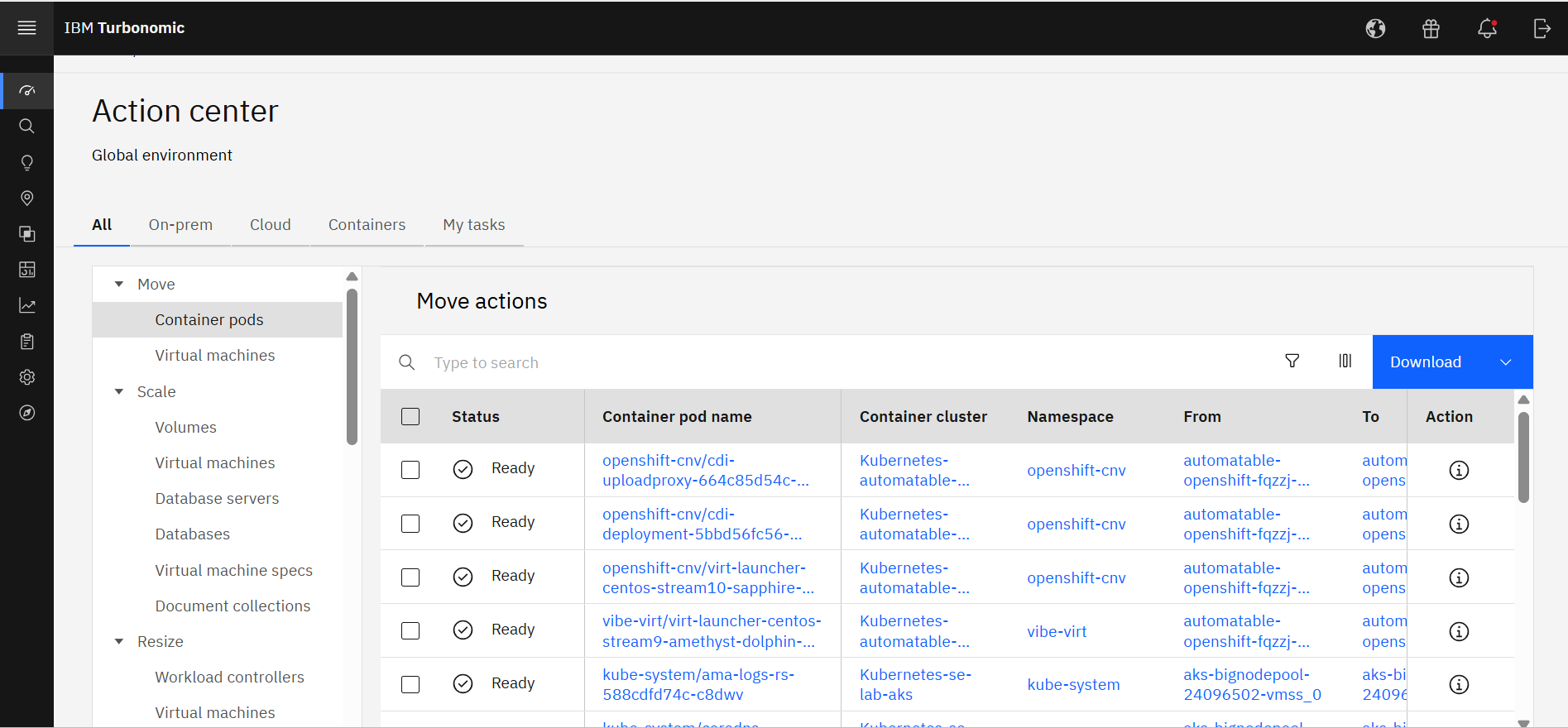
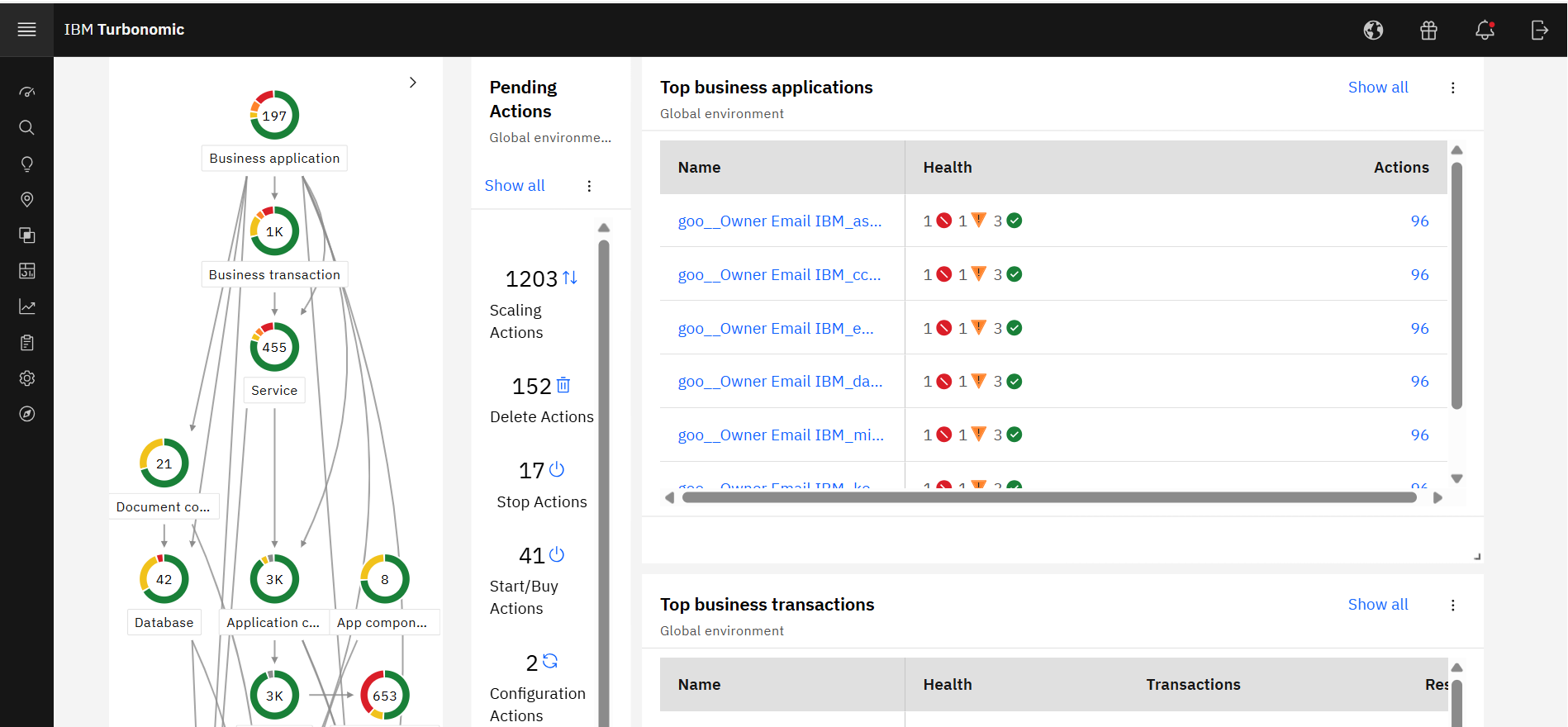
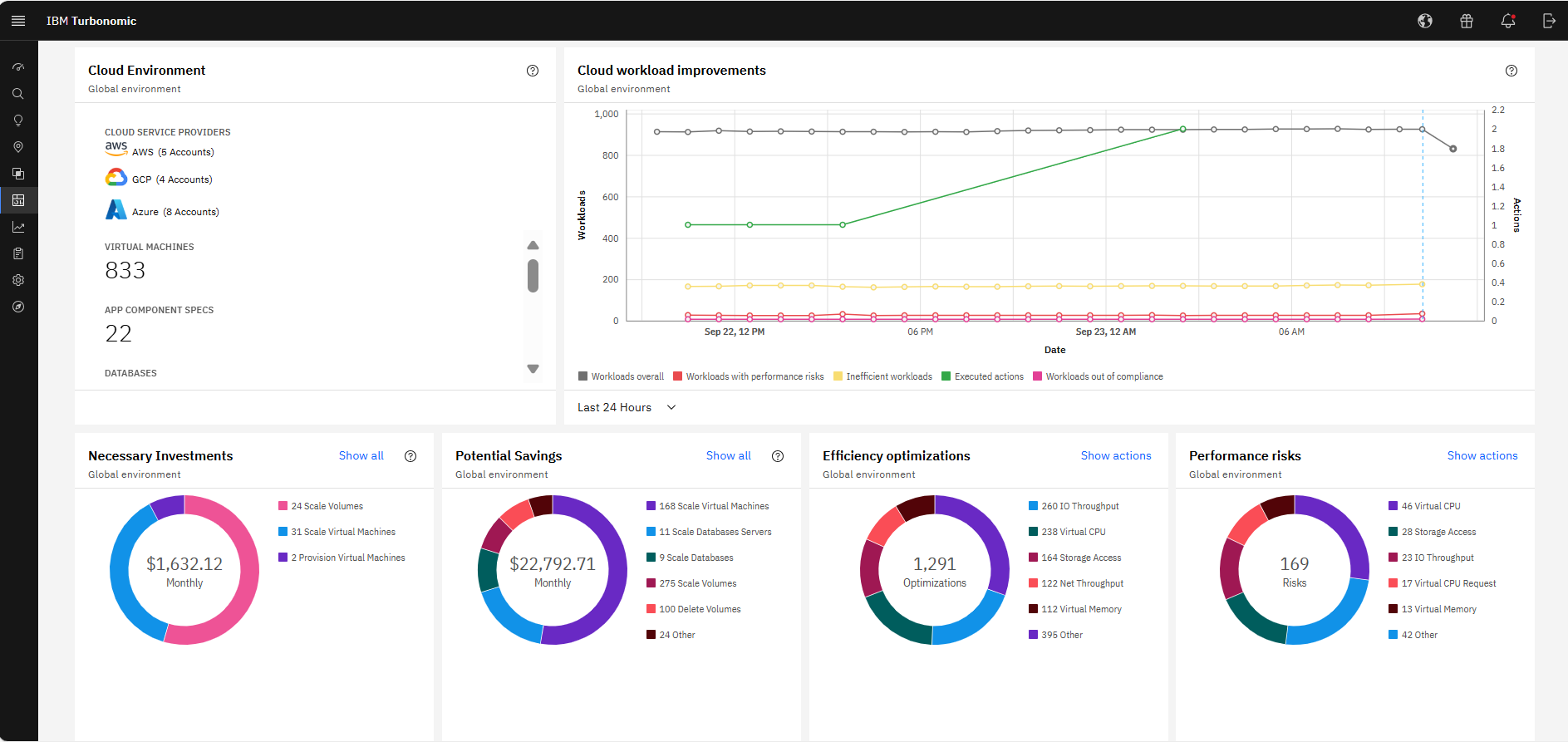
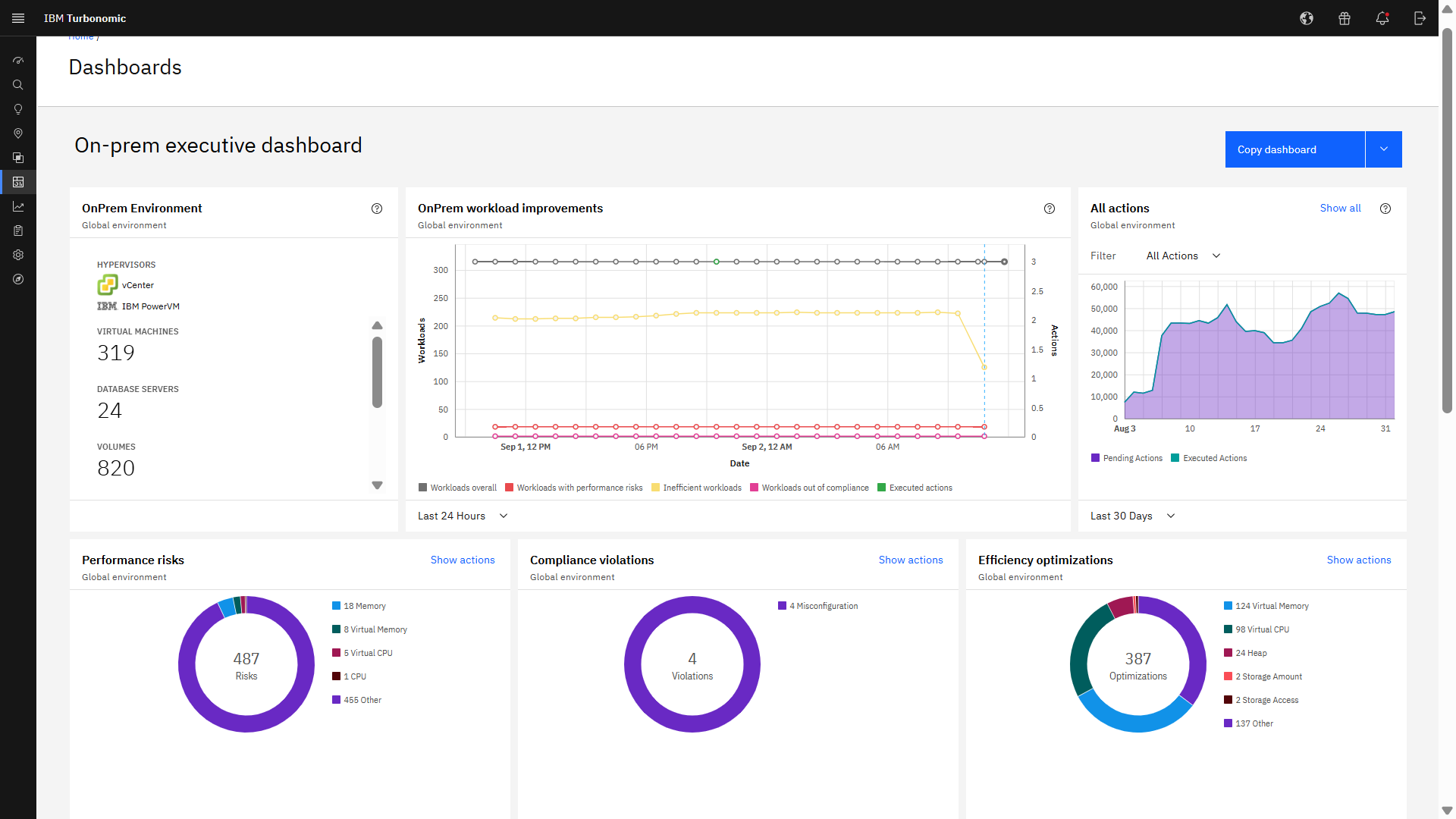
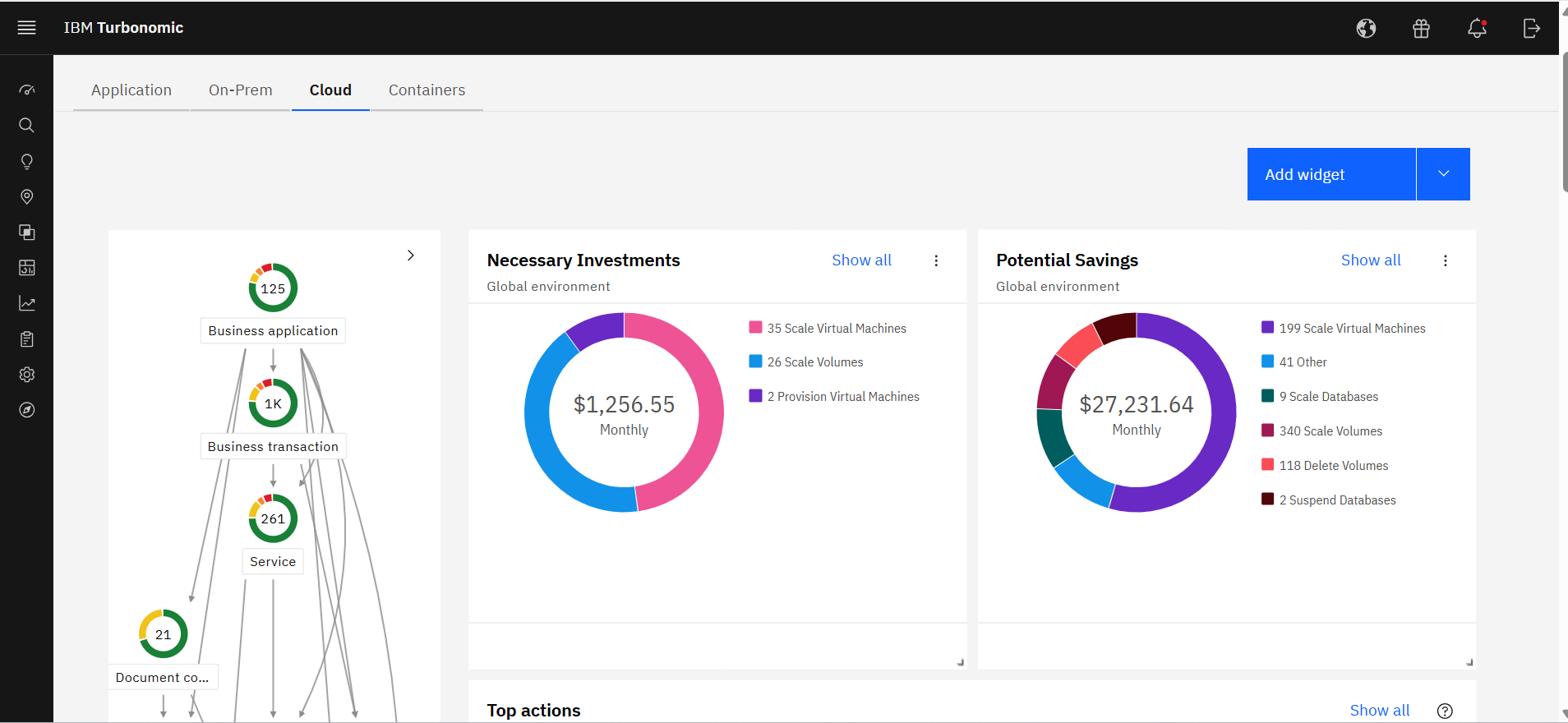
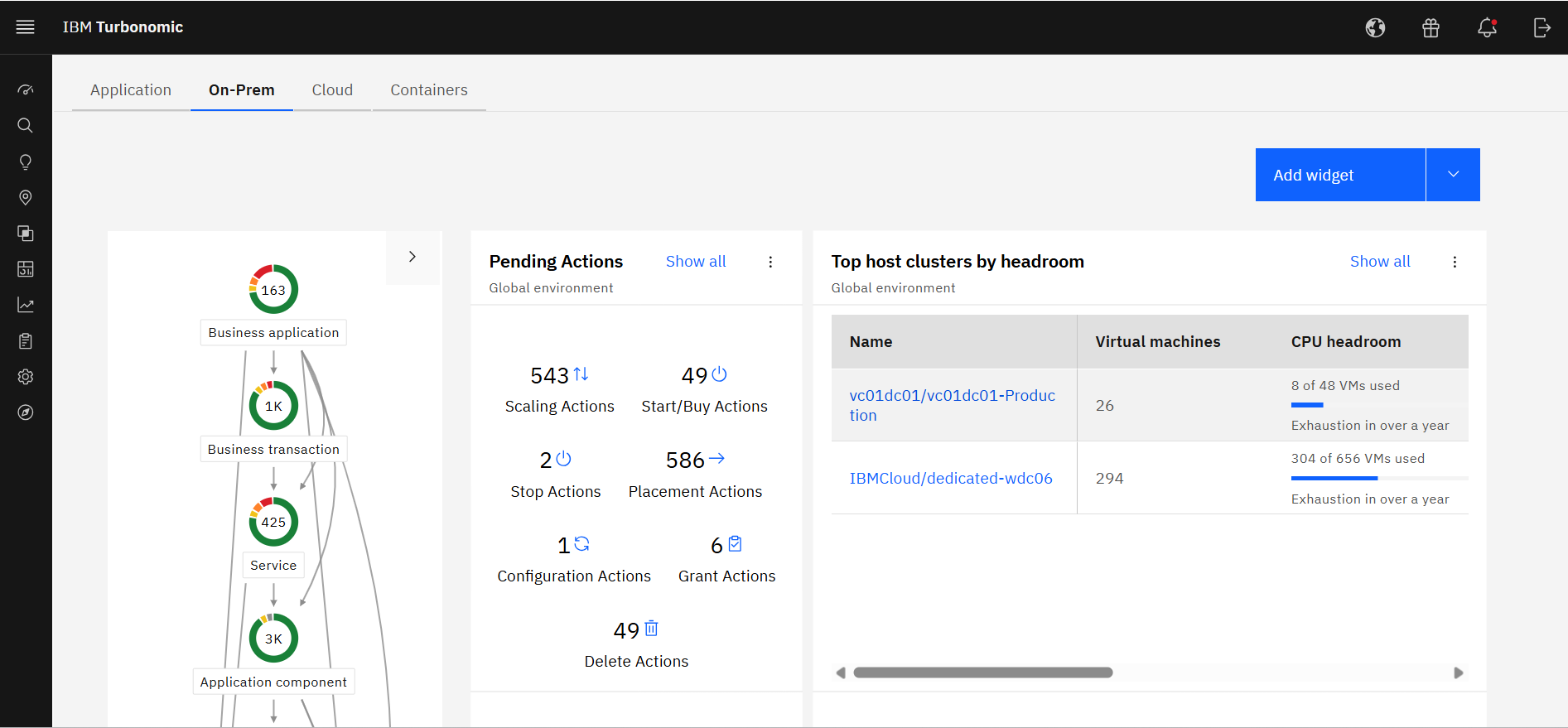
    Screenshot of IBM Turbonomic Action Center, where it shows the list of optimization actions across the global environment—on-prem and cloud—that should be taken to minimize cost while assuring performance.Screenshot of IBM Turbonomic Application, a view that shows the global environment across private and public infrastructure from the context of individual application components. Users can optimize one application at a time by viewing each app's pending actions. The Supply Chain at left shows all of the entities across applications and their interdependencies.Screenshot of The IBM Turbonomic Cloud Executive Dashboard, an out of the box dashboard that allow users to rapidly communicate value to executives. This view shows the cloud cost savings opportunities realized and not yet realized over any time period.Screenshot of The IBM Turbonomic On-prem Executive Dashboard, an out of the box dashboard that allow users to rapidly communicate value to executives. This view shows the savings opportunities realized and not yet realized over any time period.Screenshot of an IBM Turbonomic Cloud view, where the public cloud environment(s) and all of the pending actions required to bring them into an efficient, performant state. The Supply Chain at left shows all of the entities in the public cloud(s) and their interdependencies.Screenshot of The IBM Turbonomic On-Prem view that shows the user's private data center environment(s) and all of the pending actions required to bring them into an efficient, performant state. The Supply Chain at left shows all of the entities in data center(s) and the interdependencies between them.