With thousands of users world-wide, WinEst estimating from Trimble GC is a database-driven construction project management solutions on the market. It looks and feels just like Excel with familiar Windows navigation, including drop-down menus and ribbon bars. Behind the covers is a database with multiple work-breakdown structures (WBS) and filters that can be customized to the user's preferences so that estimating data can be sliced and diced and presented in different ways. WinEst…
N/A
ProContractor
Score5 out of 10
N/A
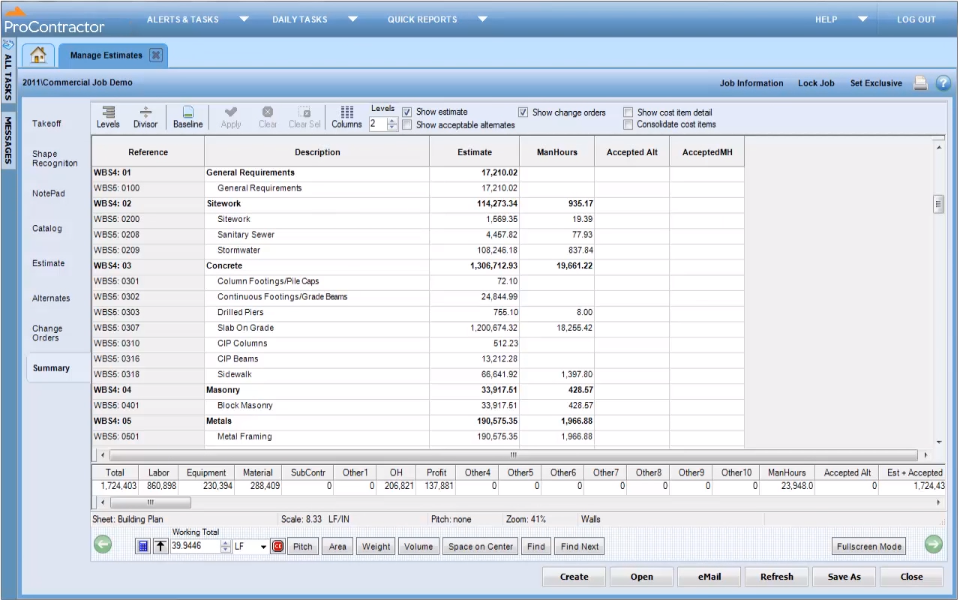
ProContractor is a Cloud-Based Solution for Estimating, Project Management, and Accounting. Designed to improve visibility and profitability across construction businesses, ProContractor™ by Viewpoint is a cloud-based software solution for estimating, project management, and accounting. The user can manage the entire project lifecycle from bid to cash in a single solution. Built to be flexible and scalable, ProContractor allows users to go all-in-one, or build a complete solution…
WinEst is truly built for everyone. Their assemblies/database linking is perfect for self perform and subcontractors while their database management and custom reporting is perfect for GCs. While Excel set the bar, WinEst is on another planet. With the immediacy required by today's markets, WinEst allows you to deliver a superior product while being more accurate.
A de minimis incentive was given to thank the reviewer for their time. The incentive was not used to bias or drive a particular response, nor was the incentive contingent on a positive endorsement. More Info
It is appropriate for the size and scale of my company - 150 projects a year that has a lot going on a multiple lines with each project. However there are many features and things that go unused with the software, because of how tinkery it can be. For example - our company needs a positive pay file, however we had to employ an outside service provide to create the file within the system. Same with a Backlog - the system kind of has a report but then again it has to be manipulated in order for it be of use. It gets the job done and has the reports needed to submit for certified payroll to the state, which was why we purchased Viewpoint ProContractor, however its ease of use is one of its biggest downfalls.
A de minimis incentive was given to thank the reviewer for their time. The incentive was not used to bias or drive a particular response, nor was the incentive contingent on a positive endorsement. More Info
It's very flexible when building an estimate and selecting items to include. You can either click your way to the datebase or quickly copy and paste similar items.
The numerous ways to view and estimate whether it's by CSI, Uniformat, Master Format, or any view you'd like to see. One of ours is by program area, i.e. Sitework, Tower, Parking Deck, etc. After that, you can sort by Bid Package, CSI, etc. Quick buttons can be created far all the views you'd need which allows changing between views a breeze.
The visual interface is pleasing and easy to read.
It's easy to create your own database using Excel. Once you tag an item with unit costs, sort codes, etc., Winest will import it. You can also build it manually within the program but Excel was faster.
A de minimis incentive was given to thank the reviewer for their time. The incentive was not used to bias or drive a particular response, nor was the incentive contingent on a positive endorsement. More Info
A de minimis incentive was given to thank the reviewer for their time. The incentive was not used to bias or drive a particular response, nor was the incentive contingent on a positive endorsement. More Info
At times, WinEst controls feel counter intuitive. Also the tools available for actually developing the database can feel clunky. This means that if you do not take the time to create a robust import file, you will spend a serious amount of time fixing your errors.
WinEst is also an object based database which means that it is difficult to do mass dumps of information (mainly takeoff) into the program. While this is great for ensuring that everything is done purposefully, it does lead to extended hours of data entry
It takes hours upon hours of use before you begin to realize the true potential. The sheer number of tools is overwhelming and their help resources are very basic and only explain how to correctly enter the data but not the feature's best use cases.
A de minimis incentive was given to thank the reviewer for their time. The incentive was not used to bias or drive a particular response, nor was the incentive contingent on a positive endorsement. More Info
A de minimis incentive was given to thank the reviewer for their time. The incentive was not used to bias or drive a particular response, nor was the incentive contingent on a positive endorsement. More Info
I give Viewpoint ProContractor a 10 out of 10. This system is user friendly to help keep me organized on a daily basis. I can find everything I need daily with this system. I am able to look up our subcontactors, vendors and clients I need to find quickly. I am able to see bills that I need to pay as well as invoices that I need to send out.
Doug Quinn was our trainer and travels all over the country. Whenever I have an issue I shoot him an email and he quickly responds as soon as his training gets a break.
A de minimis incentive was given to thank the reviewer for their time. The incentive was not used to bias or drive a particular response, nor was the incentive contingent on a positive endorsement. More Info
When something isn't working, you can contact support who will gladly remote into your system and try and work out a solution. Though several of the issues we encountered, they were not able to fix and had to submit for further review. While some were eventually rectified in updates, it takes time for these to be addressed and implemented.
A de minimis incentive was given to thank the reviewer for their time. The incentive was not used to bias or drive a particular response, nor was the incentive contingent on a positive endorsement. More Info
WinEst simply blows excel and Timberline out of the water. The shear depth of functionality is unparalleled. Not only does WinEst deliver a better product, it also shortens the amount of man hours required for each bid, alternate, pricing exercise, etc. On top of this, it has a number of redundant safeguards for catching errors that the others don't have.
A de minimis incentive was given to thank the reviewer for their time. The incentive was not used to bias or drive a particular response, nor was the incentive contingent on a positive endorsement. More Info
Procore beats Viewpoint hands down but can integrate well with Viewpoint Vista accounting software. I think that if the Viewpoint software was more flexible if they were more interested in patches, updates, and hearing customer feedback in the way the Procore does, that they would actually have the opportunity to corner the market.
A de minimis incentive was given to thank the reviewer for their time. The incentive was not used to bias or drive a particular response, nor was the incentive contingent on a positive endorsement. More Info
A de minimis incentive was given to thank the reviewer for their time. The incentive was not used to bias or drive a particular response, nor was the incentive contingent on a positive endorsement. More Info
Overall it allowed us to go electronic for certified payroll allowing us to be more accurate in reporting which was a giant win for the company
It's viewable pay estimates with dates and records of payment are crucial to a company like ours that relies on a general contractor and the state for payment of EADA quantites
Negatively training is not the easiest for the company and therefore onboarding new employees with no experience with the software is time consuming and difficult.
A de minimis incentive was given to thank the reviewer for their time. The incentive was not used to bias or drive a particular response, nor was the incentive contingent on a positive endorsement. More Info