Tally vs. Zoho Books

Overview
ProductRatingMost Used ByProduct SummaryStarting Price
Tally
Score 6.2 out of 10
Small Businesses (1-50 employees)
Tally is an online form builder designed to make creating online forms simple and free. No coding required — users simply type questions like they would in a doc to get started. The form editor is designed to accommodate both beginners and experienced users, scaling from simple forms to sophisticated workflows. Key Features: Unlimited forms and submissions Conditional logic and calculations Multi-page and password-protected…
$0
Indefinitely per user
Zoho Books
Score 9.0 out of 10
N/A
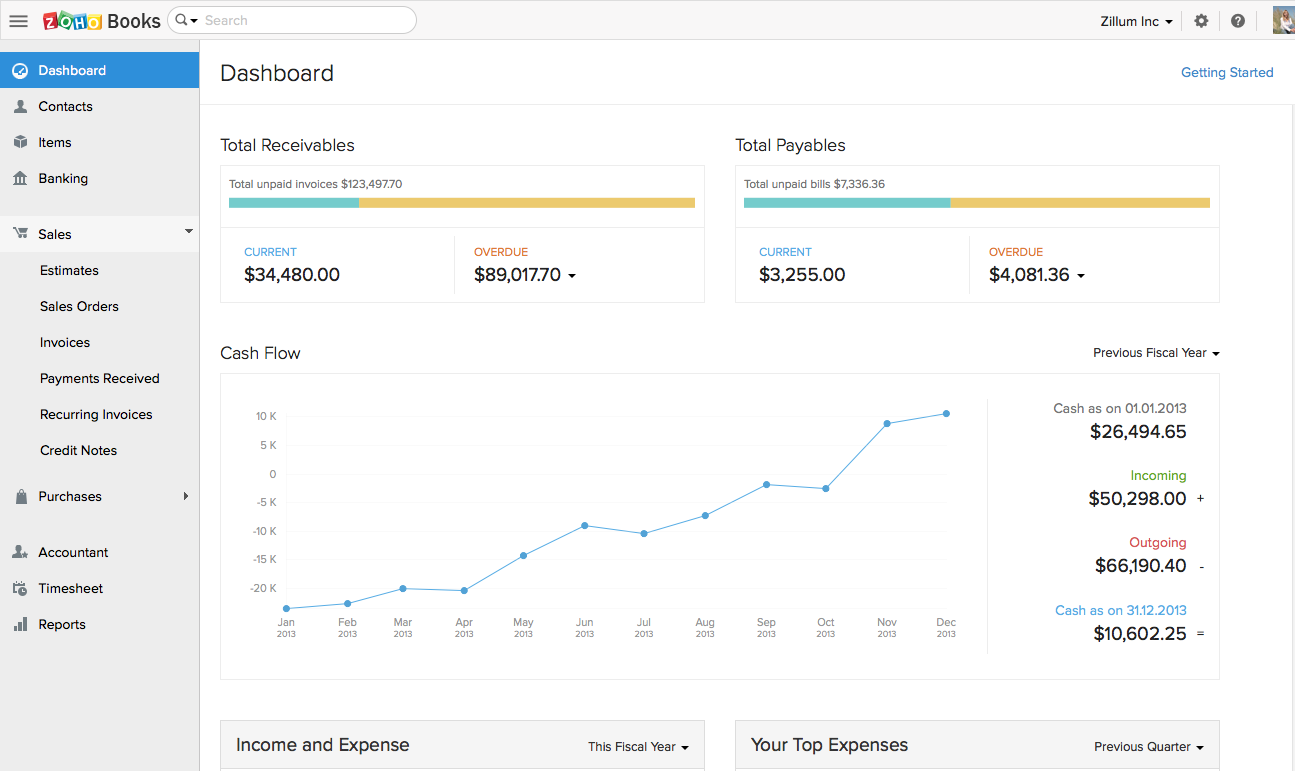
Zoho Books is an accounting solution that is designed to help small businesses manage their finances. This solution includes dashboards and a wide variety of reports. Business users can automate tasks and set up custom workflows. Zoho offers a 14 day free trial.
$0
For businesses with turnover <50K USD per annum
Pricing
TallyZoho Books
Editions & Modules
Tally Free
$0
Indefinitely per user
Tally Pro
$29
per month per user
Tally Business
$89
per month per user
Free
$0
For businesses with turnover <50K USD per annum
Standard
$20
per month per org
Professional
$50
per month per org
Premium
$70
per month per org
Offerings
Pricing Offerings
TallyZoho Books
Free Trial
NoYes
Free/Freemium Version
YesYes
Premium Consulting/Integration Services
NoNo
Entry-level Setup FeeNo setup feeNo setup fee
Additional DetailsSome of Tally's advanced features are available for free without limits. Tally Pro ($29/month) adds team collaboration features, while Tally Business ($89/month) includes enterprise controls like email verification and submissions data retention control.Zoho Books is available for both monthly and yearly plans. Users who sign up for the annual plan get a discount.
More Pricing Information
Community Pulse
TallyZoho Books
Features
TallyZoho Books
Survey Format & Appearance
Comparison of Survey Format & Appearance features of Product A and Product B
Tally
7.0
Ratings
13% below category average
Zoho Books
-
Ratings
Survey templates7.00 Ratings00 Ratings
Themes6.00 Ratings00 Ratings
Custom logo/branding8.00 Ratings00 Ratings
Survey Content
Comparison of Survey Content features of Product A and Product B
Tally
8.3
Ratings
2% below category average
Zoho Books
-
Ratings
Changes to live survey8.00 Ratings00 Ratings
Question design help9.00 Ratings00 Ratings
Multiple question types8.00 Ratings00 Ratings
Survey Logic
Comparison of Survey Logic features of Product A and Product B
Tally
9.0
Ratings
9% above category average
Zoho Books
-
Ratings
Survey logic flexibility9.00 Ratings00 Ratings
Survey Reporting & Analytics
Comparison of Survey Reporting & Analytics features of Product A and Product B
Tally
6.7
Ratings
20% below category average
Zoho Books
-
Ratings
Data export9.00 Ratings00 Ratings
Standard reports5.00 Ratings00 Ratings
Analytics6.00 Ratings00 Ratings
Survey Administration & Security
Comparison of Survey Administration & Security features of Product A and Product B
Tally
8.0
Ratings
8% below category average
Zoho Books
-
Ratings
Access controls8.00 Ratings00 Ratings
Compliance8.00 Ratings00 Ratings
Customization
Comparison of Customization features of Product A and Product B
Tally
-
Ratings
Zoho Books
7.8
Ratings
2% above category average
API for custom integration00 Ratings7.80 Ratings
Security
Comparison of Security features of Product A and Product B
Tally
-
Ratings
Zoho Books
9.2
Ratings
10% above category average
Single sign-on capability00 Ratings8.40 Ratings
Role-based user permissions00 Ratings10.00 Ratings
Reporting & Analytics
Comparison of Reporting & Analytics features of Product A and Product B
Tally
-
Ratings
Zoho Books
8.7
Ratings
10% above category average
Dashboards00 Ratings8.20 Ratings
Standard reports00 Ratings9.00 Ratings
Custom reports00 Ratings9.00 Ratings
General Ledger and Configurable Accounting
Comparison of General Ledger and Configurable Accounting features of Product A and Product B
Tally
-
Ratings
Zoho Books
8.4
Ratings
8% above category average
Accounts payable00 Ratings8.20 Ratings
Accounts receivable00 Ratings8.20 Ratings
Cash management00 Ratings7.00 Ratings
Bank reconciliation00 Ratings8.00 Ratings
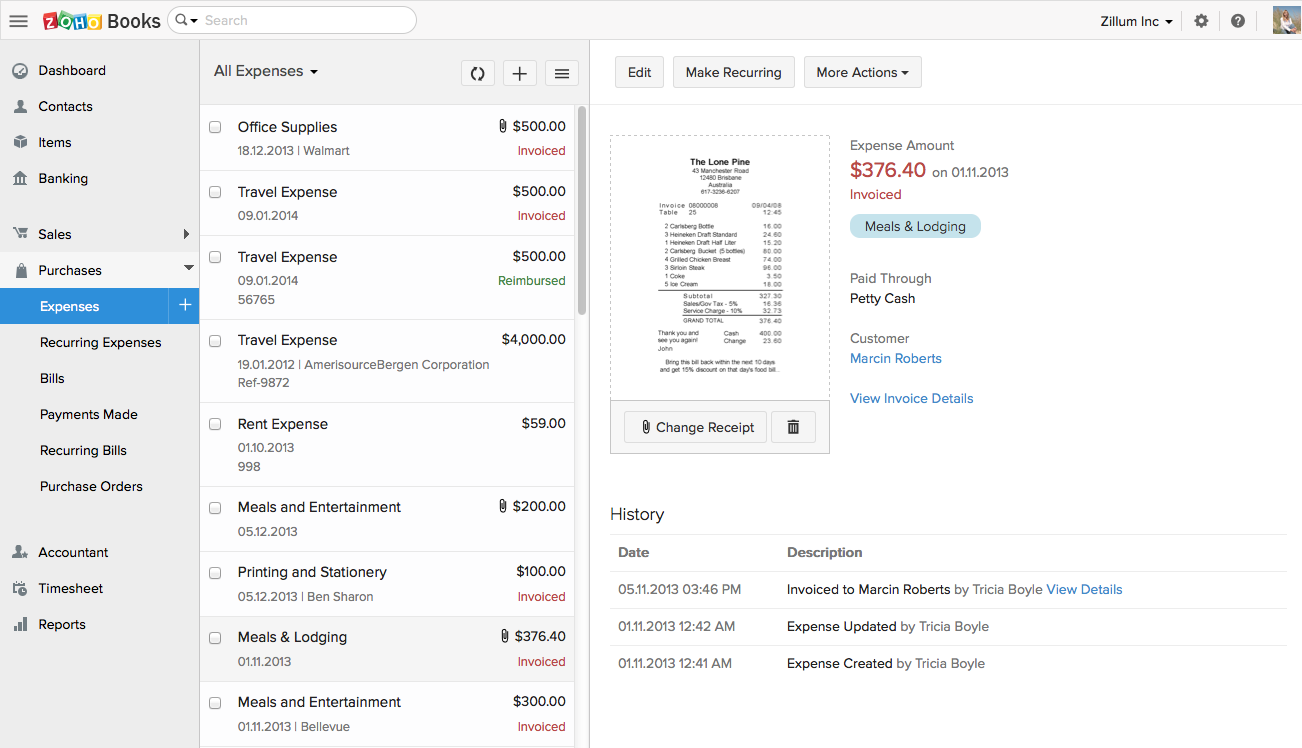
Expense management00 Ratings8.80 Ratings
Time tracking00 Ratings8.80 Ratings
Multi-currency support00 Ratings9.20 Ratings
Regulations compliance00 Ratings8.00 Ratings
Self-service portal00 Ratings9.00 Ratings
Inventory Management
Comparison of Inventory Management features of Product A and Product B
Tally
-
Ratings
Zoho Books
7.0
Ratings
5% below category average
Inventory tracking00 Ratings9.00 Ratings
Automatic reordering00 Ratings5.00 Ratings
Order Management
Comparison of Order Management features of Product A and Product B
Tally
-
Ratings
Zoho Books
8.7
Ratings
12% above category average
Pricing00 Ratings9.00 Ratings
Order entry00 Ratings9.00 Ratings
Credit card processing00 Ratings6.70 Ratings
Cost of goods sold00 Ratings10.00 Ratings
Best Alternatives
TallyZoho Books
Small Businesses
Square 9 Softworks
Square 9 Softworks
Score 9.5 out of 10
QuickBooks Self-Employed (discontinued)
Score 8.9 out of 10
Medium-sized Companies
Qualaroo
Qualaroo
Score 6.1 out of 10
Accounting Seed
Accounting Seed
Score 6.4 out of 10
Enterprises
Verint Voice of the Customer
Score 10.0 out of 10
Oracle Fusion Cloud Enterprise Performance Management
Score 10.0 out of 10
All AlternativesView all alternativesView all alternatives
User Ratings
TallyZoho Books
Likelihood to Recommend
7.0
(0 ratings)
8.2
(0 ratings)
Usability
8.0
(0 ratings)
8.4
(0 ratings)
Support Rating
8.0
(0 ratings)
5.3
(0 ratings)
User Testimonials
TallyZoho Books
Likelihood to Recommend
No answers on this topic
Zoho Books is good for a company or organization that wants to keep track of invoices, payments, and cash flow. If you do not have a full-time accountant in your organization, it can work well as whenever you hire one or have someone check your books, the information they need will be there, provided it has been entered into Zoho Books. It works as a one-man operation or a small team. For larger teams, it would depend on how much information needs to be input on a daily basis.
Read full review
Pros
No answers on this topic
  • The projects feature is what we use a lot it helps setting up projects as well as tracking expenses and bills for the whole project. The budgeting feature is very developed, allowing you to budget by total project cost, total project hours, hours per task, or hours per staff.
  • Customer Estimates and Invoices are very easy to setup and send directly from the app (it also has a very nice and customizable reminder option).
  • Stock and pricing listings is very intuitive and easy and makes it a very helpful and time saving feature.
  • Bank reconciliation and Financial reporting are very developed and make it easy to share information with bookeepers and accounting specialists.
Read full review
Cons
No answers on this topic
  • Printing checks - they only offer one vendor and they are expensive compared to QuickBook alternatives.
  • Their interface for bids - retainers and applying them against income could be improved, but once you know how it's easy.
  • Their recurring fees don't seem to always work the way I'd want. But overall they work.
Read full review
Usability
No answers on this topic
Customization is the biggest struggle for us and most of the time we need to involve a tech person. The chat support is a great feature and very helpful. It would be great to be able to customize and create invoices and correspondence (templates) such are reminders in multiple languages within one organization. The currency (USD) would be the same. We have clients in different countries that don't speak English but pay in USD.
Read full review
Support Rating
No answers on this topic
The support team feels very disjointed. We have filtered through a number of "lead" contacts and are frequently spammed by other Zoho members. Once getting an appropriate support contact on the phone - the team is very helpful, it just takes a lot of hoop jumping to get there. We actually unsubscribed from their support package as we were not getting the value we were looking for.
Read full review
Alternatives Considered
No answers on this topic
Cloud vs. desktop, this and the fact that Zoho Books syncs with our other Zoho apps were the most pressing reasons for switching to Zoho Books. As mentioned previously, we consider our accounting software to be an integral part of doing business efficiently, and we can now do that considering our systems are all integrated.
Read full review
Return on Investment
No answers on this topic
  • I was able to cut my costs for a more complete and easy to use tool.
  • Many transactions, and accounting tasks on 1 platform, reduction in time by a lot.
  • Clients can pay without leaving your website (less drop-off, better conversions).
Read full review
ScreenShots

Tally Screenshots

Screenshot of how to create forms for all purposes in seconds without knowing how to code, and for free.Screenshot of some of the advanced features packed in a simple form builder.Screenshot of Tally's smart features that make it easy to turn forms into a tailored experience for every respondent.Screenshot of how to customize the design and layout to fit any form to a brand.Screenshot of how to share and display forms to connect with audiences across platforms.Screenshot of some of the popular integrations to sync form submissions.

Zoho Books Screenshots

Screenshot of Screenshot of Screenshot of Screenshot of Screenshot of Screenshot of