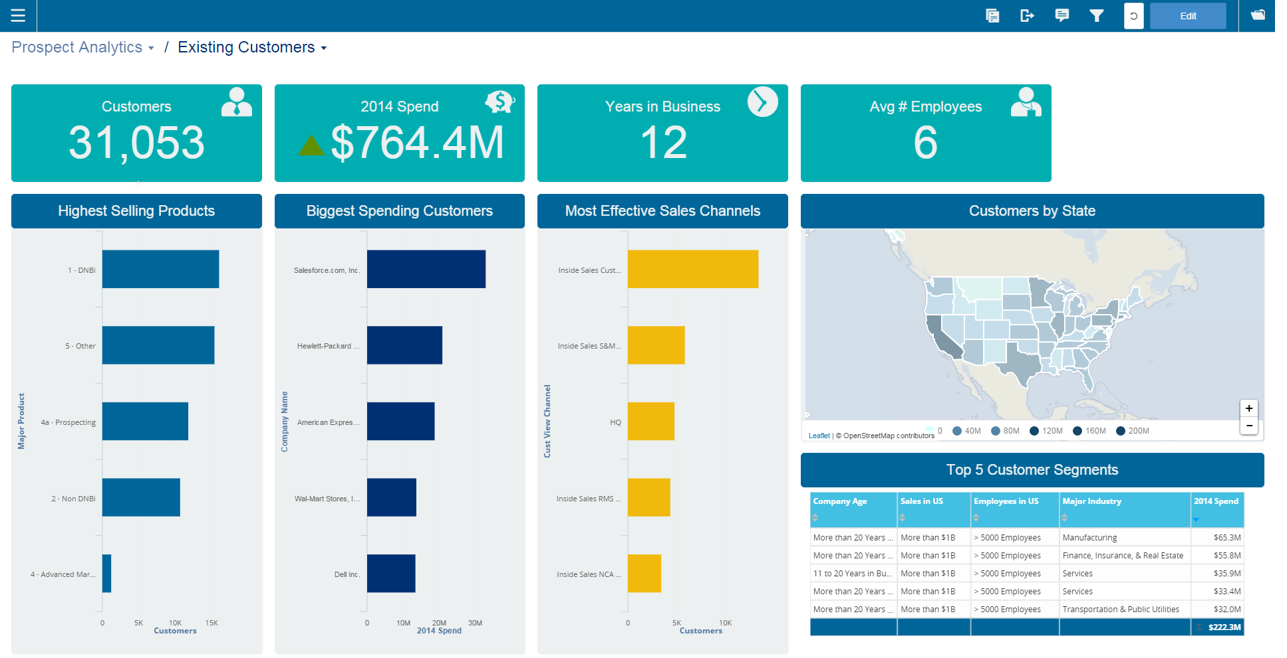
Infor Birst offers multi-tenant cloud BI for deployment in a public or private cloud, or on-premises. It provides an in-memory columnar data store and a BI layer comprising a reporting engine, predictive analytics tools, mobile native apps, dashboards, discovery tools, and an open client interface.
N/A
Tableau Public
Score 9.6 out of 10
N/A
Tableau Public is a free edition of the Desktop product. With this edition, data can only be published to the Tableau public website and does not allow work to be saved or exported locally.
N/A
Pricing
Infor Birst
Tableau Public
Editions & Modules
No answers on this topic
No answers on this topic
Offerings
Pricing Offerings
Infor Birst
Tableau Public
Free Trial
No
No
Free/Freemium Version
No
Yes
Premium Consulting/Integration Services
No
No
Entry-level Setup Fee
No setup fee
No setup fee
Additional Details
—
—
More Pricing Information
Community Pulse
Infor Birst
Tableau Public
Features
Infor Birst
Tableau Public
BI Standard Reporting
Comparison of BI Standard Reporting features of Product A and Product B
Infor Birst
7.4
Ratings
10% below category average
Tableau Public
9.8
Ratings
15% above category average
Pixel Perfect reports
7.00 Ratings
9.70 Ratings
Customizable dashboards
8.00 Ratings
10.00 Ratings
Report Formatting Templates
7.10 Ratings
9.70 Ratings
Ad-hoc Reporting
Comparison of Ad-hoc Reporting features of Product A and Product B
Infor Birst
7.0
Ratings
14% below category average
Tableau Public
9.7
Ratings
19% above category average
Drill-down analysis
8.00 Ratings
9.80 Ratings
Formatting capabilities
7.00 Ratings
9.70 Ratings
Integration with R or other statistical packages
6.10 Ratings
9.50 Ratings
Report sharing and collaboration
7.00 Ratings
9.80 Ratings
Report Output and Scheduling
Comparison of Report Output and Scheduling features of Product A and Product B
Infor Birst
8.0
Ratings
4% below category average
Tableau Public
9.5
Ratings
12% above category average
Publish to Web
8.00 Ratings
10.00 Ratings
Publish to PDF
8.00 Ratings
10.00 Ratings
Report Versioning
7.20 Ratings
9.80 Ratings
Report Delivery Scheduling
9.00 Ratings
9.60 Ratings
Delivery to Remote Servers
00 Ratings
8.10 Ratings
Data Discovery and Visualization
Comparison of Data Discovery and Visualization features of Product A and Product B
Birst is well suited for an organization looking for a cloud-hosted analytics solution that is contained within one package. It is able to connect to a very wide variety of different data sources, and has options for either light or involved ETL procedures, depending on the users experience with preparing data. As with any BI project, it would not be suitable for an organization where there is no dedicated team to maintain and manage the project.
Tableau Public is great, especially if you're new to the platform or considering implementing it within an organization. The Public version has most of the capabilities of the full version, with extensive community documentation to troubleshoot issues you may run into. Additionally, there are many resources to check out Public workbooks from other users and communities: a GREAT learning resource to figure out new, innovative ways to visualize and present data. It is perfect for evaluating public datasets, for doing exploratory data analysis, or contributing to cross-organizational or extracurricular projects that may benefit from more sophisticated data analysis and exploration. Tableau Public, because it stores to the cloud and has limitations on connectivity (ie, cannot connect to SQL servers) is not suited for confidential, financial, PII, etc., data, and care should be taken to avoid including sensitive data in any of the Tableau Public workbooks used by an individual or organization.
Birst is an platform that provides connectors to some of the applications we use, but also allows us to bring in data from disparate systems to perform ETL and integrate all of the data for analyses. It makes no assumptions about your data, which is good for us, as we have a lot of customizations to many of our systems.
Tableau Public can work with data that are differently formatted, such as MS Excel, .txt file, Google Sheets, not sure about MS Access.
GUI interface of Tableau Public is not that hard to start working on; Also, it can generate codes for the operations and so it is relatively easy to visualize and correct mistakes.
Lots of Tableau Public users upload their work to the online community, users can easily find very good figures/graphs that are similar to their problems and so they can use these figures/graphs as templates to modify and make their own ones.
The biggest drawback to the Public version of Tableau is that any data used in the program is 'public' and therefore not secure: workbooks are saved to the cloud, rather than locally
Tableau Public limits data ingestion to 10 million rows per source
Limited connections - can't connect to SQL databases to ingest data (must be through CSV, Access, TDE, or text files)
We have been able to overcome any of the drawbacks we've found with Birst easily and it has fulfilled almost all of our analytic needs to date. Having seen their roadmap it would be highly unlikely we would move away from this platform any time soon. You simply can't beat the functionality that Birst provides for the price and the things I see coming out of the company solidify that our decision to choose Birst was the best possible choice. We have never regretted the decision.
It's free, right? I'll keep using the free version. So the real question to ask is this? Will I pay $999 for the Personal version or $1,999 for the Professional? Yikes! That is a big stretch. I'm not sure about that. The product comparison chart is at: http://www.tableausoftware.com/public/comparison
Birst is a reliable BI platform that has developed through uploads via the cloud, easy tabular views, quick manual uploads and links to SQL databases. It however does not compete with other BI tools with the data manipulation and connections when your data is uploaded in the platform and the visualisation and customisations available. The automation aspect is very useful and is one of the top features, alongside the user hierarchy and permissions. Birst is an easy and useful tool for finicial reporting, however is not currently the best option on the market for providing easy to understand, edit and present visualisations.
Tableau public is a great training tool to understand the basics of Tableau before buying it. A great tool to extend Excel's visualization and to publish data for others. Not useful for anything you need secure. No ability to access databases. Static information only.
We frequently experience -103 errors due to us using the Live Connect functionality, which does not seem to handle even minor interruptions in connectivity, and treats all future connection attempts or data requests as errors, even if the issue does not exist any longer
In a reporting and analytics package there are two distinct performance times to look at. First is the performance of calculating the report data and metrics. I would rate a 9 for this. However, the interface rendering is slow, rating a 7. Dashboards can take 3-5 seconds to load. This is probably not a problem for normal users, as the dashboard render is performed once. My application integrated the dashboard into a commercial product though, with hundreds of customers - so my demands are higher with a large number of end users.
I went to their annual user conference (Birst Forward) and their standard training class (Birst Boot Camp) this year, and both were excellent. Very educational, and I got all of the personal attention I needed to get my questions about my specific answered. I've also reached out to the trainers after those events to ask more questions, and they've been great about getting back to me with answers
Although I found the online resources helpful, a lack of appropriate examples for certain tasks key to report creation and advanced modeling make the online training/documentation less than perfect. For an inexperienced BI professional, the online training would not enable a streamlined launch of the product.
Have clean data! Birst flexibility allows - Start small, then introduce functionality and complexity along the way. If you try to present all the functionality [bells and whistles] and wow them, but bad data is uncovered, the end user blames the new application and turns away.
Start at the end and work backward. Identify the business case / issue and questions the end users have, then identify the data needed, and where to get it.
Infor Birst OEM and embedded analytics have low-code no-code features which are easy to deploy and with easy instances creation with a dev-quality-production environment. Good capability on data mapping features from source to intermediate to target with impressive metadata management.
Tableau public is Free and no subscription is required whereas Tableau Desktop is a paid subscription. if there is no private or confidential data it's easy to Tableau public and share reports with people. Tableau public has same features and options same as desktop. its easy for students or beginners to signup and start learning/build reports.
we can see that loading a lot of data can cause a noticable slow down in performance. Birst support indicated that they don't really consider anything less than 30 seconds to be an issue, but that is not the case for our customers, so we have had to change some of implementation to address this
Being a manufacturing company we tend to lag behind technologically. But having all the data for different ERP systems in one place has been an eye opener for the executives. It has lessened the need to convert some legacy ERP systems.
Having such a simple reporting tool is a great asset to some of our sites that have traditionally had trouble gathering data from AS400 systems.