SysTools PDF Tools vs. Tungsten Power PDF

Overview
ProductRatingMost Used ByProduct SummaryStarting Price
SysTools PDF Tools
Score 0.0 out of 10
N/A
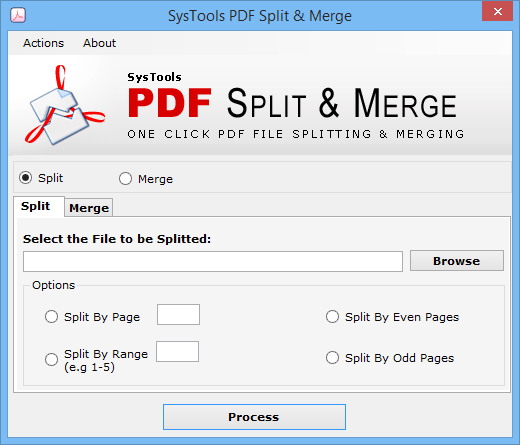
Systools PDF Tools, including Split & Merge Software allows users to perform split and merge operations on multiple PDF files. The tool offers various PDF split options to divide a single PDF file into multiple PDF files such as split PDF by page, range, even pages, and odd pages. Split by page function offers to split the PDF file selected with a particular page limit while split by range extracts the pages from a PDF file with the provided page range. The split by odd pages feature splits…N/A
Tungsten Power PDF
Score 9.3 out of 10
Small Businesses (1-50 employees)
Tungsten Power PDF (formerly Kofax) is a solution to manage PDFs for businesses and individuals available with a one-time purchase with no subscription fees. It has a built-in eSignature integration with SignDoc and DocuSign for a complete end-to-end document…
$129
one-time fee per license
Pricing
SysTools PDF ToolsTungsten Power PDF
Editions & Modules
No answers on this topic
Power PDF Standard
$129
one-time fee per license
Power PDF for Mac
$129
one-time fee per license
Power PDF Advanced
$179
one-time fee per license
Power PDF Business
Get a Quote
per year per seat
Offerings
Pricing Offerings
SysTools PDF ToolsTungsten Power PDF
Free Trial
YesYes
Free/Freemium Version
YesNo
Premium Consulting/Integration Services
NoNo
Entry-level Setup FeeNo setup feeNo setup fee
Additional DetailsDesktop licenses are buy once, own forever. No subscription fees. Business server licenses are term-based or perpetual with optional maintenance & support contract. Volume and upgrade discounts available.
More Pricing Information
Community Pulse
SysTools PDF ToolsTungsten Power PDF
Features
SysTools PDF ToolsTungsten Power PDF
PDF Editors
Comparison of PDF Editors features of Product A and Product B
SysTools PDF Tools
-
Ratings
Tungsten Power PDF
7.8
Ratings
7% below category average
Edit Text and Images00 Ratings7.50 Ratings
Merge or Split PDFs00 Ratings8.80 Ratings
Add Annotations00 Ratings7.80 Ratings
Text Recognition (OCR)00 Ratings6.50 Ratings
Page Management00 Ratings8.20 Ratings
Form Creation and Editing00 Ratings6.50 Ratings
Secure PDFs00 Ratings7.90 Ratings
Convert to Different Formats00 Ratings8.40 Ratings
Comment and Review Tools00 Ratings8.10 Ratings
Undo and Redo Actions00 Ratings8.20 Ratings
User Ratings
SysTools PDF ToolsTungsten Power PDF
Likelihood to Recommend
-
(0 ratings)
8.8
(0 ratings)
Likelihood to Renew
-
(0 ratings)
10.0
(0 ratings)
Usability
-
(0 ratings)
9.8
(0 ratings)
Availability
-
(0 ratings)
9.1
(0 ratings)
Performance
-
(0 ratings)
9.1
(0 ratings)
Support Rating
-
(0 ratings)
9.5
(0 ratings)
In-Person Training
-
(0 ratings)
3.6
(0 ratings)
Online Training
-
(0 ratings)
8.2
(0 ratings)
Implementation Rating
-
(0 ratings)
9.1
(0 ratings)
Configurability
-
(0 ratings)
9.1
(0 ratings)
Ease of integration
-
(0 ratings)
9.1
(0 ratings)
Product Scalability
-
(0 ratings)
9.1
(0 ratings)
Vendor post-sale
-
(0 ratings)
9.1
(0 ratings)
Vendor pre-sale
-
(0 ratings)
9.1
(0 ratings)
User Testimonials
SysTools PDF ToolsTungsten Power PDF
Likelihood to Recommend
No answers on this topic
Tungsten does not handle movement of pages well inside of document. Small documents with under 10 pages is fine, but 100+ page documents are extremely difficult to move pages or groups of pages around. We replace Adobe with Tungsten and in general the reception has been fine. It is a little clunky with clicking on links instead PDF's as you have you click the hand, and then to copy text you have to go back and click the arrow.
Read full review
Pros
No answers on this topic
  • Typewriter functionality is great, although can take some time to load. This allows you to fill in text wherever applicable without turning the rest of the pdf into editable text.
  • Fast load times
  • Has autogenerated text feature so anything in the pdf can become editable
Read full review
Cons
No answers on this topic
  • I find that quickly editing text within a document or adding a line of text is clunky and can snowball into things popping out of place. I prefer to export text, and then work on it elsewhere.
  • Sometimes it seems that text recognition is trying too hard and throws me paper punches as "O"s and wrinkles as shapes, so I have to get rid of those artifacts.
  • The "Update Available" popup which is usually not an actual update announcement but rather an offer to sell me something is annoying.
Read full review
Likelihood to Renew
No answers on this topic
It was very easy to learn the software and find the features I needed, and I was able to use the help menu for any questions I had. Staff was easily able to start using with no additional training. It easily works with things created in Adobe - handling field forms just fine.
Read full review
Usability
No answers on this topic
It is fast and easy to get the hang of. It really didn't take a lot of effort to learn how to use this program and I appreciated that it was pretty "plug and play" and there wasn't a long learning curve.
Read full review
Reliability and Availability
No answers on this topic
Other that a PDF partially disappearing if left up for a long period of time - no issues. (If you close it and reopen it, it is all there. We have some PDFs that are 400-600 pages long.)
Read full review
Performance
No answers on this topic
Pages nearly always load at the expected rapid speed. Some documents that print quickly from Adobe Reader print much more slowly from Power PDF. I have never generated a report - that's a feature I didn't know existed until now and do not know what it's for
Read full review
Support Rating
No answers on this topic
I haven't had much interaction with support for this product as it is relatively easy for me to use and intuitive. When Kofax acquired the program it rewrote some of the features and I think I reached out for help at one point but tech support provided a quick answer. I did have a very positive experience with the sales staff who helped me get a discount on the current version because I'm a long-time user.
Read full review
In-Person Training
No answers on this topic
I got an overview of the product from my predecessor who was about to retire from the job I now hold. He did not go into very many of the features and probably only knew about the ones he used most frequently.
Read full review
Online Training
No answers on this topic
We watched the training videos and tested out the features and functionality side by side. Some features are not used on a regular basis is it is convenient to go back and review training on that particular functionality when needed.
Read full review
Implementation Rating
No answers on this topic
It was simple and we were using the program the same day. It was as easy as downloading the program and getting in there and playing around. We felt comfortable with it within the first few hours of use.
Read full review
Alternatives Considered
No answers on this topic
I initially selected Tungsten Power PDF because it was more affordable; however, I soon discovered the features and stability of the Tungsten product was comparable to working directly within the Adobe environment. I feel very confident now, that I would select Tungsten Power PDF ABOVE any of the Adobe products and not just because of the price point!
Read full review
Scalability
No answers on this topic
Not really familiar since I'm the only person who uses it. But in the past it has been my understanding that Power PDF was offered only on a single-license basis, so it's been expensive for me to use it at home and at work because I had to pay for it on my own. In my current position management supports it so I at least only have to pay for it once.
Read full review
Return on Investment
No answers on this topic
  • I save hundreds every month by not sending documents to outside editors.
  • On a monthly basis, I have received files that would be very limited in use, but the PDF software allows me to work with them, saving hours of human power otherwise wasted.
  • The software is worth the money, but it can be more competitively priced.
Read full review
ScreenShots

SysTools PDF Tools Screenshots

Screenshot of Screenshot of Screenshot of Screenshot of

Tungsten Power PDF Screenshots

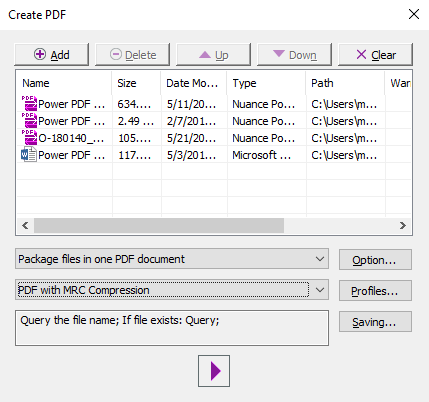
Screenshot of the PDF Create Assistant, which can be used to create multiple PDFs at the same time from a variety of source formats. Create individual PDFs, or combine into one PDF package.Screenshot of PDF Profiles that can be created to apply commonly desired settings to new PDF documents created in Power PDF.Screenshot of the application's color, changed from purple to blue, light gray or dark gray.Screenshot of some lightweight document automation that can also be achieved with the Watched Folder and Sequence features.Screenshot of where packages can be signed with pre built templates using Kofax Sign Doc or other integrating e-signersScreenshot of PDFs that can be navigated with a thumbnail view