TrustRadius: an HG Insights company

Save this comparison

Save this comparison

Add Product

Recommended Comparisons

    Overview
    ProductRatingMost Used ByProduct SummaryStarting Price

    ShareGate

    Score8.2 out of 10
    N/AShareGate is an Microsoft 365 migration and governance platform that focuses on simplicity, boasting over 100,000 IT pros as users.

    $5,995

    per year

    Syskit Point

    Score9 out of 10
    N/ASysKit Point is a Automated Office 365 Governance and Security tool, from SysKit in Zagreb. It is designed to enable users to get a full overview of an Office 365 environment and ownership across Microsoft Teams, SharePoint Online, Office 365 Groups, and OneDrive in a central web interface. With it, the vendor says users can create easy-to-read security reports and proactively manage users and access.

    $1

    per month

    Pricing
    ShareGateSyskit Point
    Editions & Modules
    ShareGate Protect
    $1995
    per year
    Migrate Essentials
    $5,995
    per year 1 machine activation for essential migrations
    Migrate Pro
    $9,995
    per year 5 machine activation for essential migrations
    Migrate Enterprise
    $17,995
    per year 25 machine activation for essential migrations
    No answers on this topic
    Offerings
    Pricing Offerings
    ShareGateSyskit Point
    Free Trial
    YesYes
    Free/Freemium Version
    NoNo
    Premium Consulting/Integration Services
    NoNo
    Entry-level Setup FeeNo setup feeNo setup fee
    Additional Details
    More Pricing Information
    Community Pulse
    ShareGateSyskit Point
    Considered Both Products
    Workleap
    No answer on this topic
    Syskit
    No answer on this topic
    Key User Insights
    Would buy again
    100%
    Would buy again
    6 Answers
    No answers on this topic
    Delivers good value for the price
    100%
    Delivers good value for the price
    6 Answers
    No answers on this topic
    Happy with the feature set
    100%
    Happy with the feature set
    6 Answers
    No answers on this topic
    Lived up to sales and marketing promises
    100%
    Lived up to sales and marketing promises
    6 Answers
    No answers on this topic
    Implementation went as expected
    100%
    Implementation went as expected
    5 Answers
    No answers on this topic
    Best Alternatives
    ShareGateSyskit Point
    Small Businesses
    No answers on this topic
    No answers on this topic
    Medium-sized Companies
    No answers on this topic
    ER/Studio Data Architect
    Score9.9 out of 10
    Enterprises
    No answers on this topic
    ER/Studio Data Architect
    Score9.9 out of 10
    All AlternativesView all alternativesView all alternatives
    User Ratings
    ShareGateSyskit Point
    Likelihood to Recommend
    8.0
    (6 ratings)
    -
    (0 ratings)
    Likelihood to Renew
    8.0
    (1 ratings)
    -
    (0 ratings)
    Usability
    8.0
    (2 ratings)
    -
    (0 ratings)
    Support Rating
    8.0
    (1 ratings)
    -
    (0 ratings)
    Implementation Rating
    9.0
    (1 ratings)
    -
    (0 ratings)
    User Testimonials
    ShareGateSyskit Point
    Likelihood to Recommend
    Workleap
    ShareGate is well suited for SharePoint on-prem to on prem site migrations, on-prem site to online SharePoint migrations, file share migrations to SharePoint online. Moving power and automating workflows using the ShareGate tool is less appropriate.
    Incentivized
    Read full review
    Syskit
    No answers on this topic
    Pros
    Workleap
    • Migrating Sites and data on harddrives to SharePoint
    • Copying all kinds of SharePoint objects between sites
    • Reports on Orphaned users and other audit requirements
    Incentivized
    Read full review
    Syskit
    No answers on this topic
    Cons
    Workleap
    • Auditing -connect with MS purview
    • Better reports export for permissions matrix
    • Better user mapping (poll source and destination sites and try to auto map)
    Incentivized
    Read full review
    Syskit
    No answers on this topic
    Likelihood to Renew
    Workleap
    It is a powerful tool for copying files along with their associated metadata and version history. It integrates seamlessly with Microsoft 365 and supports workflow migrations. However, it may not be ideal for non-technical users. Currently, it does not support Power Platform workflow migrations and lacks a pause function—offering only start or stop options during migration.
    Incentivized
    Read full review
    Syskit
    No answers on this topic
    Usability
    Workleap
    Overall, I am very satisfied with the ShareGate tool, which is used effectively for migration purposes, not only to migrate the contents from SharePoint to SharePoint but also to the contents from file share to SharePoint. This tool helps us review the warnings/errors from the migrations quickly and helps us identify what caused the errors. I hope the ShareGate product team will consider migration of power automated workflows using this tool in future releases.
    Incentivized
    Read full review
    Syskit
    No answers on this topic
    Reliability and Availability
    Workleap
    The tool is generally very reliable, with minimal downtime or unplanned outages. It performs consistently during migrations and administrative tasks, and users rarely encounter critical application errors.
    Incentivized
    Read full review
    Syskit
    No answers on this topic
    Performance
    Workleap
    In most cases, ShareGate performs well—pages load quickly, and reports are generated in a reasonable timeframe, even for moderately complex environments. Its interface is responsive, and it handles standard migrations and administrative tasks efficiently. However, performance can slow down during very large migrations or when processing high volumes of data, especially if the source or destination environments are heavily customized
    Incentivized
    Read full review
    Syskit
    No answers on this topic
    Support Rating
    Workleap
    Haven't needed it that many times. But they respond very fast and are knowledgeable. They are easy to reach!
    Incentivized
    Read full review
    Syskit
    No answers on this topic
    Implementation Rating
    Workleap
    You only need some global admin consent after that you can do almost anything which is available in the app.
    Incentivized
    Read full review
    Syskit
    No answers on this topic
    Alternatives Considered
    Workleap
    Cost prohibitive since it's based on size migrated and rather expensive. However, the feature-set is VERY good and has some things ShareGate doesn't.
    Incentivized
    Read full review
    Syskit
    No answers on this topic
    Scalability
    Workleap
    ShareGate scales well across departments and sites, supporting large migrations and tenant moves with strong Microsoft 365 integration. However, it lacks advanced automation, Power Platform support, and pause/resume functionality, which can limit its effectiveness in highly complex or enterprise-scale environments.
    Incentivized
    Read full review
    Syskit
    No answers on this topic
    Return on Investment
    Workleap
    • Share gate has saved my colleagues and I hundreds of hours of migration headaches
    • Share Gates reporting tools as an administrator make my job very very simple.
    • The ROI could be measured alone in man hours saved migrating environments. That alone has probably paid for the licensing cost
    Incentivized
    Read full review
    Syskit
    No answers on this topic
    ScreenShots

    ShareGate Screenshots

    Screenshot of the ShareGate migration tool – from migration to content management, it is used to migrate to Microsoft 365, move channels in Teams, and merge tenants.Screenshot of the Permissions Matrix Report used to validate, monitor and manage permissions for internal and external users. It is also used to audit permissions security without scripting, or update permissions in bulk.Screenshot of the built-in and custom reports that offer an overview of SharePoint and Teams inventory. They display what exists, and who created it.Screenshot of the team management interface, used to manage a SharePoint team and communication sites without PowerShell scripts. It is also used to build governance policies, and automatically spot risks, gaps and clutter.Screenshot of a display of who can do what in the SharePoint environment. From the interface, users can copy and edit permissions in bulk, control and review external sharing and guest access, or delegate control to owners to review, without leaving Teams.Screenshot of the interface where users can provision their workspaces using templates, with guardrails in place – like minimum owners, blueprint sites, naming conventions, multiple approvers, and privacy level.

    Syskit Point Screenshots

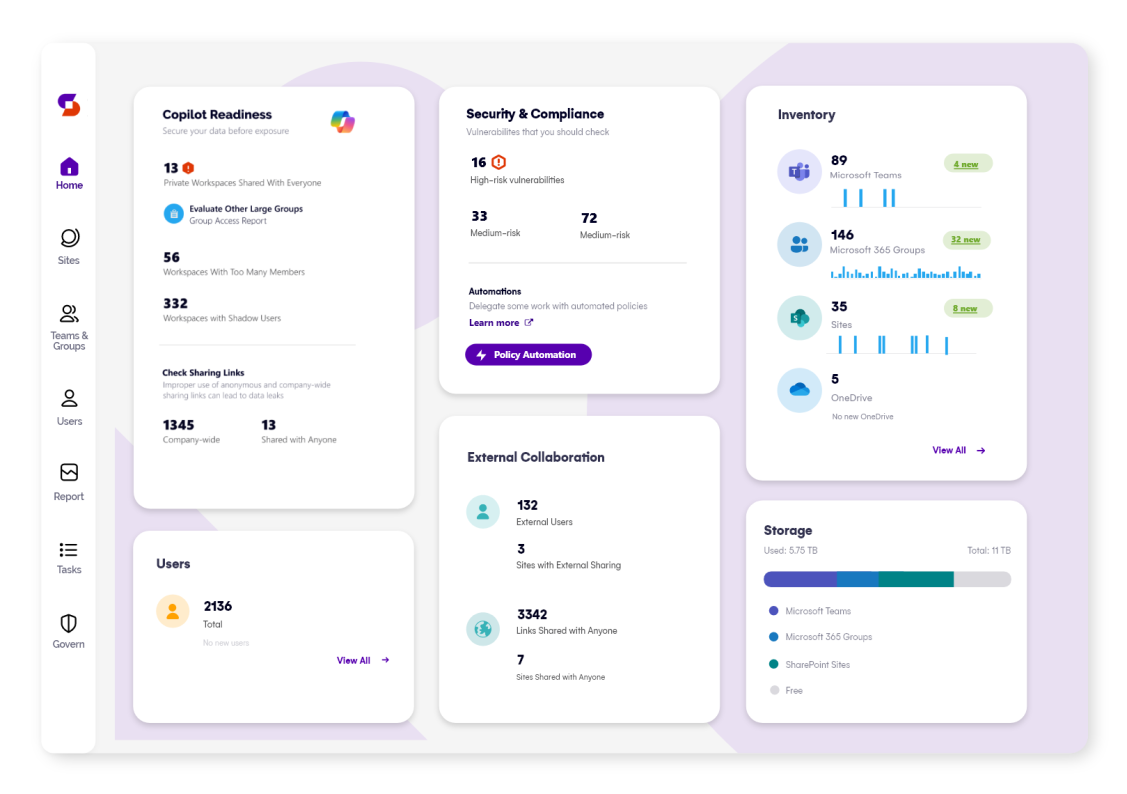
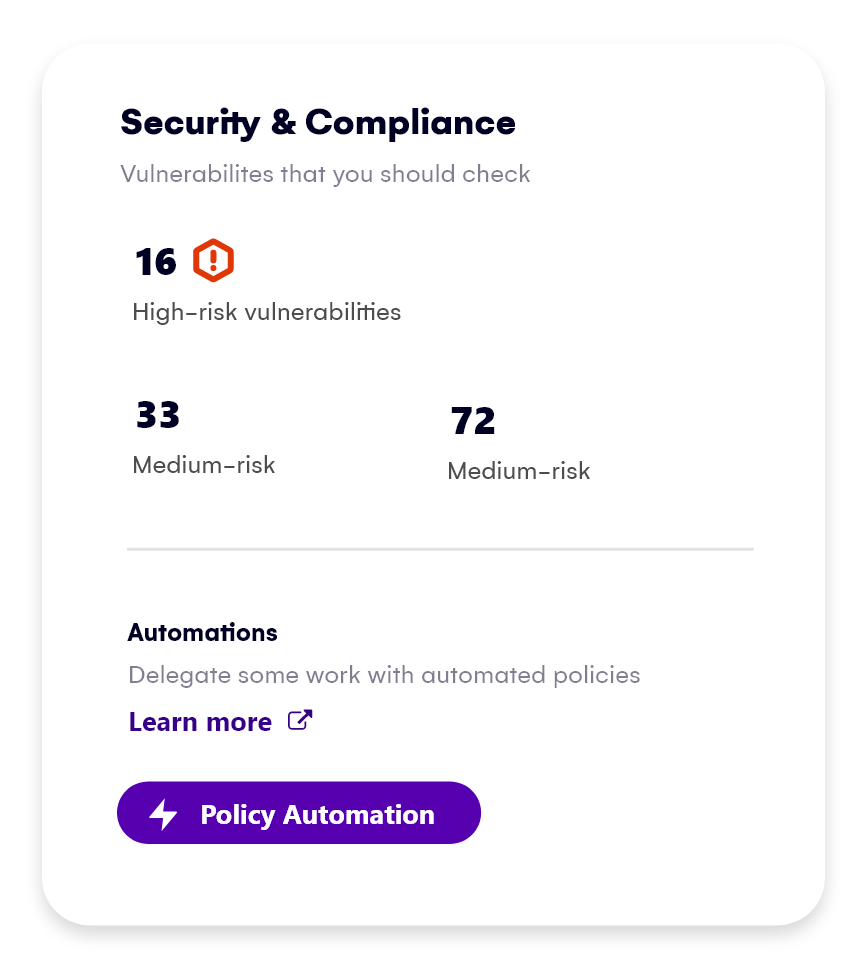
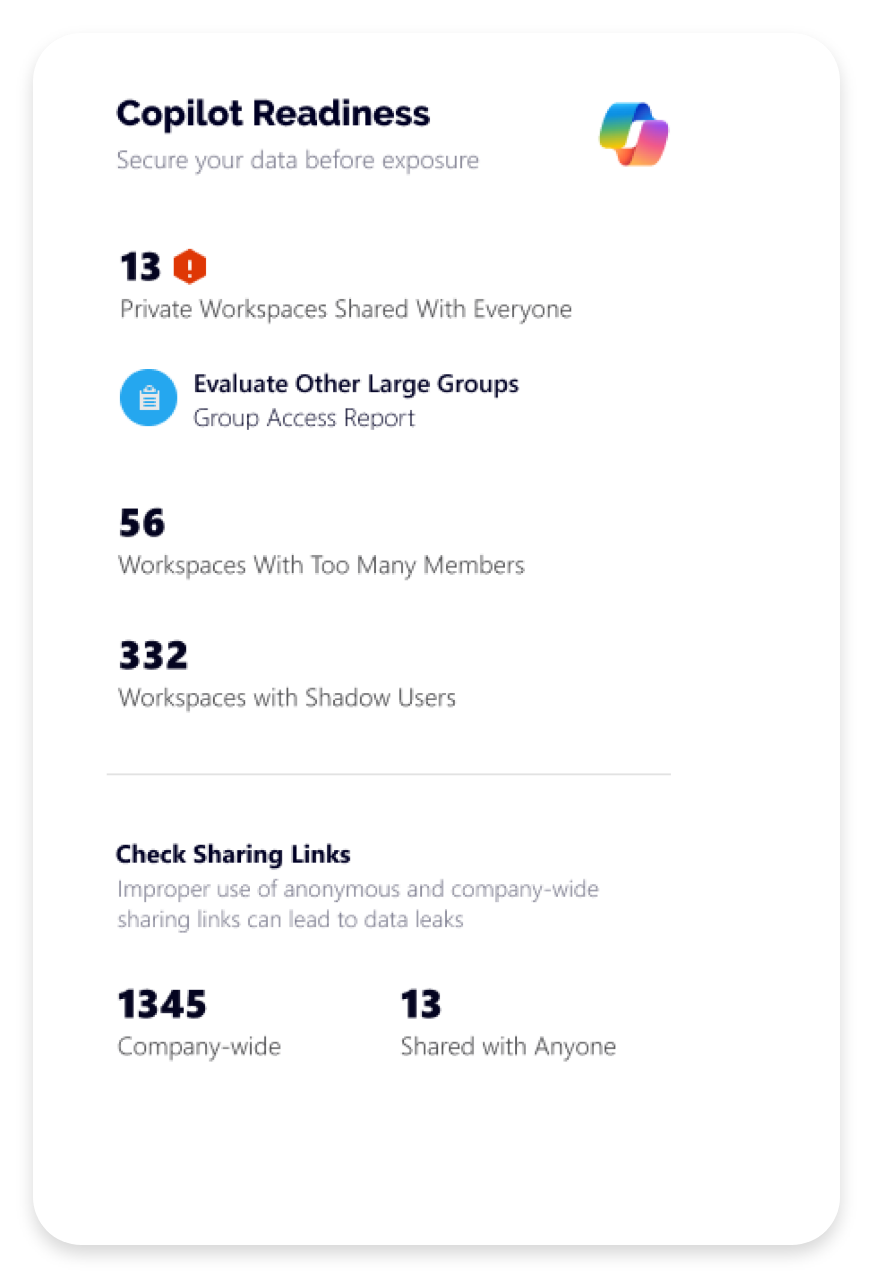
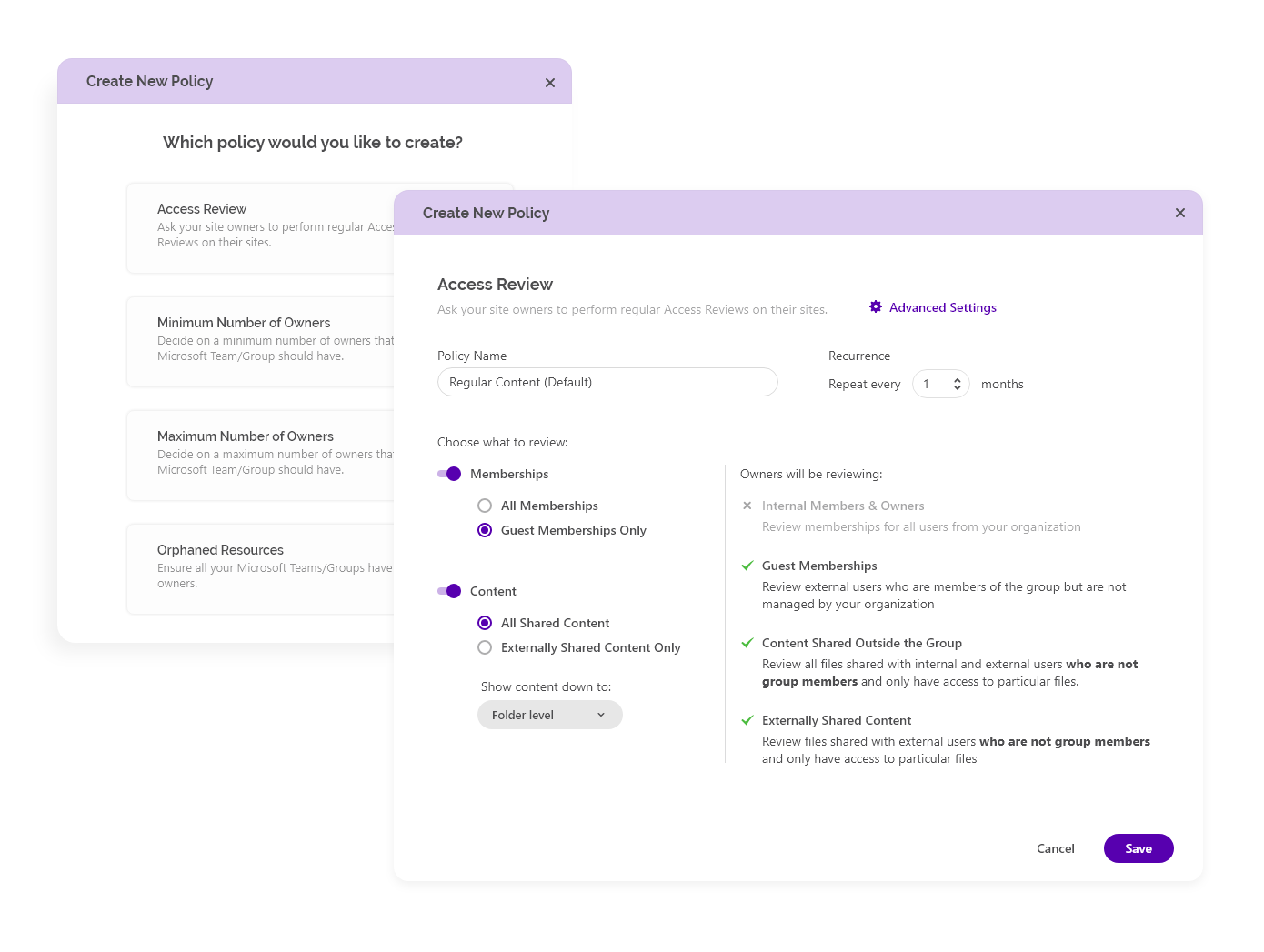
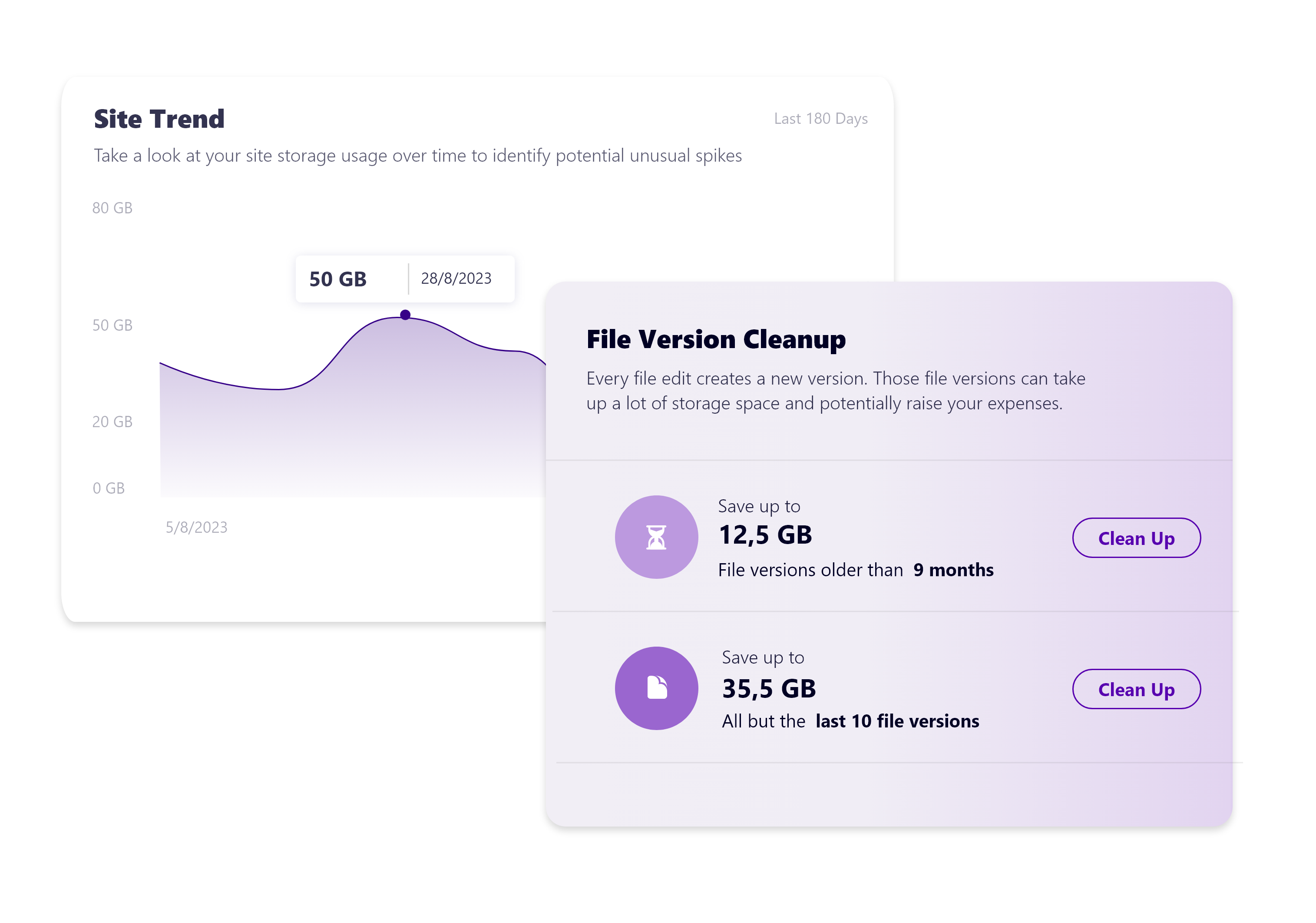
    Screenshot of Syskit Point’s dashboard, which offers a centralized view of yoan ur entire Microsoft 365 environment. This offers visibility across Microsoft Teams, SharePoint, OneDrive, Microsoft 365 Groups, and Power Platform. Viewers can quickly identify who has access to what, monitor external sharing, and spot potential risks before they become issues. With real-time insights, detailed reports, and automated governance workflows, the Syskit Point dashboard helps stay in control, simplify management, and protect sensitive data.Screenshot of Syskit Point’s Security & Compliance Dashboard, which provides a centralized view of permissions, user activity, and external sharing across a Microsoft 365 environment. Users can monitor who has access to sensitive data, enforce policies, and take immediate action to prevent unauthorized access or data leaks. With built-in compliance and security checks, the dashboard helps to ensure regulatory alignment and quickly mitigate potential risks.Screenshot of how Syskit Point helps prepare a Microsoft 365 environment for Copilot by ensuring only secure, relevant data is accessible. It identifies oversharing risks, enforces access controls, and provides visibility into sharing activity, so Copilot delivers accurate, trustworthy outputs without exposing sensitive information. With proactive permission reviews and workspace lifecycle management, Syskit Point ensures data is clean, compliant, and Copilot-ready.Screenshot of how Syskit Point simplifies Microsoft 365 governance with automated access reviews and workspace lifecycle management. It empowers resource owners to regularly review access, manage permissions, and keep workspaces secure and well-organized. With policy-based automation, storage optimization, and clear ownership responsibilities, Syskit Point helps prevent oversharing, reduce unnecessary access, and ease the governance burden on IT teams.Screenshot of how Syskit Point provides clear visibility into SharePoint storage usage, helping resource owners track storage trends, identify oversized workspaces, and spot unnecessary file versions. With built-in cleanup options and customizable policies, owners can remove outdated or redundant data, optimize storage, and prevent capacity issues. This proactive approach supports cost savings, improves workspace organization, and helps maintain a healthy Microsoft 365 environment.