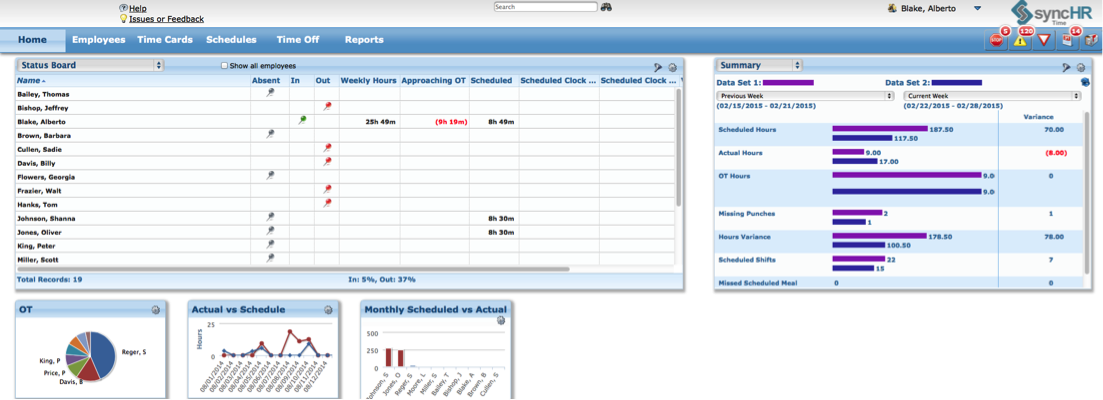
SyncHR headquartered in Oakland, California offers their eponymous platform for HR management, benefits and payroll.
N/A
Workday HCM
Score8.2 out of 10
N/A
Workday Human Capital Management is a cloud-native system offering a globally
consistent user experience. Workday HCM is part of an intelligent, unified system with other
Workday products.
N/A
Pricing
syncHR
Workday HCM
Editions & Modules
syncHR v5.9
Varies
Per User per Month
No answers on this topic
Offerings
Pricing Offerings
syncHR
Workday HCM
Free Trial
No
No
Free/Freemium Version
No
No
Premium Consulting/Integration Services
No
No
Entry-level Setup Fee
Required
No setup fee
Additional Details
SyncHR charges a one-time implementation fee plus a PEPM fee. All charges are based on employer size and complexity.
syncHR is designed for mid to large size companies, typically 200-2000 employees. Any organization that has a strong reporting need and/or a complicated payroll process could benefit from the unique features built into the platform
I would say it's well suited in every environment because I think it does so much. It's like the holy grail of HRIS systems is what I like to call it because thinking about all parts of the employee lifecycle, it lives here in Workday Human Capital Management. So I love the fact that you can do the people data analytics, you can store employee records, the talent acquisition pieces there. I'm thinking I can't think of anything negative right now except for the fact that I can't drill down into the data for the people analytics side. Other than that, I think it's literally, yeah, the holy grail of HRIS systems, I love it and I would highly recommend it.
A de minimis incentive was given to thank the reviewer for their time. The incentive was not used to bias or drive a particular response, nor was the incentive contingent on a positive endorsement. More Info
Automated retroactive change processing and mid-period rate changes – completely automated with no manual intervention needed - If you ever need to give someone a merit increase and make it retroactive or if an employee is entitled to enroll in health benefits on their first day employment but has 30 days to enroll, syncHR will automatically handles these retro changes.
A single application designed from the ground up that gives equal weight to HR, payroll, and benefit functions - syncHR is designed as a true unified solution with no back-end mainframes or separate front-ends vs backends. Everything is processed real-time in the cloud which has eliminated all discrepancies.
Customer Service - syncHR provides a designated account manager as your single point of contact. Since the The StaffWell Group is a 24/7 business, I needed a company that was available when I needed them. syncHR delivered with 24/7 emergency support.
Event-driven employee self service - Other systems we have used rely on employees to make the correct choices as to what is required when completing an employee initiated transaction. With syncHR, the system always directs the employee to the next step reducing both errors and calls to our support staff. I believe this is also the reason why we had a 40% increase in the adoption of ESS.
Dynamic Security & Workflows - syncHR has no static pages which allows security and workflows to be updated automatically whenever a change is made. This has virtually eliminated the time and effort required from HR to manually update workflows to the correct personnel.
Groups employees in management hierarchies and creates Org Charts that are easy to navigate and allow for visualizing management chains regardless of employee locations
Intuitive and easy to use. The Workday search functionality works very much like Google; one can search for anything that they have access to in the database and drill down into the various details. All information is connected through hyperlinks and users can easily keep digging into the details for as far as their security access would take them.
Tasks such as to do, review or approve items are sent to the user's Workday Inbox, very much resembling email. Notifications about outstanding "to do" items are also sent to each the user's work email address on a daily basis.
A de minimis incentive was given to thank the reviewer for their time. The incentive was not used to bias or drive a particular response, nor was the incentive contingent on a positive endorsement. More Info
Learning Management System- syncHR currently does not offer an LMS system. They only track and report training dates, licenses and certifications.
Although syncHR is a global solution it is somewhat limited to tracking employee headcount, HR documents, paperless on boarding and benefit information. There is no international payroll option like the one they provide for domestic employees. Although the system can handle multiple languages and currencies, I would like to see a global payroll option.
Succession Planning - syncHR provides little functionality for succession planning. The system can track budgets vs actuals, goals and ratings but does not offer a true succession planning module
It is work to make one system the source of truth for our data, but now that it is done, there is less work involved in staying on this path. This means for us that maintaining and/or implementing new modules like performance, finance, talent, etc. is simple. It's a no-brainer
A de minimis incentive was given to thank the reviewer for their time. The incentive was not used to bias or drive a particular response, nor was the incentive contingent on a positive endorsement. More Info
Overall the system is very easy to navigate but more importantly my employees find it so easy to use. The percentage of employees who now use ESS went up by 40%
Workday's on a great path in terms of user experience. Their goals is to deliver a use experience that doesn't require training or instruction, like Amazon on the consumer side for example. That's hard to do when you're talking about complex business processes and important and sensitive employee information, but they're doing it well
A de minimis incentive was given to thank the reviewer for their time. The incentive was not used to bias or drive a particular response, nor was the incentive contingent on a positive endorsement. More Info
In 2014, Workday has changed the update process. There will be two updates a year; the updates will be delivered to customers typically in a 24 hour window during these two weekends a year. They also keep the Community up-to-date about any planned outages, etc. There is weekly scheduled downtime on Friday night.
From my perspective, the system runs like a well oiled machine and I have not had any issues with customers complaining about speed. If a report is taking long to run, the report can run in the background and you can go about your business. For larger enterprises, there is additional space and machines to process the application in what Workday refers to it as Extended Configuration Tenant
Whenever we need support our designated account manager is there to provide answers for us. If she doesn't have or know the answer, additional support is provided via a service matter expert in that field. Support hours are 24/7
Workday is still learning about the needs of higher education. I have seen rapid improvement in support and knowledge over the last year so am confident this will continue to improve. Overall however, I have found the Support Team to be extremely responsive and Workday offers the advantage of having support across several timezones so that we never wait more than a few hours for a response.
Some training is offered online. Cost is per-person. This also gets quite expensive. Training doesn’t follow a logical path A to B. Starts in middle. When you try to do it afterwards at your desk, difficult. • Training scenarios are not very real
I have done for report writing and mass imports (EIBs). They give materials and you run through examples, i.e. you don’t just watch them do tasks, so that is helpful. Training is expensive – a single reporting writing class is $600 per person for virtual training
During the first few weeks of implementation it is important to have all key members participate in meetings. Finance, HR, Payroll and Benefits should be involved from the early stages to ensure that the solution is designed to meet your specific requirements. Since syncHR personalizes their solution for each company a few wrong steps early on regarding the design we wanted caused us to spend extra time later. The more info you provide syncHR upfront the better they can take all of your rules and needs into account from day one. In our case, finance did not get involved right away and therefore some of the items that we needed for our GL needed to be re-done. SyncHR was very accommodating though as they spent extra time with us to update some of the allocations so that finance got what they needed
It was implemented before my joining the company. At my last company, we used Workday professional services.
Based upon my experience at my last company, I would rate the implementation experience an 8/10. There are different ways to set things up and we had different people telling us different things. It set us back a couple of times.
Regarding configuration advice, we could set things up where every manager has supervisory organizations, or have it financially based i.e. aligned to cost center/department. We chose the individual manager path and I think we should have chosen a department route. Going down the individual manager path, to maintain the information, we have to inactivate a supervisory org whenever a manager changes/leaves.
As I mentioned I have used UltiPro, ADP, Ceridian as well as several others and none of them seem to offer half of the functionality and service that syncHR provides. Although we had some problems from time to time, I hold companies in high regard by how they resolve these problems. It's a comfort knowing that my HCM provider truly cares about me and my business so if for no other reason than this, I feel syncHR is far and away the best system I have used. The system works as advertised which is all I could ask for
Workday is an incomplete product, by this I mean it must work alongside other products and does not work by itself. Trying to make several different products work smoothly together becomes very challenging. As compared to ADP products, when purchased all together work very well all together. Also, ADP has extensive Training programs and extensive Customer Support. So ADP's products are far superior to Workday's products in my opinion.
A de minimis incentive was given to thank the reviewer for their time. The incentive was not used to bias or drive a particular response, nor was the incentive contingent on a positive endorsement. More Info
Workday has released Financials and is continuing to develop it's Human Capital Management footprint with the addition of Workday Recruiting. I think customers will find that is easy to add on additional functionality in the system. Workday does make it easy for customers to make changes without relying on IT resources. The Business Process framework is a visual tool that allows functional resources to make changes and see the flow of the transaction
Due to complexity of our payroll, it would typically take us almost 3 full days to verify hours and perform retro changes before actually running payroll. With so many retroactive changes and manual calculations it was a time consuming and error prone process. With syncHR, the accuracy of payroll has increased tremendously and the amount of time we now spend preparing to process payroll decreased to less than 4 hours per week. All approved time seamlessly moves from the T&A module into payroll and all retro transactions are automatically processed.
When I initially selected syncHR I was a little hesitant because I never heard of them before and was concerned about their viability as a company and customer service. Several years later I'm happy to say that syncHR has provided better support than any of the better know competitors ever did.
Although no system is ever perfect, overall syncHR has exceeded most of my expectations. The sales and implementation process was wonderful, the salesperson was responsive and did not oversell what the system could do.
Training & Implementation - syncHR spent a considerable amount of time learning my business rules in order to build the system to meet my requirements. Training was provided on all aspects of the system until my team felt comfortable enough to handle things on their own. I never felt as though we had a set number of hours of training or that our questions, no matter how redundant or simple were a bother to them.
Positive ROI, we were one of the first organizations that went with Workday HCM, and we received numerous discounts. Cloud systems are the way to go and we feel the system is stable for our growing work force.
The user conferences have been helpful to network and learn more deepness in the modules and functionality.
Right off the bat, our implementation costs were lower than budgeted and we had less 'billing' surprises.
A de minimis incentive was given to thank the reviewer for their time. The incentive was not used to bias or drive a particular response, nor was the incentive contingent on a positive endorsement. More Info