Stackby is designed to bring together the simplicity of spreadsheets, the functionality of databases and integrations with best business APIs to let anyone build their own tools, the way they want. No coding needed. Users can build a database from scratch, import data from pre-existing sources like spreadsheets or Google Sheets, or choose from over 100 pre-built templates across multiple categories. Stackby offers over 25 unique column types like text,…
$5
per month per user
WorkflowMax
Score9.2 out of 10
Small Businesses (1-50 employees)
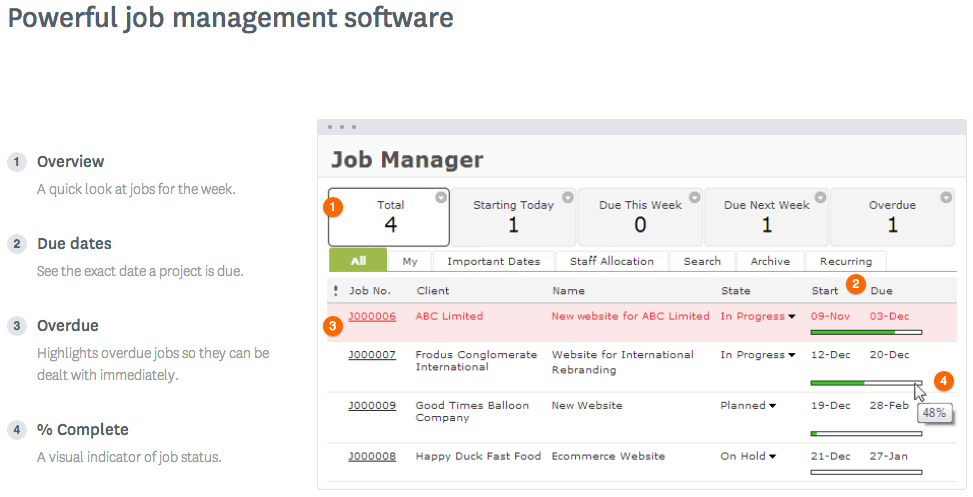
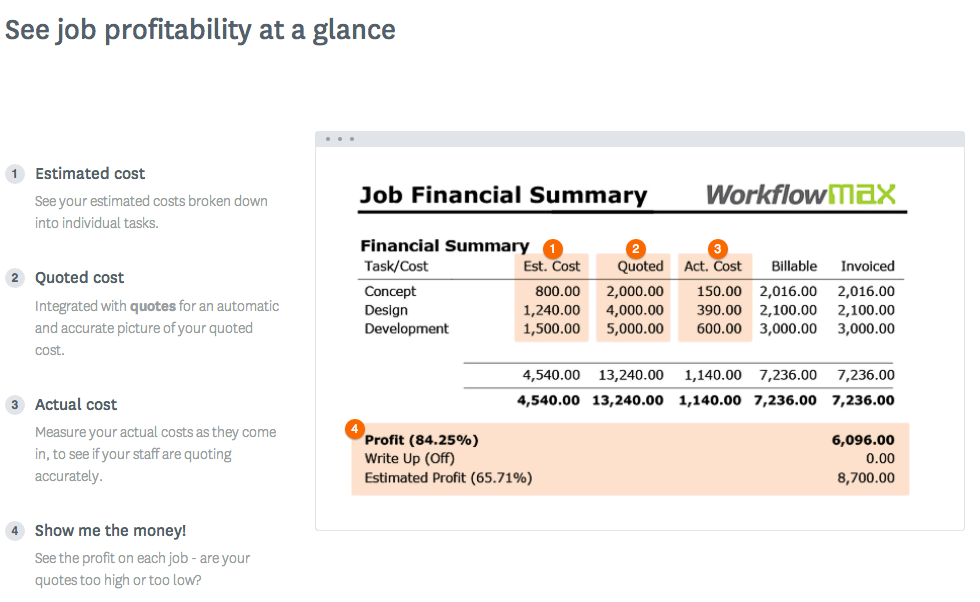
WorkflowMax is a web-based project management solution.The platform offers end-to-end functionality standard to project management software, including time tracking, lead management, collaboration with external stakeholders, invoicing, integrations, and customizable reporting.
Based on my experience, I can provide specific scenarios where Stackby is well suited and others where it may be less appropriate: Project Management: Stackby is an excellent choice for project management scenarios. Its ability to create custom databases, track tasks, assign responsibilities, and collaborate in real-time makes it highly effective for managing and monitoring project progress. CRM and Sales: Stackby is well suited for managing customer relationships and sales processes. Its customizable database structure allows for organizing customer information, tracking leads, managing deals, and generating reports. The ability to integrate with other tools further enhances its usefulness in CRM and sales workflows. Content Planning: Stackby is a great fit for content planning scenarios. Users can create databases to manage editorial calendars, track content ideas, assign tasks to team members, and monitor content performance. Collaboration features facilitate seamless content collaboration and ensure timely publishing.
WorkflowMax is very well suited for a business that wants to track time billed by project, to have an easy way to generate invoices for those projects, and to keep track of overall productivity and invoice status. I imagine it can also be adapted to different types of businesses that deal in goods rather than services and time. I am not sure for which scenarios or businesses the program is not appropriate.
A de minimis incentive was given to thank the reviewer for their time. The incentive was not used to bias or drive a particular response, nor was the incentive contingent on a positive endorsement. More Info
You can customize the notifications and this has helped us enormously to schedule dates that we overlooked. Also the templates are customizable which gives the company its own branding on its reports.
It is integrated with the Xero platform which makes it very useful to streamline the processes of billing, accounts payable, accounts receivable, petty cash flow and all the accounting and administrative area.
It also has a very complete mobile version, where we can be present and monitor the progress of projects in real time, no matter where we are.
A de minimis incentive was given to thank the reviewer for their time. The incentive was not used to bias or drive a particular response, nor was the incentive contingent on a positive endorsement. More Info
Implement the same views available on desktop into the mobile app
Internal automations (like Airtable)
Ability to implement and display info as a dashboard (like Airtable)
Polish up the formatting of formulas, inputting them causes user frustration due to the formula input cursor jumping around
Better intelligence and ease of inputting data in bulk i.e have the fields automatically identify what data is being input and format appropriately (like Airtable does)
Currently the timesheet function allows staff to input time for overlapping periods which can cause some headaches when it comes to payroll and invoicing. We understand this is being addressed.
The amount of flexibility in the product can create some challenges when setting up the jobs database at the onset. It is a daunting challenge but worthwhile when completed correctly and rolled out across the firm. Adding new jobs is much easier.
No search function to find a specific job, you have to scroll through all jobs allocated to you.
A de minimis incentive was given to thank the reviewer for their time. The incentive was not used to bias or drive a particular response, nor was the incentive contingent on a positive endorsement. TR verified that a representative sample of customers was invited. More Info
A de minimis incentive was given to thank the reviewer for their time. The incentive was not used to bias or drive a particular response, nor was the incentive contingent on a positive endorsement. TR verified that a representative sample of customers was invited. More Info
Stackby is overall pretty easy to use, especially if you're used to something like Airtable or SmartSuite. Some of the pages seem like near exact clones (though they put their own creative spin on things). I'd prefer a slighty fresher interface (like SmartSuite), but I'm willing to sacrifice that for the better price and great customer service.
A de minimis incentive was given to thank the reviewer for their time. The incentive was not used to bias or drive a particular response, nor was the incentive contingent on a positive endorsement. TR verified that a representative sample of customers was invited. More Info
A de minimis incentive was given to thank the reviewer for their time. The incentive was not used to bias or drive a particular response, nor was the incentive contingent on a positive endorsement. More Info
Decide how to breakdown your ongoing jobs - are they monthly recurring or annual broken into chunks? What are you going to give clients i.e. how will your proposals and invoices look?
A de minimis incentive was given to thank the reviewer for their time. The incentive was not used to bias or drive a particular response, nor was the incentive contingent on a positive endorsement. More Info
I have also tried Ora.Pm. Infinity has better graphical interface, but nowhere near as many features and the UI isn't as effective (i.e, moving around with keys). Grist has a much more technical interface and it comes from being more of a database/interactive spreadsheet vs Stackby. Grist has much more functionality in terms of formulas, but is much harder to learn to use and less other functionalities. Ora.PM is more of a test at a task management app, and doesn't compare - Stackby is much better.
WorkflowMax is much much easier than Streamtime, much more affordable and easier to try out and see if it meets your needs. Streamtime is a great comprehensive product but we lost a year's subscription in investment because we couldn't get answers to the support questions we needed and they had a no refund policy!
A de minimis incentive was given to thank the reviewer for their time. The incentive was not used to bias or drive a particular response, nor was the incentive contingent on a positive endorsement. TR verified that a representative sample of customers was invited. More Info
Max enables Loan Assistant to invoice very quickly and easily and integration with Xero for card payments brings our cashflow forward.
Max enables the Loan Assistant team to manage their workflow in an efficient and productive way. The team all work from home. It is the centre of our Loan Assistant universe.
A de minimis incentive was given to thank the reviewer for their time. The incentive was not used to bias or drive a particular response, nor was the incentive contingent on a positive endorsement. More Info