Square Online (formerly Weebly) is a basic content management system with blogging and eCommerce features. It can be utilized for building standard websites or specialized webpages for online stores.
$13
per month
WebWave
Score9.5 out of 10
N/A
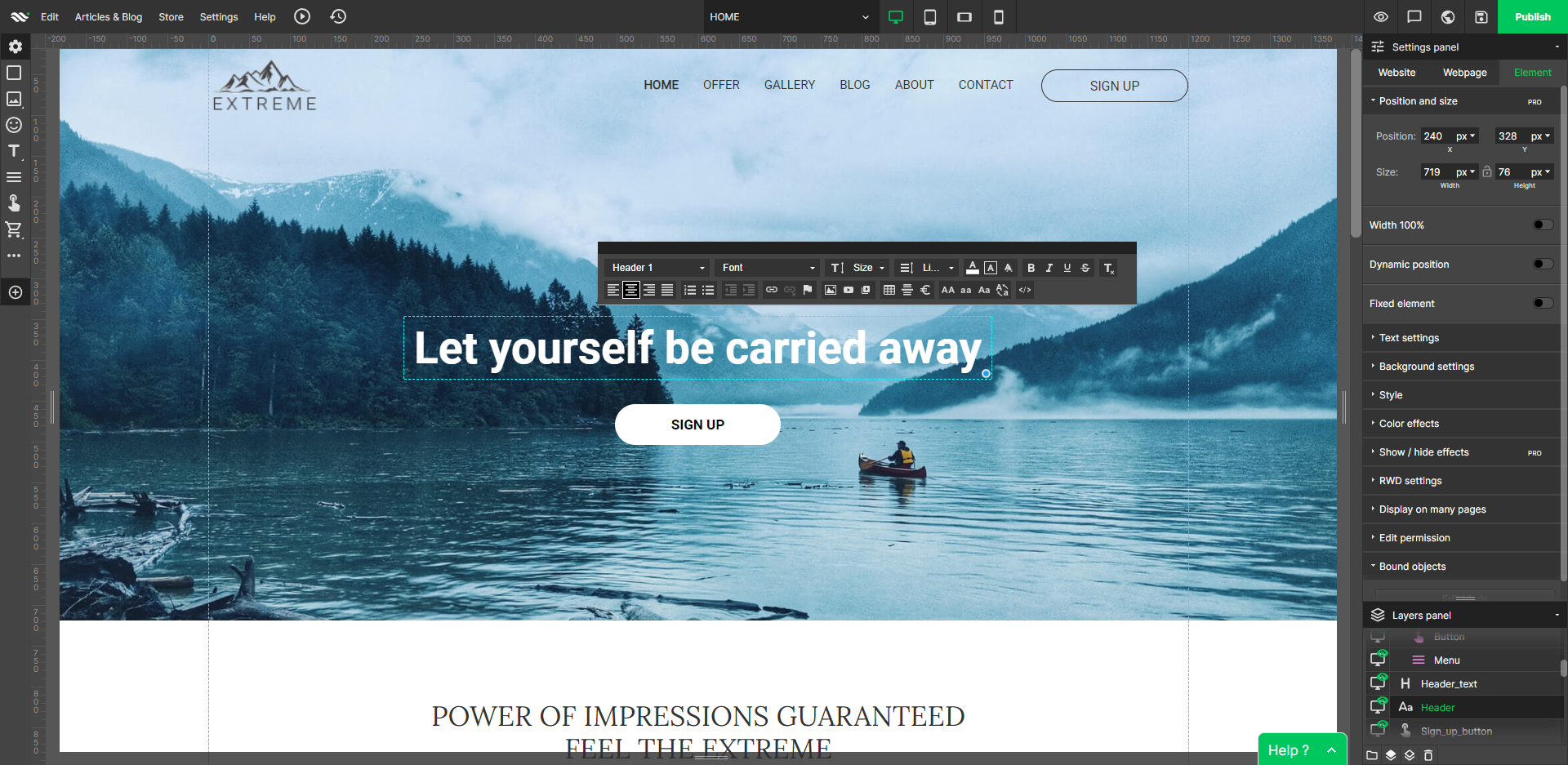
WebWave — an alternative for agencies and freelancers for creating custom websites for clients with the support of CMS. Using CMS with no sacrifices WebWave is a CMS platform that gives a designer precision up to 1 px in every single detail just like in more sophisticated graphic programs such as Photoshop while remaining a drag and drop software. This is to make creating websites much faster without loosing on details. Spend less time talking WebWave…
N/A
Pricing
Square Online
WebWave
Editions & Modules
Personal
$13
per month
Professional
$16
per month
Performance
$29
per month
Free
Free
Free
No answers on this topic
Offerings
Pricing Offerings
Square Online
WebWave
Free Trial
No
Yes
Free/Freemium Version
Yes
Yes
Premium Consulting/Integration Services
No
Yes
Entry-level Setup Fee
No setup fee
$7 per month
Additional Details
Pricing decreases when paid annually:
Personal - $10/Month
Professional - $12/Month
Performance - $26/Month
A de minimis incentive was given to thank the reviewer for their time. The incentive was not used to bias or drive a particular response, nor was the incentive contingent on a positive endorsement. More Info
A de minimis incentive was given to thank the reviewer for their time. The incentive was not used to bias or drive a particular response, nor was the incentive contingent on a positive endorsement. More Info
If you are having students create websites or information pages about something they are studying in class, this is a great option. The fact that students can spend less time getting situated and learning the app and get right to work researching and creating their pages is great. For middle to high school, this is a fantastic app to use. However, if you want more nuanced analytics or want students to focus on blogging more than webpage building, this is limited.
A de minimis incentive was given to thank the reviewer for their time. The incentive was not used to bias or drive a particular response, nor was the incentive contingent on a positive endorsement. More Info
Well suited: Small businesses and entrepreneurs: WebWave is an excellent option for small businesses and entrepreneurs who need a professional-looking website without spending a lot of time and money. It's easy to use, customizable, and offers fast load times and responsive design. Less appropriate: Large e-commerce websites: If you're looking to create a large e-commerce website with a vast number of products and advanced features, WebWave may not be the best option. Its e-commerce functionality is limited compared to other website builders, and it may not be able to accommodate the needs of a large-scale online store. Also, if you need much coding, you would rather have it with something that is wordpress-based.
A de minimis incentive was given to thank the reviewer for their time. The incentive was not used to bias or drive a particular response, nor was the incentive contingent on a positive endorsement. More Info
Drag and drop interface makes it very easy to add all types of content, including images, text, video (and YouTube videos), embeddable applications and more.
It's very easy to set up navigation features like cascading menus and sticky navigation (where the menu stays put - may depend on the template chosen though).
A technical backend is fairly straight-forward for setting up a fav icon, 301 redirects, SEO, Google Analytics, etc.
A de minimis incentive was given to thank the reviewer for their time. The incentive was not used to bias or drive a particular response, nor was the incentive contingent on a positive endorsement. More Info
WebWave's site builder is the platform's truly innovative feature. I've never come across another service that deploys a layer-based approach in web design, as most of them usually deploy a grid-based system. This is an incredible alteration that ensures WebWave behaves much like a traditional graphic design tool, thereby resulting in an experience that is a lot more intuitive and instinctive. I believe this has the potential to radically change the way people approach no-code web design.
WebWave provides automatic, daily backups and a free SSL certificate for every website. This results in excellent security.
WebWave's support team is first-class! I had some teething-issues in the beginning, but the support team quickly got me back on track.
WebWave's community/forum is an excellent place to vote and request new features. This proves the development team is committed to making WebWave better by listening to their users.
Weebly doesn't have a lot of templates to choose from, so if you don't have any experience with CSS or HTML, it's hard to customize your site to an extent.
Weebly isn't fully SEO friendly. They don't allow you to add H1 tags to pages out of the box.
You can't create folder structures when it comes to web page URLs. You can put web pages under a main menu dropdown, but they don't allow you to put all sub-menu items in a structured folder (like site.com/folder/page-1 and site.com/folder/page-2).
A de minimis incentive was given to thank the reviewer for their time. The incentive was not used to bias or drive a particular response, nor was the incentive contingent on a positive endorsement. More Info
Some scope for improvement in UX (colors are not very appealing). It is simple to use but design is a little dated. Especially in the builder section, I'd like to see modern design for buttons and maybe gradients also: as this is where visual motivation is also important
Some edits take effect only after pressing OK. That should be eliminated as it's an unnecessary addition. It's also kind of annoying to do that again and again, which can add up to a lot as we do so many small tweaks while building the website.
Few things (maybe glitches) in design. The rectangle below the footer was uneditable for me. I spent quite some time trying to figure it out so I'm convinced it's a glitch.
Weebly is consistently adding features that line up with our needs. The ease of use makes it the perfect program for us since we have users of multiple age brackets and knowledge of web design. We love that we can give users access to only the pages they are affiliated with
A de minimis incentive was given to thank the reviewer for their time. The incentive was not used to bias or drive a particular response, nor was the incentive contingent on a positive endorsement. More Info
Very easy to use and intuitive to design after all of our business needs. From the website and POS system to how we represent ourselves internally and to our customers... Square is second-to-none in helping our business and others in our same boat become the kind of businesses we want to be when it comes to our inventory and sales of these kinds of products.
A de minimis incentive was given to thank the reviewer for their time. The incentive was not used to bias or drive a particular response, nor was the incentive contingent on a positive endorsement. More Info
1. The support person does not seem to understand the issues, and seems like they go off to talk to somebody and revert back every 5 to 10 minutes. It takes up a lot of time. 2. There is a lack of reading material to address simple issues like changing the website name in the dashboard, pasting a code, etc.
A de minimis incentive was given to thank the reviewer for their time. The incentive was not used to bias or drive a particular response, nor was the incentive contingent on a positive endorsement. More Info
Weebly's designs, plugins, and customization options are a little more advanced in some cases than other similar programs. WordPress requires a different level of expertise and knowledge of code, keywording, and plugins, so I wouldn't even compare them. Wix is a little more user-friendly because you can drag and drop your design, which was very convenient for customizing your site. I didn't personally select Weebly, but it is user-friendly and nearly anyone comfortable with a computer could figure it out. Weebly support is also pretty good.
A de minimis incentive was given to thank the reviewer for their time. The incentive was not used to bias or drive a particular response, nor was the incentive contingent on a positive endorsement. More Info
WordPress is a more flexible and adaptive content management system than Webwave. In addition to the functionalities that are already built-in, I am unable to add any customizable plugins or add-ons. However, in the majority of cases, the inherent features of Webwave are sufficient for developing a website that serves its intended purpose. Webwave also makes it possible for you to add animations and the appearance of each of your design elements, whereas WordPress builders require additional plugins in order for users to access most of such capabilities. Webwave has several essential design features available internally, thus saving money and time.
Weebly has allowed our business to create a connection with our customers by offering home decor, cooking and styling tips.
Weebly gives us the chance to relay information to customers regarding merchandise, current sales and promotions, store hours and locations etc. Which has helped increase business.
Weebly has given our not very tech savvy business the opportunity to have a website and stay relevant with our competitors.
A de minimis incentive was given to thank the reviewer for their time. The incentive was not used to bias or drive a particular response, nor was the incentive contingent on a positive endorsement. More Info