Splunk SOAR vs. TheHive

Overview
ProductRatingMost Used ByProduct SummaryStarting Price
Splunk SOAR
Score 9.0 out of 10
N/A
Splunk now offers a security orchestration, automation, and response (SOAR) platform via its acquisition of Phantom. Splunk Security Orchestration and Automation (Splunk SOAR) provides playbook automation and is available as a standalone solution.N/A
TheHive
Score 9.7 out of 10
Enterprise companies (1,001+ employees)
TheHive is an open source and free cybersecurity incident response platform.
$17
per year per installation
Pricing
Splunk SOARTheHive
Editions & Modules
No answers on this topic
TheHive Gold Edition
Starting from $17.000
per year per installation
TheHive Platinum Edition
Starting from $23.000
per year per installation
TheHive Cloud Platform - Large
Starting from $41.000
per year per installation
TheHive Cloud Platform -X Large
Starting from $48.000
per year per installation
TheHive Cloud Platform - Custom
Starting from $48.000
per year per installation
Offerings
Pricing Offerings
Splunk SOARTheHive
Free Trial
NoYes
Free/Freemium Version
NoYes
Premium Consulting/Integration Services
NoNo
Entry-level Setup FeeNo setup fee$5,000 one-time fee per installation
Additional DetailsTheHive Gold and Platinum editions are priced per number of users (seats) and orgnizations (tenants). Our prices start from 1 organization and 5 users.
More Pricing Information
Community Pulse
Splunk SOARTheHive
Features
Splunk SOARTheHive
Incident Response Platforms
Comparison of Incident Response Platforms features of Product A and Product B
Splunk SOAR
-
Ratings
TheHive
10.0
Ratings
13% above category average
Company-wide Incident Reporting00 Ratings10.00 Ratings
Integration with Other Security Systems00 Ratings10.00 Ratings
Centralized Dashboard00 Ratings10.00 Ratings
Live Response for Rapid Remediation00 Ratings10.00 Ratings
User Ratings
Splunk SOARTheHive
Likelihood to Recommend
8.1
(0 ratings)
10.0
(0 ratings)
Likelihood to Renew
7.5
(0 ratings)
-
(0 ratings)
Usability
8.2
(0 ratings)
-
(0 ratings)
Performance
8.2
(0 ratings)
-
(0 ratings)
Support Rating
8.2
(0 ratings)
-
(0 ratings)
Online Training
8.2
(0 ratings)
-
(0 ratings)
Implementation Rating
8.2
(0 ratings)
-
(0 ratings)
Configurability
8.2
(0 ratings)
-
(0 ratings)
Product Scalability
8.2
(0 ratings)
-
(0 ratings)
User Testimonials
Splunk SOARTheHive
Likelihood to Recommend
Our company has very complex and dynamic security operations because of the large number of security tools and systems that we need to manage and coordinate. Moreover, it helps us to meet many regulatory and compliance requirements because it helps us to automate and document our security operations. We also use it to streamline our security operations and improve our response to potential threats.
Read full review
Managing incident response - it does exactly what it is supposed to do!
Read full review
Pros
  • Its security orchestration and integration capability that supports multiple tools.
  • Easy coding that automates our security actions.
  • Enables us to easily collaborate and respond to security issues faster.
  • Splunk SOAR is a flexible product that is easy to deploy.
  • Efficient tracking and monitoring capability.
  • Excellent real-time reporting functionality.
Read full review
No answers on this topic
Cons
  • A lack of instruction It can be difficult to contact the support staff. Limited experience from current users.
  • It takes some effort to set up and learn new technology at first. More assistance is required from the support staff. The product's price needs to go down.
  • Cost of the larger version.
Read full review
No answers on this topic
Likelihood to Renew
As we already have a lot of clients being catered with Splunk SOAR and because Splunk SOAR is robust and efficient, we are already using it, and we have understood the product to a certain extent, I feel we are personally more enticed to use and scale it to a lot of business.
Read full review
No answers on this topic
Usability
Building playbooks through the visual editor is fine for basic tasks, but once you start chaining complex logic or integrating 3rd party APIs you hit a wall that requires deep scripting knowledge.
Read full review
No answers on this topic
Performance
It has APIs that are useful for integration with third party solutions as well as for absorbing large volumes of data from our servers, networks and apps. Splunk SOAR offers a variety of playbooks that we use in automating workflows for migrating data and for analyzing the data to ensure its security.
Read full review
No answers on this topic
Support Rating
Splunk Support is always great! In addition the Community is very efficient and active.
Read full review
No answers on this topic
In-Person Training
I never followed an in-person training, I gave my evaluation based on the online training
Read full review
No answers on this topic
Online Training
I followed training for Phantom admins and it opened a world for me
Read full review
No answers on this topic
Implementation Rating
I already said that the main key insight is the knowledge of Phantom, so a detailed training for all the people involeved.
Read full review
No answers on this topic
Alternatives Considered
If you use Splunk SIEM, you might wanna use Splunk soar, too. one vendor for SIEM and SOAR, and you do not need to think about integration, etc. Easy to use if we compare to other SOARs, chat and war rooms are great, and almost every action that we need is already created in Splunk SOAR.
Read full review
No answers on this topic
Scalability
me and the customers I encountered found it flexible and scalable
Read full review
No answers on this topic
Return on Investment
  • The playbooks are valuable. They are the core component. Being able to implement and build a code process to work through and scale out what we want to do is valuable
  • Before its use, analyzing each email would take at least 15 to 20 minutes, with some complex cases taking up to 30 minutes...With the automation provided by Splunk Phantom, we could significantly reduce the amount of time and human effort required to complete this task
Read full review
No answers on this topic
ScreenShots

TheHive Screenshots

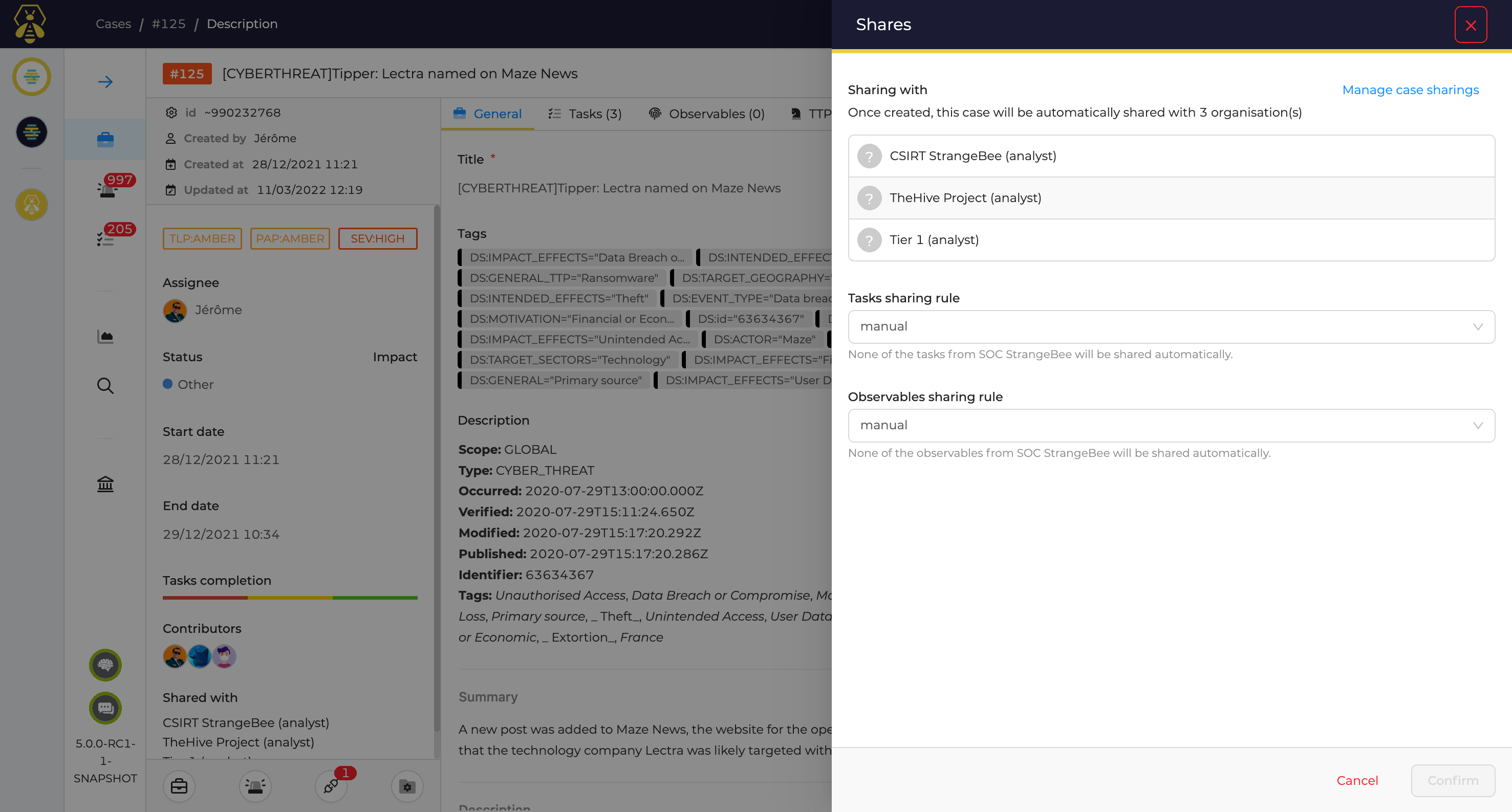
Screenshot of Alert Management: Go through your dedicated and detailed Alert page, make comments, identify similar Alerts, define custom statuses and fields. Then decide whether or not they should be escalated to investigations or to incident response.Screenshot of Case Management: Create cases and associated tasks and observables. Identify similar cases and alerts, define the PAP (Permissible Actions Protocol) level on each Observable, or improve your Incident Response process using a simple yet powerful template engine.Screenshot of Muti Tenant Environments: Define the different organizations and teams and get them to work in a dedicated or collaborative mode: tenants' cases can be isolated or investigated by users from different organizations based on customizable roles and permissions.Screenshot of User Management: Define and customize user profiles, assign them to users within their organizations and synchronise them via LDAP or AD.Screenshot of Metrics and Dashboards: Compile and correlate statistics on cases, tasks, observables, metrics and more to generate useful KPIs and MBOs with our dynamic dashboard engine.Screenshot of MISP Integration: Get shared Indicators of compromise quickly imported and ready to use or share yours easily with your communities by connecting TheHive with MISP.