Spiceworks offers a set of free tools for IT network management and help desk support ticketing. The inventory management system essentially provides comprehensive device information for asset management.
$0
UpKeep Maintenance Management
Score 7.0 out of 10
Small Businesses (1-50 employees)
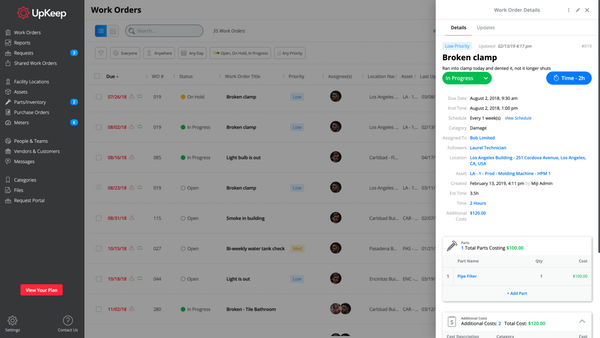
UpKeep allows users to snap a picture of a broken piece of equipment, create a work order, and schedule it for repair - all from a mobile device. UpKeep is designed for facility, property, restaurant, and manufacturing managers looking to improve communication by enabling real-time status updates for their teams. The vendor says it is a modern, intuitive, and customizable CMMS that is proven to expedite workflow processes. Capabilities include: -Add co-workers and easily assign work…
$40
per technician/per month
Pricing
Spiceworks Cloud Help Desk
UpKeep Maintenance Management
Editions & Modules
Core Plan
$0
Premium
$6
per month per user
Starter
$40
per technician/per month
Professional
$75
per technician/per month
Business Plus
$120
per technician/per month
Enterprise
$180
per technician/per month
Offerings
Pricing Offerings
Spiceworks Cloud Help Desk
UpKeep Maintenance Management
Free Trial
No
Yes
Free/Freemium Version
Yes
Yes
Premium Consulting/Integration Services
No
No
Entry-level Setup Fee
No setup fee
Optional
Additional Details
—
—
More Pricing Information
Community Pulse
Spiceworks Cloud Help Desk
UpKeep Maintenance Management
Features
Spiceworks Cloud Help Desk
UpKeep Maintenance Management
Incident and problem management
Comparison of Incident and problem management features of Product A and Product B
Spiceworks Cloud Help Desk
8.5
Ratings
6% above category average
UpKeep Maintenance Management
-
Ratings
Organize and prioritize service tickets
8.00 Ratings
00 Ratings
Expert directory
8.00 Ratings
00 Ratings
Subscription-based notifications
9.00 Ratings
00 Ratings
ITSM collaboration and documentation
6.00 Ratings
00 Ratings
Ticket creation and submission
10.00 Ratings
00 Ratings
Ticket response
10.00 Ratings
00 Ratings
Self Help Community
Comparison of Self Help Community features of Product A and Product B
Spiceworks Cloud Help Desk
7.0
Ratings
11% below category average
UpKeep Maintenance Management
-
Ratings
External knowledge base
7.00 Ratings
00 Ratings
Internal knowledge base
7.00 Ratings
00 Ratings
Multi-Channel Help
Comparison of Multi-Channel Help features of Product A and Product B
Spiceworks Help Desk from the user end is very simple. Once you submit your technology needs, I automatically receive an email stating that my ticket was received and is being processed. It's also helpful to have the VNC feature so that my IT department can automatically VNC into my computer if it's a quick fix. At times Spiceworks Help Desk can be tricky because as someone who's not in a Tech role at my company, it can be hard to describe what I need assistance with writing.
Very appropriate within our business since It is so easy to use and implement. The software gives the techs more accountability and ownership of jobs, along with the ability to create re-occurring work orders for inspections and checks. I now get accurate data to report against on a weekly basis, and get KPI's to set goals for our team.
Periodic maintenance needs are still a little tricky keeping in the system without flooding the user with too many work orders.
It does not immediately update all the time. For example, closing out work orders and the number of total work orders stays the same until it’s rebooted.
There is no contract to renew, since it's free. Spiceworks has helped me so much that I couldn't imagine trying to replace it with a different product. I'd have a hard time finding a single product that does everything that Spiceworks does, let alone one that does it as well as Spiceworks and for free
1. Its free. 2. Its easy to install. 3. You can have it up and running in under 1-hour. 4. You get dashboards that are easy to read so you know the state of your network. 5. You can create your own reports and not just the ones already installed. 6. Excellent tool for network administrators and security practitioners. 7. Did I mention that its free?
I think the platform is user-friendly but there have been some issues that colleagues have been complaining about. For example, the program tends to run slow from time to time. Reporting could be better. We could use more fields for categories under parts and assets.
Spiceworks has been working out of the box, and some of the basic customizations have been successful with just our internal staff handling. We don't have any other issues with the tool. It provides us with the inventory information we want in a quick and concise report in a variety of formats for our team.
I cannot say enough great things about their customer service. From the start of the purchase, Upkeep was extremely helpful and informative. They have been ongoingly keeping us informed and available to answer any of our questions as they arise. They ongoing learning portal is also helpful when new features and changes happen with the interface.
If you can spin up a VM to run it on, you'll thank yourself later. If you have remote sites, set up a local server (or dedicated computer) at each site and set them up as remote collectors for the main site. You'll save time and bandwidth
EGroupware UI is clunky and hard to use, Jira is great but the pricing is expensive in comparison with spice works that has a free version and you can test it out properly before buying and make a correct decision based on your business plan and company objectives with the right software.
We liked the Hippo CMMS for the mapping feature - you can do an overlay of the building plan and markup the locations - but the barcode feature was not there at the time we reviewed, so there was some automation lost there. UpKeep had the barcode - but lacked the mapping. We preferred the barcode feature. Also - the mobile app for UpKeep was much more mature, and they've since added the sensors (beta) which I don't believe Hippo has yet.
It's a bit too soon to speak of ROI, but being able to track issues over multiple service calls has proven to be useful, especially when it comes to holding workers accountable for their use of the machines.
It's easy to use for those who use it.
It's no harder to submit issues than it is to send an email. If you can send an email, you can submit an issue.