Kaspersky Small Office Security (formerly Kaspersky Work Space Security) is antivirus / endpoint security software from Russian company Kaspersky.
$29.99
per month
Sophos Intercept X
Score9 out of 10
N/A
Sophos Endpoint Protection (Sophos EPP) with Intercept X is an endpoint security product providing an antivirus / antimalware solution that when upgraded with Intercept X or Intercept X Advanced provides advanced threat detection and EDR capabilities.
$28
per year per user
Pricing
Kaspersky Endpoint Security
Sophos Intercept X
Editions & Modules
Essential Suite
$29.99
per month
Advanced Suite
$39.99
per month
Premium Suite
$44.99
per month
Intercept X Advanced
$28
per year per user
Intercept X Advanced with XDR
$48
per year per user
Sophos Managed Threat Response
$79
per year per user
Offerings
Pricing Offerings
Kaspersky Endpoint Security
Sophos Intercept X
Free Trial
No
No
Free/Freemium Version
No
No
Premium Consulting/Integration Services
No
No
Entry-level Setup Fee
No setup fee
No setup fee
Additional Details
—
Pricing is for a 3-year commitment. Government and Education pricing available.
A de minimis incentive was given to thank the reviewer for their time. The incentive was not used to bias or drive a particular response, nor was the incentive contingent on a positive endorsement. More Info
Security Architect in Information Technology at Securicon, LLC (Computer & Network Security, 51-200 employees)
Chose Kaspersky Endpoint Security
Kaspersky is a leader in endpoint protection, but its ties to potential adversaries are unsettling. Kaspersky has a great threat research team and quickly identifies malicious software and its signature. Its web-based protection is also top notch. This is a great product but as …
A de minimis incentive was given to thank the reviewer for their time. The incentive was not used to bias or drive a particular response, nor was the incentive contingent on a positive endorsement. More Info
Sophos
Verified User
Chose Sophos Intercept X
Sophos is much more user friendly and scalable for partners who wish to [centralize] all security across the IT industry, from email security, server security, phish threat management and more.
A de minimis incentive was given to thank the reviewer for their time. The incentive was not used to bias or drive a particular response, nor was the incentive contingent on a positive endorsement. More Info
Vice President of Information Technology in Information Technology at 3form (Plastics, 501-1000 employees)
Chose Sophos Intercept X
In our analysis we discovered that for the price and feature set, Sophos was able to rise above the rest. Pricing is always a large consideration, however it isn't the only consideration - the feature set that Sophos Endpoint Protection provided over its competitors made the …
A de minimis incentive was given to thank the reviewer for their time. The incentive was not used to bias or drive a particular response, nor was the incentive contingent on a positive endorsement. More Info
Verified User
Chose Sophos Intercept X
Sophos had the most mature cloud solution, mixing good work flows with strong capabilities. While many of the endpoint protection solution are very comparable when on-premise, it has been our experience that the cloud solutions can differ widely in terms of capabilities and …
A de minimis incentive was given to thank the reviewer for their time. The incentive was not used to bias or drive a particular response, nor was the incentive contingent on a positive endorsement. More Info
CEO And Founder in Information Technology at Advisor Consulting Group Corp (Computer Networking, 1-10 employees)
Chose Sophos Intercept X
Sophos has top of the line definitions, and support response for new threats (that goes undetected for days or even months with the competition). We selected Sophos, because they are aligned with our company objectives, we always look for NextGen Protection and tools, and …
A de minimis incentive was given to thank the reviewer for their time. The incentive was not used to bias or drive a particular response, nor was the incentive contingent on a positive endorsement. More Info
I think Kaspersky is well suited for large and small companies. Larger companies can take advantage of the KSC (Kaspersky Security Center) servers to help manage a large network. The KSC has many good features to help monitor the health of the organization. It does a good job with updating and deploying remotely. It has inventory features, and can even deploy non-Kaspersky software packages uploaded to the center. KSC can become a source of good information about [your] network that can be seen at a glance. IT departments are normally smaller than they need to be. KSC helps with larger and smaller companies because of this. A small company would appreciate the amount of information and management that can be done through KSC without needing extra help. If the company is small enough that they don't have servers on-site, there is a cloud version. I have not used that to know how it differs from the local KSC.
A de minimis incentive was given to thank the reviewer for their time. The incentive was not used to bias or drive a particular response, nor was the incentive contingent on a positive endorsement. More Info
To be frank, this product is fairly expensive. So I would recommend this to companies that are mid-sized or larger to condone the cost of the purchase. It does save me a significant amount of time in my day - being able to glance at the dashboard and see if there are any outstanding issues that require my attention, as not much digging must be done to accomplish this. So for our company, with a short-staffed IT department, it's incredibly helpful to us. We also qualify for Educational pricing which brings the cost down - which helps tremendously
A de minimis incentive was given to thank the reviewer for their time. The incentive was not used to bias or drive a particular response, nor was the incentive contingent on a positive endorsement. More Info
The Security Center is laid out very well and makes it easy to install and manage the client endpoint protection on servers and workstations.
The way security policies are defined and managed is very easy to understand.
The client programs seem to be lighter and smaller on the client systems than others I have used in the past. Using fewer resources is always an advantage.
A de minimis incentive was given to thank the reviewer for their time. The incentive was not used to bias or drive a particular response, nor was the incentive contingent on a positive endorsement. More Info
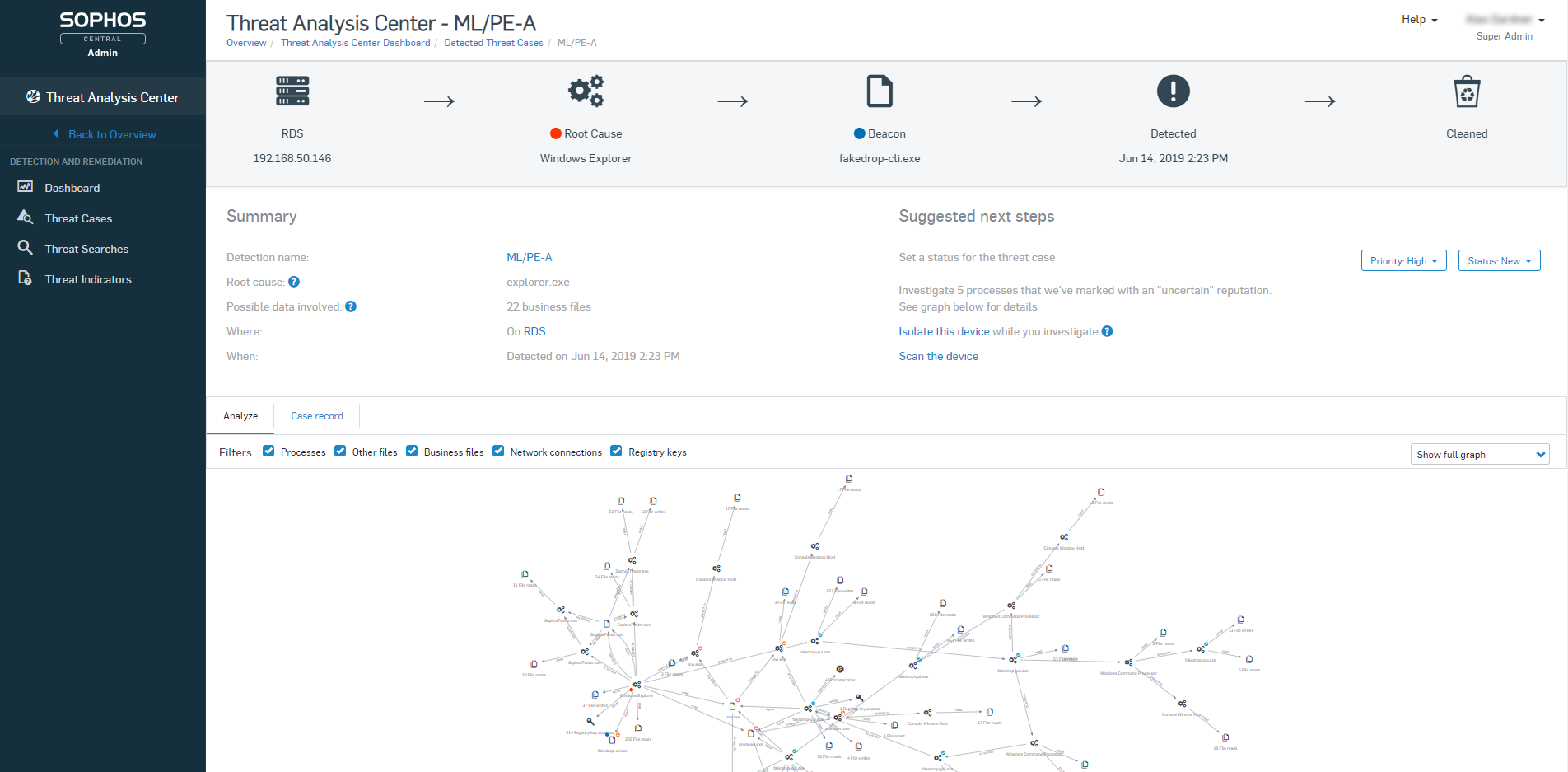
Sophos Intercept X is great at preventing malware infections and rolling back their effects. I have seen this happen hundreds of times since we installed it
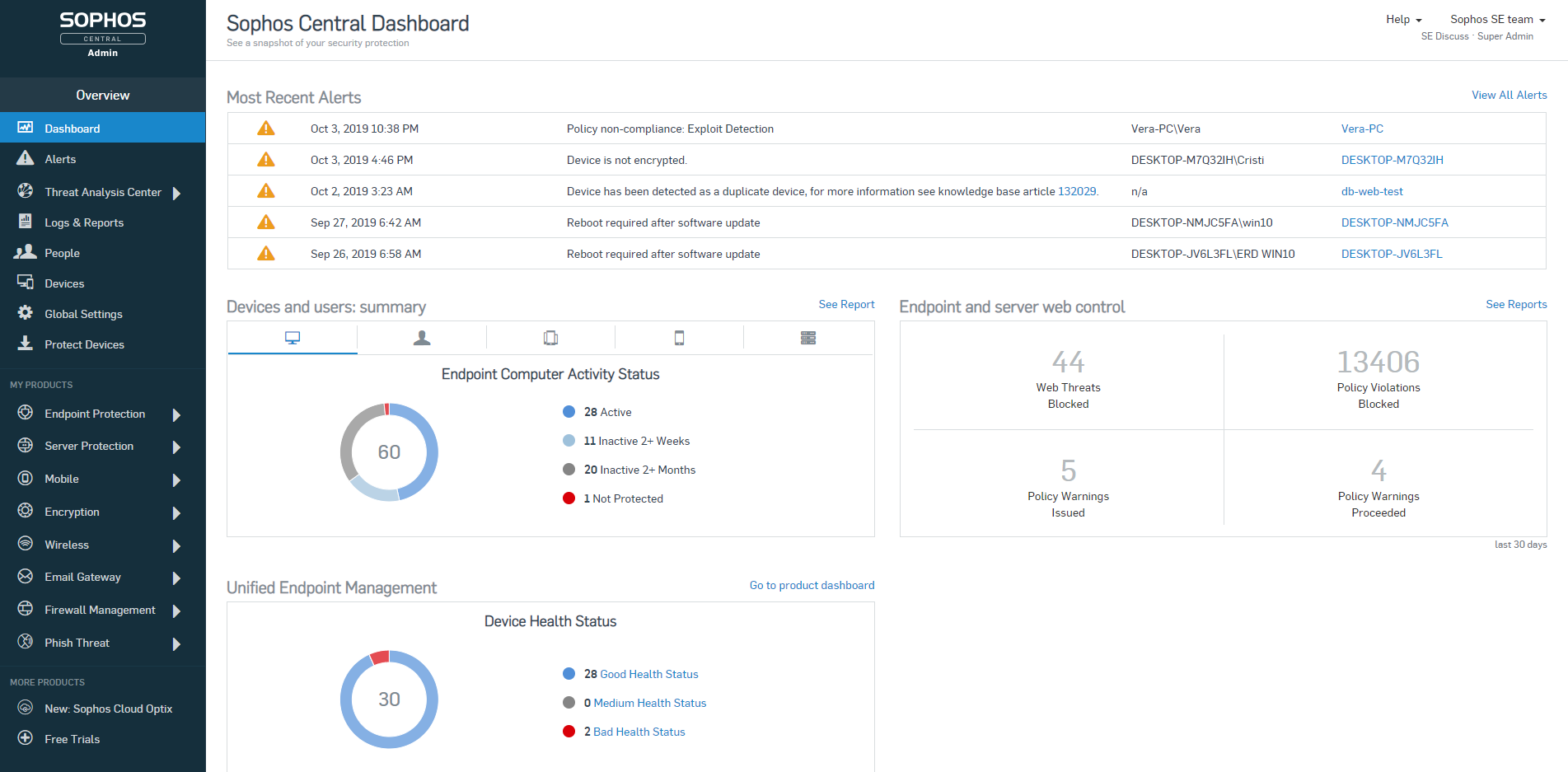
When combined with Sophos Central, you have an easy to use dashboard where you can manage all installations from a single pane of glass.
It's easy to deploy on machines and stays updated.
Good reporting features including alerts sent to the admin if there's ever something wrong with it.
A de minimis incentive was given to thank the reviewer for their time. The incentive was not used to bias or drive a particular response, nor was the incentive contingent on a positive endorsement. More Info
A de minimis incentive was given to thank the reviewer for their time. The incentive was not used to bias or drive a particular response, nor was the incentive contingent on a positive endorsement. More Info
Sophos OOTB policies are very strict and they don't offer anything less strict without you creating new custom policies. I'm sure this is deliberate because the product starts you out in the safest way possible but it means that you will have lots of calls to your tech support desk when you first deploy it unless you do somewhat extensive testing beforehand.
Sophos Intercept X is currently broken (at least the DLP component) by having secure boot turned on in the UEFI/BIOS. If any user wants to be able to write data to a USB drive or floppy from their PC (yes we still have a couple users who need to use floppies) we have to turn off secure boot on their PC, even if the DLP policy for that user/PC combination specifies that the user and PC are allowed to write to USB/floppy. This would be a very serious problem if it weren't for the fact that we have very few users who need to write files to USB. For us it's OK but I bet it would be a deal-breaker for others.
I don't see a whole lot of evidence that Intercept X is any different than any other anti-virus, so maybe their admin alerts just don't clearly identify when they have identified a zero-day threat or maybe we just haven't had any zero-day threats.
A de minimis incentive was given to thank the reviewer for their time. The incentive was not used to bias or drive a particular response, nor was the incentive contingent on a positive endorsement. More Info
The product is stable and accurate in detecting security threats. There are very few or no false positives in detecting security threats or unusual behavior and has very sharp heuristics. The product does the job very well including saving us money in getting 3rd party patch management tools as the business is already using Microsoft System Center Configuration Manager which is Microsoft product specific and the product patches these third party products e.g Adobe Flash Player
A de minimis incentive was given to thank the reviewer for their time. The incentive was not used to bias or drive a particular response, nor was the incentive contingent on a positive endorsement. More Info
A de minimis incentive was given to thank the reviewer for their time. The incentive was not used to bias or drive a particular response, nor was the incentive contingent on a positive endorsement. More Info
I will give Kaspersky a score of 9 out of 10 for scalability, as it allows businesses to easily expand their security infrastructure. This means it won't cost them a lot to add further protection and security. It won't also require them to purchase other hardware and services for their required protection.
The usability has never been a problem. Sophos Intercept X is a program you can install and let protect your company without much intervention. Apart from a few policies, Sophos will keep you protected better than most any product on the market. Sophos Intercept X works quite well when you are looking to "tighten your grip" on user's access to websites, programs, and add-ons.
I've used the on-premise server. I've only experienced one time that we couldn't open the console, and that was a server issue. It seems to be a dependable solution. It's there, and it's stable.
A de minimis incentive was given to thank the reviewer for their time. The incentive was not used to bias or drive a particular response, nor was the incentive contingent on a positive endorsement. More Info
Users don't notice any slowdown with the antivirus running on their systems. There have been issues when the systems have missed a scheduled scan, and it was checked to run at [a] first available time, they will start a full scan at startup. This has caused some lag. Normally there are also some issues with the workstation, but it is something to note.
A de minimis incentive was given to thank the reviewer for their time. The incentive was not used to bias or drive a particular response, nor was the incentive contingent on a positive endorsement. More Info
I give the maximum grade because we have no complaints; we never had any failure, serious error, and serious threat to the company. All of its features work very well. The great advantage of having a product supported by an industry-leading security company is that regularly updated security protocols will protect the system against all emerging threats.
A de minimis incentive was given to thank the reviewer for their time. The incentive was not used to bias or drive a particular response, nor was the incentive contingent on a positive endorsement. More Info
Most of the support reps are fantastic. There have been a few though that have had to be escalated via Account Manager when they haven't followed up but this is a rare instance, and often followed up by the Support Manager for APAC.
A de minimis incentive was given to thank the reviewer for their time. The incentive was not used to bias or drive a particular response, nor was the incentive contingent on a positive endorsement. More Info
Make sure to provide awareness campaigns on changes that will be implemented and WHY the business is doing it and the benefits reaped. Benefits reaped is very important for the justification of why things have to change and emphasizing the importance of security. This will reduce user disgruntlement and total bitterness on use of their workstation or laptop
A de minimis incentive was given to thank the reviewer for their time. The incentive was not used to bias or drive a particular response, nor was the incentive contingent on a positive endorsement. More Info
A de minimis incentive was given to thank the reviewer for their time. The incentive was not used to bias or drive a particular response, nor was the incentive contingent on a positive endorsement. More Info
Kaspersky is a leader in endpoint protection, but its ties to potential adversaries are unsettling. Kaspersky has a great threat research team and quickly identifies malicious software and its signature. Its web-based protection is also top notch. This is a great product but as with everything has its place.
A de minimis incentive was given to thank the reviewer for their time. The incentive was not used to bias or drive a particular response, nor was the incentive contingent on a positive endorsement. More Info
Webroot Endpoint Protection is not even in the same league as Sophos Intercept-X. I have tested and compared both sides by side, run simulations and it's not even close. Plus the Sophos central management is so much better. Easier to view user activities and apply policies and remediate threats. Sophos is the clear winner between these two products.
A de minimis incentive was given to thank the reviewer for their time. The incentive was not used to bias or drive a particular response, nor was the incentive contingent on a positive endorsement. More Info
You can create groups and create different policies for each group. You can customize many parts of the software before it is deployed. You can create different tasks and schedules based on the groups. It is customizable.
A de minimis incentive was given to thank the reviewer for their time. The incentive was not used to bias or drive a particular response, nor was the incentive contingent on a positive endorsement. More Info
A de minimis incentive was given to thank the reviewer for their time. The incentive was not used to bias or drive a particular response, nor was the incentive contingent on a positive endorsement. More Info
Once our technical and commercial areas got certified, the ROI over the time spent, is great. Actual customers, and/or new ones with other tools, feel safe and advised, once they get in touch with us.
When Sophos EndPoint is being compared against Web Management Tools (competitors), we have failed to deliver, nevertheless, there is a version of Sophos Central (Cloud) which achieves this requirement at 100% and more, since is Cloud Based (on AWS).
We are grateful to be on Sophos "Radar" as a Platinum Partner, and "The Americas" valued partner, we have seen our business grow, thanks to this kind of technology, throughout the years.
A de minimis incentive was given to thank the reviewer for their time. The incentive was not used to bias or drive a particular response, nor was the incentive contingent on a positive endorsement. More Info