TrustRadius: an HG Insights company

Solutions2Share External User Manager vs. Syskit Point

Save this comparison

Save this comparison

Add Product

Recommended Comparisons

    Overview
    ProductRatingMost Used ByProduct SummaryStarting Price

    External User Manager

    Score7.7 out of 10
    N/AIT administrators can keep control of external users in Microsoft 365 with External User Manager. External User Manager is used for inviting guests, automated access reviews and lifecycles in Microsoft Teams and Microsoft 365 Groups. Key Features: •External users dashboard and reports •Request & approval workflow for guests •Lifecycles for external guests •Regular automated access…

    $1,500

    per year

    Syskit Point

    Score9 out of 10
    N/ASysKit Point is a Automated Office 365 Governance and Security tool, from SysKit in Zagreb. It is designed to enable users to get a full overview of an Office 365 environment and ownership across Microsoft Teams, SharePoint Online, Office 365 Groups, and OneDrive in a central web interface. With it, the vendor says users can create easy-to-read security reports and proactively manage users and access.

    $1

    per month

    Pricing
    External User ManagerSyskit Point
    Editions & Modules
    XL: more than 4,000 users
    € 1.50
    per year per user
    S: 1-249 users
    € 1500
    per year
    M: 250 - 999 users
    € 3780
    per year
    L: 1,000 - 4,000 users
    € 6050
    per year
    No answers on this topic
    Offerings
    Pricing Offerings
    External User ManagerSyskit Point
    Free Trial
    YesYes
    Free/Freemium Version
    NoNo
    Premium Consulting/Integration Services
    NoNo
    Entry-level Setup Fee$2,100 one-time feeNo setup fee
    Additional DetailsFor information on support packages and self-hosting options, please refer to Solutions2Share's website.—
    More Pricing Information
    Best Alternatives
    External User ManagerSyskit Point
    Small Businesses
    Teams Manager
    Score8 out of 10
    No answers on this topic
    Medium-sized Companies
    Teams Manager
    Score8 out of 10
    ER/Studio Data Architect
    Score9.9 out of 10
    Enterprises
    Teams Manager
    Score8 out of 10
    ER/Studio Data Architect
    Score9.9 out of 10
    All AlternativesView all alternativesView all alternatives
    User Ratings
    External User ManagerSyskit Point
    Likelihood to Recommend
    10.0
    (1 ratings)
    -
    (0 ratings)
    User Testimonials
    External User ManagerSyskit Point
    Likelihood to Recommend
    Solutions2Share
    I can depend on it to work and be there when I need it. It is very intuitive and easy to use and even first time users have little to no issues with it. I can have small or large meetings with it and utilize the functionality i need to depending on the situation
    Incentivized
    Read full review
    Syskit
    No answers on this topic
    Pros
    Solutions2Share
    • Group meetings
    • Audio controls
    • control over external users
    Incentivized
    Read full review
    Syskit
    No answers on this topic
    Cons
    Solutions2Share
    • Not aware of any shortcomings with my use of this tool
    Incentivized
    Read full review
    Syskit
    No answers on this topic
    Return on Investment
    Solutions2Share
    • Saves time!
    • Improves efficiency with getting projects done faster
    • Great for product demos and training
    Incentivized
    Read full review
    Syskit
    No answers on this topic
    ScreenShots

    External User Manager Screenshots

    Screenshot of External User Manager's dashboard and reports display an overview of all external users and guests.Screenshot of Guest users in Microsoft 365 and Microsoft Teams management: request and approval workflow, onboarding & compliance portal, lifecycle for access reviews, and reporting.Screenshot of Users can request access for new guests with an automated request & approval workflow. Team owners or administrators can then approve the requests.Screenshot of Regular automated access reviews and guest lifecycles can be set so that if the guest users do not require further access, they can be removed automatically from the tenant.Screenshot of In the Onboarding & Compliance Portal, the user can ask new guests for additional information as metadata and have them read or even sign non-disclosure agreements, GDPR rules etc.

    Syskit Point Screenshots

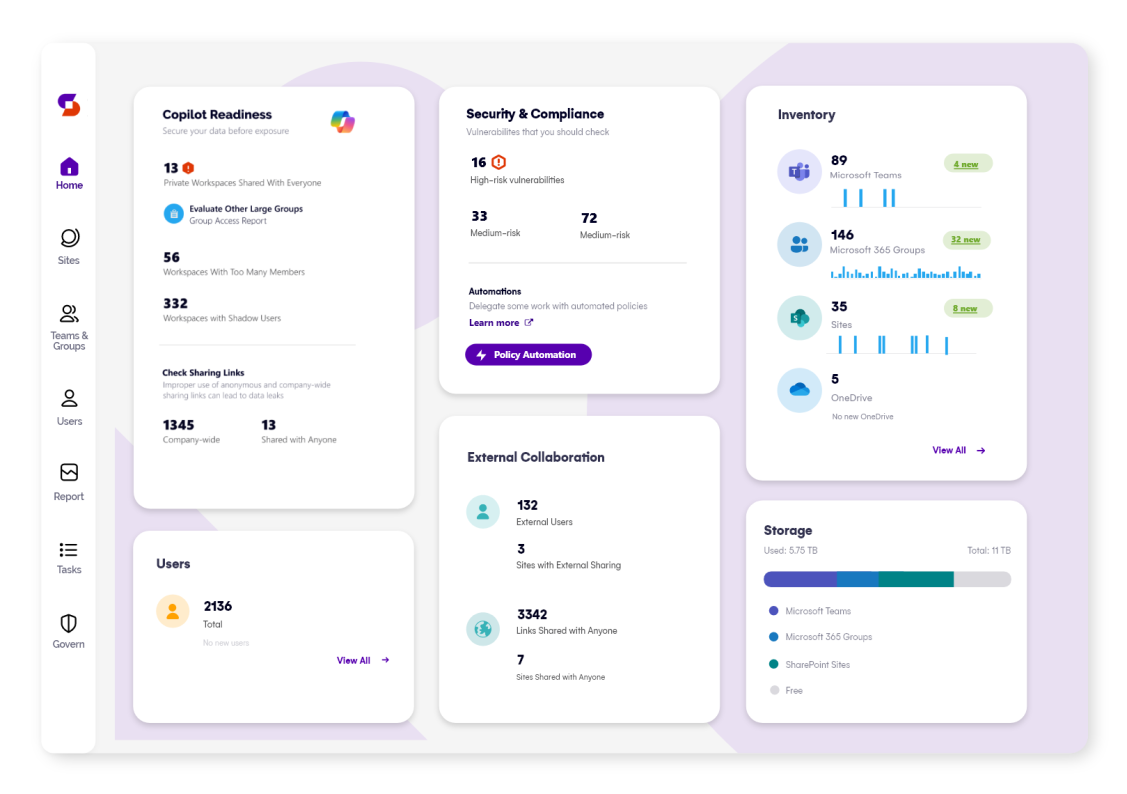
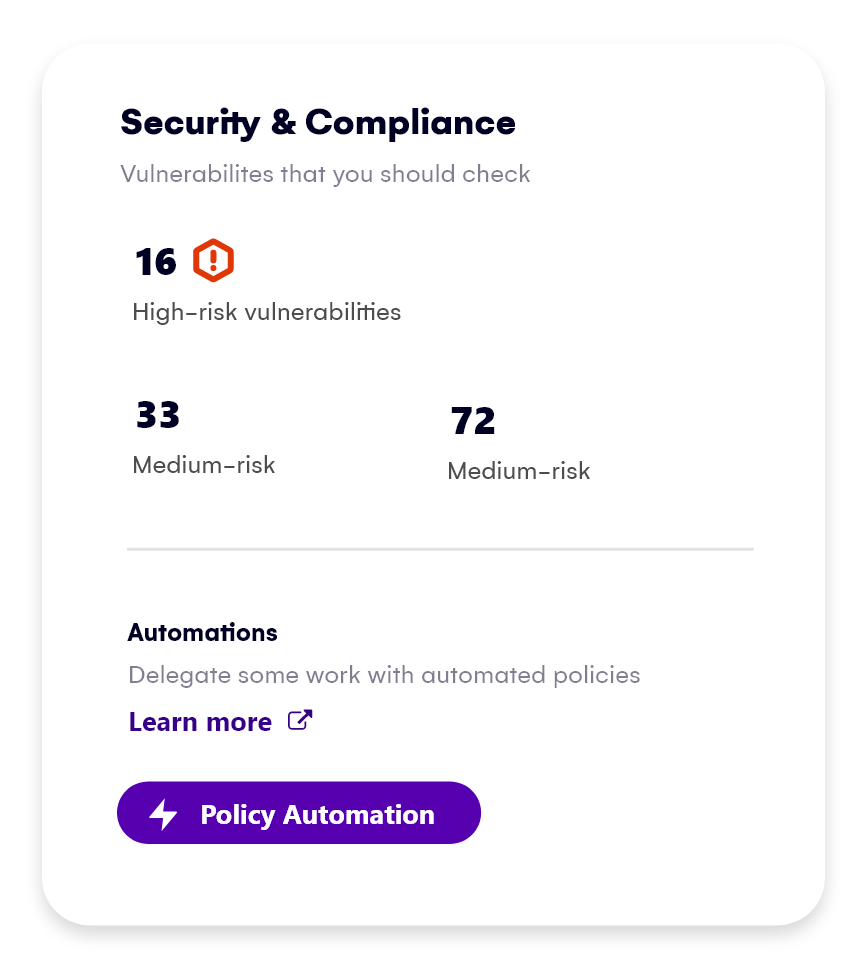
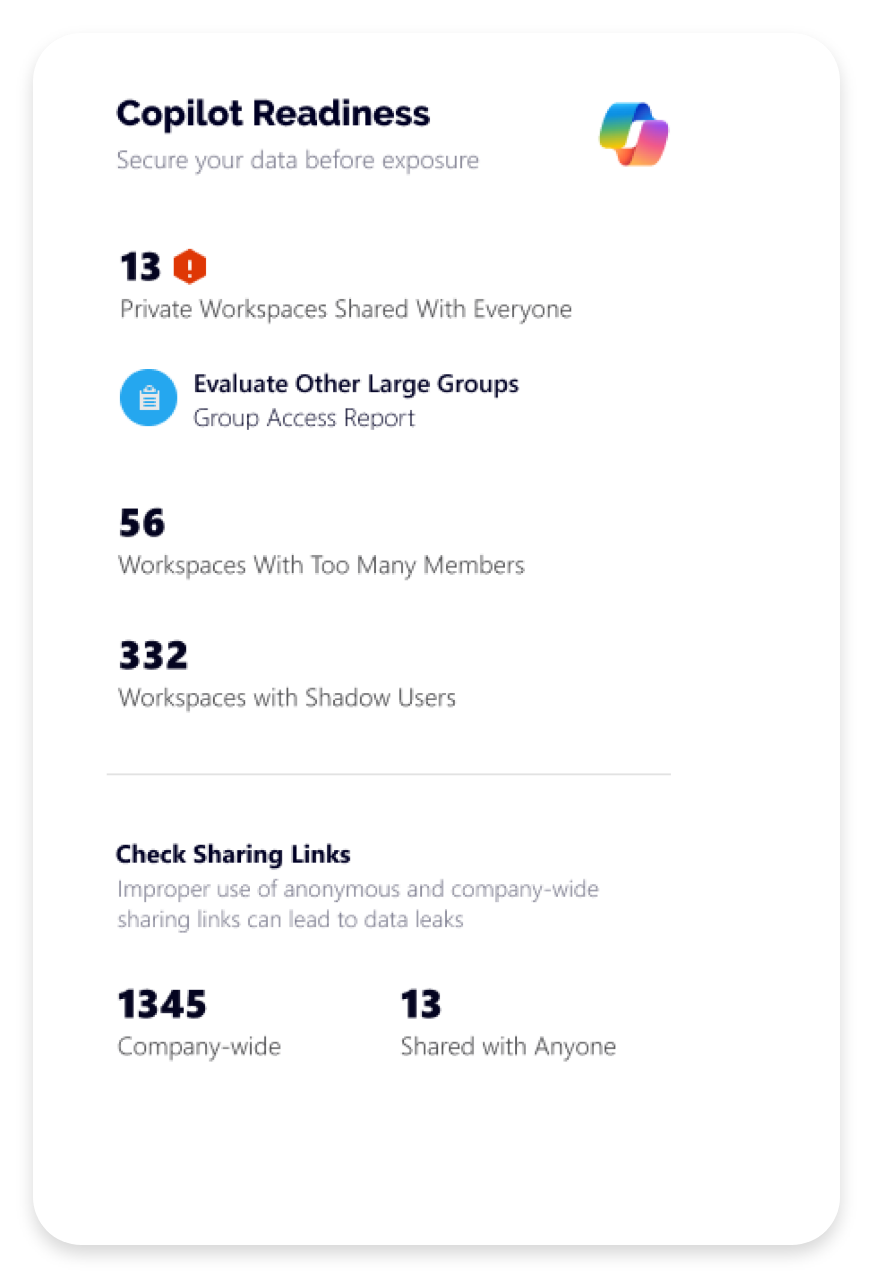
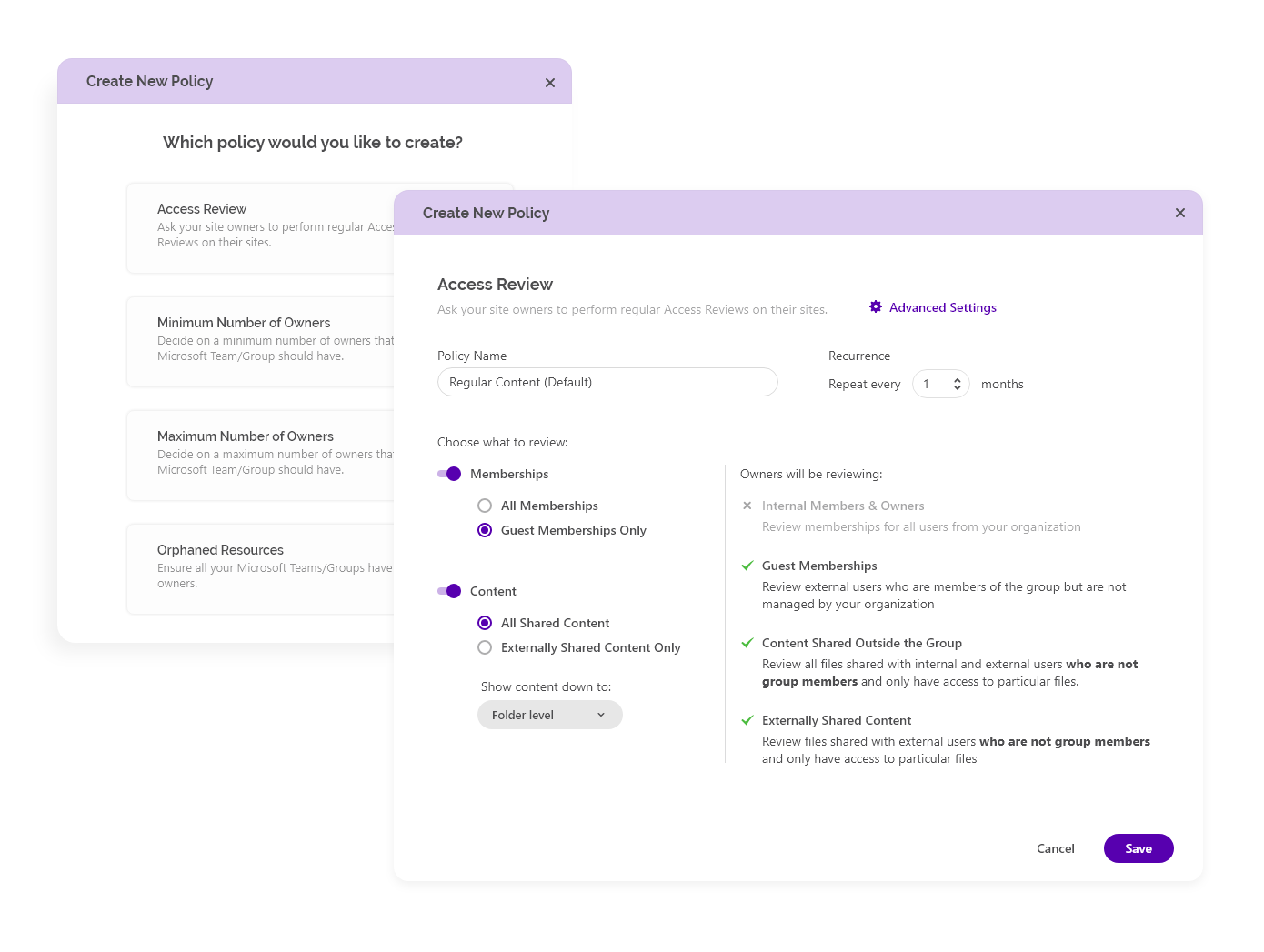
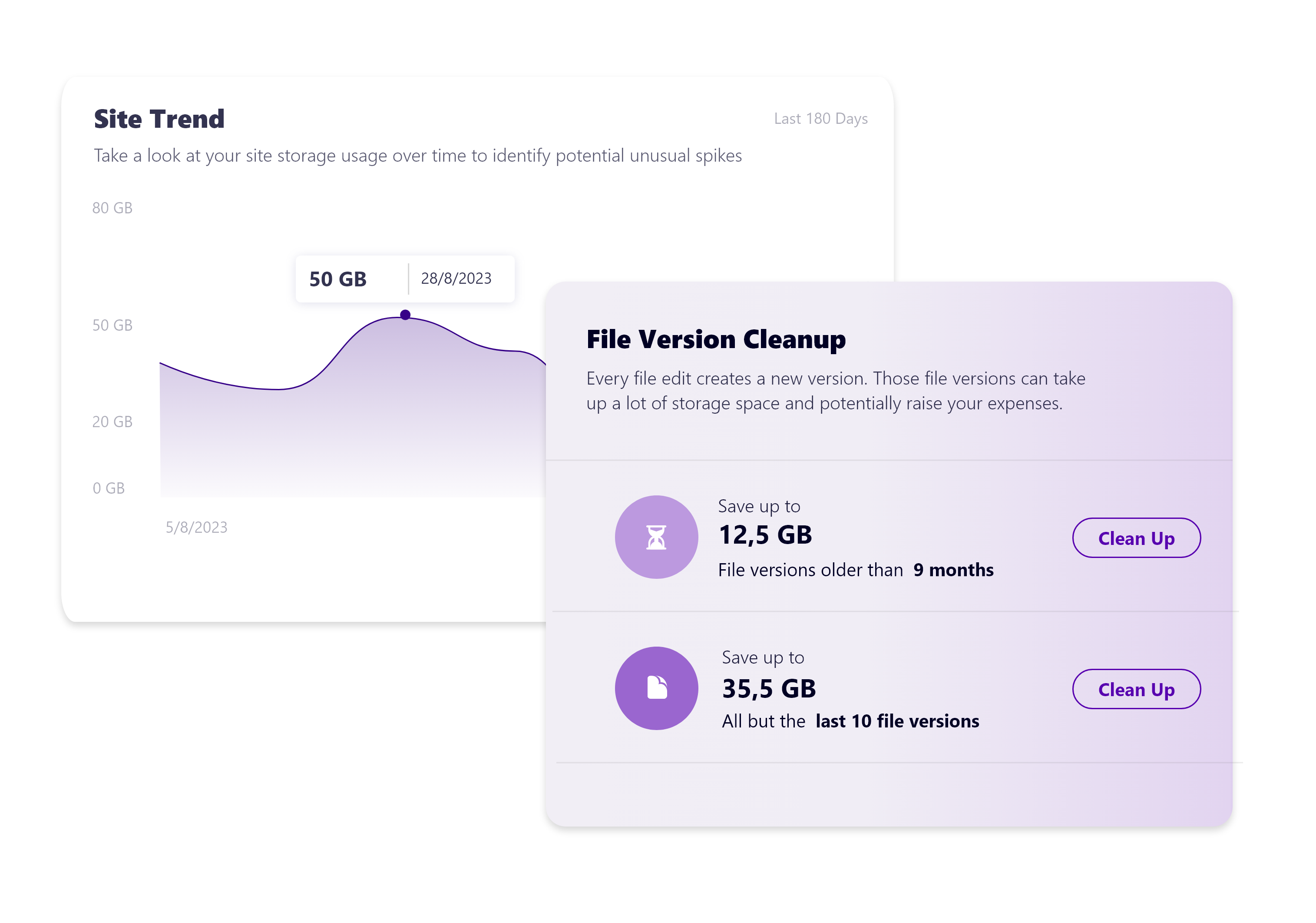
    Screenshot of Syskit Point’s dashboard, which offers a centralized view of yoan ur entire Microsoft 365 environment. This offers visibility across Microsoft Teams, SharePoint, OneDrive, Microsoft 365 Groups, and Power Platform. Viewers can quickly identify who has access to what, monitor external sharing, and spot potential risks before they become issues. With real-time insights, detailed reports, and automated governance workflows, the Syskit Point dashboard helps stay in control, simplify management, and protect sensitive data.Screenshot of Syskit Point’s Security & Compliance Dashboard, which provides a centralized view of permissions, user activity, and external sharing across a Microsoft 365 environment. Users can monitor who has access to sensitive data, enforce policies, and take immediate action to prevent unauthorized access or data leaks. With built-in compliance and security checks, the dashboard helps to ensure regulatory alignment and quickly mitigate potential risks.Screenshot of how Syskit Point helps prepare a Microsoft 365 environment for Copilot by ensuring only secure, relevant data is accessible. It identifies oversharing risks, enforces access controls, and provides visibility into sharing activity, so Copilot delivers accurate, trustworthy outputs without exposing sensitive information. With proactive permission reviews and workspace lifecycle management, Syskit Point ensures data is clean, compliant, and Copilot-ready.Screenshot of how Syskit Point simplifies Microsoft 365 governance with automated access reviews and workspace lifecycle management. It empowers resource owners to regularly review access, manage permissions, and keep workspaces secure and well-organized. With policy-based automation, storage optimization, and clear ownership responsibilities, Syskit Point helps prevent oversharing, reduce unnecessary access, and ease the governance burden on IT teams.Screenshot of how Syskit Point provides clear visibility into SharePoint storage usage, helping resource owners track storage trends, identify oversized workspaces, and spot unnecessary file versions. With built-in cleanup options and customizable policies, owners can remove outdated or redundant data, optimize storage, and prevent capacity issues. This proactive approach supports cost savings, improves workspace organization, and helps maintain a healthy Microsoft 365 environment.