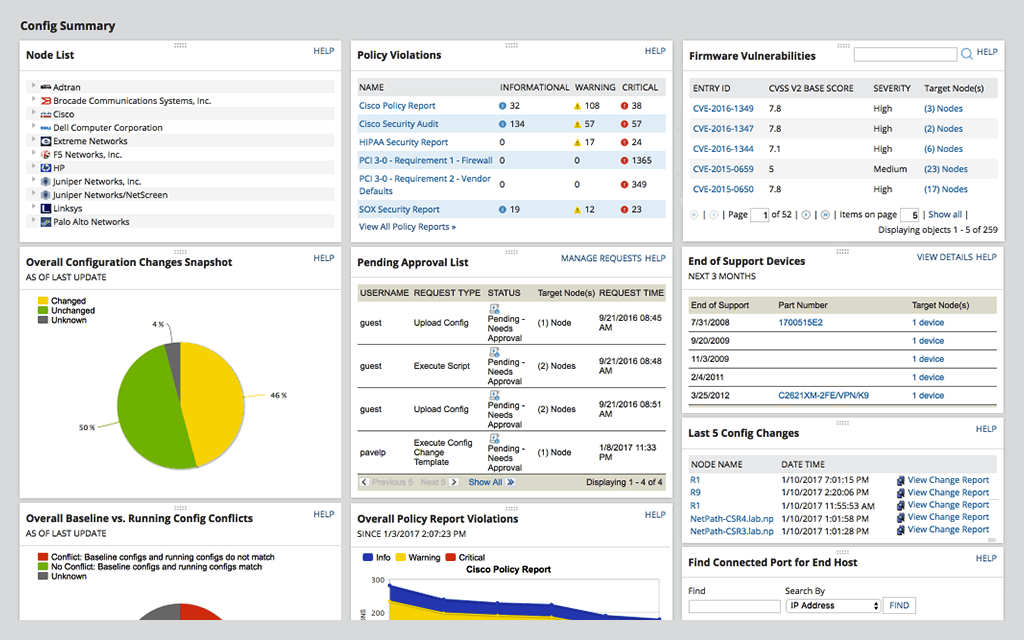
SolarWinds Network Configuration Manager is network diagnostics and troubleshooting technology, from Austin-based SolarWinds.
N/A
VMware Skyline
Score 9.0 out of 10
N/A
VMware Skyline is a suite of products that provide proactive findings and recommendations for vSphere, NSX, vSAN, vRealize Operations and Horizon that aim to provide proactive intelligence that helps users avoid problems before they occur and reduces the time spent on resolving active support requests.
There was a need to find an old configuration of a network switch that was accidentally wiped clean. Fortunately, SolarWinds Network Configuration Manager (NCM) kept and archived a backup copy of the switch device in question! We were easily able to upload the configuration file to the switch and restore the device back on the network in a matter of minutes!
Well suited to analyze DDoS attacks on my application. This helped me to gain visibility into the traffic. Enhanced reactive and proactive support, Privacy and Security, Dashboard view, Inventory, Proactive findings, Skyline log assist, Upgrade recommendations & Operational Summary Report (OSR). Its Holistic view and Integrated reporting also helps a lot.
For our use case, it does everything great and some of the features we underutilize but I would like to be able to set a configuration baseline when initially adding a node instead of after the configuration is pulled but it's not a particularly big deal to let it pull the configuration then set it as the baseline.
Medium complexity to set up in the beginning if using any non-standard devices or configurations, else fairly easy (e.g. Cisco Nexus or IOS-based devices). Reports are fairly straightforward to set up. Updates to the platform are fairly straightforward and don't take a major effort. Easy to add or remove devices.
The user interface is lacking. It is difficult to navigate at times and things can be done multiple ways. Quite often I am confused by how their notification structure works. It is not very intuitive. They do offer a free Academy. They also offer a community of other technical folks. I have enjoyed both.
To be fair, I have not had to involve Support in a number of years, but when I did, I was greeted with enthusiastic engineers who wanted to understand and solve the issue. It was a fairly complex scenario and I have discovered in my most recent implementation that engineering included that option as a standard now.
Solarwinds has actually produced new training since I last used it that is available on their site at any time. Their previous training was more than enough to get us started but now there is significantly more content. Since I'm comfortable with the Orion platform and the products we use I haven't checked the new training out yet but we have new staff go through portions of that training and they always come away with an understanding of the platform and ready to use it
At the time SolarWinds was the biggest player in the space and their whole portfolio was very comprehensive. As time progressed and newer technologies came about (i.e. SDWAN) their products couldn't keep up with the consumer demands and changing market. Security became such a big focus that once Solarwinds got hacked we had to remove all their products from our environment
I've used other products such as VMAN and such yet Skyline is different. This is not aimed at your virtual machine's internal usage but at the VMware / Hypervisor level. This looks and monitors at hardware drivers, VMtools versions, and VM hardware versions. If you have Horizon it will look at versions and current vs minimum driver versions.
Saves 100s of hours a year in man hours over manual configuration.
Saved easily 50k in lost revenue when a switch rebooted with months old unsaved configuration. NCM let us quickly restore a snapshot of the running config from the previous day.
Saves us several man hours per week of config auditing by reducing all changes to a summary email.