Smartsheet vs. WEEEK

Overview
ProductRatingMost Used ByProduct SummaryStarting Price
Smartsheet
Score 8.4 out of 10
N/A
Smartsheet is an online project management and collaboration tool. It includes automated alerts, instantaneous updating and sharing across team members, resource management, nested tasks organized in a hierarchy, a Gantt chart view, exportable and automated reports, and integration with email.
$12
per month per user (up to 10 users)
WEEEK
Score 10.0 out of 10
N/A
WEEEK helps managers set tasks for team members and track their productivity, and helps team members not forget about anything. The service helps users to keep track of tasks from all projects on one screen, and provides information about important events with a notification system, and so on. WEEEK is available FREE for individual usage with limitations on the amount of projects (up to 7 projects). It can also be leveraged for free in a team, with an additional limit on the number of…
$0
per month per user
Pricing
SmartsheetWEEEK
Editions & Modules
Pro
$12
per month per user (up to 10 users)
Business
$24
per month per user (3 user minimum)
Enterprise
Contact Sales
Advanced Work Management
Contact Sales
Free for teams of up to 5 people
$0
per month per user
Lite tariff
$2.90
Pro tariff
$5.99
per month per user
Business tariff
$8.4
per month per user
Offerings
Pricing Offerings
SmartsheetWEEEK
Free Trial
YesYes
Free/Freemium Version
NoYes
Premium Consulting/Integration Services
NoNo
Entry-level Setup FeeNo setup fee$2.90
Additional DetailsA discount is offered for annual billing.WEEEK is totaly free for teams of up to 5 people.
More Pricing Information
Community Pulse
SmartsheetWEEEK
Features
SmartsheetWEEEK
Project Management
Comparison of Project Management features of Product A and Product B
Smartsheet
9.0
Ratings
16% above category average
WEEEK
-
Ratings
Task Management10.00 Ratings00 Ratings
Resource Management9.00 Ratings00 Ratings
Gantt Charts9.00 Ratings00 Ratings
Scheduling10.00 Ratings00 Ratings
Workflow Automation8.10 Ratings00 Ratings
Team Collaboration10.00 Ratings00 Ratings
Support for Agile Methodology7.00 Ratings00 Ratings
Support for Waterfall Methodology8.90 Ratings00 Ratings
Document Management8.90 Ratings00 Ratings
Email integration9.90 Ratings00 Ratings
Mobile Access8.00 Ratings00 Ratings
Timesheet Tracking9.90 Ratings00 Ratings
Change request and Case Management9.00 Ratings00 Ratings
Budget and Expense Management9.00 Ratings00 Ratings
Professional Services Automation
Comparison of Professional Services Automation features of Product A and Product B
Smartsheet
9.1
Ratings
19% above category average
WEEEK
-
Ratings
Quotes/estimates8.80 Ratings00 Ratings
Invoicing9.70 Ratings00 Ratings
Project & financial reporting8.90 Ratings00 Ratings
Integration with accounting software8.90 Ratings00 Ratings
User Ratings
SmartsheetWEEEK
Likelihood to Recommend
10.0
(0 ratings)
-
(0 ratings)
Likelihood to Renew
10.0
(0 ratings)
-
(0 ratings)
Usability
9.0
(0 ratings)
-
(0 ratings)
Performance
10.0
(0 ratings)
-
(0 ratings)
Support Rating
8.1
(0 ratings)
-
(0 ratings)
Online Training
7.0
(0 ratings)
-
(0 ratings)
Implementation Rating
10.0
(0 ratings)
-
(0 ratings)
User Testimonials
SmartsheetWEEEK
Likelihood to Recommend
The Smartsheet platform is extremely similar to Microsoft Excel, so if you are familiar with Excel, you will pick Smartsheet up quickly. Even if you aren't Smartsheet has a relatively simple user interface, meaning just about anyone can learn it. One thing to note is that the interface is that some may consider the interface so simple that they feel the need to look for more robust platforms. If you have a small to medium project that needs to be manages in a central hub, Smartsheet would be a great fit. If you have a very large project, I might consider looking into more advanced platforms.
Read full review
No answers on this topic
Pros
  • The easy to use dashboard has enabled us get comprehensive view of projects across the entire business.
  • It has streamlined internal communication with ease of sharing information across different teams.
  • Smartsheet automates our workflows, enhances collaboration and ensures there are no data silos.
  • I like that it saves time for us and ensures we spend less time switching between apps.
Read full review
No answers on this topic
Cons
  • Smartsheet set up is similar to Excel, yet when you upload an Excel file, things like conditional formatting are lost. Smartsheet has its own conditional formatting, and you have to reinstate the rules. It would be great if those would apply automatically once a file is uploaded
  • Some Smartsheet management and access rules can take some tweaking to work properly. This may be a case of offering more info to admins so they can apply these better and with more efficiency
Read full review
No answers on this topic
Likelihood to Renew
Smartsheet has made my work life easier. Reduced my email significantly. Smartsheet and SaneBox have got me leaving the office with 0... Yes 0 emails in my inbox. My inbox would reach 150-250 email per day. Smartsheet brought that number down significantly and SaneBox took it the rest of the way. Do yourself a favor and check out SaneBox, too.
Read full review
No answers on this topic
Usability
Smartsheet is very easy to learn. However, while I have been able to pick it easily, Microsoft Excel and Project super users that I have trained on Smartsheet get bogged down in the differences and can find it frustrating. Explaining the differences ahead of time and why Smartsheet is being chosen instead of a different software seems to counteract those reactions
Read full review
No answers on this topic
Support Rating
They're a smaller company but they've always given great service when we rarely need to reach out. Pretty good online content but a bigger user base would help to produce more content in a self-sufficient community much as we see with Salesforce. To be fair we haven't needed their direct customer support very often. The sales guys are nice and not too pushy!
Read full review
No answers on this topic
Implementation Rating
Work with the Smartsheet support team to get the best overall. If no one in your organization has used Smartsheet before, the support team will get things started. We had a couple of people who had used this product before and it was a great help in getting our framework together how we wanted to use it.
Read full review
No answers on this topic
Alternatives Considered
Smartsheet is a dedicated project management tool that is built on spread sheet principles. When compared to Microsoft's own offering, Smartsheet came out on top in some areas like dedicated project management features vs having to build custom features to Microsoft 365. However when you compare them on price, Microsoft 365 definitely has more value than Smartsheet.
Read full review
No answers on this topic
Return on Investment
  • Our positive ROI has decreased the overall cost in project management as it reduced the amount of MS project licenses we needed.
  • We have also seen a positive ROI on using the cloud storage and it automatically supports proper version control.
Read full review
No answers on this topic
ScreenShots

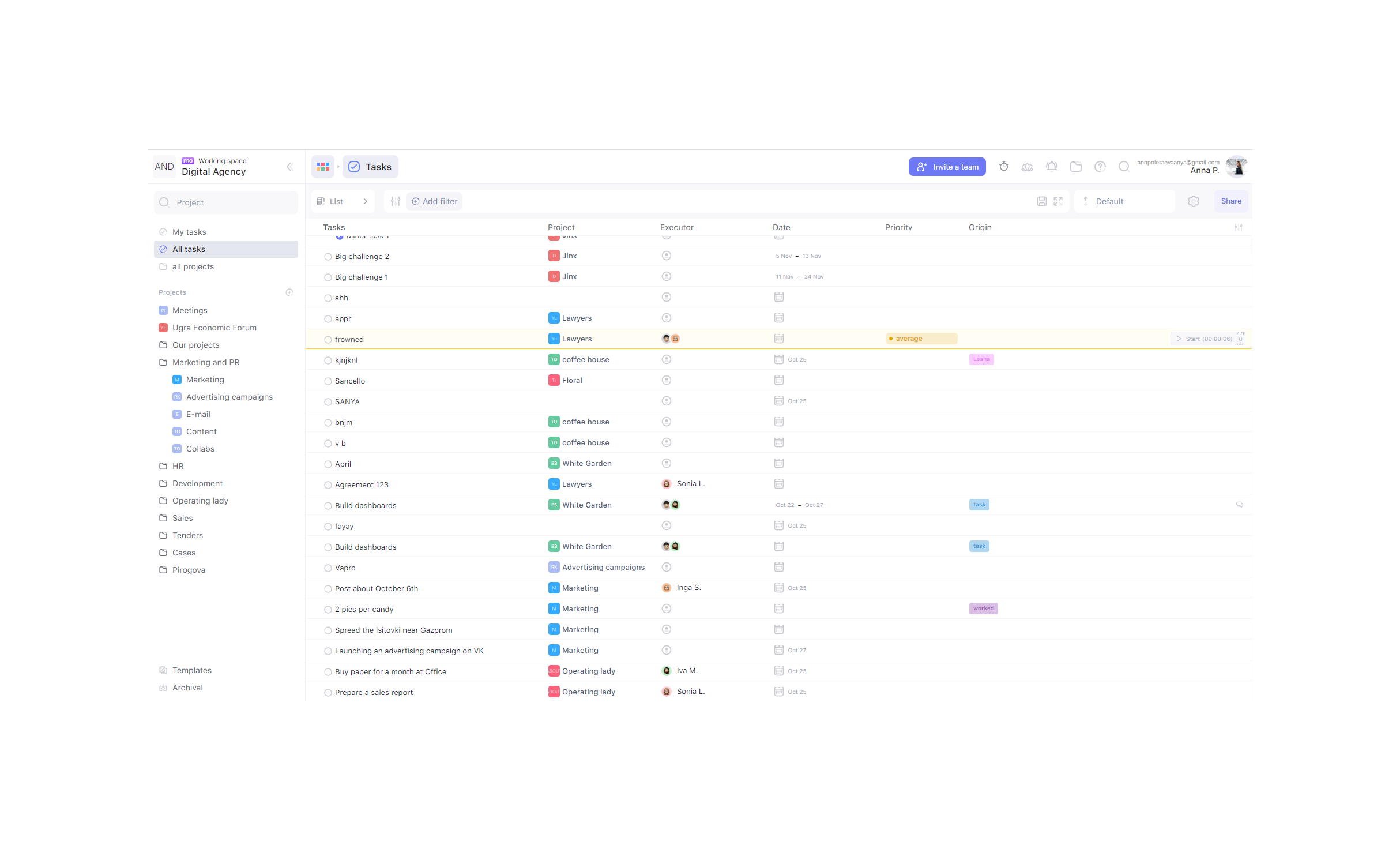
WEEEK Screenshots

Screenshot of TasksScreenshot of Calendar view and notificationsScreenshot of ListScreenshot of BoardsScreenshot of Analytics