SignRequest, now part of Box vs. ziplogix Digital Ink

Overview
ProductRatingMost Used ByProduct SummaryStarting Price
SignRequest, now part of Box
Score 8.0 out of 10
Small Businesses (1-50 employees)
SignRequest was an e-signature platform acquired by Box in 2021. The eSignature tool is the basis for Box Sign, a feature now included in Box's core offering.
$0
per user
ziplogix Digital Ink
Score 7.0 out of 10
N/A
ziplogix Digital Ink is an electronic signature software offering from ziplogix. It includes features such as specific design for the real estate industry and digitally signing documents.N/A
Pricing
SignRequest, now part of Boxziplogix Digital Ink
Editions & Modules
Start
$0.00
per user
Professional
$8.00
per user
SME
minimal $16.00
$4.00 per user
Enterprise
Custom
per user
API
Custom
per installation
No answers on this topic
Offerings
Pricing Offerings
SignRequest, now part of Boxziplogix Digital Ink
Free Trial
YesNo
Free/Freemium Version
YesNo
Premium Consulting/Integration Services
NoNo
Entry-level Setup FeeNo setup feeNo setup fee
Additional DetailsFor text message verification and bank payment verification additional fees apply
More Pricing Information
Community Pulse
SignRequest, now part of Boxziplogix Digital Ink
Best Alternatives
SignRequest, now part of Boxziplogix Digital Ink
Small Businesses
Foxit eSign
Foxit eSign
Score 9.8 out of 10
Foxit eSign
Foxit eSign
Score 9.8 out of 10
Medium-sized Companies
MSB Docs
MSB Docs
Score 9.4 out of 10
MSB Docs
MSB Docs
Score 9.4 out of 10
Enterprises
DocuSign
DocuSign
Score 8.4 out of 10
DocuSign
DocuSign
Score 8.4 out of 10
All AlternativesView all alternativesView all alternatives
User Ratings
SignRequest, now part of Boxziplogix Digital Ink
Likelihood to Recommend
8.0
(0 ratings)
7.0
(0 ratings)
Usability
10.0
(0 ratings)
8.0
(0 ratings)
Support Rating
8.8
(0 ratings)
8.0
(0 ratings)
User Testimonials
SignRequest, now part of Boxziplogix Digital Ink
Likelihood to Recommend
It's great for a law firm--especially ours which is paperless--and for any business that needs reviews and signatures constantly. I have recommended it to courts, my general contractor working on our house, and to other law firms that have a hard time getting us their clients' signatures. I think most businesses would benefit from SignRequest!
Read full review
Because it's built into the ZipForms software it's far easier than having to personally load most signatures if other software is used which isn't integrated automatically.
Read full review
Pros
  • SignRequest is extremely user-friendly and its interface is smooth and straightforward. It takes the guesswork out of sending contracts and agreements online for review and signatures.
  • SignRequest is easy to set up and customize. I truly like how well its setup is structured. I've had zero issues uploading documents and customizing them.
  • SignRequest also allows you to save documents and use over and over. I really liked this feature as we send a lot of a similar contract out to our clients. We are able to change the amount and tweak the client information quickly and streamline the process.
  • SignRequest sends a final signed document after reach party signs it. I like adding this final PDF to our invoices when we send it out so our clients can keep a digital record of our agreements.
Read full review
  • Fairly easy for the end user to click and sign
  • Signature lines, initials, and dates are often automatically populated
  • The software keep an archive of signed documents
Read full review
Cons
  • Clunky UI when filling in documents that require long-form responses. (Doesn't allow for entering of multiple lines at one time; lots of clicks required to complete a document with many fields)
  • In the free version, can only send one document at a time
Read full review
  • Doesn't always have auto-populated initial, signature, and date boxes
  • Sometimes the software is slow or non-responsive
  • Sometimes clients complain about error messages they get or don't seem to figure out they need to click somewhere to "finish signing"
Read full review
Usability
I have found it easy to use and self-explanatory from day one. I love how clear and easy it is to use since I am not techy!
Read full review
it can do pretty much everything I need - just can be slow and cumbersome at times between pages.
Read full review
Support Rating
Easy to understand supporting documents with a great search feature to easily find the information I need for legal purposes, API connections, how to connect Gmail or G Suite, along with the ability to send a message to them. They don't seem to have an online chat feature or a call option, but that's why it's so inexpensive. Since it's already easy to use, it takes less time to find out information.
Read full review
I've only had to reach out to customer service a couple of times for login issues, but they were helpful.
Read full review
Alternatives Considered
When I started this company in 2017, I looked for alternative solutions to getting e-signatures on business documents but never found anything that met our needs well until I encountered SignRequest. At this point we've been using it so long that I honestly can't remember the specific names of other products or vendors.
Read full review
ZipLogix is a bit slower and more cumbersome of an interface than Adobe Sign, but again, automatic integration is key. Annoying that on Adobe Sign when adding a signature field it doesn't automatically add a date signed field, whereas ZipLogix DIgital Ink 1.0 does, but not 2.0
Read full review
Return on Investment
  • We ended up switching vendors after about 3 months due to CRM integration with Salesforce not meeting our needs.
  • The cost was low enough where we did not feel it would be overly expensive with a growing sales team.
  • It allowed us to quickly get set up, and get e-signed contracts out to customers.
Read full review
  • Biggest advantage is the speed of use since already integrated into ZipForms
  • Free as a part of ZipForms
Read full review
ScreenShots

SignRequest, now part of Box Screenshots
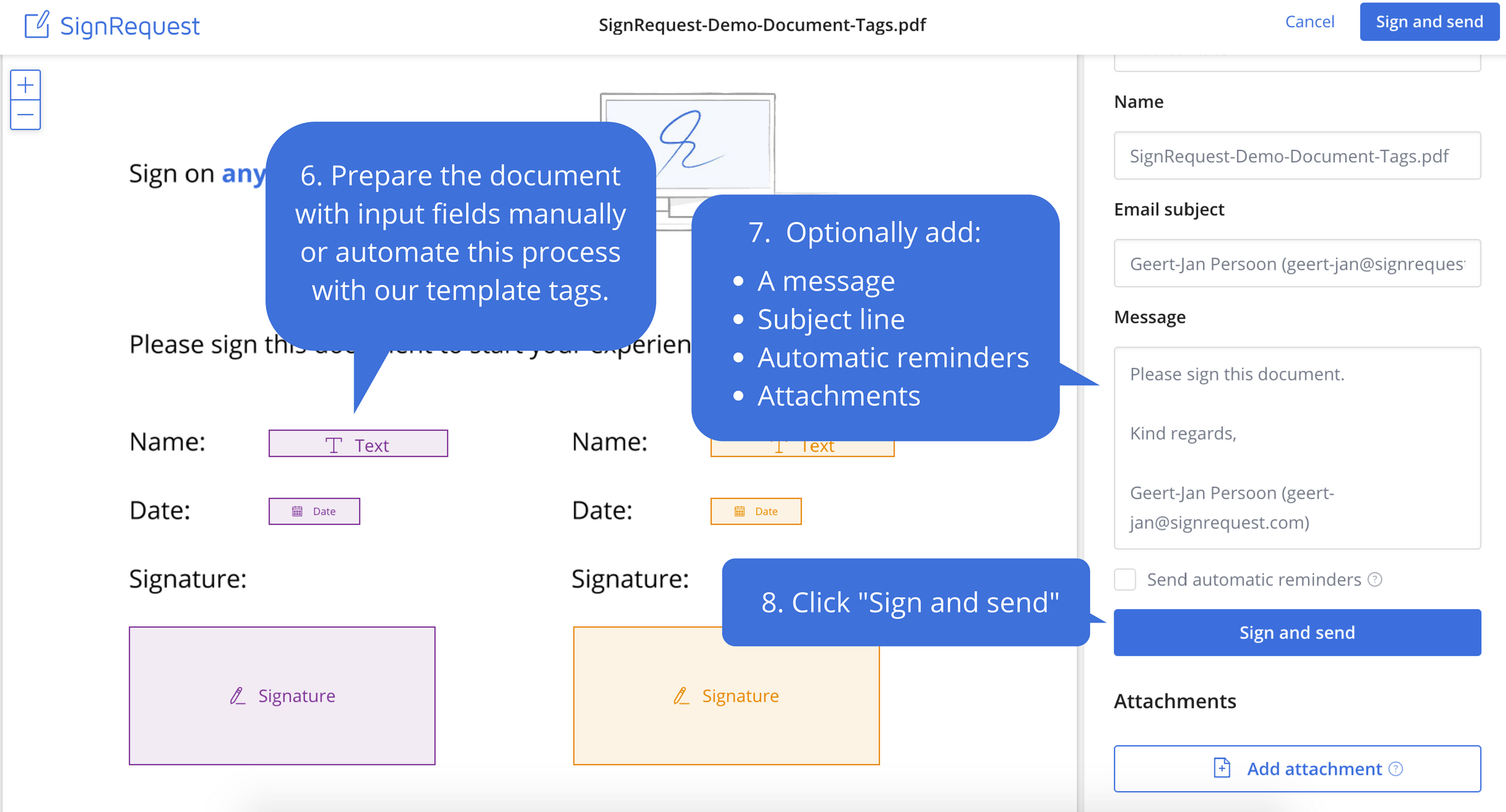
Screenshot of Step 1: Upload the document that needs to be signedScreenshot of Step 2: Prepare document before sendingScreenshot of Step 3: Your customers experience the ease of e-signingScreenshot of Step 4: Signed documents are stored and shared with your customerScreenshot of Step 5: Every alteration to a document is logged for legal purposes
