DocuSign supports transactions with document sharing and electronic signature, as well as automated and guided data collection and entry, record updating across disparate systems and payment collection upon agreement, as well as analytics and reporting.
$15
per month
SignRequest, now part of Box
Score 8.0 out of 10
Small Businesses (1-50 employees)
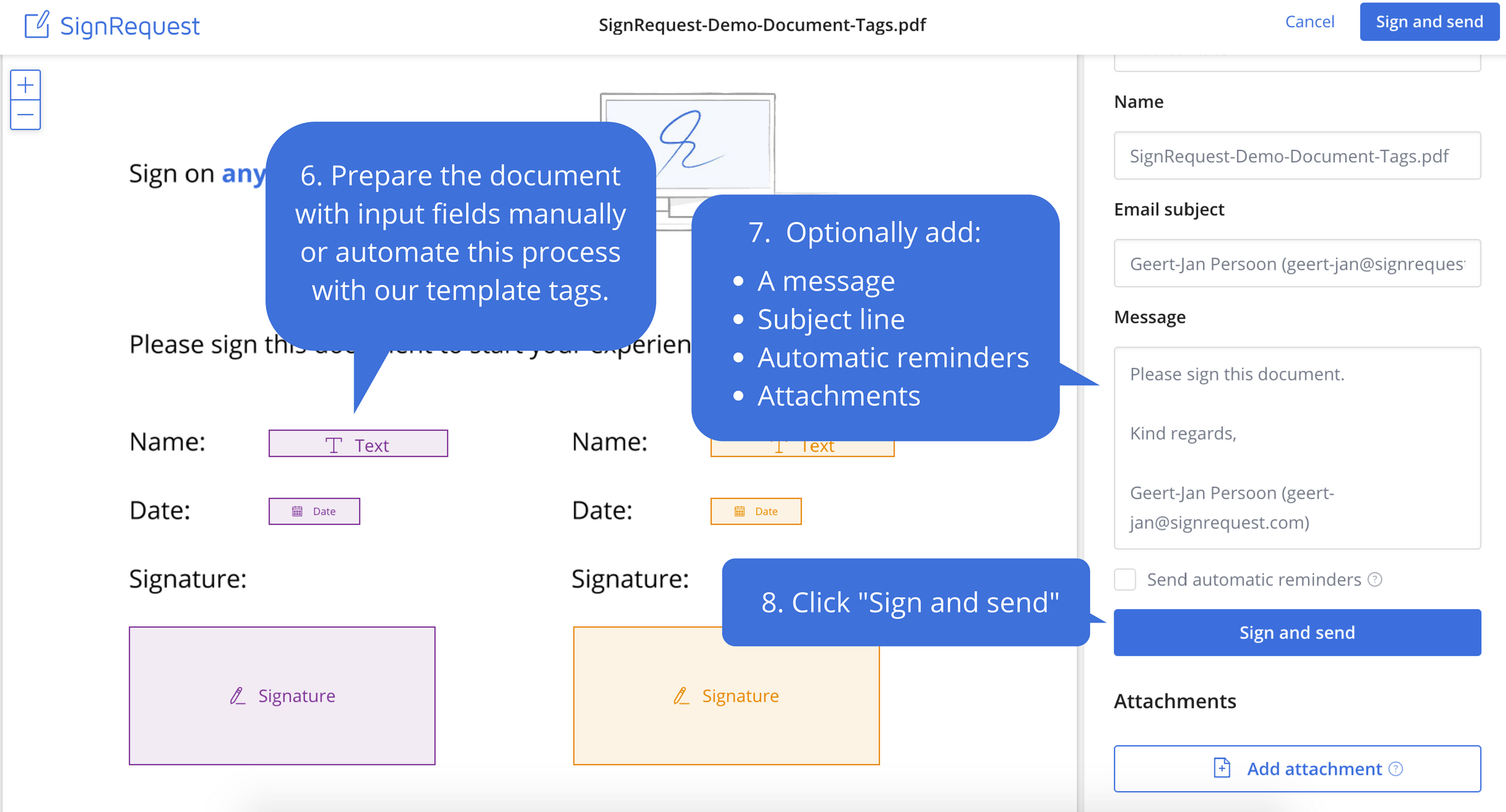
SignRequest was an e-signature platform acquired by Box in 2021. The eSignature tool is the basis for Box Sign, a feature now included in Box's core offering.
$0
per user
Pricing
DocuSign
SignRequest, now part of Box
Editions & Modules
Personal
$15
per month
Real Starter
$15
per month
DocuSign for Realtors
$35
per month
Standard
$40
per month
Business Pro
$60
per month
Advanced Solutions
Custom Pricing
Start
$0.00
per user
Professional
$8.00
per user
SME
minimal $16.00
$4.00 per user
Enterprise
Custom
per user
API
Custom
per installation
Offerings
Pricing Offerings
DocuSign
SignRequest, now part of Box
Free Trial
Yes
Yes
Free/Freemium Version
No
Yes
Premium Consulting/Integration Services
No
Yes
Entry-level Setup Fee
No setup fee
No setup fee
Additional Details
—
For text message verification and bank payment verification additional fees apply
More Pricing Information
Community Pulse
DocuSign
SignRequest, now part of Box
Considered Both Products
DocuSign
No answer on this topic
SignRequest, now part of Box
Verified User
Contributor
Chose SignRequest, now part of Box
DocuSign is used in other areas of our business (client contracts, MSAs, SOWs, etc.) because it integrates with Salesforce and because we are a partner. We don't use DocuSign for HR purposes because DocuSign automatically creates a copy of the document in Salesforce, which …
Unlike Adobe Acrobat DC, SignRequest is actually designed to request signatures and presents itself as such to my clients. DocuSign is not as user-friendly and approachable as SignRequest in my opinion. Even the free version of SignRequest offers more options and functionality …
SignRequest is far and away more afforable than its competitors. Their support is also very responsive and willing to make improvements whereas its competitors seem to be a bit more unapproachable as far as their support goes. I have been able to resolve billing and reporting …
Less money and easier to set up than more well-branded e-signature platforms. Unlimited contracts on paid plans, which is a lot more than any other e-signature software I've used before. And under the free plan, you can get 15 contracts signed with limited features. For smaller …
We actually ended up switching to HelloSign after about three months. The main reason was the depth of the Salesforce integration that we needed to have. SignRequest is a really top-notch product for the market they play in. Small businesses especially will be able to use the …
They have an unlimited free plan. In other words, you can sign as many documents as you want for free each month. The others (last I checked) limited your total number of signed docs on the freemium plan. That's certainly nice. SignRequest's upgrades come from more features …
I think SignRequest offers more and more powerful customization options thank competitors. I wasn't a fan of the user interface and usability when trying to customize documents on competitors' products, but SignRequest was easy. I also like SignRequest's template functionality …
I am going to speak of a personal experience- on multiple occasions: I need my husband to sign documents during the day and I don't need him here- physically. He sometimes works in different parts of the state as well at his own company. There is no problem at all, as long as he has access to his cell phone, email, and cell phone service- he can sign the documents I need him to. It is AMAZING- I can't speak highly enough of Docusign.
It works great for us; we deal with contractors in different parts of the world and it has been perfect for securing e-signatures from them and having a signed contract that both parties have access to. I'm not sure where it would be less appropriate—perhaps when there are significant legal risks or something of that nature, but with the types of transactions we've been dealing with, it's been perfect.
e-Signatures- Businesses are all working online today. Paper contracts are becoming more and more obsolete, so you need a solution that provides online contracts.
Price- SignRequest has one of the more attractive price points for businesses.
Usability- Our team was able to figure out how to use SignRequest without too much hassle, although some competitors have more intuitive products.
Tracking, particularly when collecting signatures through connected applications, such as an ATS, is not always clean or easily traceable.
Formatting documents to handle electronic signature types (signatures, initials, etc.) is not always easy, and highly dependent on the partner's technology.
It is not convenient to have to use DocuSign as a stand alone product if the signatures are required for 3rd party applications. It definitely excels on its own, but the scope of that usage, at least for us, is slim.
I can't imagine doing business without DocuSign now. I would never want to go back to the way we used to do things. The "new way" is "the way" is "the right way." We can honestly be proud of a "one right way" process and not have to suffer through "5 ways for 5 days."
Generally user-friendly once you have command of the basics, but also has a lot of nuances that can make it difficult to train others on. DocuSign University is a helpful tool, but understandably a lot of content to get through to become a well-versed user. A lot of different functionalities but only a few I use on a weekly basis.
I'd give them a 10, but there has been 1 or 2 small cases that seemed to fall to the wayside, but I was able to call them up and get them resolved. We were having a bad implementation night (after midnight) and we needed assistance from Docusign. They were able to get an engineer to help us in the early morning hours
Easy to understand supporting documents with a great search feature to easily find the information I need for legal purposes, API connections, how to connect Gmail or G Suite, along with the ability to send a message to them. They don't seem to have an online chat feature or a call option, but that's why it's so inexpensive. Since it's already easy to use, it takes less time to find out information.
Docusign is super easy to use, and apart from a few administration details, there was really nothing to train on. Post implementation, there were issues with configuration of auto-filled documents with the integrating 3rd party. That training required some time, because the DocuSign expert took the time to walk me through the 3rd party's configuration (how often does that happen?) so I could see how DocuSign should be best used to overcome weaknesses in the 3rd party platform. 10/10 expert care.
Until you get the hang of it, I recommend doing several internal tests before sending a document to a client. As I mentioned earlier, you have to go through a bit of trial and error at first to verify that the workflow works as expected.
I would say that DocuSign's biggest competitor and a most similar product is Adobe Sign. They both offer almost identical features with Adobe offering a slightly better interface. Adobe Sign is also less costly than DocuSign while offering templates that can be useful for various activities. If you are looking for more branding options then Adobe offers a slight advantage but for corporate control, I would say DocuSign offers more security.
Adobe Acrobat left me frustrated and annoyed. I was wasting hours each week trying to upload contracts and agreements and customize them for each client. It never sent right and ended up being more frustrating for us and our clients in the end. So I tested some other tools before coming across SignRequest in a Google search. I started with their free plan which offered so much for a small business owner. As our business grew, we upgraded and haven't looked back. From day one I've never had an issue with this tool and recommend it to anyone looking for an online easy to use software to manage signing documents and contracts