SignEasy vs. Zoho Sign

Overview
ProductRatingMost Used ByProduct SummaryStarting Price
SignEasy
Score 10.0 out of 10
N/A
SignEasy is a simple and fast way to sign or get documents signed from a phone, tablet or computer. SignEasy is used by businesses and individuals across industries such as real estate, legal, accounting, banking, HR, sales, and logistics from over 150 countries. The vendor says the benefits of using SignEasy include being able to close deals faster, cut costs and delight customers by eliminating the need to print, scan or fax documents. Notable clients include…
$20
per month/for 1 user
Zoho Sign
Score 9.2 out of 10
Small Businesses (1-50 employees)
Zoho Sign is a digital signing service that lets you execute contracts quickly without the hassles of transporting paper documents while ensuring security and legality. It works completely on cloud and integrates readily with your everyday apps. According to the vendor, Zoho Sign is perfect for anyone who needs to sign business documents but widely used for HR, legal, finance, HR, and sales functions. Documents that can be signed include:…
$0
per user
Pricing
SignEasyZoho Sign
Editions & Modules
Plus
$20
per month/for 1 user
Professional
$25
per month/for 1 user
Premium
$25
per user/per month
Free
$0.00
per user
Standard
$10.00
per user/ month
Professional
$15.00
per user/ month
Offerings
Pricing Offerings
SignEasyZoho Sign
Free Trial
YesNo
Free/Freemium Version
NoYes
Premium Consulting/Integration Services
NoNo
Entry-level Setup FeeRequired$10 per user
Additional Details
More Pricing Information
Community Pulse
SignEasyZoho Sign
Best Alternatives
SignEasyZoho Sign
Small Businesses
Foxit eSign
Foxit eSign
Score 9.7 out of 10
Foxit eSign
Foxit eSign
Score 9.7 out of 10
Medium-sized Companies
MSB Docs
MSB Docs
Score 9.4 out of 10
MSB Docs
MSB Docs
Score 9.4 out of 10
Enterprises
DocuSign
DocuSign
Score 8.4 out of 10
DocuSign
DocuSign
Score 8.4 out of 10
All AlternativesView all alternativesView all alternatives
User Ratings
SignEasyZoho Sign
Likelihood to Recommend
9.0
(8 ratings)
9.0
(5 ratings)
Support Rating
10.0
(1 ratings)
-
(0 ratings)
User Testimonials
SignEasyZoho Sign
Likelihood to Recommend
Glykka LLC
If you have an operation like us in which you cannot start operations with your client until you have all the documentation signed, this is the right option, since in urgent matters with proper coordination you can have all the legal paperwork signed in just a few minutes.

Sometimes the electronic signature of certain documents is not yet clear under the Mexican law to be accepted with the same validity as a handwritten signature. So we still get the paper copies.
Read full review
Zoho
If your business needs an electronic signing software, then I recommend Zoho Sign because it has all the great features. It ensures fast and secure document signing and, most importantly, it is legally binding.
Read full review
Pros
Glykka LLC
  • Enables sign off of digitally signed and locked documents
  • Insert data into fields like name, address etc. quickly with single click.
  • Insert freeform text
  • multi location access.
  • multi platform access like phone, ipad, PC
Read full review
Zoho
  • Shared organizational templates encourage corporate uniformity and standards.
  • Centralized retention of the executed agreements.
  • Orchestrated signing workflow with internal and external users.
Read full review
Cons
Glykka LLC
  • Would always appreciate a lower price point...
  • Wish there were email templates that go along with the documents so we didn't have to write a new one each time.
Read full review
Zoho
  • Better ways to edit templates
  • add a credit card form input
  • create documents that then can be changes instead of uploading a document from word or pdf
Read full review
Usability
Glykka LLC
No answers on this topic
Zoho
The UI is easy and using Zoho Sign is easy too.
Read full review
Support Rating
Glykka LLC
The email me several times a year to check in and see that we are doing well or if we have any questions. They have also flown to us from their HQ to Dallas, TX to come tour our facility and see how we use their product first hand.
Read full review
Zoho
No answers on this topic
Alternatives Considered
Glykka LLC
Adobe does not allow you to save signatures, easily enter dates, and its form structure is clunky to work with. SignEasy is more user-friendly.
Read full review
Zoho
Before using Zoho Sign, we simply send out PDFs and had our partners and clients sign them and send them back. Obviously, Zoho Sign stacks pretty high against that because of how professional it is, how much simpler it is for us to use, and how much time it saves us
Read full review
Return on Investment
Glykka LLC
  • It is total. The decrease in the cost of obtaining the client in the final item of the process is almost total. With just one month of what was previously spent on parcels we can cover a year of the service of this platform.
  • We save a lot of paper in the process.
  • We have a complete traceability of the information and we reduce the loss of important documents.
Read full review
Zoho
  • Zoho Sign was far more affordable for the simple uses we need. It simplified our processes at a very affordable price.
Read full review
ScreenShots

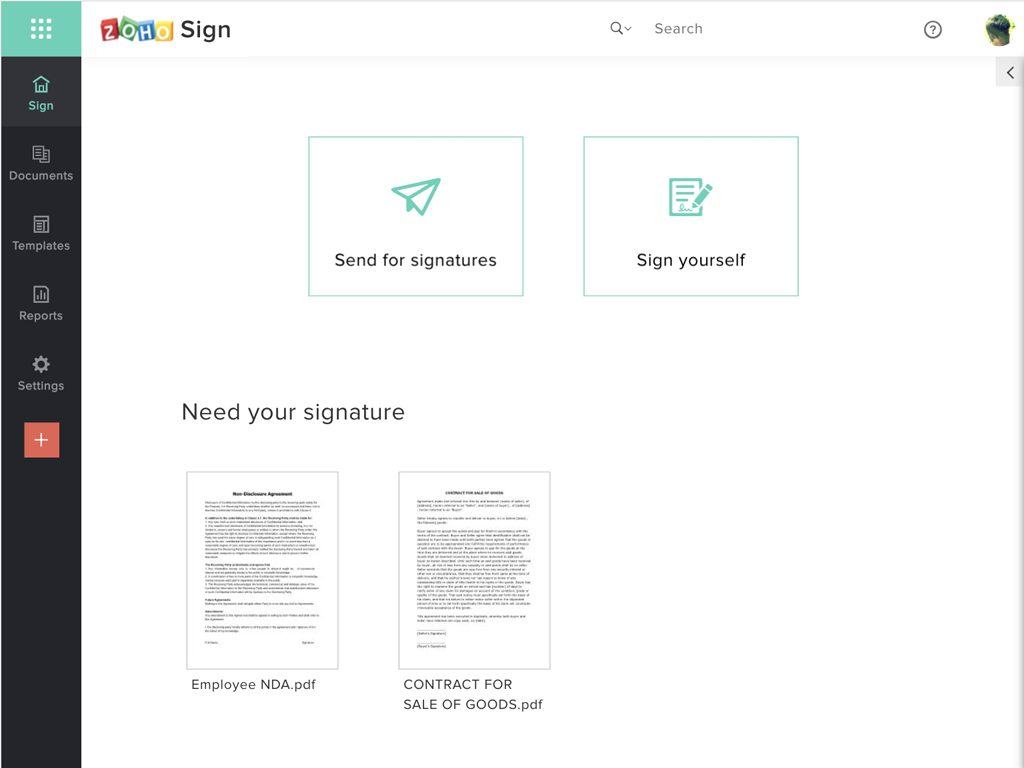
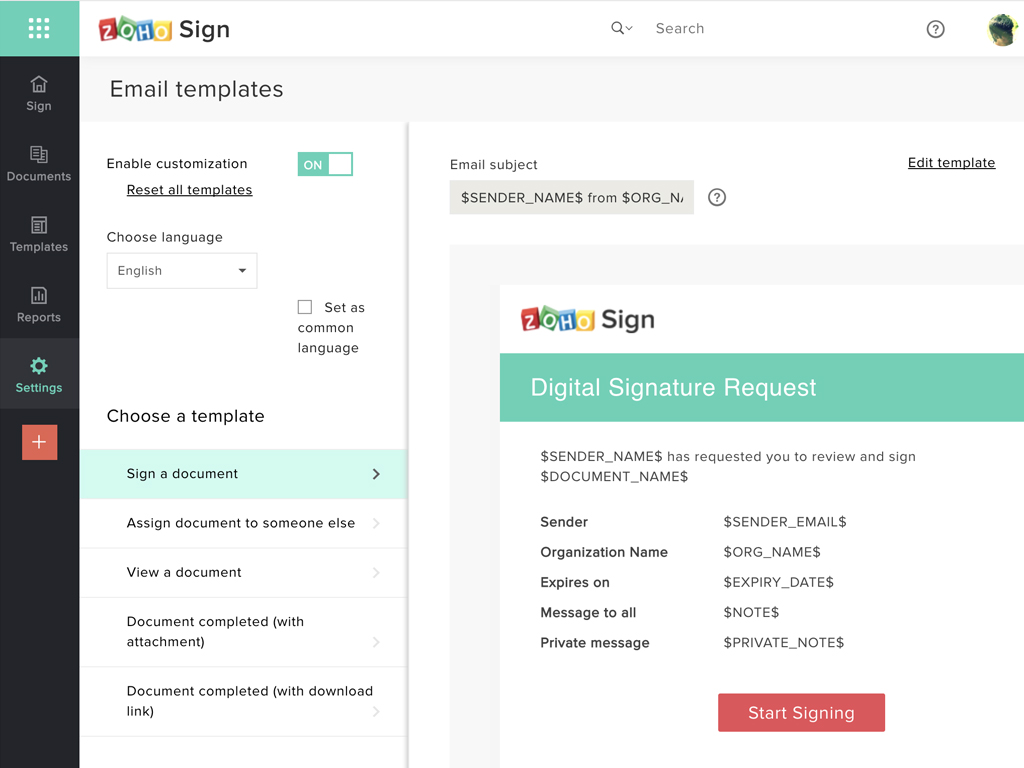
Zoho Sign Screenshots

Screenshot of Zoho Sign DashboardScreenshot of Sending documents for signatures using templatesScreenshot of All document sent using Zoho SignScreenshot of Rebranding email templates sent from Zoho Sign