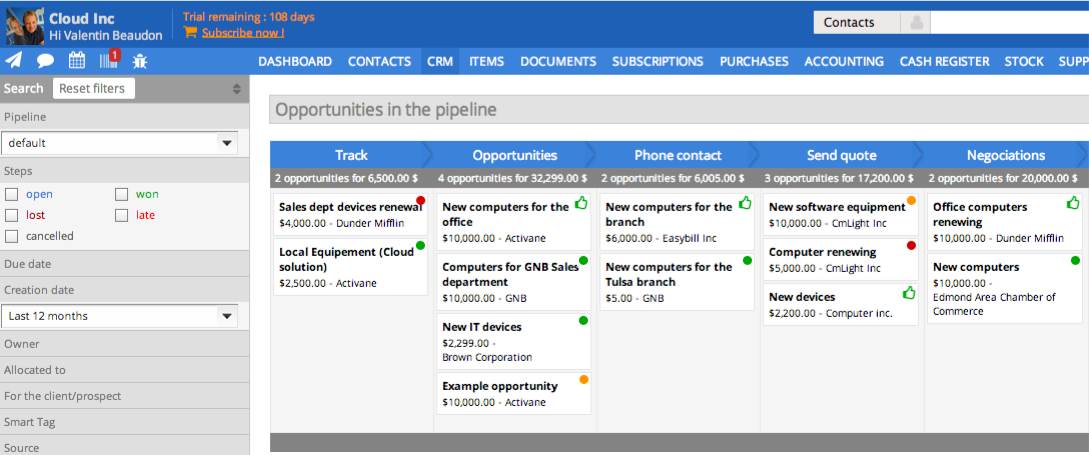
Pipedrive is a fantastic tool to help monitor and track lead generation and referral sources. It helps maintain accountability with the sales team and helps ensure that we are doing appropriate marketing to maintain a steady influx of cases. The weekly and quarterly sales reports that it can generate are incredibly helpful and insightful. They help inform us of what we need to focus on each quarter/year.
A de minimis incentive was given to thank the reviewer for their time. The incentive was not used to bias or drive a particular response, nor was the incentive contingent on a positive endorsement. More Info
We like sellsy. Its not perfect and as other users have pointed out, there is and always will be, room for improvement.
If you require deep integration with Google apps and Microsoft Office 365, then Sellsy may not be for you. Sellsy just about manages to work with google in so far that it can sync contacts, calendar, sales docs and incoming email with google. There is currently no way to make sent email appear in the sent items section of sellsy unless you compose the email within the sellsy app. The O365 integration is not nearly as powerful as sellsy does not sync sellsy contacts or calendar with microsoft (in its current form).
I believe that one of the primary functions of any business management app should be the capability to centrally manage all of a company's business clients, contacts etc. and sync this data to all employee accounts with the 2 biggest players for business email (Microsoft and Google) as a minimum. This data should never be an island stored only on 1 application. The Discovery that sellsy does not currently sync contacts and calendars with O365 was a disappointment. If Sellsy started supporting exchange sync for Microsoft Office 365 we would immediately dump google and switch over. In fact Sellsy is the only reason we continue to use Gapps as we need our contacts and calendars synced to our mobile devices.
We have built up a list of small little things that do not work as expected since we started using sellsy and continually pass them on to the development team. Many are small trivial things from an engineering perspective but are still annoying nonetheless, especially to users who wish to get the job done. Employees are easily frustrated if they have to fight with software to do certain tasks. Annoyances in the user experience (no matter how small) can lead to lost productivity which in turn costs money in the business world. However based on our experience with Sellsy support we believe that they do listen carefully to their customers concerns and are on the path to deliver a quality experience to their customers through the process of frequent updates to the software. You can easily establish how good a SAAS provider is by measuring their ability to fix problems soon after they are initially reported.
In simple terms Sellsy is an incredibly feature rich application and is way ahead of the competition. It represents good value for money and is backed up by free support.
Great visual visibility of the funnel plus easy to drag the deals across the stages
The email integration that collects all relevant communication (also through the possibility of adding a deal-specific Pipedrive address on BCC)
The integration with Pandadoc, which we use a lot, so that Pipedrive keeps a really handy overview of the documents we have sent out / which have been signed
Showing the customers name on the pipeline page. Right now I can only get it to show the brand name twice. I wish it would replace the second brand name with the main point of contact.
Better reporting tools. Their reporting tools are not easy to pick up. I've spent time trying to figure it out and it isn't something I can pick up on quickly.
Better training options. I wish I had a personal trainer to walk me through the best way to use Pipedrive so I can get the most out of it.
A de minimis incentive was given to thank the reviewer for their time. The incentive was not used to bias or drive a particular response, nor was the incentive contingent on a positive endorsement. More Info
Training. The only real issue I have with Sellsy is that its got so many features its hard to understand them all. I looked for training videos and they are all in French. Thats a big problem for a guy who grew up in NJ.
I would embed training videos directly into the software. This way as you add services, you get a full tutorial immediately.
A de minimis incentive was given to thank the reviewer for their time. The incentive was not used to bias or drive a particular response, nor was the incentive contingent on a positive endorsement. More Info
Sellsy ticks the most boxes for us. While it could still do a lot of things better there is no other single app that offers the same spectrum of features at a comparable price for SMEs.
Pipedrive is easy to use and has a clean interface so we can follow up accurately. Its custom features help manage leads and evaluate team performance. It saves time and improves efficiency. Pipedrive is stable and supports integrations and automation.
A de minimis incentive was given to thank the reviewer for their time. The incentive was not used to bias or drive a particular response, nor was the incentive contingent on a positive endorsement. More Info
Between quick video tutorials and having very quick feedback from their support teams, it is one of the main reasons I would recommend Pipedrive. It is critical, especially when setting up the platform to meet your companies needs, that a solid support team like Pipedrive has is there to make the transition easier.
A de minimis incentive was given to thank the reviewer for their time. The incentive was not used to bias or drive a particular response, nor was the incentive contingent on a positive endorsement. More Info
Based on our experience. We have submitted a large amount of tickets and they have proven the Sellsy development team have the ability to respond fast and implement changes reasonably quickly. (Updated July 2015) It took sellsy a number of weeks to solve an issue with the billable hours section of their application. This delayed us from being able to invoice our client for completed works. Lots of small things like email tracking timestamps have never been fixed even though we highlighted this issue months ago. Though small it is growing more and more frustrating to be reminded every time we try to see what time a client read or opened an email from us.
If you are importing data from a CSV, Sellsy recommends you use OpenOffice. OpenOffice is an absolute disaster on Windows 8 and crashes every few mins. While no fault of Sellsy they should not recommend software which makes an already challenging task even more difficult. A small gripe in hindsight but during the process was deeply frustrating. For any users looking to format your CSV Google, try importing CSV data into Excel and your life will be much more easy.
I much prefer the interface of Pipedive when compared to Zoho. Much more user friendly and the team is always readily available when we need them. Pipedrive allowed for many custom integrations to be added, as Zoho was a tad more complicated to manipulate. We would not go back to Zoho in any case.
A de minimis incentive was given to thank the reviewer for their time. The incentive was not used to bias or drive a particular response, nor was the incentive contingent on a positive endorsement. More Info
The license model once you understand it is very flexible allowing you to select from the modules within sellsy. This gives small companies control of the cost facilitating them with the option to only pay for the features they use.
Great on setup which made our work easier and less technically equipped people can manage a lot of things(compared to SalesForce where you need to hire a developer to set it up)
We were able to integrate our calling system easily and get things going on the lead calling aspect.
Great multipipeline option where we were able to manage both organisations under one roof.
A de minimis incentive was given to thank the reviewer for their time. The incentive was not used to bias or drive a particular response, nor was the incentive contingent on a positive endorsement. More Info