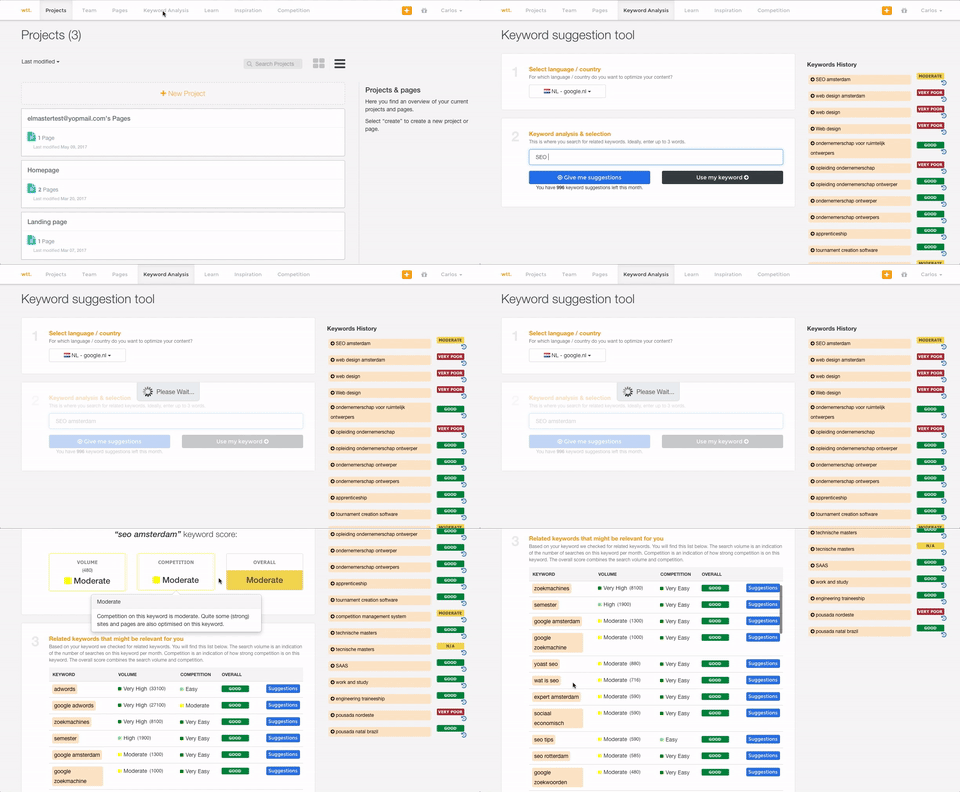
Textmetrics (formerly Webtexttool) aims to help content creators create rank-boosting web content. The tools key differentiator is big data Textmetrics creates predictive data, by analyzing the data of users (anonymously). 20.000+ user generated texts are analyzed and compared to real-world outcomes. The best performing outcomes are used to better its real-time optimization tips. Value prop: More website…
Screaming Frog SEO Spider is well suited to auditing brand new websites, when you need a quick, holistic view of the websites technical issues. Its great for providing a top line view of a websites architecture, perhaps for a new business approach where you need to assess the scale of work to maintain a website. Its also a useful tool in situations where you might need to see whether a large scale change in the website has taken place, you can see word counts, pages and their https response codes. Screaming Frog may be less useful if you need an idea of the customer experience on a website, it doesn't really provide information that helps assess how fast a website loads, what issues might come up when trying to convert or faults with the payment process. Screaming Frog is largely a technical SEO focused tool, it also can't assess the quality of a websites, layout or the quality of the content used on the website. As mentioned, its niche, but very useful within that niche.
I honestly can't think of a scenario where WebTextTool (TextMetrics) would not be valuable for anyone writing content intended for publishing either online or in print media. If the intent is for print media, then even if you completely ignore the SEO section of the analysis, all of the other analysis tools intended for content are incredibly insightful and helpful. These days, even print media almost always ends up online in some form or another on the publisher's website or in a digital format of the publication. So the SEO tools can still give a little boost in reworking or rewording some parts to make sure they will be effective not only in print but online as well.
A de minimis incentive was given to thank the reviewer for their time. The incentive was not used to bias or drive a particular response, nor was the incentive contingent on a positive endorsement. More Info
A de minimis incentive was given to thank the reviewer for their time. The incentive was not used to bias or drive a particular response, nor was the incentive contingent on a positive endorsement. More Info
A de minimis incentive was given to thank the reviewer for their time. The incentive was not used to bias or drive a particular response, nor was the incentive contingent on a positive endorsement. More Info
Requires Java. This isn't a huge deal as many computers already have it installed, but it's yet another 3rd party component.
The free version has a crawl limit of 500 pages per site. This is fine for smaller sites, but if you're running a big e-commerce site then you'll need to pay for Pro version.
The user interface isn't very pretty. This is an analytics tool so it doesn't really have to be, but it might be helpful for improving the overall user experience.
A de minimis incentive was given to thank the reviewer for their time. The incentive was not used to bias or drive a particular response, nor was the incentive contingent on a positive endorsement. More Info
WebTextTool (TextMetrics) assumes that each uploaded or typed in the article is intended for online publishing, mostly in a blog type environment. While this is a perfectly understandable assumption in this day and age, it shouldn't be so difficult to ask the question of whether the content is intended for online or print media.
The "Credibility" section tends to be a little too harsh for my taste. Depending on the style of writing and the type of content, "too many adjectives" is too subjective a metric to apply to all writing ( still, I do get why they try to do it).
This is a little nitpicky, but I'd prefer to see how many projects and credits I have left to use on the dashboard page as opposed to having to click over to my account. A dashboard should show everything that a user needs to see in one shot.
A de minimis incentive was given to thank the reviewer for their time. The incentive was not used to bias or drive a particular response, nor was the incentive contingent on a positive endorsement. More Info
The tool has become integrated into our teams daily workings and I have yet to find a tool other than scremaing frog to replicate all of our use cases for it. It's a great tool and we're sticking with it
A de minimis incentive was given to thank the reviewer for their time. The incentive was not used to bias or drive a particular response, nor was the incentive contingent on a positive endorsement. More Info
The main problem of Screaming Frog SEO Spider is it being an offline software which limits itself to a single pc and that creates problem when multi user agents want to get involved or even work on it, it’s a difficult task to collaborate on it and do research for keywords at one place
A de minimis incentive was given to thank the reviewer for their time. The incentive was not used to bias or drive a particular response, nor was the incentive contingent on a positive endorsement. More Info
Screaming Frog is a relatively primitive system, and doesn't need to be supported by devs or other software. Screaming Frog does interface directly with some programs that are most needed (Google Analytics, Search Console, Page Speed Insights), so that's convenient. It isn't widely supported by other programs, but it also doesn't need to be.
A de minimis incentive was given to thank the reviewer for their time. The incentive was not used to bias or drive a particular response, nor was the incentive contingent on a positive endorsement. More Info
I only had to reach out to TexMetrics once when initially getting my account setup after signing up. The response was swift, and they addressed my question completely. I've had no other issues since I began using TextMetrics, so based on that one interaction, I have to give them a great score. I assume that it is still the same as when I reached out that one time (at least I hope it is!).
A de minimis incentive was given to thank the reviewer for their time. The incentive was not used to bias or drive a particular response, nor was the incentive contingent on a positive endorsement. More Info
A de minimis incentive was given to thank the reviewer for their time. The incentive was not used to bias or drive a particular response, nor was the incentive contingent on a positive endorsement. More Info
Screaming Frog SEO Spider is probably the best non-client facing SEO audit tool in terms of technical SEO. There are other tools on the market that do a more complete job of keyword tracking, competitive analysis, and backlink profiles...however, for analyzing the technical SEO health of any website, Screaming Frog is the best
A de minimis incentive was given to thank the reviewer for their time. The incentive was not used to bias or drive a particular response, nor was the incentive contingent on a positive endorsement. More Info
A de minimis incentive was given to thank the reviewer for their time. The incentive was not used to bias or drive a particular response, nor was the incentive contingent on a positive endorsement. More Info
Increased employee efficiency - We spend many less hours tracking down and reporting simple meta tags.
Better Client Servicing - We are able to ensure we have a total look at a client's site before we recommend anything.
True Pricing Structure - We are able to more accurately predict how much help a client may need based on factors such as size of site, number of redirects, proper use of meta tags, etc.
A de minimis incentive was given to thank the reviewer for their time. The incentive was not used to bias or drive a particular response, nor was the incentive contingent on a positive endorsement. More Info
A de minimis incentive was given to thank the reviewer for their time. The incentive was not used to bias or drive a particular response, nor was the incentive contingent on a positive endorsement. More Info