The SAP Analytics Cloud solution brings together analytics and planning with integration to SAP applications and access to heterogenous data sources. As the analytics and planning solution within SAP Business Technology Platform, SAP Analytics Cloud supports trusted insights and integrated planning processes enterprise-wide to help make decisions without doubt.
$36
per month per user
Vena
Score8.8 out of 10
Mid-Size Companies (51-1,000 employees)
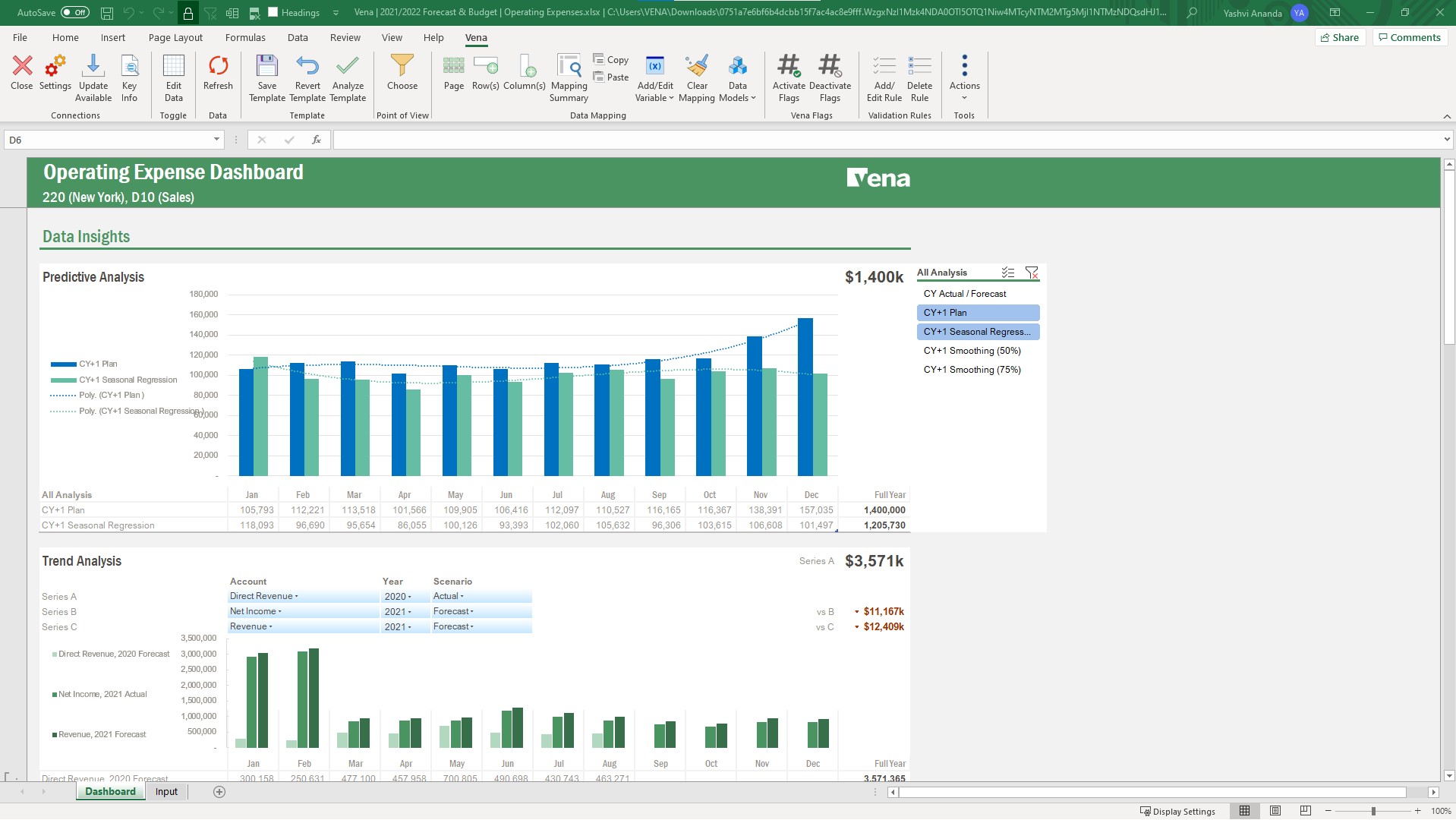
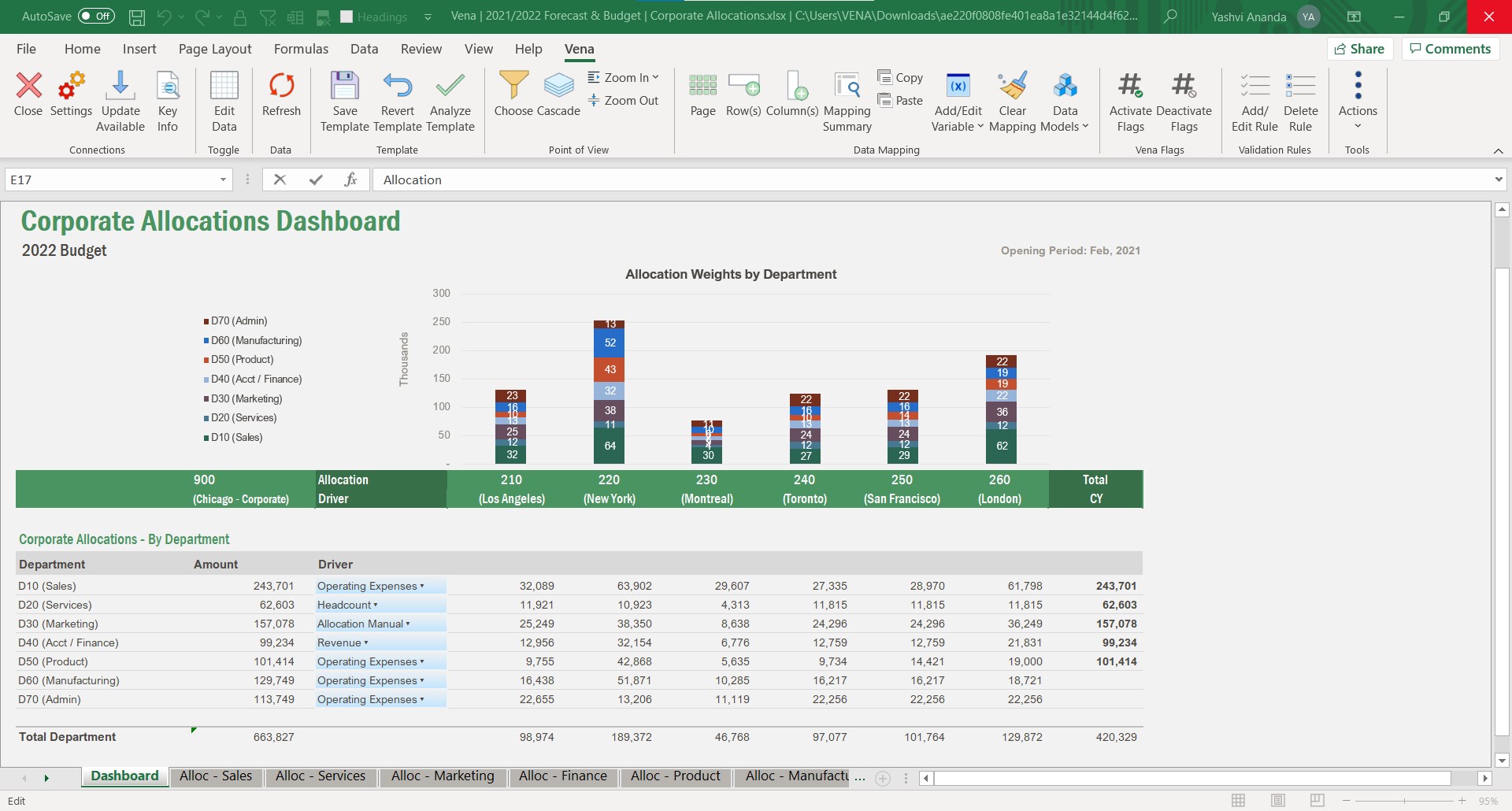
Vena Solutions provides a financial process automation solution to automate Corporate Performance Management, accounting and budgeting, Regulatory & Compliance, and other finance-related processes. It is scaled for medium to large-sized organizations.
N/A
Pricing
SAP Analytics Cloud
Vena
Editions & Modules
SAP Analytics Cloud for Business Intelligence
$36.00
per month per user
SAP Analytics Cloud for Planning
Price upon request
per month per user
Professional
N/A
Complete
N/A
Offerings
Pricing Offerings
SAP Analytics Cloud
Vena
Free Trial
Yes
No
Free/Freemium Version
No
No
Premium Consulting/Integration Services
No
Yes
Entry-level Setup Fee
No setup fee
Optional
Additional Details
A 30-day trial with SAP Analytics Cloud is available, supporting analytics enterprise-wide. A trial can be extended up to 90 days on request.
The Professional Plan is the most flexible way to get started quickly and can be added onto as a company grows. The plan includes: Vena Platform, Customer Success Manager, Standard Support and Customer Portal.
Complete Plan includes everything in Professional, plus: Vena Insights, Premium Support, Sandbox Environment, and Expert Managed Services.
For a limited time, new customers who use Microsoft Dynamics 365 Business Central (Online) as their primary ERP can get a free year of Vena and 40% off implementation costs.
Vena also offers special pricing for not for profit organizations. To learn more, speak to an expert.
Business Development Executive and Lead Generation in Sales at Opusing LLC (Staffing & Recruiting, 11-50 employees)
Chose Vena
Vena Solutions stands out due to its familiar Excel-based interface, making it easy for our team to adopt without extensive training. Compared to alternatives like Anaplan and Oracle Hyperion, Vena's strong customer support and efficient automation have significantly reduced …
A de minimis incentive was given to thank the reviewer for their time. The incentive was not used to bias or drive a particular response, nor was the incentive contingent on a positive endorsement. More Info
A de minimis incentive was given to thank the reviewer for their time. The incentive was not used to bias or drive a particular response, nor was the incentive contingent on a positive endorsement. More Info
A de minimis incentive was given to thank the reviewer for their time. The incentive was not used to bias or drive a particular response, nor was the incentive contingent on a positive endorsement. More Info
Directeur Principal - Conseil en Management - Responsable Anaplan, Vena et SAP in Professional Services at Raymond Chabot Grant Thornton (Accounting, 1001-5000 employees)
A de minimis incentive was given to thank the reviewer for their time. The incentive was not used to bias or drive a particular response, nor was the incentive contingent on a positive endorsement. More Info
Vice President Of Accounting and Finance in Corporate at William Lyon Homes (Real Estate, 501-1000 employees)
Chose Vena
They have superior database capacity due to the power of the cloud. Usability and user adoption is quick and immediate due to the direct integration with Excel and ease of use for end users and Vena administrators.
A de minimis incentive was given to thank the reviewer for their time. The incentive was not used to bias or drive a particular response, nor was the incentive contingent on a positive endorsement. More Info
IT Business Analyst in Information Technology at Tacala, LLC (Food & Beverages, 5001-10,000 employees)
Chose Vena
We spent about a year and a half in the selection process for our budgeting system. The issue that we kept coming across was speed, flexibility, and a lack of understanding of our process during the sales cycle. Most of these other products wanted us to change our budgeting …
A de minimis incentive was given to thank the reviewer for their time. The incentive was not used to bias or drive a particular response, nor was the incentive contingent on a positive endorsement. More Info
SAP Analytics Cloud is great for big companies that want advanced data analysis and planning, especially when they need to work together in real-time or when people need to access data on their phones. It's like a super tool for predicting future trends in industries like retail or finance. SAC also works well for companies that use different types of computer systems because it can easily connect them. But, for small businesses that only need basic reports or don't have a lot of technical resources, a simpler tool might be better. If a company doesn't always have a good internet connection or if they're just starting with analytics, there might be other tools that work better.
A de minimis incentive was given to thank the reviewer for their time. The incentive was not used to bias or drive a particular response, nor was the incentive contingent on a positive endorsement. TR verified that a representative sample of customers was invited. More Info
Whether you have processes you are looking to make more efficient or starting from scratch, Vena is a great tool to handle both. When we started with Vena all of reporting was either very manual or frankly nonexistent. Vena was pivotal in bringing us from zero to 10 in a short time. it helped us streamline the process of gathering data to the end reporting
A de minimis incentive was given to thank the reviewer for their time. The incentive was not used to bias or drive a particular response, nor was the incentive contingent on a positive endorsement. More Info
It makes it easier yo analyse order and related records easily.
We can easily maintain and track the performance of employees in organisation.
Can easily track various aspects for the growth of an organisation thus allowing real time analysis and tracking of organisation's growth and performance.
A de minimis incentive was given to thank the reviewer for their time. The incentive was not used to bias or drive a particular response, nor was the incentive contingent on a positive endorsement. TR verified that a representative sample of customers was invited. More Info
What i like best about Vena is that it is very seamless Excel integration.
Vena fosters collabs across teams, helping multiple members to work together on financial planning in real-time enhancing overall efficiency.
We now also can automate manual processes like budgeting, consolidation of data and reporting saves my valuable time and also reducing the risk of errors.
A de minimis incentive was given to thank the reviewer for their time. The incentive was not used to bias or drive a particular response, nor was the incentive contingent on a positive endorsement. More Info
SAC supports various data sources, but improvements in the ease of connecting to and integrating with certain data repositories, especially non-SAP databases, would enhance the platform's versatility and integration capabilities.
An offline mode for SAC could be valuable for users who need to access and analyze data without an internet connection. Additionally, optimizing performance for large datasets and complex visualizations would contribute to a smoother user experience.
A de minimis incentive was given to thank the reviewer for their time. The incentive was not used to bias or drive a particular response, nor was the incentive contingent on a positive endorsement. TR verified that a representative sample of customers was invited. More Info
It could improve the ease of implementation; it could take a long for an inexperienced IT team.
From the ERP system perspective, it can be linked easily, but it has room for improvement when you make core changes and require a Vena specialist again.
Some administrators can get confused while working on Excel implementation; it has complicated technical requirements.
A de minimis incentive was given to thank the reviewer for their time. The incentive was not used to bias or drive a particular response, nor was the incentive contingent on a positive endorsement. More Info
There’s no doubt I will renew SAP Analytics Cloud. It is the most vital tool in our organization that makes it seamless to make rapid business decisions by collecting, modeling and visualizing data in real-time.
Vena has been a huge win for us as an organization, as it vastly improved our budgeting process by removing manual consolidation that was incredibly time consuming, and it allows us to see a multi-year view of our organizational budget across all of our funding sources. We've seen Vena's platform grow over the years and we've not yet fully adopted some of them so it feels like there's still potential to get even more value out of the platform.
A de minimis incentive was given to thank the reviewer for their time. The incentive was not used to bias or drive a particular response, nor was the incentive contingent on a positive endorsement. More Info
On a scale of 1 to 10, I would rate 8 SAP Analytics Cloud's overall usability as a 7. SAC has a clean, modern user interface with drag-and-drop features. It is an integrated platform that combines reporting, planning, and predictive analytics in one tool. It has Real-time connectivity with SAP data sources like S/4HANA.
Self-service analytics capabilities allow non-technical users to build simple dashboards.
Vena allows any solution to be built the way you need it to work, and there are many different ways of going about what you need it to do. It may require time to build, test, and rebuild and retest, before the best solution to what you are trying to accomplish is reached. It is best for those who are Excel proficient because Vena utilizes and enhances the usage of existing Excel functions. For those who are not Excel proficient, the journey may be more challenging, however, with help of EMS, you can get your planning and reporting to a dynamic state.
A de minimis incentive was given to thank the reviewer for their time. The incentive was not used to bias or drive a particular response, nor was the incentive contingent on a positive endorsement. More Info
I would rate SAP Analytics Cloud an 8 out of 10 for scalability. It offers a flexible, cloud-based architecture that supports expansion across departments and geographies. The platform adapts well to growing data volumes and user needs, making it a strong choice for organizations looking to scale analytics capabilities efficiently.
A de minimis incentive was given to thank the reviewer for their time. The incentive was not used to bias or drive a particular response, nor was the incentive contingent on a positive endorsement. TR verified that a representative sample of customers was invited. More Info
Contact with Vena Solutions technical support is quick and experts in the field always respond. It is not necessary to go through a large form to explain the problems and then answer more questions to receive a direct answer, we simply send a message indicating the specific problem and they are immediately there to actively help us
A de minimis incentive was given to thank the reviewer for their time. The incentive was not used to bias or drive a particular response, nor was the incentive contingent on a positive endorsement. More Info
I would rate SAP Analytics Cloud’s performance an 8 out of 10. Pages generally load quickly, and reports run within a reasonable time frame, even with complex datasets. Integration with other systems is smooth and doesn’t noticeably affect performance. Overall, it’s a responsive and efficient tool for business analytics. But
A de minimis incentive was given to thank the reviewer for their time. The incentive was not used to bias or drive a particular response, nor was the incentive contingent on a positive endorsement. TR verified that a representative sample of customers was invited. More Info
Vena Solutions pages load quickly and only a few times does it get a bit slow, only when there are many integrations and the reports are long. But in general it is always fast and honestly I am very satisfied with the speed in the generation of statistical reports and the pages
A de minimis incentive was given to thank the reviewer for their time. The incentive was not used to bias or drive a particular response, nor was the incentive contingent on a positive endorsement. More Info
Since the implementation stage, the support team has been very helpful and assisting. Even in the later stages, the tech team had quite a rapid response. In general, SAP has provided us with great customer support, let it be for a specific product of SAP or for integration of different modules.
A de minimis incentive was given to thank the reviewer for their time. The incentive was not used to bias or drive a particular response, nor was the incentive contingent on a positive endorsement. More Info
They are very quick to respond when you submit a ticket and typically fix issues quickly as well. I only didn't give this a 10 because there is still an open issue with our Salesforce connection that we've been waiting on now for a few months.
A de minimis incentive was given to thank the reviewer for their time. The incentive was not used to bias or drive a particular response, nor was the incentive contingent on a positive endorsement. More Info
A de minimis incentive was given to thank the reviewer for their time. The incentive was not used to bias or drive a particular response, nor was the incentive contingent on a positive endorsement. TR verified that a representative sample of customers was invited. More Info
Our initial in person training was a little rough b/c I felt like our trainer wanted to focus on maximizing Vena rather than understanding what we were needing for our organization. He was very responsive and added insights, but could have worked to understand our needs a little better.
A de minimis incentive was given to thank the reviewer for their time. The incentive was not used to bias or drive a particular response, nor was the incentive contingent on a positive endorsement. More Info
A de minimis incentive was given to thank the reviewer for their time. The incentive was not used to bias or drive a particular response, nor was the incentive contingent on a positive endorsement. TR verified that a representative sample of customers was invited. More Info
The training was structured as a group training to learn the basics of creating a data model and mapping a template. While we had nearly 10 participants, I was the only actual implementer so we probably didn't actually need the training and could have just learned the initial skills from the implementation consultant. Two years later, when we hired a new team member, they completed several modules in Vena Academy (a self paced learning course) which allowed them to get up to speed on the basics with just a bit of supplemental guidance from me as our existing admin.
A de minimis incentive was given to thank the reviewer for their time. The incentive was not used to bias or drive a particular response, nor was the incentive contingent on a positive endorsement. More Info
SAC is a simple solution ad it works fine when connecting it to other SAP tools. On the other hand, connecting it to third party solutions brings difficulties when there's no previous design and the objetives are not clear. It is really important to integrate Business users from the start to provide with valuable business insights
A de minimis incentive was given to thank the reviewer for their time. The incentive was not used to bias or drive a particular response, nor was the incentive contingent on a positive endorsement. TR verified that a representative sample of customers was invited. More Info
The Vena consultant had great knowledge of both the Vena solution and Excel and Excel functions. He was able to help suggest ways to build our templates that met our requirements using Excel functions we had not previously considered using. And we have been able to use the Excel information he provided in other ways outside of Vena. He was very patient and flexible as we learned the Vena tool and created templates
SAP Analytics Cloud vs. Microsoft Power BI:Cost: Power BI is often perceived as a cost-effective solution, especially for organizations already using Microsoft products. SAP Analytics Cloud might be seen as a higher-cost option.Integration: SAP Analytics Cloud may have an edge in integration with SAP systems, while Power BI is known for its broad integration capabilities, including seamless integration with other Microsoft tools.Usability: Power BI is often praised for its user-friendly interface and quick adoption, while SAP Analytics Cloud may be seen as offering more advanced features.
A de minimis incentive was given to thank the reviewer for their time. The incentive was not used to bias or drive a particular response, nor was the incentive contingent on a positive endorsement. TR verified that a representative sample of customers was invited. More Info
Vena Solutions stands out due to its familiar Excel-based interface, making it easy for our team to adopt without extensive training. Compared to alternatives like Anaplan and Oracle Hyperion, Vena's strong customer support and efficient automation have significantly reduced our budgeting cycle time. We chose Vena for its seamless integration with our existing systems and substantial time-saving benefits, ultimately enhancing our decision-making process.
A de minimis incentive was given to thank the reviewer for their time. The incentive was not used to bias or drive a particular response, nor was the incentive contingent on a positive endorsement. More Info
A de minimis incentive was given to thank the reviewer for their time. The incentive was not used to bias or drive a particular response, nor was the incentive contingent on a positive endorsement. TR verified that a representative sample of customers was invited. More Info
I would rate SAP Analytics Cloud an 8 out of 10 for scalability. It offers a flexible, cloud-based architecture that supports expansion across departments and geographies. The platform adapts well to growing data volumes and user needs, making it a strong choice for organizations looking to scale analytics capabilities efficiently.
A de minimis incentive was given to thank the reviewer for their time. The incentive was not used to bias or drive a particular response, nor was the incentive contingent on a positive endorsement. TR verified that a representative sample of customers was invited. More Info
We onboarded the entire company in a very short time frame to complete the full company budget cycle the first year out of the gate. Now we are looking to add more data and the ETL tool makes it easy to backload data into the cube as if was always there. Vena has been very scalable for our needs.
A de minimis incentive was given to thank the reviewer for their time. The incentive was not used to bias or drive a particular response, nor was the incentive contingent on a positive endorsement. More Info
A de minimis incentive was given to thank the reviewer for their time. The incentive was not used to bias or drive a particular response, nor was the incentive contingent on a positive endorsement. TR verified that a representative sample of customers was invited. More Info
Many manual data manipulations and exports in Excel have been replaced by the tool, providing management with improved insight into the amount of time spent at each stage of an invoice's lifetime, allowing bottlenecks to be discovered.
We now have more insight into the data, and people with little technical experience can easily build stories.
A de minimis incentive was given to thank the reviewer for their time. The incentive was not used to bias or drive a particular response, nor was the incentive contingent on a positive endorsement. TR verified that a representative sample of customers was invited. More Info
A de minimis incentive was given to thank the reviewer for their time. The incentive was not used to bias or drive a particular response, nor was the incentive contingent on a positive endorsement. More Info