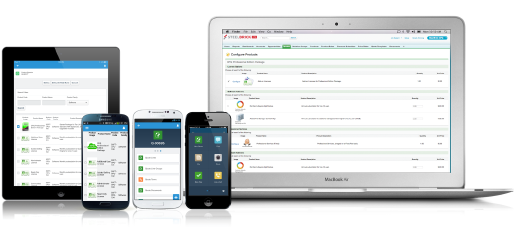
Salesforce Revenue Cloud (formerly Salesforce CPQ or SteelBrick) is built and delivered on the Salesforce Platform and Salesforce1 Mobile App which enables users to create accurate sales quotes quickly and submit error-free orders on the fly from any device.
$30
Per User per Month
VanillaSoft
Score 4.3 out of 10
Small Businesses (1-50 employees)
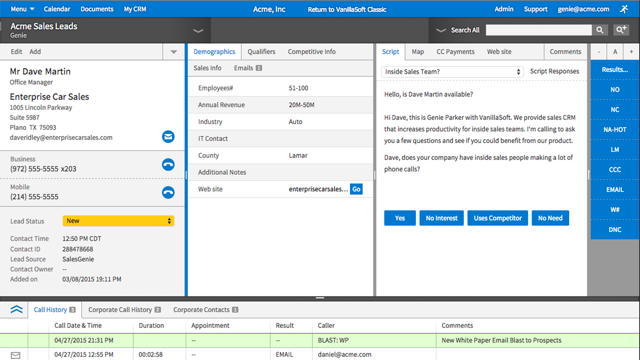
VanillaSoft is a lead optimization platform designed to assist fast-response sales teams in maximizing their conversion rates. By providing a structured and efficient approach to lead management, VanillaSoft aims to ensure that every potential customer receives the attention they deserve. This platform is beneficial for sales teams that operate in high-pressure environments where timely follow-ups can significantly impact sales outcomes. The primary audience for VanillaSoft…
N/A
Pricing
Salesforce Revenue Cloud
VanillaSoft
Editions & Modules
Basic
$30
Per User per Month
Professional
$50
Per User per Month
Enterprise
$75
Per User per Month
No answers on this topic
Offerings
Pricing Offerings
Salesforce Revenue Cloud
VanillaSoft
Free Trial
Yes
No
Free/Freemium Version
No
No
Premium Consulting/Integration Services
Yes
Yes
Entry-level Setup Fee
Optional
No setup fee
Additional Details
—
VanillaSoft offers several add-ons to use in conjunction with our base platforms including:
Auto Dialing
Call Recording
VoIP
SmartCaller ID
SMS
More Pricing Information
Community Pulse
Salesforce Revenue Cloud
VanillaSoft
Features
Salesforce Revenue Cloud
VanillaSoft
CPQ
Comparison of CPQ features of Product A and Product B
What I like best is the ease of use to be able to track all opportunities and quotes in my daily sales tracker I also like the fact that you can reorganize the view for your opportunities. For instance, it is very similar to a spreadsheet where you can filter them by date, dollar amount, name, and several other ways. I found this to be less appropriate when we have to do multiple roles while assigning one task to multiple users. Column resizing within the Quote Line Editor is not supported in the Salesforce mobile app.
VanillaSoft is well suited for any marketing operations or sales operations team looking for a tool to help them efficiently reach prospects and engage with them through a streamlined method. This can be a great way to manage that engagement, measure it, and keep track of various aspects of prospects.
Salesforce CPQ easily maps to standard and custom fields within the opportunity in SFDC, allowing you to avoid time spent duplicating effort or copying and pasting deal criteria.
Salesforce CPQ connects directly to pre-determined price book, making it very easy to provide a proposal based on standard cost and/or add discounts to standard cost and reflect those reductions on the order form as appropriate.
Salesforce CPQ provides the ability for administrators to configure workflows for approval based on certain discount %'s on the standard cost, offering a quick and easy way to route automatically through the organization for approval.
Our employees love it - very user friendly, easy to grasp, very little down time to learn it. They feel very confident immediately.
Great technical support - I can get solutions to customer problems that make our company look more responsive to our clients. Our clients appreciate our solving their problems immediately.
Because of the real time analytics - we can address immediate issues with marketing campaigns to make our client's personnel look great to their superiors.
Because of all the functionality - we can provide a turnkey approach from a small company with big company capabilities.
Our Salesforce is very messy, which tells me it's not super easy to clean up.
I always have a really hard time removing a contacts from an account - it seems like you can't simply remove the relationship so we have lots of people named DO NOT CONTACT or things of that nature.
Sometimes when saving it doesn't seem like things actually save.
It really needs an "undo" button. I can't tell you how many times I was typing notes etc and hit a wrong button and all was gone so I had to start over.
This may be the way we have it set up....we have term codes which are how the callers terminate a call they were on. They finish the call, then type notes in the notepad section of what happened, then they terminate the call. But there are times that I need to go onto a record and just leave a note but don't need to terminate it as anything. If there is a way to do that, it would make my life a lot easier.
We have no reason not to renew. VanillaSoft has been the best CRM (for us) that we have ever used. The value is great, we love the system, and it's easy to get assistance from VanillaSoft team when needed. Our team is so used to the calling and admin functions there is no desire to change.
The entire system is set up so perfectly. It makes training callers much quicker, and admin tools are so easy to navigate when you get used to using it. Also, if there is ever something I cannot figure out, I can get support from VanillaSoft very quickly to resolve and get my task accomplished.
It is very rare that we have system issues. Maybe a handful of times over the years, we had to contact support about being unable to access. It was always a quick response from the VanillaSoft team, and they would clearly explain the issue and usually give time frame on fixing, or have it fixed immediately.
I work on all aspects for VanillaSoft for our company. The pages overall do load very quickly. Reports are amazing, I can get quick report, customized reports, and anything I may need to present to client in very little time. It has made my job so much simpler. As far as I know, integration goes smoothly as well.
There have been some issues with multi-year pricing of certain products and services which we have been assured will be resolved but I guess are still underway, the support team apart from this has not been needed much and in the rare scenarios, it has been needed the resolutions of conflicts has been prompt and quick, so the overall support would have my high regards for being so helpful and customer-oriented so as to assure good performance of their toolset and customer satisfaction.
It was very thorough. VanillaSoft team did not rush us. They explained the various functions clearly and were open to any and all questions we had as we began to learn the system. Also, once training completed, if we encountered anything we could not figure out, the support team was fantastic in helping us out.
There is no comparison to a fully functional instance of CPQ. Nothing comes close due to the amount of customization and ease of use that CPQ offers once it's fully built out. Other solutions may be easier to build or administer, but for the users and business needs, CPQ is the best solution possible.
VanillaSoft stacks up against Microsoft Power BI very well by allowing the data visualization in a more effective way, Power BI has positioned itself as one of the more robust and intuitive tools for business intelligence and data presentation. VanillaSoft and Microsoft Power BI are a great bundle for the report and analytics team.
VanillaSoft has been great. The flexibility of the system is wonderful. The scalable software options are impressive as well. I would strongly support VanillaSoft's capabilities in this area. You really can do just about anything to get the setup and or integrations you may desire for your company needs.
Salesforce CPQ has helped a lot with overall visibility to the quote to order process. Reps have more insight into the business and the business has more insight into Sales Rep interactions. This makes troubleshooting issues much easier.
Our reporting capabilities have improved immensely. The ability to easily create fields allows you to capture new data points very easily.
Communication in Salesforce CPQ and Salesforce, in general, is a big improvement for our business. The ability to have a chatter feed on any object is very helpful. This can also be used for feed tracking to give some basic change management controls/history.
The ability to save my correspondence and notes on each interaction allowing for the appearance to the customer that I am very engaged when we are speaking.
Increased sales from the calendar setting and saving my notes.