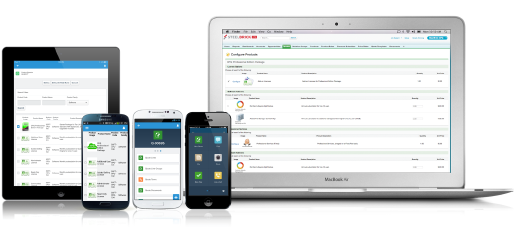
Salesforce Revenue Cloud (formerly Salesforce CPQ or SteelBrick) is built and delivered on the Salesforce Platform and Salesforce1 Mobile App which enables users to create accurate sales quotes quickly and submit error-free orders on the fly from any device.
$30
Per User per Month
sticky.io
Score9 out of 10
N/A
sticky.io (formerly LimeLight), headquartered in San Francisco, offers their subscription business management platform supporting ecommerce transactions and recurring billing along with customer management, payment gateway, and fraud protected transacting.
What I like best is the ease of use to be able to track all opportunities and quotes in my daily sales tracker I also like the fact that you can reorganize the view for your opportunities. For instance, it is very similar to a spreadsheet where you can filter them by date, dollar amount, name, and several other ways. I found this to be less appropriate when we have to do multiple roles while assigning one task to multiple users. Column resizing within the Quote Line Editor is not supported in the Salesforce mobile app.
Lime Light CRM was built specifically for online marketers, helping them to manage their online sales, contacts, orders, and payments. The software combines a number of features and 3rd party provider integrations to offer the ability to store customer data, build online eCommerce campaigns, create sales reports, and automate order management activities, as well as track, store and report on affiliate data.
A de minimis incentive was given to thank the reviewer for their time. The incentive was not used to bias or drive a particular response, nor was the incentive contingent on a positive endorsement. More Info
Salesforce CPQ easily maps to standard and custom fields within the opportunity in SFDC, allowing you to avoid time spent duplicating effort or copying and pasting deal criteria.
Salesforce CPQ connects directly to pre-determined price book, making it very easy to provide a proposal based on standard cost and/or add discounts to standard cost and reflect those reductions on the order form as appropriate.
Salesforce CPQ provides the ability for administrators to configure workflows for approval based on certain discount %'s on the standard cost, offering a quick and easy way to route automatically through the organization for approval.
A de minimis incentive was given to thank the reviewer for their time. The incentive was not used to bias or drive a particular response, nor was the incentive contingent on a positive endorsement. More Info
For an easy to learn CRM this would be it, you can fully train someone on Limelight in less than a few days
It allows for various wildcard searches to be performed in different fields, which speeds up productivity and requires less request to repeat information to locate accounts while speaking to clients.
The CRM holds multiple user accounts and products, and shows failed attempts to purchase and gives reason codes for why the purchase was not successful. Allows for different views to review client accounts.
A de minimis incentive was given to thank the reviewer for their time. The incentive was not used to bias or drive a particular response, nor was the incentive contingent on a positive endorsement. More Info
Our Salesforce is very messy, which tells me it's not super easy to clean up.
I always have a really hard time removing a contacts from an account - it seems like you can't simply remove the relationship so we have lots of people named DO NOT CONTACT or things of that nature.
Sometimes when saving it doesn't seem like things actually save.
A de minimis incentive was given to thank the reviewer for their time. The incentive was not used to bias or drive a particular response, nor was the incentive contingent on a positive endorsement. More Info
Note taking can be a hassle, when writing notes there is not a separate tab, or dedicated area which allows for multiple users to leave notes for future users, or administrators to reference regarding actions made to the account, users must search per line item to view notes, or go to a different view to see all notes which is still per line item as you toggle through the notes
If the client has been with the product for several months or years it is a lot of notes you have to reference through which hurts productivity and creates longer calls. A huge con is when you are canceling out a user account, or if you are changing a recurring date if the user clicks the back button after the tasks completes refreshing the webpage to reflect the new dates, the new changes will go undone and revert back to the original data as if no changes were made resulting in user error. The client continues to be billed and discounts continue to apply.
The CRM needs to fix this to prompt "Do you want to undo discount/date change/cancellation?" if the back button is clicked to eliminate user error based on the software limitations. Features which can be customized to automatically perform after actions are done on an account need a function to allow for agents to resend emails if the user did not get them. If automatic emails go to users canceling and they did not get it you have to restart the product then cancel it again to have another automatic email sent to the client/customer or manually send an email. For refunds, if the automatic email did not go out you have to manually send out the email which is time-consuming allocating to another agent or for the current agent. There is a need for an upgrade which allows that after an automatic email has been sent a button will appear which says "resend cancellation" "resend refund" this should also be true if the user inputted the email wrong and it was only noticed by agent after the automatic email was sent and the agent needs to update the email for the client/customer to be able to receive the email at the correct address.
A de minimis incentive was given to thank the reviewer for their time. The incentive was not used to bias or drive a particular response, nor was the incentive contingent on a positive endorsement. More Info
There have been some issues with multi-year pricing of certain products and services which we have been assured will be resolved but I guess are still underway, the support team apart from this has not been needed much and in the rare scenarios, it has been needed the resolutions of conflicts has been prompt and quick, so the overall support would have my high regards for being so helpful and customer-oriented so as to assure good performance of their toolset and customer satisfaction.
A de minimis incentive was given to thank the reviewer for their time. The incentive was not used to bias or drive a particular response, nor was the incentive contingent on a positive endorsement. More Info
There is no comparison to a fully functional instance of CPQ. Nothing comes close due to the amount of customization and ease of use that CPQ offers once it's fully built out. Other solutions may be easier to build or administer, but for the users and business needs, CPQ is the best solution possible.
A de minimis incentive was given to thank the reviewer for their time. The incentive was not used to bias or drive a particular response, nor was the incentive contingent on a positive endorsement. More Info
Salesforce CPQ has helped a lot with overall visibility to the quote to order process. Reps have more insight into the business and the business has more insight into Sales Rep interactions. This makes troubleshooting issues much easier.
Our reporting capabilities have improved immensely. The ability to easily create fields allows you to capture new data points very easily.
Communication in Salesforce CPQ and Salesforce, in general, is a big improvement for our business. The ability to have a chatter feed on any object is very helpful. This can also be used for feed tracking to give some basic change management controls/history.
A de minimis incentive was given to thank the reviewer for their time. The incentive was not used to bias or drive a particular response, nor was the incentive contingent on a positive endorsement. More Info
A de minimis incentive was given to thank the reviewer for their time. The incentive was not used to bias or drive a particular response, nor was the incentive contingent on a positive endorsement. More Info