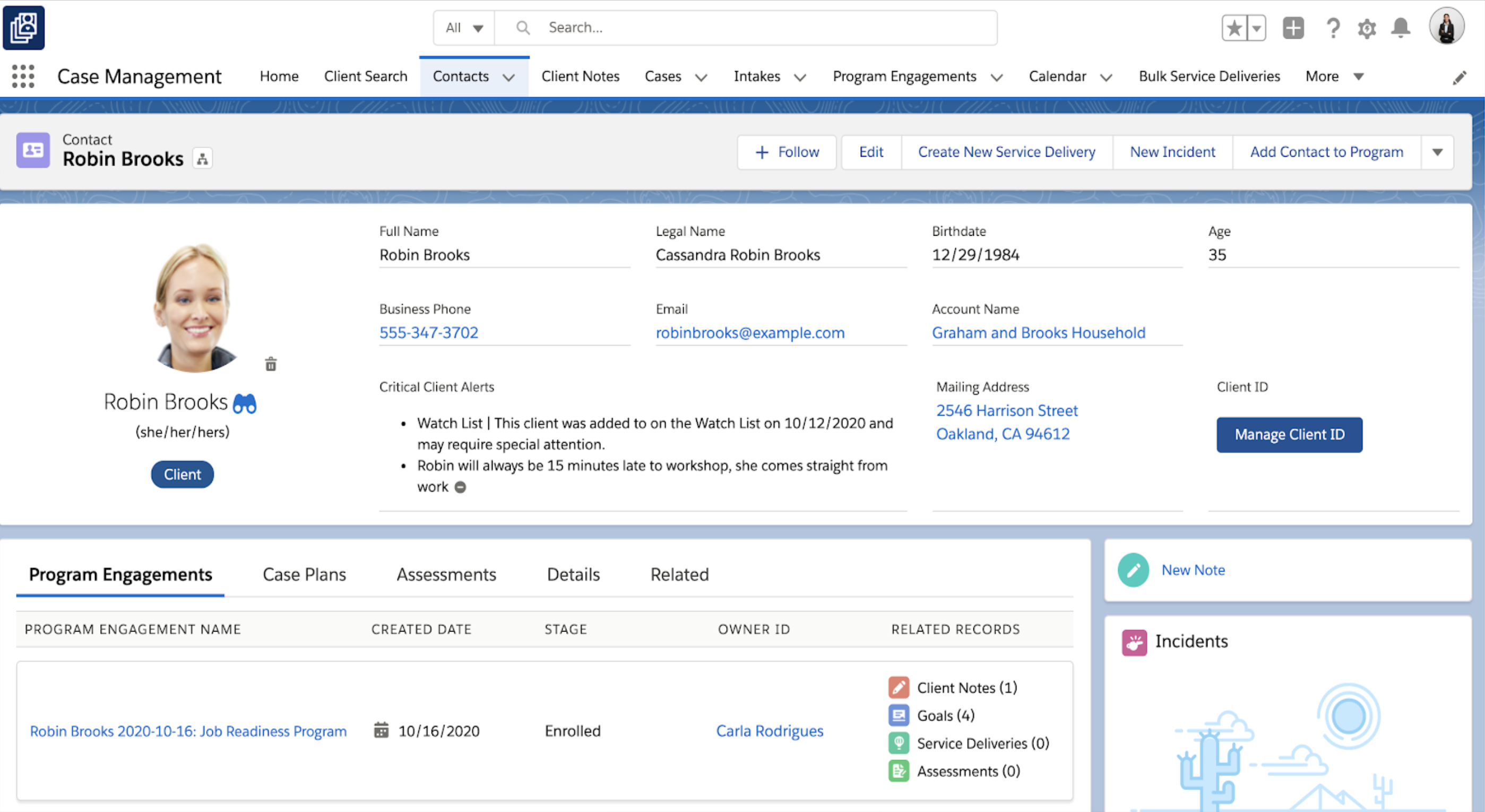
Salesforce for Nonprofits, the Salesforce.org Nonprofit Cloud, is a nonprofit constituent relationship management platform from Salesforce, which supports constituent engagement, fundraising, and grants. Nonprofit editions contain Salesforce Lightning Edition along with the former Nonprofit Success Pack (NPSP) combined.
$36
per month per user
Submittable
Score8.8 out of 10
N/A
Submittable offers tools to launch, measure, and grow social impact programs, locally and globally. From grants and scholarships to awards and CSR programs, Submittable partners with users to make a difference. The vendor states Submittable has supported over 95,000 social impact programs, receiving nearly 20 million applications, and that teams save an average of 12 hours per week and launch in an average of 14 days.
If you only want to track donations, I'd go with something simpler. If you want to track donations and programs and connections between them, there may be nothing better. If you have no technical abilities and no budget, restricted yourself solely to what it does as described exactly in the manual. If you can't devote about 0.25FTE to the constant maintenance and upgrades, don't go with it.
A de minimis incentive was given to thank the reviewer for their time. The incentive was not used to bias or drive a particular response, nor was the incentive contingent on a positive endorsement. More Info
Submittable is great for grant management, grantmaking, and scholarship awards. It's a very useful tool also when there are multiple reviewers and committees involved in the assessment of the application. The table feature is helpful, but to download the information in a usable report is a pain. Overall a very useful tool for funding.
A de minimis incentive was given to thank the reviewer for their time. The incentive was not used to bias or drive a particular response, nor was the incentive contingent on a positive endorsement. More Info
A de minimis incentive was given to thank the reviewer for their time. The incentive was not used to bias or drive a particular response, nor was the incentive contingent on a positive endorsement. TR verified that a representative sample of customers was invited. More Info
Form-logic: Allows application forms to adjust based on answers to crucial questions (if-then-else) so that all applications don't have to see extended questions that may not apply to them or their situation.
Messaging Platform: This platform allows interactions with applicants or internal review teams to be associated with the specific submission, allowing for an easier, complete view of an application being considered and as an audit trail.
Good Voting/Polling Management: It makes it easier to record the latest vote/feedback from assigned team members and allows customization of the vote/feedback review as a form. It also summarizes the votes for easy review in a submissions dashboard view.
A de minimis incentive was given to thank the reviewer for their time. The incentive was not used to bias or drive a particular response, nor was the incentive contingent on a positive endorsement. More Info
A de minimis incentive was given to thank the reviewer for their time. The incentive was not used to bias or drive a particular response, nor was the incentive contingent on a positive endorsement. More Info
We are some of the earliest users of employee volunteerism, so there have been some things to work out. However, because of that, we've gotten a lot of one-on-one support to help make minor tweaks to the system in a way that works for us.
A de minimis incentive was given to thank the reviewer for their time. The incentive was not used to bias or drive a particular response, nor was the incentive contingent on a positive endorsement. More Info
A de minimis incentive was given to thank the reviewer for their time. The incentive was not used to bias or drive a particular response, nor was the incentive contingent on a positive endorsement. More Info
We use this software annually to help with our grant processes. Without it, I'd be so lost! Our team relies on the data from our past years to sift applications and we try to prioritize those who have applied and been a finalist but perhaps didn't win in years prior
A de minimis incentive was given to thank the reviewer for their time. The incentive was not used to bias or drive a particular response, nor was the incentive contingent on a positive endorsement. TR verified that a representative sample of customers was invited. More Info
I think Salesforce has so much functionality that it makes it difficult in terms of overall usability. Once you can figure it out, it's a 10/10, it's just getting there. If you're willing to do the work to figure it out then you're golden. For what it's worth, I don't know if you're going to find something with this level of functionality that's easier to figure out
A de minimis incentive was given to thank the reviewer for their time. The incentive was not used to bias or drive a particular response, nor was the incentive contingent on a positive endorsement. More Info
A submittable requires a great deal of thought to set up. It would be best if you really did an outline and flowcharting. Once you have a detailed plan and set up the system, you have to think of the process that you would manually do step-by-step to deal with the what-ifs; it’s beautiful. The ability to Clone events is invaluable. The onboarding can be complex, but the ease of use afterward is worth it.
A de minimis incentive was given to thank the reviewer for their time. The incentive was not used to bias or drive a particular response, nor was the incentive contingent on a positive endorsement. TR verified that a representative sample of customers was invited. More Info
We have thankfully never experienced an outage nor been affected by a technology issue on Submittable's side that has delayed our grant process. We have instead been able to distribute over $6M in donated dollars to AAPI small business owners because Submittable is trustworthy and available
A de minimis incentive was given to thank the reviewer for their time. The incentive was not used to bias or drive a particular response, nor was the incentive contingent on a positive endorsement. TR verified that a representative sample of customers was invited. More Info
We've had a quick and efficient submittable experience that has always been easy to use. When we need a report it downloads within seconds, even the larger reports are 30 seconds or less to download. Pages are quick to load and reports complete in a more than reasonable time frame
A de minimis incentive was given to thank the reviewer for their time. The incentive was not used to bias or drive a particular response, nor was the incentive contingent on a positive endorsement. TR verified that a representative sample of customers was invited. More Info
I have never had bad conversations with any support people with Salesforce but we also have not used them very much. I put it a little less because we are struggling to switch to lightning (some of our custom features do not migrate well) and it feels like the help and support for a little organization is not incredibly helpful unless we want to spend a lot of money.
A de minimis incentive was given to thank the reviewer for their time. The incentive was not used to bias or drive a particular response, nor was the incentive contingent on a positive endorsement. More Info
I think that they are good at answering our questions and solving our problems. We occasionally get reports from applicants about problems the Submittable team has not solved, but I do not know what the applicant has done to get the problem solved.
A de minimis incentive was given to thank the reviewer for their time. The incentive was not used to bias or drive a particular response, nor was the incentive contingent on a positive endorsement. TR verified that a representative sample of customers was invited. More Info
We have been using this for many years but my memory is that we had a human walk us through how to use basic features. We also used the resource library to learn about specific topics or issues as they came up.
A de minimis incentive was given to thank the reviewer for their time. The incentive was not used to bias or drive a particular response, nor was the incentive contingent on a positive endorsement. TR verified that a representative sample of customers was invited. More Info
10/10 because we were able to meet virtually and still get all of our questions answered! Online was effective too because we could easily record the sessions and review them later. Since we had to onboard our reviewers virtually, it was actually convenient that this was the same method we learned how to use the entire program virtually too.
A de minimis incentive was given to thank the reviewer for their time. The incentive was not used to bias or drive a particular response, nor was the incentive contingent on a positive endorsement. TR verified that a representative sample of customers was invited. More Info
I would say, provide Submittable as much detailed information on your planned use of the platform and your desires with the platform as possible, and the implementation will be tailored to accommodate your organization with minimal lag time and issues/problems.
A de minimis incentive was given to thank the reviewer for their time. The incentive was not used to bias or drive a particular response, nor was the incentive contingent on a positive endorsement. More Info
As a cloud native organization with no previous Microsoft infrastructure, Salesforce was a more logical and effective option for us. The suite of products was also far more comprehensive and required less customization. We were able to adopt a "configure not code" approach to our development of systems to support our mission that lowered the cost of upgrades.
A de minimis incentive was given to thank the reviewer for their time. The incentive was not used to bias or drive a particular response, nor was the incentive contingent on a positive endorsement. More Info
Submittable isn't in the same league as these other platforms. It's trying to get there but it's been a rocky road. Neither customer support nor the account people we've dealt with at Submittable seem particularly knowledgeable about how the product actually works for foundations and can't provide detailed recommendations for how to use the product more effectively. The decision to use Submittable was made before I came on board. We are moving to another platform next year, probably SmartSimple.
A de minimis incentive was given to thank the reviewer for their time. The incentive was not used to bias or drive a particular response, nor was the incentive contingent on a positive endorsement. More Info
I wish we could choose our own number of applications we want for the year and have the price be changed because we are in-between buyable numbers and always have to add more applications at the end of the year
A de minimis incentive was given to thank the reviewer for their time. The incentive was not used to bias or drive a particular response, nor was the incentive contingent on a positive endorsement. TR verified that a representative sample of customers was invited. More Info
We have been easily able to grow. Not only are we able to process different applications, but Submittable makes it easy to add applications onto our plan. Additionally, their eligibility form before the application does a good job of screening applicants so we do not pay for extra applications.
A de minimis incentive was given to thank the reviewer for their time. The incentive was not used to bias or drive a particular response, nor was the incentive contingent on a positive endorsement. TR verified that a representative sample of customers was invited. More Info
A de minimis incentive was given to thank the reviewer for their time. The incentive was not used to bias or drive a particular response, nor was the incentive contingent on a positive endorsement. TR verified that a representative sample of customers was invited. More Info
Salesforce has allowed us to easily track donor communications in one area, which I believe has improved our donor communication overall.
Salesforce for Nonprofits has made it easier on my org to track and pull donation-related information and has reduced the amount of time we need to do these regular tasks.
A de minimis incentive was given to thank the reviewer for their time. The incentive was not used to bias or drive a particular response, nor was the incentive contingent on a positive endorsement. More Info
A de minimis incentive was given to thank the reviewer for their time. The incentive was not used to bias or drive a particular response, nor was the incentive contingent on a positive endorsement. More Info