Sage 100 Contractor is a construction accounting and project management software. It is intended to provide primary accounting and other management capabilities across a construction project lifecycle, including estimating, service management, and reporting.
N/A
WorkflowMax
Score 9.2 out of 10
Small Businesses (1-50 employees)
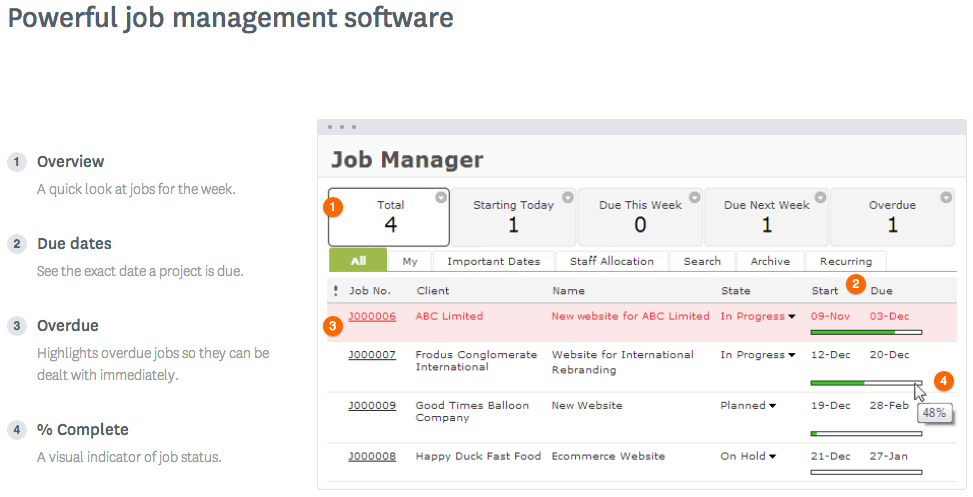
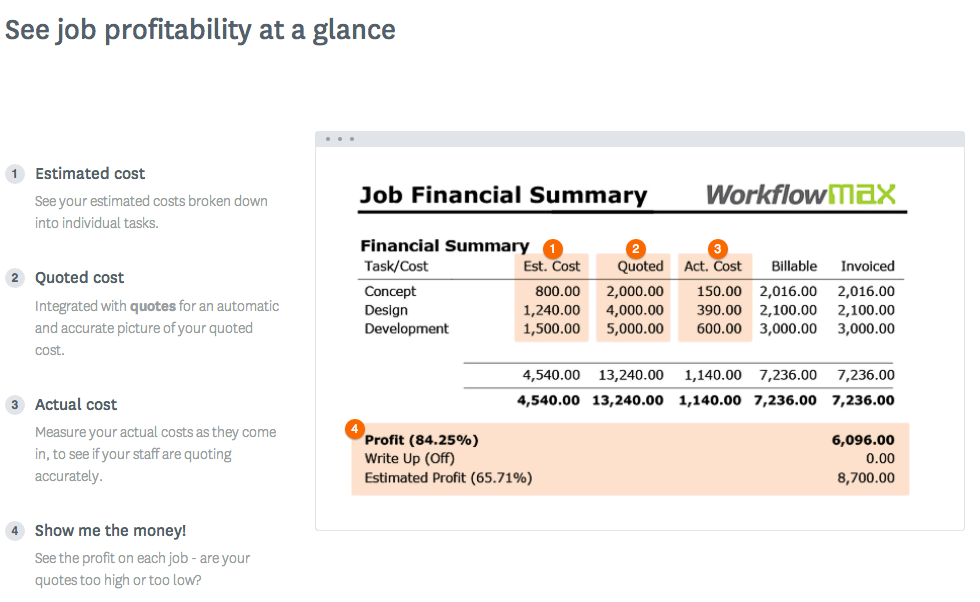
WorkflowMax is a web-based project management solution.The platform offers end-to-end functionality standard to project management software, including time tracking, lead management, collaboration with external stakeholders, invoicing, integrations, and customizable reporting.
$20
per month
Pricing
Sage 100 Contractor
WorkflowMax
Editions & Modules
No answers on this topic
Standard
$20
per month
Standard
$35
per month
Premium
$70
per month
Offerings
Pricing Offerings
Sage 100 Contractor
WorkflowMax
Free Trial
No
Yes
Free/Freemium Version
No
No
Premium Consulting/Integration Services
No
No
Entry-level Setup Fee
No setup fee
No setup fee
Additional Details
—
—
More Pricing Information
Community Pulse
Sage 100 Contractor
WorkflowMax
Features
Sage 100 Contractor
WorkflowMax
Human Resource Management
Comparison of Human Resource Management features of Product A and Product B
Sage 100 Contractor
7.6
3 Ratings
1% below category average
WorkflowMax
-
Ratings
Employee demographic data
7.02 Ratings
00 Ratings
Employment history
8.03 Ratings
00 Ratings
Job profiles and administration
8.03 Ratings
00 Ratings
Workflow for transfers, promotions, pay raises, etc.
8.03 Ratings
00 Ratings
Organizational charting
7.02 Ratings
00 Ratings
Organization and location management
7.73 Ratings
00 Ratings
Compliance data (COBRA, OSHA, etc.)
7.72 Ratings
00 Ratings
Payroll Management
Comparison of Payroll Management features of Product A and Product B
Sage 100 Contractor
8.4
3 Ratings
10% above category average
WorkflowMax
-
Ratings
Pay calculation
8.73 Ratings
00 Ratings
Support for external payroll vendors
9.53 Ratings
00 Ratings
Off-cycle/On-Demand payment
7.72 Ratings
00 Ratings
Benefit plan administration
8.01 Ratings
00 Ratings
Direct deposit files
8.52 Ratings
00 Ratings
Salary revision and increment management
9.01 Ratings
00 Ratings
Reimbursement management
7.02 Ratings
00 Ratings
Asset Management
Comparison of Asset Management features of Product A and Product B
Sage 100 Contractor
8.0
2 Ratings
11% above category average
WorkflowMax
-
Ratings
Tracking of all physical assets
8.02 Ratings
00 Ratings
Reporting & Analytics
Comparison of Reporting & Analytics features of Product A and Product B
Sage 100 Contractor
7.9
4 Ratings
4% above category average
WorkflowMax
-
Ratings
Dashboards
6.84 Ratings
00 Ratings
Standard reports
8.84 Ratings
00 Ratings
Custom reports
8.54 Ratings
00 Ratings
Data exportability
7.54 Ratings
00 Ratings
Construction Project & Field Management
Comparison of Construction Project & Field Management features of Product A and Product B
Sage 100 Contractor
6.9
6 Ratings
9% below category average
WorkflowMax
-
Ratings
Plan distribution & viewing
9.02 Ratings
00 Ratings
Plan markups & sharing
8.02 Ratings
00 Ratings
Issue tracking & punchlists
3.02 Ratings
00 Ratings
Jobsite reports
8.05 Ratings
00 Ratings
Document sharing
7.03 Ratings
00 Ratings
RFI tools
6.02 Ratings
00 Ratings
Collaboration & approvals
8.02 Ratings
00 Ratings
Mobile app
7.01 Ratings
00 Ratings
Submittal design and management
6.01 Ratings
00 Ratings
Checklists
8.01 Ratings
00 Ratings
Meeting Minutes
7.01 Ratings
00 Ratings
Specifications
8.02 Ratings
00 Ratings
Change orders
4.83 Ratings
00 Ratings
Estimating
Comparison of Estimating features of Product A and Product B
Sage 100 Contractor
7.2
4 Ratings
11% below category average
WorkflowMax
-
Ratings
Takeoff tools
2.01 Ratings
00 Ratings
Job costing
9.04 Ratings
00 Ratings
Cost databases
8.34 Ratings
00 Ratings
Cost calculator
7.54 Ratings
00 Ratings
Bid creation
9.01 Ratings
00 Ratings
Project Management
Comparison of Project Management features of Product A and Product B
Sage 100 Contractor
-
Ratings
WorkflowMax
9.3
27 Ratings
19% above category average
Task Management
00 Ratings
9.525 Ratings
Resource Management
00 Ratings
9.56 Ratings
Gantt Charts
00 Ratings
9.23 Ratings
Scheduling
00 Ratings
9.419 Ratings
Workflow Automation
00 Ratings
9.54 Ratings
Team Collaboration
00 Ratings
9.519 Ratings
Support for Agile Methodology
00 Ratings
8.93 Ratings
Support for Waterfall Methodology
00 Ratings
9.23 Ratings
Document Management
00 Ratings
9.219 Ratings
Email integration
00 Ratings
9.44 Ratings
Mobile Access
00 Ratings
9.221 Ratings
Timesheet Tracking
00 Ratings
9.624 Ratings
Change request and Case Management
00 Ratings
9.111 Ratings
Budget and Expense Management
00 Ratings
9.418 Ratings
Professional Services Automation
Comparison of Professional Services Automation features of Product A and Product B
If you want a SQL-based ERP, this is a great solution. You can host it locally or on a cloud-based SQL instance. If you want a more modern, browser and cloud-based system, Sage 100 Contractor will not work.
WorkflowMax is very well suited for a business that wants to track time billed by project, to have an easy way to generate invoices for those projects, and to keep track of overall productivity and invoice status. I imagine it can also be adapted to different types of businesses that deal in goods rather than services and time. I am not sure for which scenarios or businesses the program is not appropriate.
Sage integrates very well with our field time tracking software called Exaktime. We import the start/end time card data that includes job costs directly to the PR module which greatly reduces the time it takes to process payroll.
Sage 100 C payroll calculations and WC/GL overhead calculations are easy to use and understand. The WC/GL overhead calculations are posted to project costs in real-time allowing for accurate total cost reporting of the project.
You can customize the notifications and this has helped us enormously to schedule dates that we overlooked. Also the templates are customizable which gives the company its own branding on its reports.
It is integrated with the Xero platform which makes it very useful to streamline the processes of billing, accounts payable, accounts receivable, petty cash flow and all the accounting and administrative area.
It also has a very complete mobile version, where we can be present and monitor the progress of projects in real time, no matter where we are.
Currently the timesheet function allows staff to input time for overlapping periods which can cause some headaches when it comes to payroll and invoicing. We understand this is being addressed.
The amount of flexibility in the product can create some challenges when setting up the jobs database at the onset. It is a daunting challenge but worthwhile when completed correctly and rolled out across the firm. Adding new jobs is much easier.
No search function to find a specific job, you have to scroll through all jobs allocated to you.
The cost of Sage 100 Contractor software is relatively inexpensive compared to some higher-priced options like Foundation and Microsoft Dynamics GP. But more importantly, the cost of implementing new software is costly. Implementation costs include testing and training. There are also risks involved with switching software such as missing data after conversion. Plus, there are always some unknown downsides to switching that are not apparent until the switch is made such as perceived capabilities that really don't exist. For these reasons, we will likely stay with Sage 100 Contractor for a long time. If we grow (say double) in size, we would consider other options.
In the end there are tons of other products that are much better. Time cards don't work, we needed an external software to track this for employees. Estimation is cumbersome, we just used Excel. Payroll was ok, but didn't do employee taxes correctly when they make a certain amount for some reason. Overall, it's a bad product.
If we ever have issues with Sage 100, the live chat is an awesome tool. However, most of our live chat inquiries are not because of the issues we have, but more for us to better understand how we are supposed to use the software. Sometimes we ask ourselves "what if we" and if we need guidance, the live chat will provide us with the answers or resources to figure out what we need. They always follow up to ensure the problems we encounter have been fixed. If our issue is an indicator of an upgrade that could be made, Sage 100 C offers a way to submit the idea for review and improvement of the software.
Decide how to breakdown your ongoing jobs - are they monthly recurring or annual broken into chunks? What are you going to give clients i.e. how will your proposals and invoices look?
I have use Sage 50, Sage 90, Peachtree Quantum, QuickBooks, Great Plains. They are all good for what they can do. Sage 100 Contractor is the best at what it does. It's a good fit.
WorkflowMax is much much easier than Streamtime, much more affordable and easier to try out and see if it meets your needs. Streamtime is a great comprehensive product but we lost a year's subscription in investment because we couldn't get answers to the support questions we needed and they had a no refund policy!
Max enables Loan Assistant to invoice very quickly and easily and integration with Xero for card payments brings our cashflow forward.
Max enables the Loan Assistant team to manage their workflow in an efficient and productive way. The team all work from home. It is the centre of our Loan Assistant universe.