Roomzilla vs. TableAir

Overview
ProductRatingMost Used ByProduct SummaryStarting Price
Roomzilla
Score 10.0 out of 10
N/A
A workplace management a room booking system supporting rooms of all sorts (meeting, class, gyms, etc.) and hot desks. It features a timeline interface that displays the availability of rooms at a glance, to make it simple to find the perfect space for a meeting or event.
$12
per month per resource
TableAir
Score 0.0 out of 10
N/A
TableAir helps companies manage hybrid offices by providing integrated smart workplace solutions. From a simple workspace booking to a full hybrid office management: - Booking apps for desk reservation - Meeting room booking solution - Remote work booking solution - Office parking space booking and management -Analytics for insights - Workspace occupancy sensors - Meeting room displays - Smart…
$3
per month per resource
Pricing
RoomzillaTableAir
Editions & Modules
Standard
$12
per month per resource
Business
$20
per month per room (+$12 per desk / equipment)
No answers on this topic
Offerings
Pricing Offerings
RoomzillaTableAir
Free Trial
YesYes
Free/Freemium Version
YesNo
Premium Consulting/Integration Services
NoYes
Entry-level Setup FeeNo setup fee$500 undefined
Additional DetailsThe monthly base fee is lower with an annual subscription. Additionally, further discounts are available for accounts with 30+ resources and for non-profit organizations.- Free 30-day trial - Initial System setup starts from EUR 500 - The user number is unlimited - Mobile app for free - The launch of the account within 1-2 workdays - Pricing per resource, not users - Licenses either annually or monthly
More Pricing Information
Community Pulse
RoomzillaTableAir
Best Alternatives
RoomzillaTableAir
Small Businesses
Zoho Calendar
Zoho Calendar
Score 9.6 out of 10
Zoho Calendar
Zoho Calendar
Score 9.6 out of 10
Medium-sized Companies
Zoom Rooms
Zoom Rooms
Score 8.6 out of 10
Zoom Rooms
Zoom Rooms
Score 8.6 out of 10
Enterprises

No answers on this topic

No answers on this topic

All AlternativesView all alternativesView all alternatives
User Ratings
RoomzillaTableAir
Likelihood to Recommend
9.0
(4 ratings)
-
(0 ratings)
Support Rating
8.0
(1 ratings)
-
(0 ratings)
User Testimonials
RoomzillaTableAir
Likelihood to Recommend
Roomzilla
great for recurring meetings on a weekly basis when we don't have to schedule it every week - automatic feature is great. ALso like how it describves the different features each room has with photo. Filters for choosing words is great too as we can see what tech is available in each room
Read full review
TableAir
No answers on this topic
Pros
Roomzilla
  • Shows how many seats the room accommodates, what AV equipment it has, and a picture.
  • Allows you to check in or end the meeting early.
  • Suggests conference rooms for particular times, based on what's already been booked.
  • Can integrate with Google Calendar.
Read full review
TableAir
No answers on this topic
Cons
Roomzilla
  • I don't like that you can't reserve a room with only one participant. Sometimes we require the room to make a remote call/meeting and it's only one participant, so that should be taken into account.
Read full review
TableAir
No answers on this topic
Usability
Roomzilla
I gave it a 9 because Roomzilla is super easy to use—even as a first-time user, I found the interface really clear. I love that we can book rooms across different sites. For someone new to CIC, it’s really helpful that the rooms show the floor number and even have a map to find them easily. Just super practical overall!
Read full review
TableAir
No answers on this topic
Support Rating
Roomzilla
I didn't use any support for Roomzilla.
Read full review
TableAir
No answers on this topic
Alternatives Considered
Roomzilla
It's easier to preview the room availability and co-coordinate between users from different organizations. It synchronises with tablets in each room allowing to confirm, schedule or cancel the meeting directly from the meeting room. Also allows to add multiple users and manage them from organisation level of different companies. Totally recommend.
Read full review
TableAir
No answers on this topic
Return on Investment
Roomzilla
  • It has made our meetings more seamless since we don't have to spend time walking around looking for available space.
  • I use it to schedule about 15 personal meetings/week.
Read full review
TableAir
No answers on this topic
ScreenShots

Roomzilla Screenshots

Screenshot of Roomzilla's cloud-based room reservation system which works on any device and supports Google Calendar and Outlook Calendar integration. This lightweight room booking system is managed through a browser with the help of onsite meeting room displays.Screenshot of the check-in and auto-cancellation feature, which helps optimize space utilization by minimizing the number of meetings that never take place.Screenshot of Quick Reservations (QR), a feature that lets users make bookings by scanning QR codes placed near resources. This process ensures efficient resource allocation while minimizing complexity.Screenshot of Roomzilla, as it appears on any iOs/Android display and enjoy a modern office.

TableAir Screenshots

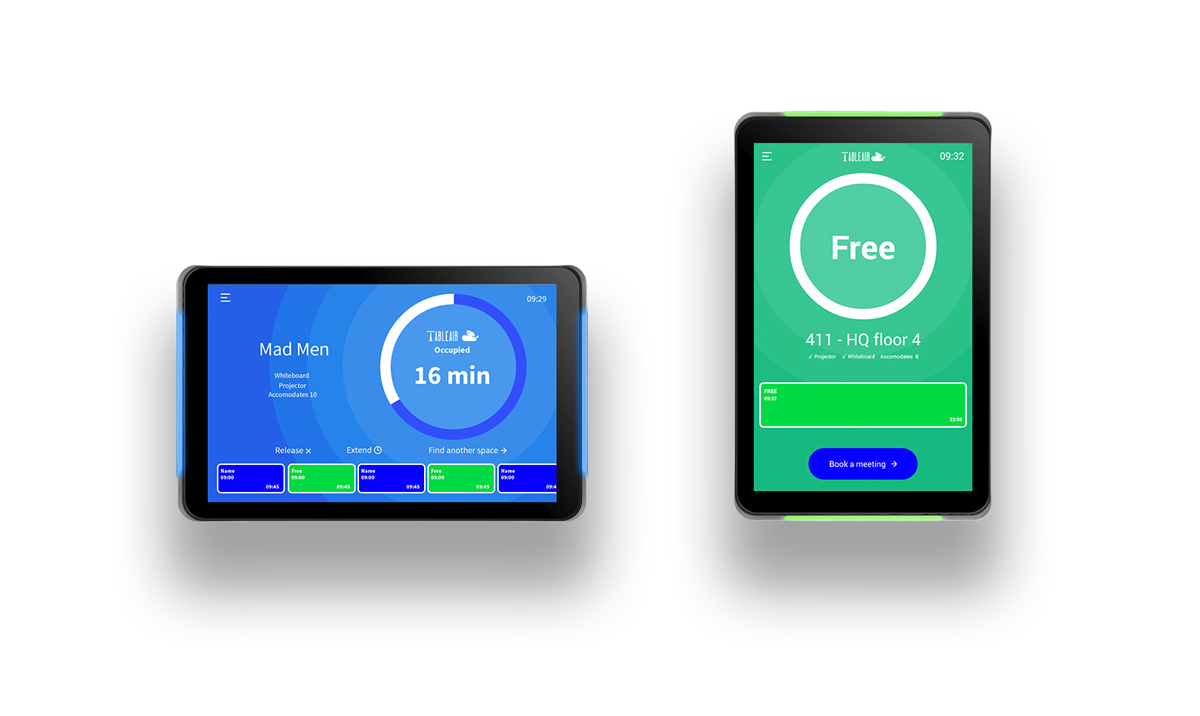
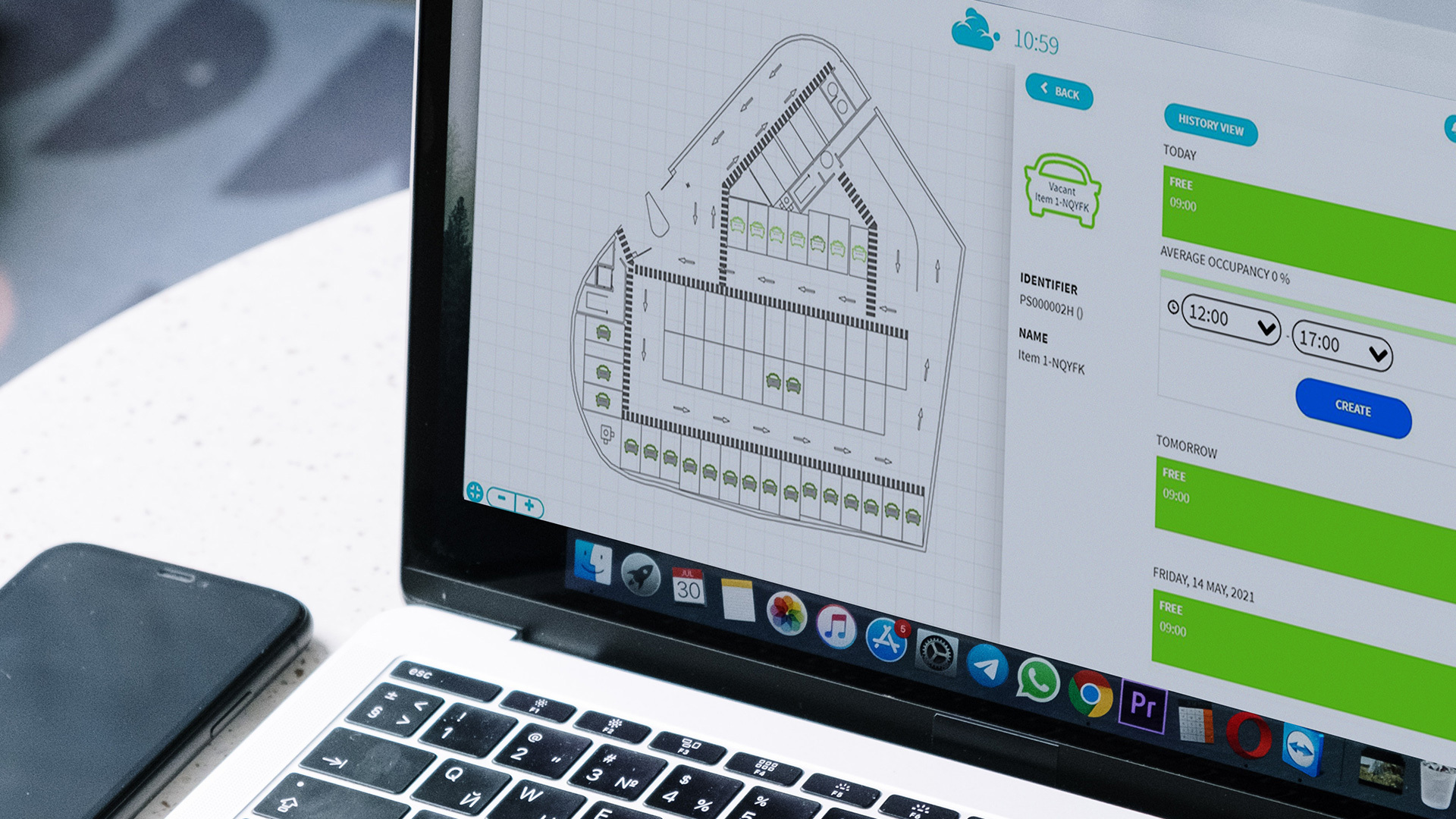
Screenshot of the mobile app of the workspace booking solution, used to manage space allocation and increase utilization. The solution helps locate available desks on different office floors or buildings and book them for the required time. The interactive floor map leads the way to the desk or even helps to find a teammate.Screenshot of the meeting rooms' booking system used to manage meeting room bookings through a web application or mobile app - change time, invite participants, and find the room through a floor map. Its analytics provide insights by analyzing meeting rooms' day-to-day usage.Screenshot of meeting room digital signage that indicates the room occupancy status from afar. The display works in either in portrait or landscape mode, and displays meeting room information, booking details, and lets users either release the room or book it on the spot.Screenshot of the parking booking system used to manage car parking lots, that helps to utilize the entire space. Parking spots can be reserved in advance or shared through the mobile app, grouped in different zones, or assigned exclusively to certain people.