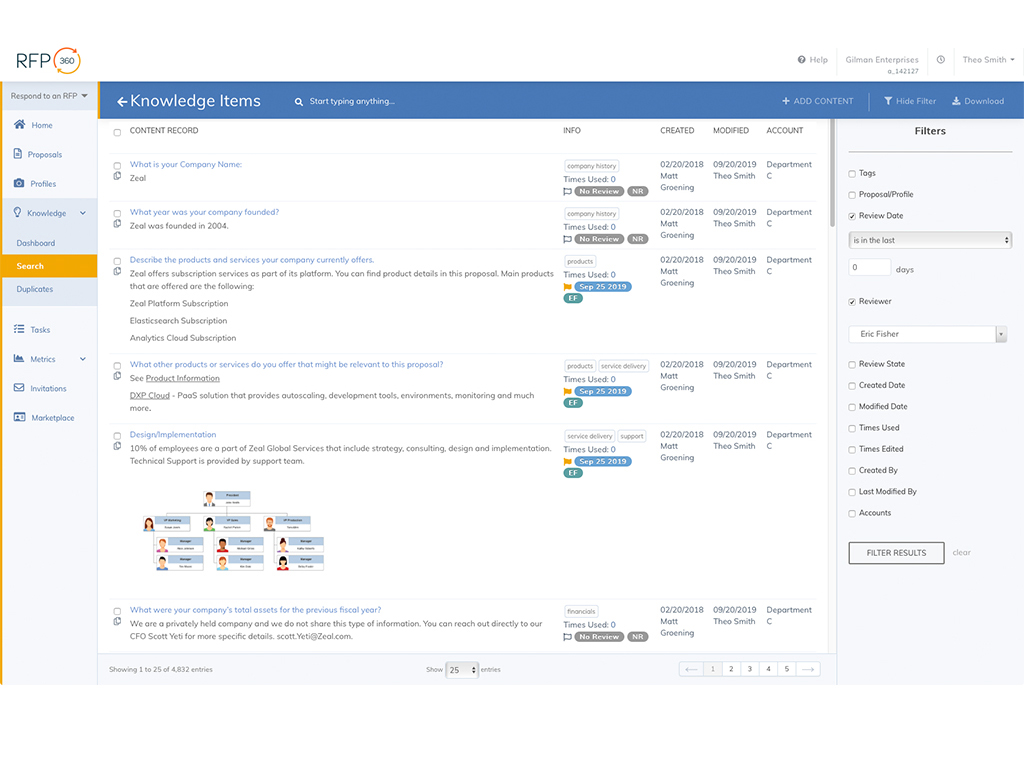
RFP360, from Responsive (formerly RFPIO) is used by organizations to request information, respond to requests and connect, aiming to make the RFP and proposal process more efficient, effective, collaborative, consistent and repeatable for everyone.
N/A
Pricing
RFP360
Editions & Modules
No answers on this topic
Offerings
Pricing Offerings
RFP360
Free Trial
Yes
Free/Freemium Version
No
Premium Consulting/Integration Services
Yes
Entry-level Setup Fee
No setup fee
Additional Details
Pricing is based on use case and client requirements.
Principal at Cerity Partners (Financial Services, 201-500 employees)
Chose RFP360
I was not involved in the process of selecting RFP360 for our firm, so I am largely unfamiliar with competitors. I am, however, quite pleased with RFP360 as a user, and am confident that my colleagues who were responsible for making the decision were thorough and discerning.
A de minimis incentive was given to thank the reviewer for their time. The incentive was not used to bias or drive a particular response, nor was the incentive contingent on a positive endorsement. More Info
Enterprise Account Executive in Sales at TrueAccord (Financial Services, 201-500 employees)
Chose RFP360
None, RFP360 is the first and the last one we will use always. It is the best, I am not sure of other competitors but I have zero desire to even look for them. Everything you need is inside this one software, and if you have past RFPs you can juggle in, it is an absolute breeze …
A de minimis incentive was given to thank the reviewer for their time. The incentive was not used to bias or drive a particular response, nor was the incentive contingent on a positive endorsement. More Info
Vice President of Marketing and Communications in Marketing at Optimum Healthcare IT (Hospital & Health Care, 501-1000 employees)
Chose RFP360
It was the only one that had a content library that was separate from the main system. Initially, we were only looking for a content library, but we ultimately went with the full RFP360 system and will move to implement more tools in the future. We stopped looking at other …
A de minimis incentive was given to thank the reviewer for their time. The incentive was not used to bias or drive a particular response, nor was the incentive contingent on a positive endorsement. More Info
In my opinion, RFP360 is well suited for any mid-to-large-scale RFP/Search project. It is probably overkill for smaller, less extensive projects, and time required for setup might outweigh any potential efficiencies.
A de minimis incentive was given to thank the reviewer for their time. The incentive was not used to bias or drive a particular response, nor was the incentive contingent on a positive endorsement. More Info
A de minimis incentive was given to thank the reviewer for their time. The incentive was not used to bias or drive a particular response, nor was the incentive contingent on a positive endorsement. More Info
A de minimis incentive was given to thank the reviewer for their time. The incentive was not used to bias or drive a particular response, nor was the incentive contingent on a positive endorsement. More Info
This tool has been fantastic as we have revamped our RFP process. We are much faster and far more efficient.Our win rate is up, but I am not 100% sure this is the cause, but I love to see it. The customer support and training are also fantastic. Thumbs up!
A de minimis incentive was given to thank the reviewer for their time. The incentive was not used to bias or drive a particular response, nor was the incentive contingent on a positive endorsement. More Info
A de minimis incentive was given to thank the reviewer for their time. The incentive was not used to bias or drive a particular response, nor was the incentive contingent on a positive endorsement. More Info
Excellent support during the training process. Since we were onboarded, we have not had too many questions, but when we did, they were answered promptly and thoroughly. We have been very satisfied.
A de minimis incentive was given to thank the reviewer for their time. The incentive was not used to bias or drive a particular response, nor was the incentive contingent on a positive endorsement. More Info
A de minimis incentive was given to thank the reviewer for their time. The incentive was not used to bias or drive a particular response, nor was the incentive contingent on a positive endorsement. More Info
I was not involved in the process of selecting RFP360 for our firm, so I am largely unfamiliar with competitors. I am, however, quite pleased with RFP360 as a user, and am confident that my colleagues who were responsible for making the decision were thorough and discerning.
A de minimis incentive was given to thank the reviewer for their time. The incentive was not used to bias or drive a particular response, nor was the incentive contingent on a positive endorsement. More Info
A de minimis incentive was given to thank the reviewer for their time. The incentive was not used to bias or drive a particular response, nor was the incentive contingent on a positive endorsement. More Info