Rencore Code (SPCAF) vs. SonarQube Server

Overview
ProductRatingMost Used ByProduct SummaryStarting Price
Rencore Code (SPCAF)
Score 8.8 out of 10
Enterprise companies (1,001+ employees)
Many organizations that use Office 365 are exposed to security risks that they are unaware of. As they extend SharePoint to meet their business needs, they build applications using technologies that range from end-user Microsoft Flow to developer-focused SharePoint Framework. Unfortunately, all of these custom applications are capable of circumventing the security measures organizations have in place exposing the organization and its data to security…N/A
SonarQube Server
Score 9.5 out of 10
N/A
SonarQube is a code quality and vulnerability solution for development teams that integrates with CI/CD pipelines to ensure the software you produce is secure, reliable, and maintainable.
$720
per year per installation
Pricing
Rencore Code (SPCAF)SonarQube Server
Editions & Modules
No answers on this topic
Community
Free
Developer EDITION
starting at $720
per year per installation
Enterprise EDITION
Contact sales for pricing
per year per installation
Data Center EDITION
Contact sales for pricing
per year per installation
Offerings
Pricing Offerings
Rencore Code (SPCAF)SonarQube Server
Free Trial
YesYes
Free/Freemium Version
NoYes
Premium Consulting/Integration Services
NoNo
Entry-level Setup FeeOptionalNo setup fee
Additional Details
More Pricing Information
Community Pulse
Rencore Code (SPCAF)SonarQube Server
Best Alternatives
Rencore Code (SPCAF)SonarQube Server
Small Businesses
GitLab
GitLab
Score 8.7 out of 10
GitLab
GitLab
Score 8.7 out of 10
Medium-sized Companies
Veracode
Veracode
Score 8.7 out of 10
Veracode
Veracode
Score 8.7 out of 10
Enterprises
Veracode
Veracode
Score 8.7 out of 10
Veracode
Veracode
Score 8.7 out of 10
All AlternativesView all alternativesView all alternatives
User Ratings
Rencore Code (SPCAF)SonarQube Server
Likelihood to Recommend
8.8
(0 ratings)
8.8
(0 ratings)
Usability
-
(0 ratings)
9.1
(0 ratings)
Support Rating
9.1
(0 ratings)
9.0
(0 ratings)
User Testimonials
Rencore Code (SPCAF)SonarQube Server
Likelihood to Recommend
For Microsoft shops that are doing custom development on the Microsoft cloud platform in Office 365 and Azure, the Rencore toolset is an absolute must, especially if you are involved in converting farm solutions to cloud, or just moving into cloud development for the first time.
Read full review
Scenarios where SonarQube is well suited:
  1. Large codebase: The tool's static analysis capabilities can help teams quickly identify and fix bugs, vulnerabilities, and code smells in large codebases.
  2. Compliance and security: The tool can check the code against industry standards or regulations, such as OWASP and CWE, and identify any issues that need to be addressed.
  3. Agile development: SonarQube can be integrated with CI/CD pipelines allowing teams to continuously monitor and improve code quality throughout the development process.
  4. Teams using multiple languages: Teams that use multiple programming languages can benefit from using SonarQube, as the tool supports a wide range of languages and can be integrated with a variety of development tools.
Scenarios where SonarQube may be less appropriate:
  1. Small codebase: Organizations with a small codebase may not see the full benefits of using SonarQube, as the tool's static analysis capabilities may be overkill for a smaller codebase.
  2. Limited resources: Organizations with limited resources may find it difficult to set up and configure SonarQube, as the tool can be complex and may require specialized expertise.
  3. Limited integration: Organizations that use development tools or IDEs that are not supported by SonarQube may find it difficult to integrate the tool into their existing development workflow.
  4. Limited scalability: Large organizations with millions of lines of code may find SonarQube's performance and scalability to be an issue. It may take longer for the analysis to finish and the results may not be as accurate.
Read full review
Pros
  • Support - It is very quick relative to other vendors in this space and also very thorough.
  • Product Features - It appears to be the only product in the market that has ALL the pieces for a baseline SPFx project versus no tools or manual activities.
Read full review
  • Generating code quality report
  • Calculates junit coverage of the codebase very efficiently and precisely
  • Highlights the bugs and vulnerabilities in our codebase
  • Informs the user of the improvements which can be done to the code to make it cleaner
  • SonarQube also suggests remediation and resolution of the problems it highlights
Read full review
Cons
  • Rencore's product line is of course still a bit of a niche: SharePoint code quality is not something every organization on the planet is concerned with - although Rencore does much more than that.
  • We feel Rencore's marketing efforts are mainly targeted at technologists. There's a lot of other potential, especially for their platform governance product.
Read full review
  • It doesn't provide automatic pull request with fixes
  • It doesn't provide insights about the libraries of the projects
  • The administration management user interface could be simplified
  • It doesn't provide an order to fix issues, like archives with more and frequent commits have top priority
Read full review
Usability
No answers on this topic
It can improve in some user experience and usability parts, like the code view and the way we assign issues it's a bit hidden and not highlighted
Read full review
Support Rating
Happy with the fast and meaningful responses.
Read full review
We we easily able to integrate the SonarQube steps into our TFS process via the Microsoft Marektplace, we didn't have the need to call SonarQube support. We've used their online documentation and community forum if we ran into any issues.
Read full review
Alternatives Considered
I don't know of any products that compete in the space and if there were any, they would not stand a chance against Rencore. Behind any good product is a team of highly skilled individuals, who all have the same goal, who are passionate what they do and lastly, are in it for the betterment of where they started; As Developers themselves. You can't buy that
Read full review
SonarQube identifies significant more thing compared to the built-in suggestions in IntelliJ IDEA. The suggestions how to correct issues are also a lot better with SonarQube. IntelliJ IDEA provides great refactoring support to make it easy to refactor the code to solve issues. We use these tools together and they really complement each other.
Read full review
Return on Investment
  • Valuable insights into large existing SharePoint customizations that would otherwise would have taken weeks to analyze and assess on quality.
  • Without Rencore's tooling, it would be impossible to track changes to client-side code. For example, we can tell exactly who changed which JavaScript in which webpart in the environment.
  • Transformation tools helped developers migrate their existing code bases to the cloud, while already providing an automatically translated code base to start from.
Read full review
  • Positive ROI from the standpoint of flagging several issues that would have otherwise likely been unaddressed and caused more time to be spent closer to launch
  • Slightly positive ROI from time-saving perspective (it's an automated check which is nice, but depending on the issues it finds, can take developers time to investigate and resolve)

Read full review
ScreenShots

Rencore Code (SPCAF) Screenshots

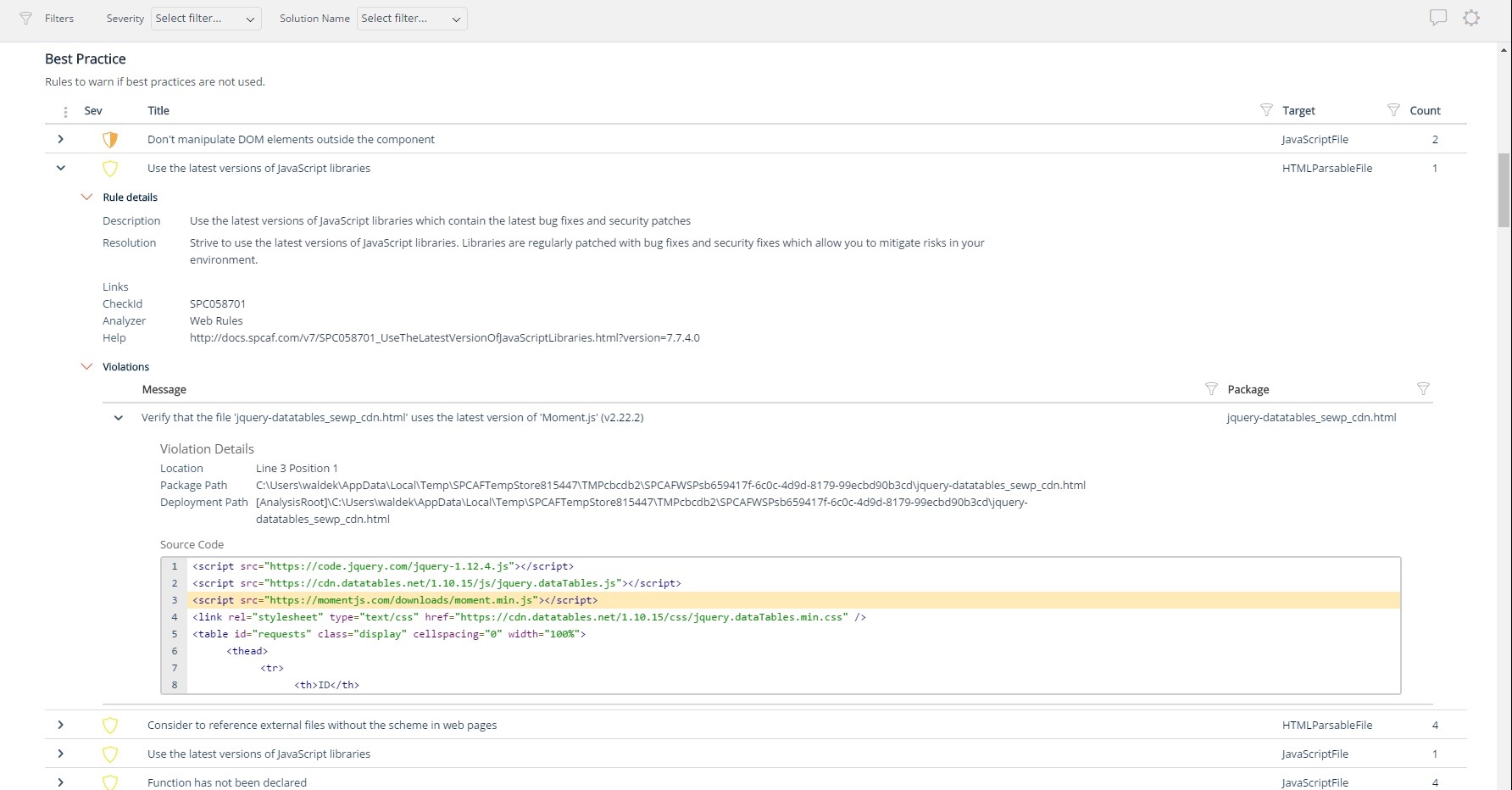
Screenshot of Using third party libraries allows you to build your SharePoint and Office 365 applications faster and focus on functionality specific for your organization. But regularly, security vulnerabilities are discovered in these external dependencies. If left unpatched, they become a security risk for your organization and its data. Rencore automatically warns you when any of the third-party libraries used in your applications has known vulnerabilities that could be exploited to hack your environment.Screenshot of Third-party libraries are regularly updated to improve performance and stability. Many organizations however don’t know when a new version of the library they use in their SharePoint and Office 365 applications is released and they keep using the old versions which exposes them not only to bugs but also to security risks. Rencore automatically warns you when a new version of a library that you use is available allowing you to verify the contents and the impact of the upgrade.Screenshot of Without proper tooling, it’s impossible to successfully enforce an application governance plan in SharePoint and Office 365. The number of ways in which users could possibly extend SharePoint combined with the thousands of pages and hundreds of settings that can be configured, make it impossible to continuously monitor for alignment with the organizational policies. 

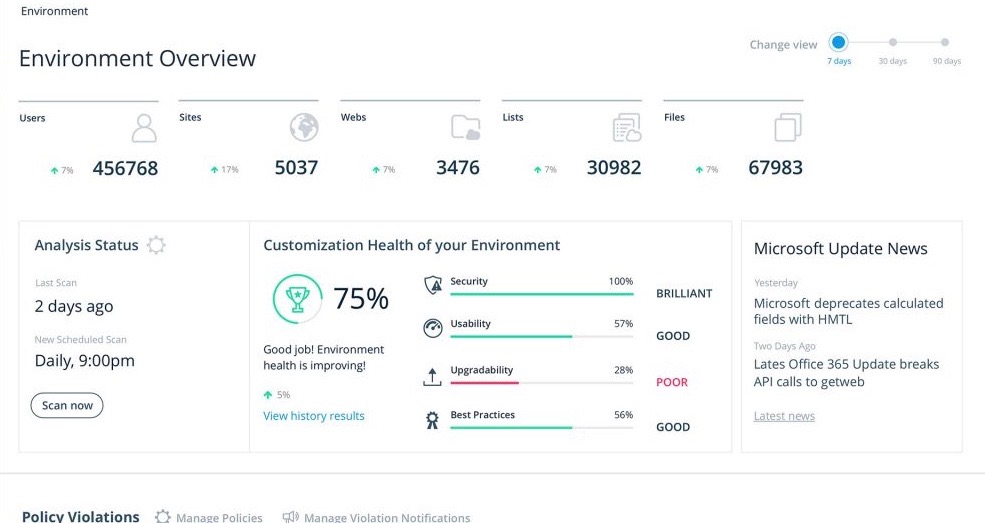
Rencore helps you understand the configuration of your tenant as well as discover the different SharePoint and Office 365 applications used in your organization. With Rencore you will easily understand how these applications are built, which dependencies they have and which possible risks they expose your organization to.Screenshot of Your organization tailors SharePoint and Office 365 to its specific needs to get more value of its investment in the platform. But each organization has different needs and is subject to different laws and regulations. 

Rencore allows you to configure what policies you want to enforce in your tenant. Each violation gets reported so that you can take corrective action and successfully enforce your organization’s application governance plan.Screenshot of As you start discovering issues in your SharePoint and Office 365 environment, you will be taking corrective actions to mitigate the risks. Rencore helps you track these issues and the related tasks so that you can easily follow up on the status of each issue and control that your organization is improving over time.Screenshot of It’s not enough to have your SharePoint and Office 365 applications verified for compliancy with your organization’s policies before using them in production. As your applications evolve, they will require changes and each change exposes you to a number of risks. Rencore helps you track how your applications change over time, even if these applications don’t follow centralized deployment and are managed by power-users. Each change is assessed for potential risks that it could expose your organization to.

SonarQube Server Screenshots

Screenshot of Application Status.Screenshot of Portfolio Overview.Screenshot of Taint Analysis.