Rencore Code (SPCAF) vs. SAI360

Overview
ProductRatingMost Used ByProduct SummaryStarting Price
Rencore Code (SPCAF)
Score 8.8 out of 10
Enterprise companies (1,001+ employees)
Many organizations that use Office 365 are exposed to security risks that they are unaware of. As they extend SharePoint to meet their business needs, they build applications using technologies that range from end-user Microsoft Flow to developer-focused SharePoint Framework. Unfortunately, all of these custom applications are capable of circumventing the security measures organizations have in place exposing the organization and its data to security…N/A
SAI360
Score 8.0 out of 10
N/A
SAI360 merges GRC software and Ethics & Compliance Learning to enhance risk management. Its scalable solutions have supported global organizations for 25+ years.N/A
Pricing
Rencore Code (SPCAF)SAI360
Editions & Modules
No answers on this topic
Offerings
Pricing Offerings
Rencore Code (SPCAF)SAI360
Free Trial
YesNo
Free/Freemium Version
NoNo
Premium Consulting/Integration Services
NoNo
Entry-level Setup FeeOptionalNo setup fee
Additional Details
More Pricing Information
Community Pulse
Rencore Code (SPCAF)SAI360
Features
Rencore Code (SPCAF)SAI360
Governance, Risk & Compliance
Comparison of Governance, Risk & Compliance features of Product A and Product B
Rencore Code (SPCAF)
-
Ratings
SAI360
7.7
Ratings
2% above category average
Common repository of GRC items00 Ratings9.00 Ratings
Risk management00 Ratings7.30 Ratings
Integration with Corporate Performance Management (CPM) systems00 Ratings7.00 Ratings
GRC policy management00 Ratings8.00 Ratings
Incident management00 Ratings7.30 Ratings
Best Alternatives
Rencore Code (SPCAF)SAI360
Small Businesses
GitLab
GitLab
Score 8.7 out of 10
Egnyte
Egnyte
Score 9.6 out of 10
Medium-sized Companies
Veracode
Veracode
Score 8.7 out of 10
Forcepoint DLP
Forcepoint DLP
Score 6.2 out of 10
Enterprises
Veracode
Veracode
Score 8.7 out of 10
Forcepoint DLP
Forcepoint DLP
Score 6.2 out of 10
All AlternativesView all alternativesView all alternatives
User Ratings
Rencore Code (SPCAF)SAI360
Likelihood to Recommend
8.8
(0 ratings)
7.3
(0 ratings)
Usability
-
(0 ratings)
9.0
(0 ratings)
Support Rating
9.1
(0 ratings)
-
(0 ratings)
User Testimonials
Rencore Code (SPCAF)SAI360
Likelihood to Recommend
For Microsoft shops that are doing custom development on the Microsoft cloud platform in Office 365 and Azure, the Rencore toolset is an absolute must, especially if you are involved in converting farm solutions to cloud, or just moving into cloud development for the first time.
Read full review
The usage of ROAM, as well as the integration of external programmes through API and import functions, has almost reduced duplication of work. One thing to keep in mind is that your use cases must be very clear. There are a lot of SAI solutions, and their titles don't always correspond to what they actually perform.
Read full review
Pros
  • Support - It is very quick relative to other vendors in this space and also very thorough.
  • Product Features - It appears to be the only product in the market that has ALL the pieces for a baseline SPFx project versus no tools or manual activities.
Read full review
  • Customized unified design platform
  • Modules that fit your organization
  • Low technology involvement with information department.
  • Built on foundational platforms some bidirectional in the ERM framework with TPRM contracts
  • Single sign-on web-based applications
Read full review
Cons
  • Rencore's product line is of course still a bit of a niche: SharePoint code quality is not something every organization on the planet is concerned with - although Rencore does much more than that.
  • We feel Rencore's marketing efforts are mainly targeted at technologists. There's a lot of other potential, especially for their platform governance product.
Read full review
  • Reporting
  • Legacy modules (i.e. tasks)
  • Look and feel
  • Intuitive UI
Read full review
Usability
No answers on this topic
Overall it is a very versatile system that does help to keep our processes automated and secure. We are able to streamline our day to day activities.
Read full review
Support Rating
Happy with the fast and meaningful responses.
Read full review
No answers on this topic
Alternatives Considered
I don't know of any products that compete in the space and if there were any, they would not stand a chance against Rencore. Behind any good product is a team of highly skilled individuals, who all have the same goal, who are passionate what they do and lastly, are in it for the betterment of where they started; As Developers themselves. You can't buy that
Read full review
This system is compatible and compares to others in the marketplace.
Read full review
Return on Investment
  • Valuable insights into large existing SharePoint customizations that would otherwise would have taken weeks to analyze and assess on quality.
  • Without Rencore's tooling, it would be impossible to track changes to client-side code. For example, we can tell exactly who changed which JavaScript in which webpart in the environment.
  • Transformation tools helped developers migrate their existing code bases to the cloud, while already providing an automatically translated code base to start from.
Read full review
  • Less administration for risk assessments allowing for quarterly control assessments
  • 100% removal of IT effort in our annual conflicts of interest assessments
  • Reduction of manual processes
  • Consolidation of legacy systems into SAI360
Read full review
ScreenShots

Rencore Code (SPCAF) Screenshots

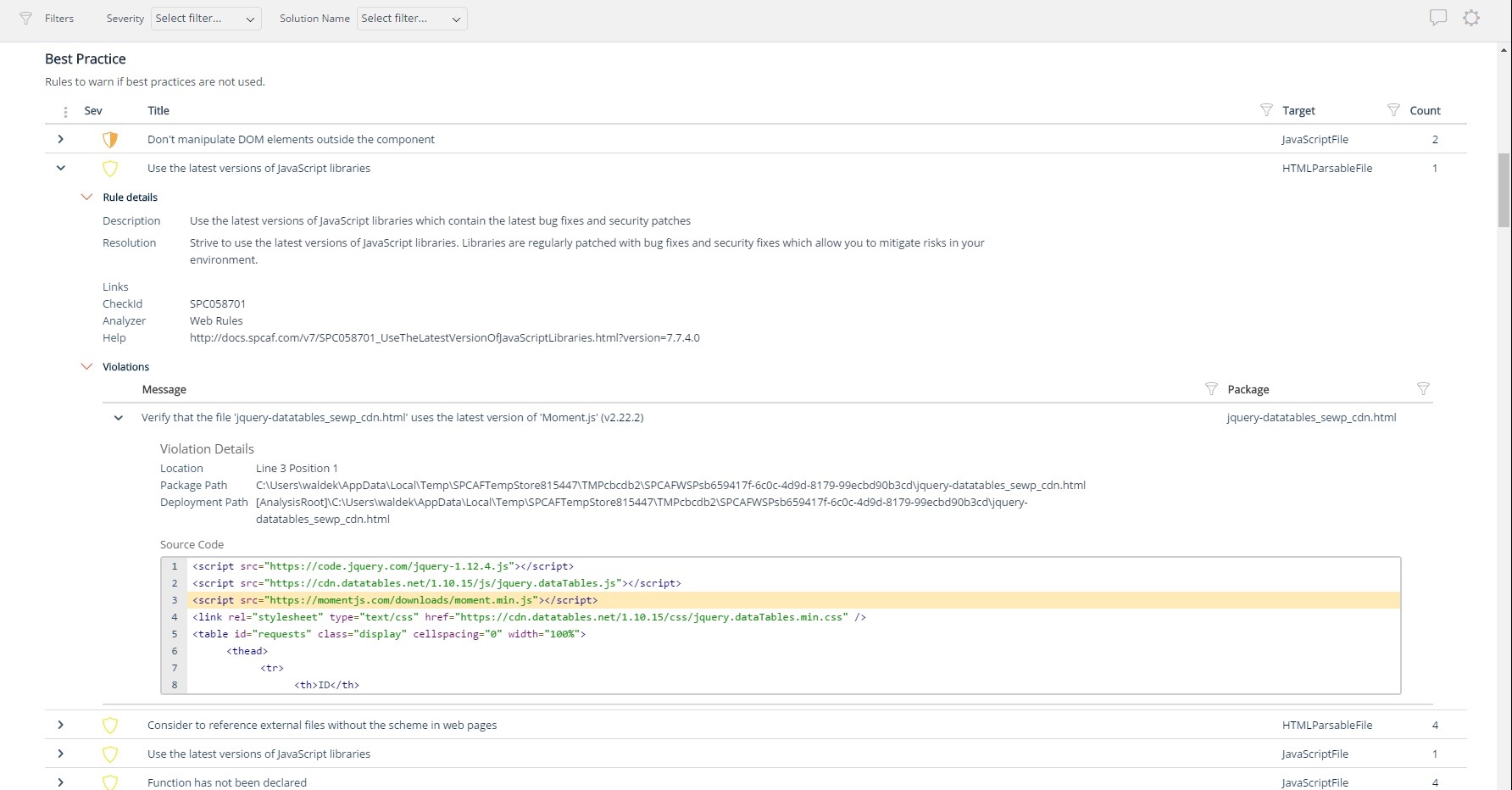
Screenshot of Using third party libraries allows you to build your SharePoint and Office 365 applications faster and focus on functionality specific for your organization. But regularly, security vulnerabilities are discovered in these external dependencies. If left unpatched, they become a security risk for your organization and its data. Rencore automatically warns you when any of the third-party libraries used in your applications has known vulnerabilities that could be exploited to hack your environment.Screenshot of Third-party libraries are regularly updated to improve performance and stability. Many organizations however don’t know when a new version of the library they use in their SharePoint and Office 365 applications is released and they keep using the old versions which exposes them not only to bugs but also to security risks. Rencore automatically warns you when a new version of a library that you use is available allowing you to verify the contents and the impact of the upgrade.Screenshot of Without proper tooling, it’s impossible to successfully enforce an application governance plan in SharePoint and Office 365. The number of ways in which users could possibly extend SharePoint combined with the thousands of pages and hundreds of settings that can be configured, make it impossible to continuously monitor for alignment with the organizational policies. 

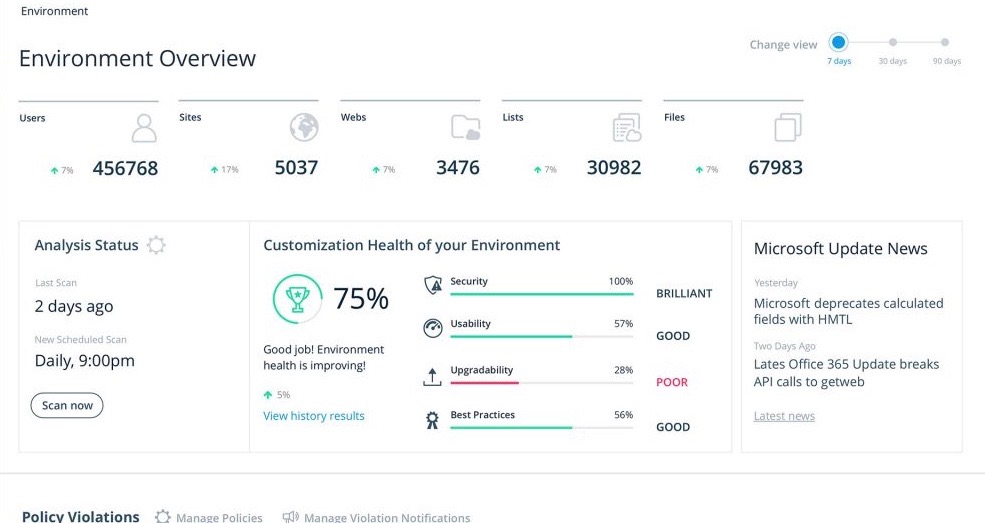
Rencore helps you understand the configuration of your tenant as well as discover the different SharePoint and Office 365 applications used in your organization. With Rencore you will easily understand how these applications are built, which dependencies they have and which possible risks they expose your organization to.Screenshot of Your organization tailors SharePoint and Office 365 to its specific needs to get more value of its investment in the platform. But each organization has different needs and is subject to different laws and regulations. 

Rencore allows you to configure what policies you want to enforce in your tenant. Each violation gets reported so that you can take corrective action and successfully enforce your organization’s application governance plan.Screenshot of As you start discovering issues in your SharePoint and Office 365 environment, you will be taking corrective actions to mitigate the risks. Rencore helps you track these issues and the related tasks so that you can easily follow up on the status of each issue and control that your organization is improving over time.Screenshot of It’s not enough to have your SharePoint and Office 365 applications verified for compliancy with your organization’s policies before using them in production. As your applications evolve, they will require changes and each change exposes you to a number of risks. Rencore helps you track how your applications change over time, even if these applications don’t follow centralized deployment and are managed by power-users. Each change is assessed for potential risks that it could expose your organization to.