Rackspace Fabric vs. VMware Tanzu CloudHealth

Overview
ProductRatingMost Used ByProduct SummaryStarting Price
Rackspace Fabric
Score 6.3 out of 10
N/A
A solution to bring cloud security, billing, operations and management together. Rackspace Fabric offers a single platform for automated multicloud management. Service includes access to Rackspace cloud technology expertise, and provides a unified interface management for all cloud resources across Azure, AWS, GCP, and VMware, in a single, SaaS like operating environment.
$500
per month
VMware Tanzu CloudHealth
Score 7.7 out of 10
N/A
Tanzu CloudHealth (formerly VMware Aria Cost Powered by CloudHealth) simplifies financial management, streamlines operations, and improves organizational collaboration across your multi-cloud environment.N/A
Pricing
Rackspace FabricVMware Tanzu CloudHealth
Editions & Modules
Minimum Service
$500.00
per month
No answers on this topic
Offerings
Pricing Offerings
Rackspace FabricVMware Tanzu CloudHealth
Free Trial
NoYes
Free/Freemium Version
NoYes
Premium Consulting/Integration Services
NoNo
Entry-level Setup FeeNo setup feeNo setup fee
Additional Details
More Pricing Information
Community Pulse
Rackspace FabricVMware Tanzu CloudHealth
Best Alternatives
Rackspace FabricVMware Tanzu CloudHealth
Small Businesses
VMware Cloud Director
Score 8.5 out of 10
VMware Cloud Director
Score 8.5 out of 10
Medium-sized Companies
IBM Turbonomic
IBM Turbonomic
Score 9.3 out of 10
IBM Turbonomic
IBM Turbonomic
Score 9.3 out of 10
Enterprises
vRealize Operations (discontinued)
Score 10.0 out of 10
vRealize Operations (discontinued)
Score 10.0 out of 10
All AlternativesView all alternativesView all alternatives
User Ratings
Rackspace FabricVMware Tanzu CloudHealth
Likelihood to Recommend
7.3
(0 ratings)
-
(0 ratings)
User Testimonials
Rackspace FabricVMware Tanzu CloudHealth
Likelihood to Recommend
In the case of our non working hours, this service is excellent. Since the service auto creates a support ticket for the Rackspace team in case of a service being down, the support team can work on a support ticket and fix the issue for us. This is all automated and we don't even need to be involved most of times.
Read full review
No answers on this topic
Pros
  • Immediate email notifications: In case a service is down on our servers, we get immediate email notifications via rackspace cloud monitoring service. This helps us to know about the issues and we get in contact with support team to get it resolved.
  • Configuration on specific services: We can configure this monitoring on specific services. So for example if i don't want to get notified if MySQL concurrent users limit reached, then I do not need to configure this monitoring for MySQL. I can just use it whenever needed for defined services.
  • Group emails and technical contacts emails: The monitoring service can send email alerts to a number of email addresses. Primarily the ones who are added as a technical contact. It helps all people get notified about any issue.
  • Auto ticket management: Rackspace automatically creates a support ticket when a service is down and is notified by their monitoring service.
Read full review
No answers on this topic
Cons
  • It would be nice if there were more templates so that beginners could easily create complex monitors
  • I seemed to stumble upon the cloud monitoring service after having Rackspace for a while
Read full review
No answers on this topic
Alternatives Considered
I've used Google/Amazons web services. They both make it easy to accidentally incur bills for things you didn't know were billable (or forgot about). Rackspace makes it extremely clear and doesn't lure you in with so many free trials that try to lock you in at a later time
Read full review
No answers on this topic
Return on Investment
  • I have overpaid in the past for services I didn't need
  • The steepish learning curve might slow things down at first
  • I have learned a lot using Rackspace Cloud Monitoring!
Read full review
No answers on this topic
ScreenShots

VMware Tanzu CloudHealth Screenshots

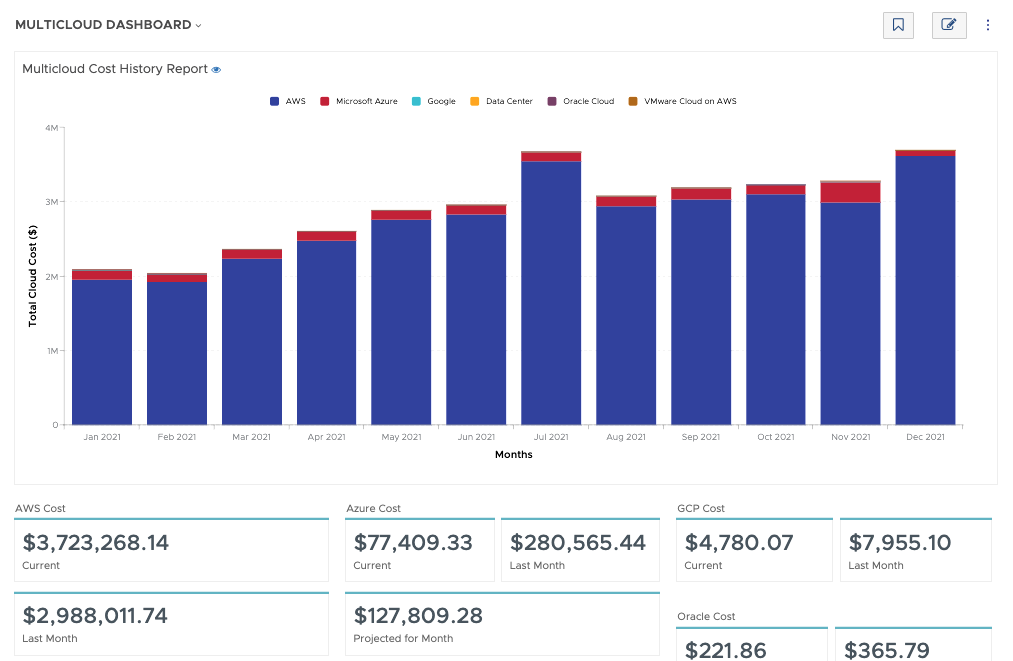
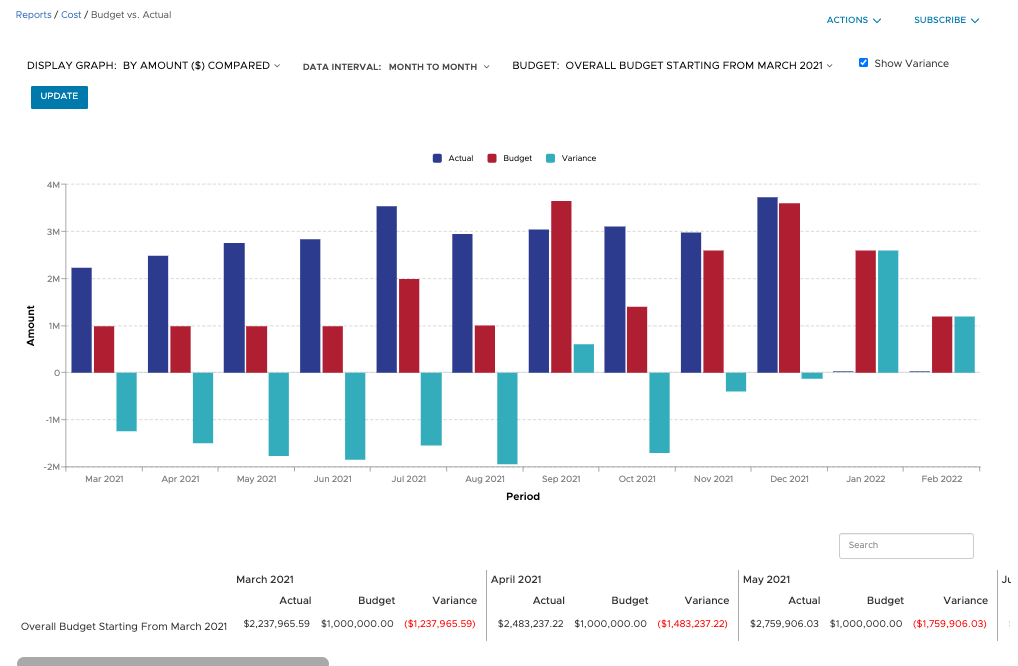
Screenshot of Filter and refine out-of-the-box graphical and tabular reports to correlate datasets for analysis against your business objectives. Create custom dashboards across clouds and easily build detailed reports from scratch, known as CloudHealth FlexReports, across various dimensions to perform more granular analysis on cost, usage, and asset data.Screenshot of Configure budgets to visualize your expected costs for the year in advance and compare it with actual spend as the year progresses. Create as many overall and categorized budgets as you need to run your business, aligned to your company’s fiscal year. Proactively alert stakeholders when costs are forecasted to exceed pre-defined budgets. Toggle on forecasting for reports to predict future values based on historical data for the interval you define.Screenshot of Use CloudHealth’s dynamic policy engine to drive consistent operations and continuously monitor your environment. Quickly identify opportunities to proactively reduce spend, remediate risks, and streamline configuration. Get alerted when conditions deviate from your desired state and enable automated actions to execute changes in your environment—stop, start, resize, or terminate infrastructure—all at the frequency you define.Screenshot of Align cloud data to your business with CloudHealth FlexOrgs and benefit from greater control over user access, sharing, and delegation across multiple levels of organizational hierarchy. Further fine tune the platform by dynamically allocating assets to business groups known as CloudHealth Perspectives. View and analyze your cloud environment by project, application, line of business, cost center, and more, to drive accountability for cost and usage.