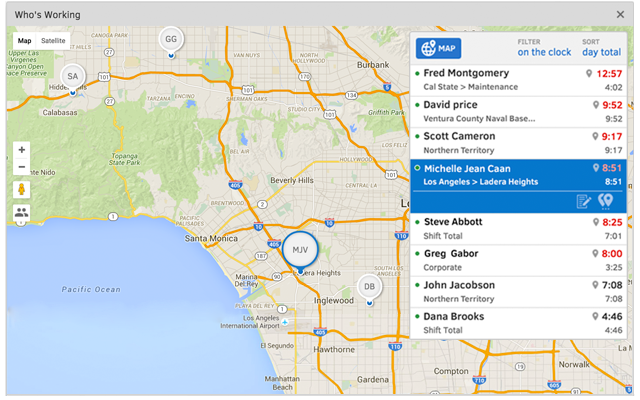
QuickBooks Time (formerly TSheets) is a cloud-based time tracking and scheduling app that allows employees to clock in and out from the job site with the devices they’ve already got in their pockets. The vendor aims to help companies replace paper timesheets with accurate, electronic time data as well as make payroll and invoicing faster and less costly. QuickBooks Time also accurately tracks time and GPS points (even without cell or internet service) then automatically syncs when back…
$0
1 user, unlimited projects
UKG Pro
Score 7.5 out of 10
N/A
UKG delivers cloud-based HCM solutions including UKG Pro that help businesses simplify payroll computations, accelerate talent acquisition, manage time and attendance, and support proactive, strategic talent management on a global level.
N/A
Pricing
QuickBooks Time
UKG Pro
Editions & Modules
Free
$0
1 user, unlimited projects
Premium
$8
per user/month + $20 base fee/month (paid annually)
Elite
$10
per user/month + $40 base fee/month (paid annually)
It would be very useful for certain remote jobs that require a high level of presence, as in the case of web development, or remote maintenance sessions, so that when reviewing the work data it is possible to ensure that there will be no failures. By being able to include files in the management, from the equipment tab, it is possible to fully control the hours in which each change in these files were made.
I would say, well, I don't want to focus on less appropriate. I want to be well suited. I really feel like if the transparency with our count rep and then just diving in onto how to problem solve and how to troubleshoot, I think that's most important with that.
UKG has an amazing support team to reach out to if assistance is needed
All add-ons of UKG Pro integrate seamlessly making it a powerful software program
UKG Pro is very configurable to meet the specific needs of companies
It is easy to use and navigate
The mobile app is loved by all employees and provides on-demand access
The Ultimate Community is amazing!! On-demand information on all products and how they are used. Connect with other companies that use UKG Pro and learn from each other.
The Learning Centre is also amazing!! Learning right at your fingertips anytime, anywhere.
Offer a fully integrated reporting solution that pulls from all modules versus a separate analytics tool in each module.
Ability to use the ideas UKG Pro presents without being forced into specific modules. Ex Provide a Learning space where ANY learning platform the customer chooses plugs in, a Recruiting/Onboarding Space where ANY platform will plug in, EE Engagement, Performance, ... then the data connects to the data points within the architecture. With this model, anyone would be able to use the Career Designer versus limited to only those who have the perfect combination of products. This is just an example. Many times the products are created by UKG Pro that are amazing, then comes the "You must have A, B, C, D modules to use it" which excludes many customers and limits UKG Pro's selling potential.
At my last organization, we had what was formerly referred to as a "Global" account rep. This person had very limited amount of clients, we met on every case. They delegated our cases immediately in products outside of core to the same team member from that product. Our response time was usually less than one day. It was the best customer service I have had in 10 years as a client. Why is this model not looked at for everyone versus 3 different reps. This one person handled everything except sales. IT was beautiful. We met weekly. We never had cases go beyond a few days unless a JIRA was in play. Customer Service matters so much where many companies sell similar technology.
Org Chart - Executives would like the ability to stage movement and budget to see what the org would look like in a reorg planning. There is no ability to move, rearrange, export to different applications like PowerPoint.
TSheets tech support people, like Shawn Sommer, from Tsheets. She has been instrumental, after terminating the person in charge of TSheets I was left with a learning curve too high to climb but after 10 mins of her instructions I was able to make payroll in no time. She cleared all errors that nobody had fixed before. TSheets is not a vendor for me, TSheets is my partner in business. Thank you TSheets.
The only reason that I give a 9 rather than a 10 is because, while I am an influencer in the decision making process, the final decision to renew vendor relationships is by committee. If the final decision is up to me, Independent Bank would be a partner with Ultimate Software for the rest of my career.
Overall good product. I think some integration issues that are probably on the way would give it a higher score. Easy to use, easy to see how well it connects to current book keeping software we use, and would be easy to adopt by someone who is a QuickBook user that has billable clients or just wants that metric to see how their time is allocated.
It gets the job done, but not with a few deep sighs. Once you know where stuff lives, it's manageable, but the first learning curve is steep, some menus feel buried. However, it's consistent, reliable and doesn't crash on me, which counts for a lot. With a little UI glow up it could push into a 9 zone.
Our up time has been 100% in the 2 and half years as I recall. We have had between 5 to 10 situations where Ultimate proactively advised us that there were global system issues and provide us with updates status until the issue has been resolved. I do not recall any internal incidents from our employees about an inability to access the system of UltiPro
Normally UKG Pro loads quickly. We had been having major issues with reports running in a timely manner but recently they broke out our virtual server to another instance where is wasn't sharing resources and that seems to have helped reporting run more efficiently.
I have never failed to have an issue resolved within minutes of contacting Support. Jen D recently assisted my with an export issue and I was back on track in less the 10 minutes. She was knowledgable and thought about the current and future contexts of the issue and assured there would be no recurrence next payroll.
The quality of UKG Support is related directly to the UKG rep. who handles the issue. In some cases you get someone who really is good at supporting the product and others may not have as much experience and it shows
I've been to a few in-person (hands on) training sessions and it is very similar to the online classes. You have the same reference material to look back on after the training. So regardless of in person training or online you really get the same thing.
Most of the online training was very generic (to be expected) but we had specific requirements for configuration that could have been better addressed with more individual sessions earlier on from our project team. However, we did finally begin booking training sessions with our implementation team which were recorded, and so provided additional information for how to correctly configure and test the system.
UltiPro made it very easy to implement. I implemented UltiPro on my own (as we were short-handed), in addition to my other duties, and was able to stay on track with our original implementation timeline. The process is laid out in a very detailed method. This was by far the most thorough and easiest implementation that I have been through
We used to do all of our scheduling manually or in archaic software that wasn't user-friendly. We researched other software and found that this was going to meet our needs most comprehensively. Staff used to track their hours on a notepad on their phone or on an excel spreadsheet. There was really nothing else available to us that did what TSheets could do and the price fit in our budget. We have been very happy with our decision!
We used ADP WFN prior to switching to UKG. We interviewed three different payroll companies to see what our options were. UKG stood out and aligned with our company values. The sales team was very helpful and asked questions about what we were currently doing and how they could assist with simplifying things. I personally had a side meeting with them to see if there were options for a process that we manually process and if UKG could actually eliminate the process. We came to the conclusion that we weren't able to get it 100%, but we could pull 80% of what we needed from UKG, and then we would only need to manipulate 20% of the information. It was also determined from that meeting that we wouldn't need to pay extra to have a special report built. The customer service is what we were sold on. The other companies that we looked at didn't give us the confidence that their customer service would be any better than what we previously had.
Helps to ensure that employees are being held accountable for their clocked in time and allows us to clock them out if we see they're not where they say they are, saving us money.
Decreases time our staffing coordinator has to spend on inputting times after events - when managers can clock staff in and out during the event, it allows our staffing coordinator to use their office time more effectively.
My company acquired another company, and with a UKG partner, we were able to bring them online in UKG within two months of the acquisition date.
When COVID sent us remote, we could configure custom fields to track vaccination status.
The C-suite can get custom reports done in minutes, or ours, where our previous HRIS would have taken days to accomplish, as data would have had to have been exported to Excel and then manipulated inside Excel.
UKG has allowed to go virtual paper free as both a candidate and employee.