
QuickBooks Online Advanced vs. Yooz
| Product | Rating | Most Used By | Product Summary | Starting Price |
|---|---|---|---|---|
 QuickBooks Online Advanced | Score8.6 out of 10 | N/A | QuickBooks Online Advanced is a SaaS-based accounting software designed to scale with growing businesses. It includes the functionalities of QuickBooks Online, as well as more robust business analytics, customization, and resource management. | N/A |
 Yooz | Score8.5 out of 10 | Small Businesses (1-50 employees) | Yooz delivers intelligent financial operations automation that aims to reduce waste, mitigate risk, prevent fraud, and eliminate errors from the AP process. Yooz provides Lean Financial Operations™ for companies of all sizes, offering clarity and control in the most complex environments. The Yooz platform combines a workflow engine, real-time applied AI, and transparency, with advanced fraud detection. Boasting over 7,000 customers worldwide and processing more than 300 million… | N/A |
| QuickBooks Online Advanced | Yooz | |||||||||||||||
|---|---|---|---|---|---|---|---|---|---|---|---|---|---|---|---|---|
| Editions & Modules | No answers on this topic | No answers on this topic | ||||||||||||||
| Offerings |
| |||||||||||||||
| Entry-level Setup Fee | No setup fee | No setup fee | ||||||||||||||
| Additional Details | — | Subscription price based on the volume of documents processed. Unlimited number of users. 4 hours of complimentary service to start. | ||||||||||||||
| More Pricing Information | ||||||||||||||||
| QuickBooks Online Advanced | Yooz | |
|---|---|---|
| Considered Both Products | No answer on this topic | No answer on this topic |
| Key User Insights | ||
| Would buy again | ||
95% Would buy again 108 Answers | 86% Would buy again 37 Answers | |
| Delivers good value for the price | ||
94% Delivers good value for the price 101 Answers | 93% Delivers good value for the price 27 Answers | |
| Happy with the feature set | ||
96% Happy with the feature set 109 Answers | 88% Happy with the feature set 38 Answers | |
| Lived up to sales and marketing promises | ||
93% Lived up to sales and marketing promises 91 Answers | 80% Lived up to sales and marketing promises 12 Answers | |
| Implementation went as expected | ||
90% Implementation went as expected 94 Answers | 89% Implementation went as expected 25 Answers | |
| QuickBooks Online Advanced | Yooz | ||||||||||||||||||||||||||||||||||||||||||||||||||||||||||
|---|---|---|---|---|---|---|---|---|---|---|---|---|---|---|---|---|---|---|---|---|---|---|---|---|---|---|---|---|---|---|---|---|---|---|---|---|---|---|---|---|---|---|---|---|---|---|---|---|---|---|---|---|---|---|---|---|---|---|---|
| Customization |
| ||||||||||||||||||||||||||||||||||||||||||||||||||||||||||
| Security |
| ||||||||||||||||||||||||||||||||||||||||||||||||||||||||||
| Reporting & Analytics |
| ||||||||||||||||||||||||||||||||||||||||||||||||||||||||||
| General Ledger and Configurable Accounting |
| ||||||||||||||||||||||||||||||||||||||||||||||||||||||||||
| Inventory Management |
| ||||||||||||||||||||||||||||||||||||||||||||||||||||||||||
| Order Management |
| ||||||||||||||||||||||||||||||||||||||||||||||||||||||||||
| Payment Management |
| ||||||||||||||||||||||||||||||||||||||||||||||||||||||||||
| Accounts Payable |
| ||||||||||||||||||||||||||||||||||||||||||||||||||||||||||
| QuickBooks Online Advanced | Yooz | |
|---|---|---|
| Small Businesses |  Sage Accounting Score9.1 out of 10 |  Tipalti Score8.8 out of 10 |
| Medium-sized Companies |  MYOB Score7.7 out of 10 |  Stampli Score8.2 out of 10 |
| Enterprises |  Microsoft Dynamics GP Score6.8 out of 10 | No answers on this topic |
| All Alternatives | View all alternatives | View all alternatives |
| QuickBooks Online Advanced | Yooz | |
|---|---|---|
| Likelihood to Recommend | 9.6 | 8.6 |
| Likelihood to Renew | 9.9 | 8.6 |
| Usability | 9.9 | 8.0 |
| Online Training | 9.1 | - |
| Implementation Rating | 6.4 | - |
| Configurability | 9.1 | - |
| QuickBooks Online Advanced | Yooz | |
|---|---|---|
| Likelihood to Recommend |
|
|
| Pros |
|
|
| Cons |
|
|
| Likelihood to Renew |
|
|
| Usability |
|
|
| Reliability and Availability |
| No answers on this topic |
| Performance |
| No answers on this topic |
| Online Training |
| No answers on this topic |
| Implementation Rating |
| No answers on this topic |
| Alternatives Considered |
|
|
| Scalability |
| No answers on this topic |
| Return on Investment |
|
|
| ScreenShots | Yooz Screenshots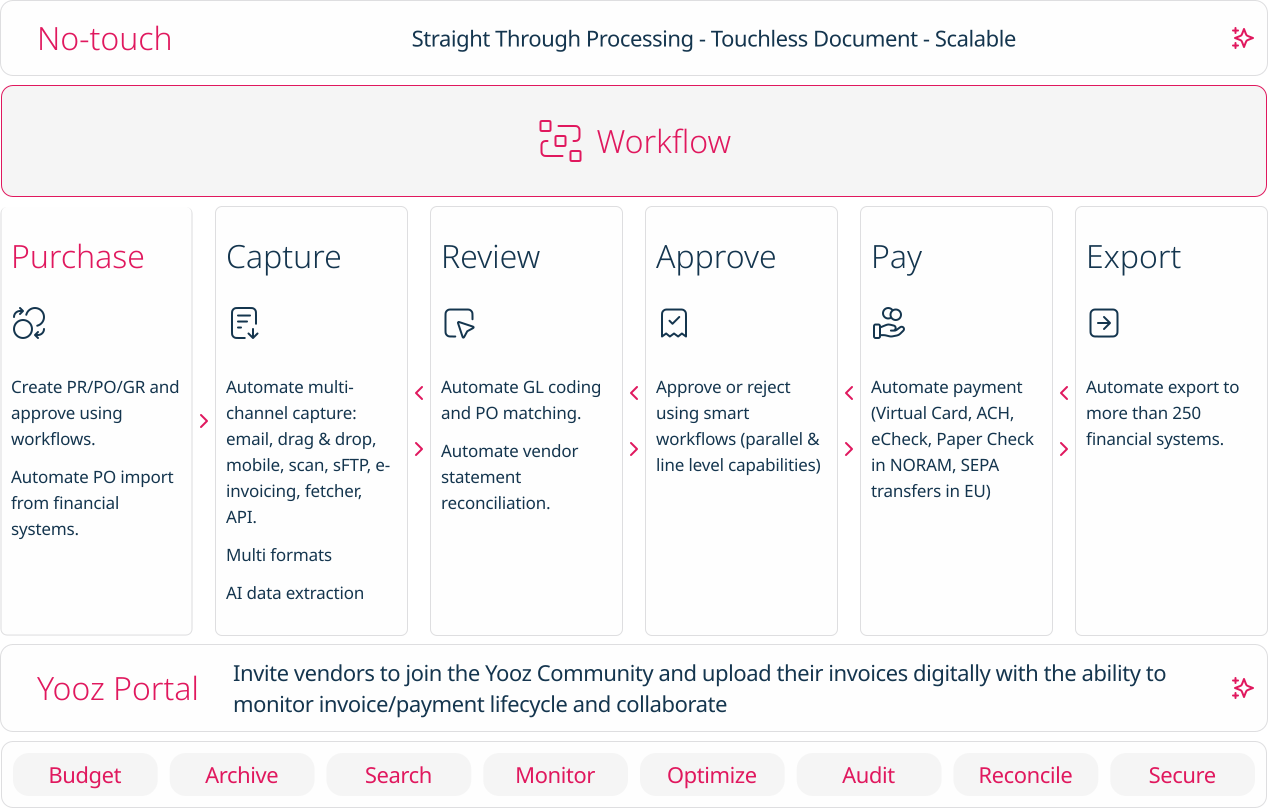    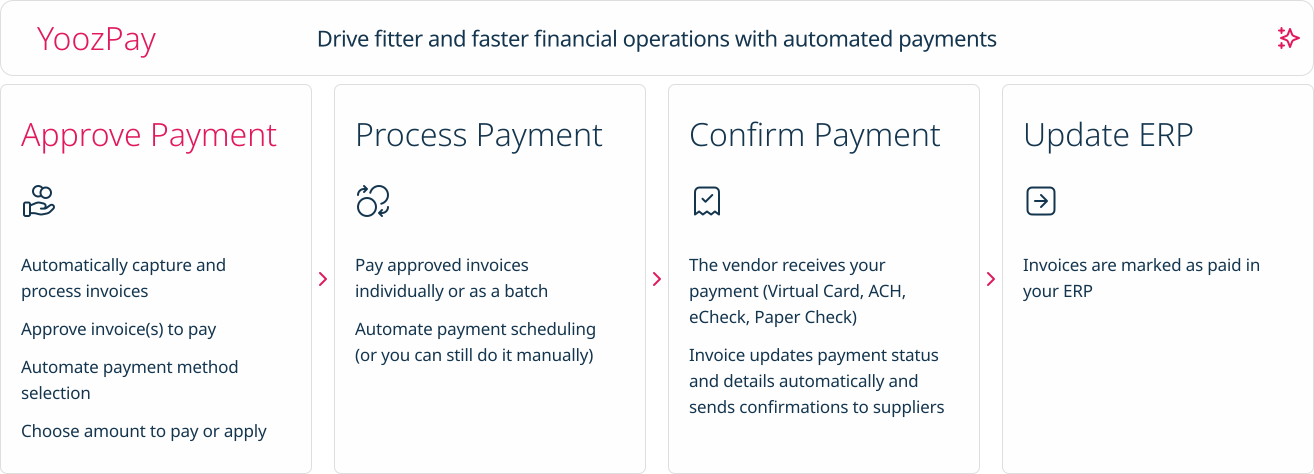  |




