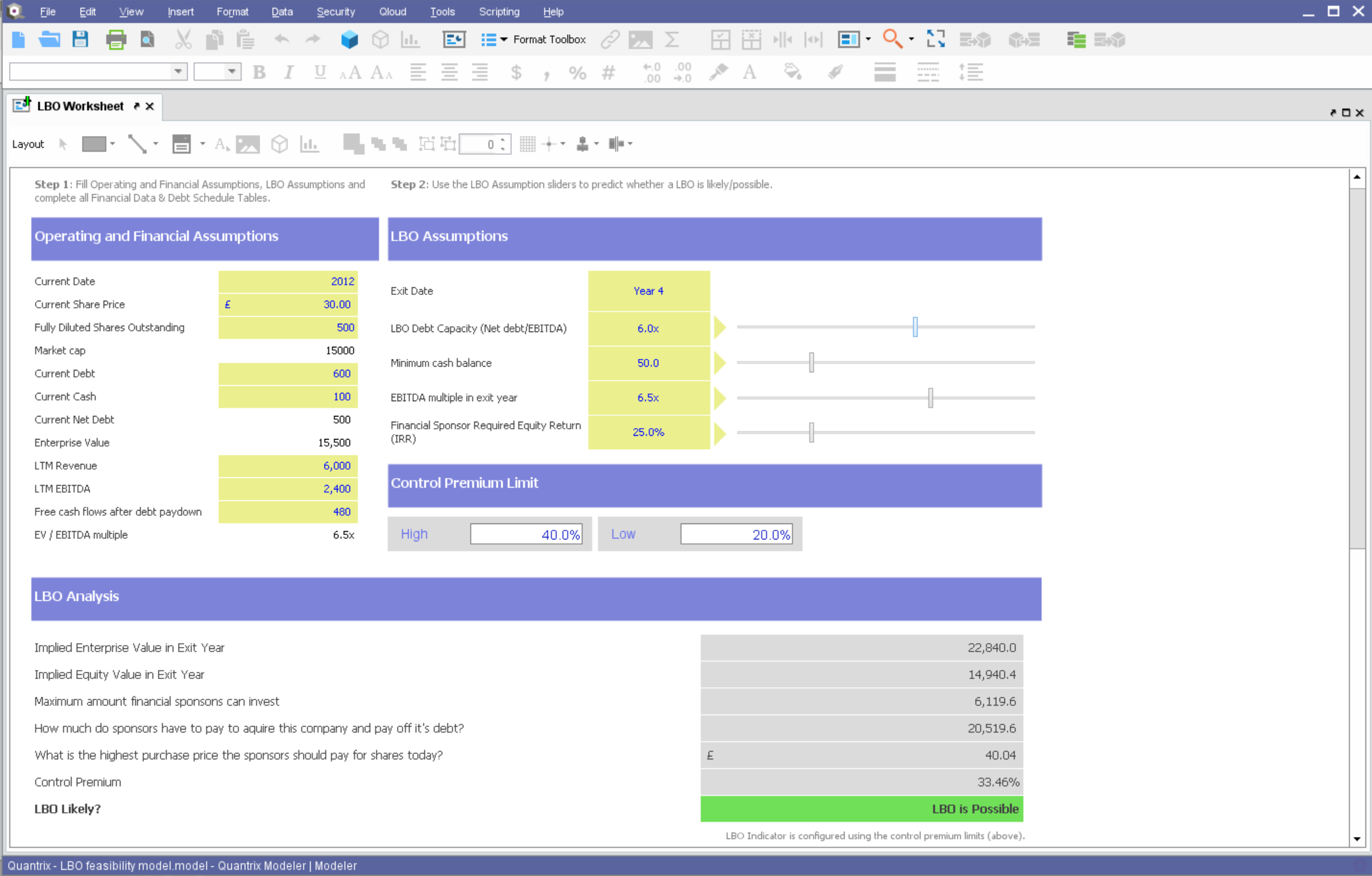
Quantrix is designed to allow users to address the limitations and risks inherent to spreadsheets when developing business-critical models. According to the vendor, this solution offers unmatched capability for forecasting, planning, budgeting, risk modeling and visual analytics, and also allows users to develop ‘what if’ scenarios and model the financial and operational impact of business decisions. Additionally, the vendor says sharing insight is made easier through the creation of interactive…
N/A
Vena
Score8.8 out of 10
Mid-Size Companies (51-1,000 employees)
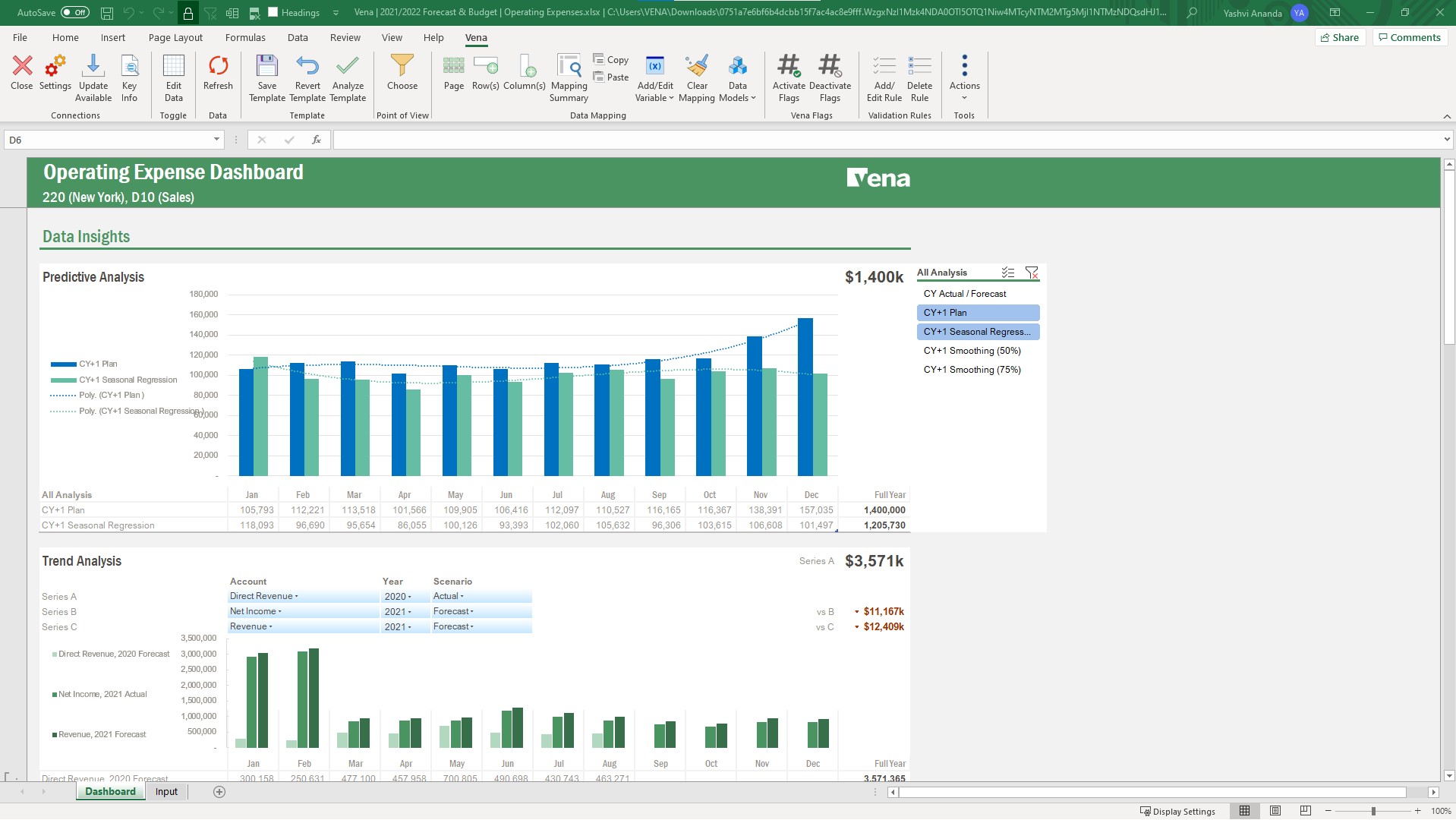
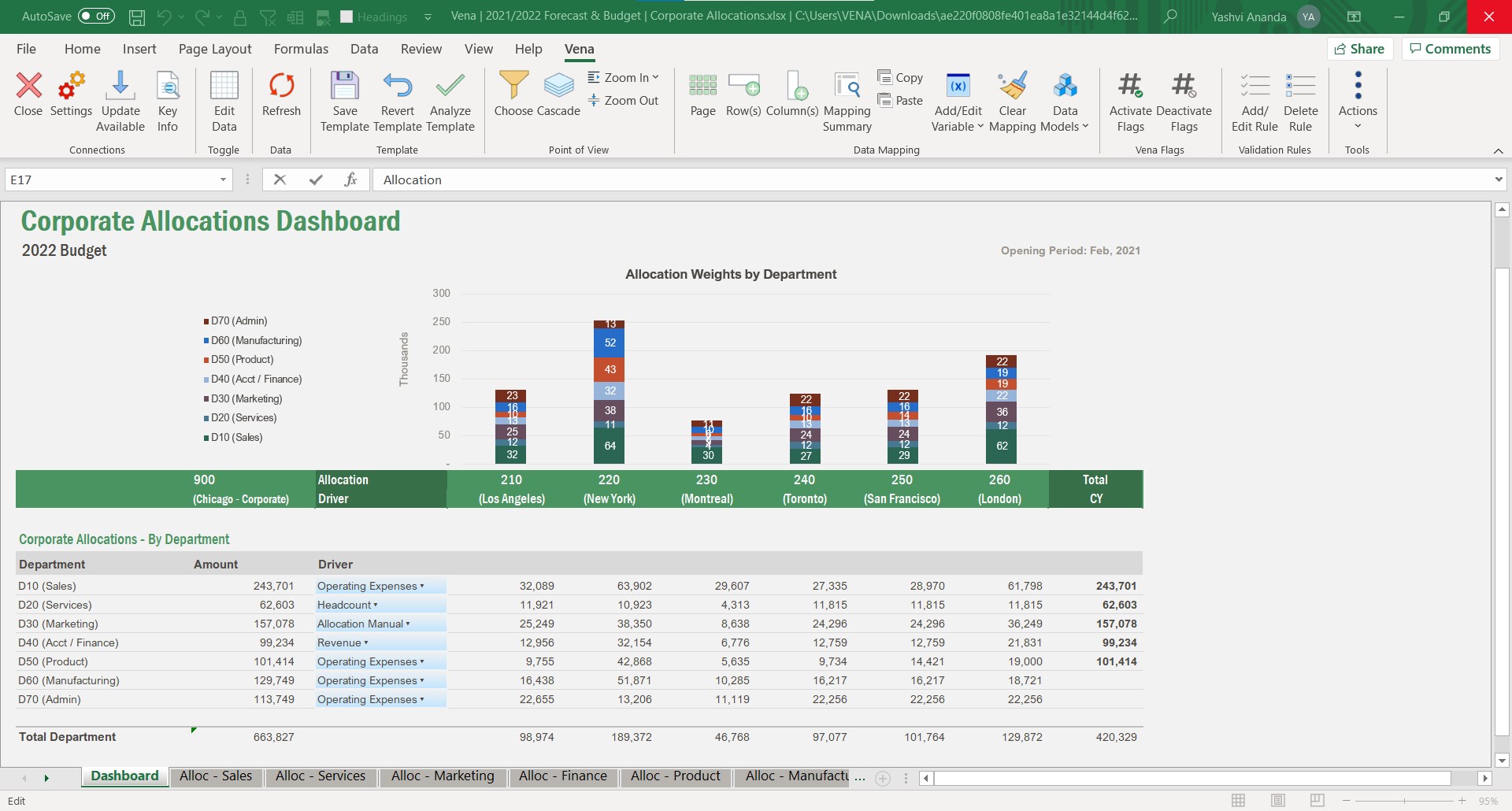
Vena Solutions provides a financial process automation solution to automate Corporate Performance Management, accounting and budgeting, Regulatory & Compliance, and other finance-related processes. It is scaled for medium to large-sized organizations.
N/A
Pricing
Quantrix
Vena
Editions & Modules
No answers on this topic
Professional
N/A
Complete
N/A
Offerings
Pricing Offerings
Quantrix
Vena
Free Trial
Yes
No
Free/Freemium Version
No
No
Premium Consulting/Integration Services
Yes
Yes
Entry-level Setup Fee
No setup fee
Optional
Additional Details
Quantrix Modeler is licensed on a per user subscription basis.
The Professional Plan is the most flexible way to get started quickly and can be added onto as a company grows. The plan includes: Vena Platform, Customer Success Manager, Standard Support and Customer Portal.
Complete Plan includes everything in Professional, plus: Vena Insights, Premium Support, Sandbox Environment, and Expert Managed Services.
For a limited time, new customers who use Microsoft Dynamics 365 Business Central (Online) as their primary ERP can get a free year of Vena and 40% off implementation costs.
Vena also offers special pricing for not for profit organizations. To learn more, speak to an expert.
If you find yourself in the ocean of traditional spreadsheets, overwhelmed by broken links, errors, model audit problems, hardwiring, etc. here is a lifebuoy for you. If you want to have full flexibility in your budgeting and forecasting in contrast to ERPs with rigid structures and one-size-fits-all concept. If you are small or medium size company and do not want to invest in costly enterprise solutions. If you need a fast implementation https://youtu.be/5W_q5Xhw5fg
Whether you have processes you are looking to make more efficient or starting from scratch, Vena is a great tool to handle both. When we started with Vena all of reporting was either very manual or frankly nonexistent. Vena was pivotal in bringing us from zero to 10 in a short time. it helped us streamline the process of gathering data to the end reporting
A de minimis incentive was given to thank the reviewer for their time. The incentive was not used to bias or drive a particular response, nor was the incentive contingent on a positive endorsement. More Info
Building complex financial planning model availing of a multidimensional data structure coupled with a powerful formula language, with the immediacy and intuitiveness typical of spreadsheets
Implement quickly model modifications (new products, new scenarios, new time periods) simply adding new "items" to "categories" (corresponding to dimensions in a multidimensional data model)
Scale up models to very large datasets with very fast computation times
Easily import data from text files, other Quantrix models and external databases via DataLink and DataNAV
Save snapshots of tables computed in Quantrix to external databases via DataPush
A de minimis incentive was given to thank the reviewer for their time. The incentive was not used to bias or drive a particular response, nor was the incentive contingent on a positive endorsement. More Info
What i like best about Vena is that it is very seamless Excel integration.
Vena fosters collabs across teams, helping multiple members to work together on financial planning in real-time enhancing overall efficiency.
We now also can automate manual processes like budgeting, consolidation of data and reporting saves my valuable time and also reducing the risk of errors.
A de minimis incentive was given to thank the reviewer for their time. The incentive was not used to bias or drive a particular response, nor was the incentive contingent on a positive endorsement. More Info
Hard to be critical of the Quantrix team as I know they strive to produce the best product possible. I suppose the next thing on my wish list would be the application of the new Solver functionality to be available in the Qloud.
A big help for new users would be a good book on transitioning from Excel or other environment into Quantrix. I know first hand it can be difficult to transition when having to learn the program through a help guide, forums and tech support. I had a lot of trial and error in my journey to producing the desired models. On one hand it was a valuable method as it taught me a lot of what not to do, but I will admit it was not the most efficient way to do things.
Would also love to see local user groups being formed at some point in the future. Quantrix puts on a fantastic conference once a year in beautiful Maine, but it is a big journey for someone in Southern California (and limited to one or two days a year). I would like to see some local chapters formed in different areas of the country so local Quantrix users can get together more often and collaborate (maybe a quarterly or semi-annual meetup?). Our Quantrix community is still relatively small and may be a difficult task for some areas, but is also the very reason why this would be great idea.
It could improve the ease of implementation; it could take a long for an inexperienced IT team.
From the ERP system perspective, it can be linked easily, but it has room for improvement when you make core changes and require a Vena specialist again.
Some administrators can get confused while working on Excel implementation; it has complicated technical requirements.
A de minimis incentive was given to thank the reviewer for their time. The incentive was not used to bias or drive a particular response, nor was the incentive contingent on a positive endorsement. More Info
Vena has been a huge win for us as an organization, as it vastly improved our budgeting process by removing manual consolidation that was incredibly time consuming, and it allows us to see a multi-year view of our organizational budget across all of our funding sources. We've seen Vena's platform grow over the years and we've not yet fully adopted some of them so it feels like there's still potential to get even more value out of the platform.
A de minimis incentive was given to thank the reviewer for their time. The incentive was not used to bias or drive a particular response, nor was the incentive contingent on a positive endorsement. More Info
Vena allows any solution to be built the way you need it to work, and there are many different ways of going about what you need it to do. It may require time to build, test, and rebuild and retest, before the best solution to what you are trying to accomplish is reached. It is best for those who are Excel proficient because Vena utilizes and enhances the usage of existing Excel functions. For those who are not Excel proficient, the journey may be more challenging, however, with help of EMS, you can get your planning and reporting to a dynamic state.
A de minimis incentive was given to thank the reviewer for their time. The incentive was not used to bias or drive a particular response, nor was the incentive contingent on a positive endorsement. More Info
Contact with Vena Solutions technical support is quick and experts in the field always respond. It is not necessary to go through a large form to explain the problems and then answer more questions to receive a direct answer, we simply send a message indicating the specific problem and they are immediately there to actively help us
A de minimis incentive was given to thank the reviewer for their time. The incentive was not used to bias or drive a particular response, nor was the incentive contingent on a positive endorsement. More Info
Vena Solutions pages load quickly and only a few times does it get a bit slow, only when there are many integrations and the reports are long. But in general it is always fast and honestly I am very satisfied with the speed in the generation of statistical reports and the pages
A de minimis incentive was given to thank the reviewer for their time. The incentive was not used to bias or drive a particular response, nor was the incentive contingent on a positive endorsement. More Info
They are very quick to respond when you submit a ticket and typically fix issues quickly as well. I only didn't give this a 10 because there is still an open issue with our Salesforce connection that we've been waiting on now for a few months.
A de minimis incentive was given to thank the reviewer for their time. The incentive was not used to bias or drive a particular response, nor was the incentive contingent on a positive endorsement. More Info
Our initial in person training was a little rough b/c I felt like our trainer wanted to focus on maximizing Vena rather than understanding what we were needing for our organization. He was very responsive and added insights, but could have worked to understand our needs a little better.
A de minimis incentive was given to thank the reviewer for their time. The incentive was not used to bias or drive a particular response, nor was the incentive contingent on a positive endorsement. More Info
The training was structured as a group training to learn the basics of creating a data model and mapping a template. While we had nearly 10 participants, I was the only actual implementer so we probably didn't actually need the training and could have just learned the initial skills from the implementation consultant. Two years later, when we hired a new team member, they completed several modules in Vena Academy (a self paced learning course) which allowed them to get up to speed on the basics with just a bit of supplemental guidance from me as our existing admin.
A de minimis incentive was given to thank the reviewer for their time. The incentive was not used to bias or drive a particular response, nor was the incentive contingent on a positive endorsement. More Info
The Vena consultant had great knowledge of both the Vena solution and Excel and Excel functions. He was able to help suggest ways to build our templates that met our requirements using Excel functions we had not previously considered using. And we have been able to use the Excel information he provided in other ways outside of Vena. He was very patient and flexible as we learned the Vena tool and created templates
Overall, I was not part of the ultimate decision to purchase Quantrix. I terms of user-friendliess and robust reporting capabilities I do think Tableau has Quantrix outclassed. That being said, Quantrix does provide more in-depth analyses for our relevant data and provides better modeling for our forecasts out of the box. The accuracy of the tools output is also much better
A de minimis incentive was given to thank the reviewer for their time. The incentive was not used to bias or drive a particular response, nor was the incentive contingent on a positive endorsement. More Info
Vena Solutions stands out due to its familiar Excel-based interface, making it easy for our team to adopt without extensive training. Compared to alternatives like Anaplan and Oracle Hyperion, Vena's strong customer support and efficient automation have significantly reduced our budgeting cycle time. We chose Vena for its seamless integration with our existing systems and substantial time-saving benefits, ultimately enhancing our decision-making process.
A de minimis incentive was given to thank the reviewer for their time. The incentive was not used to bias or drive a particular response, nor was the incentive contingent on a positive endorsement. More Info
We onboarded the entire company in a very short time frame to complete the full company budget cycle the first year out of the gate. Now we are looking to add more data and the ETL tool makes it easy to backload data into the cube as if was always there. Vena has been very scalable for our needs.
A de minimis incentive was given to thank the reviewer for their time. The incentive was not used to bias or drive a particular response, nor was the incentive contingent on a positive endorsement. More Info
Capacity forecasting used to take hours to calculate with a ton of manual modifications. Quantrix has automated that so a model can be updated at any time with a click of a button
The accuracy of the models is incredible. It took some tweaking to add in data scubbers, but now it runs almost flawlessly
The confidence the management teams have in the output of the model is amazing. Before, people would question the output, have you rebuild it, and then compare. Now the report comes out and the output has high confidence.
A de minimis incentive was given to thank the reviewer for their time. The incentive was not used to bias or drive a particular response, nor was the incentive contingent on a positive endorsement. More Info
A de minimis incentive was given to thank the reviewer for their time. The incentive was not used to bias or drive a particular response, nor was the incentive contingent on a positive endorsement. More Info