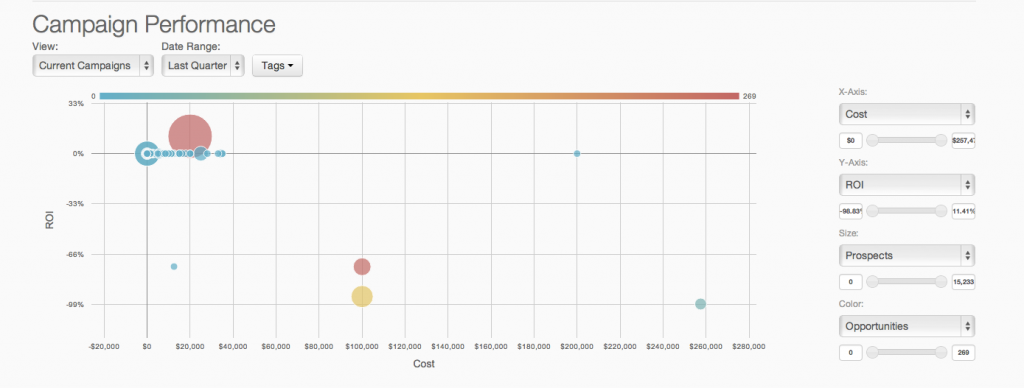
Marketing Cloud is an AI-powered, cloud-based digital marketing platform within the Salesforce Customer 360 ecosystem. Marketers can segment their audience, deliver personalized messages, track campaign performance, engage leads and accounts, and optimize strategies based on real-time insights.
Landing pages. Say, a webinar optin page. Or a lead magnet optin page. People can be persuaded to believe that others like the lead magnet and don't want to be left behind and also they can trust others opinions. So, having a widget on these pages that shows, "XYZ just signed up" can help with getting more sign ups. A widget that shows the amount of people that are looking at a certain page is also beneficial. The best thing to do, is to test at all times. See if the conversion rate is increased or if it drops. And test variations of the widget one at a time. Sometimes, it helps, but in some cases, one can see little difference. So the key is to test. We used it on a front page and we optimized it for speed. We saw that we had several things that slowed our site down. So we decided to take away some of the items. This included our widget from Provely. It does not take a lot of resources, but we were super savvy and wanted the optimal speed. We might revert back into adding it again, but for now, we stripped the page for all extra baggage so we were certain that we had the correct overview on the speed that was needed. The widgets can be less appropriate also, if one wants full attention to the copy on a page. This is also a savvy choice. So the key is to TEST, again... To determine if it helps or halts conversions. This example we are seeing on direct response sales pages in the make money online nice. They rarely use this. Some do. So again, testing will determine the effect. (A savvy user tests, but even those, skip it some times, so it is best to use your own due diligence)
I rated this a seven because I love Salesforce, and it is excellent on the sales side. However, the marketing side has some pros and cons. It is terrific for keeping track of lead, customer, and dealer information, but it is not easy to automate workflows, integrate other software, or create well-designed emails. It is also straightforward to generate reports, which is very helpful in keeping track of lead progression to better market those leads and turn them into customers.
A de minimis incentive was given to thank the reviewer for their time. The incentive was not used to bias or drive a particular response, nor was the incentive contingent on a positive endorsement. TR verified that a representative sample of customers was invited. More Info
A de minimis incentive was given to thank the reviewer for their time. The incentive was not used to bias or drive a particular response, nor was the incentive contingent on a positive endorsement. TR verified that a representative sample of customers was invited. More Info
A de minimis incentive was given to thank the reviewer for their time. The incentive was not used to bias or drive a particular response, nor was the incentive contingent on a positive endorsement. TR verified that a representative sample of customers was invited. More Info
We see the professional look it gives, and the live proof it provides. It helps with conversions, so we want to be sure we have the optimized numbers for our business. It is worth keeping so we earn more leads, and sales by piggybacking on the psychological effect of FOMO and more. We believe it is a must have in our arsenal, at least on selected pages.
As of right now we have not seen any other program that integrates as seamlessly into our Salesforce platform. We have barely scratched the surface of all the features and use cases. It would be irresponsible to make a move to another platform in the near future. We have not come up against any limitations that would prompt a need to switch
You won't find another solution that has as many features as Salesforce Marketing Cloud Interaction Studio. We all know Salesforce, we all know how big they are and it's not for nothing... Their tools do most of the things you want, need and even imagine. Using it is complicated, but the usability is infinite.
A de minimis incentive was given to thank the reviewer for their time. The incentive was not used to bias or drive a particular response, nor was the incentive contingent on a positive endorsement. More Info
Upgrades and timing of the upgrades were communicated well and planned during off hours for our work. If we did have a campaign scheduled during that time, it would kick-off after the system was back active. There were a few unplanned system down times, but it was a rare occurrence and those times were also short in duration.
Though the make up of MA apps is not built this way today, it would be nice to see them become more real-time. The integration between Salesforce and Pardot is not a true real-time integration. If I modify something in Salesforce, those changes are not automatically reflected in Pardot immediately. There is a delay of about 15 minutes before the systems sync. This delay, although not long, is less than ideal We would love the systems to be integrated real time such that changes are propagated from one system to the other immediately.
We had a question... We asked about a certain feature... One that was not present. So, what happened is that they responded quickly, but also, they developed the feature FOR US, which is unprecedented in many ways. It is not the norm, so we were taken great care of. The support was more than helpful and we would recommend them any day of the week.
They are really responsive and more than not solve the problem or give you insight to how you can manage the solution yourself. I do find however sometimes a long delay on the more complex issues when they need to loop in other departments. but overall a good experience with support
A de minimis incentive was given to thank the reviewer for their time. The incentive was not used to bias or drive a particular response, nor was the incentive contingent on a positive endorsement. TR verified that a representative sample of customers was invited. More Info
The trainers at the Pardot user conference (Elevate and Connections) were very knowledgeable and presented the material well. Again, the content was targeted to more of a new user audience, and was not really relevant for folks who had been using the product for 2+ years.
Pardot's online training touches on all topics briefly and vaguely without much indepth exploration into how a final outcome could look, such as Nurturing Campaigns, Email templates, landing page templates, etc... The only true way to uncover Pardot's full capabilities is to have Front End design and coding experience. Without this key skill set, I would not recommend Pardot to another business.
The only thing to note, if you're afraid of tech, get the developer to install the code. You can do the design, but maybe get someone to install the code, again, it is done in minutes. Maybe 5. The other thing to note, keep an eye on your stats and analytics. You install this for a reason, to help with conversions. The only way to know for sure if it is right for your page(s) is to track it. If it does not aid your % it is of no use. Not EVERY page will be a candidate at all times. BUT, most are. So my advice is to go for it, get it set up. Track your before and after. If you an uplift in your % then keep it. If there is no visible change, maybe you're not tracking the right metrics over the right amount of time, so check if you can track deeper. If you have tracked really well, and not seeing an uplift, maybe change the wording, the widget, or the placement of it. And keep tracking. If there is no change short-term or long-term, then I would reflect on the usage. It is made to uplift conversions and it does so. But it is your job to place it where it matters, like on a lead magnet page, where others can see that they are not alone in both wanting and/or taking action and physically signing up to a lead magnet. So, again, my advice, get it set up. You will most likely do the job right on the first go, and from there, enjoy, and keep tracking
From an IT perspective, once you set up the Javascript beacon and start collecting data there is a waiting game. During this time you can start labeling your site actions which can be labor intensive for a single person, but you don't really have the final end-users on the platform yet. We did a lot of training so users were experienced, but it wasn't until they had their first tasks to accomplish that they started using the system and had questions. I'd recommend setting up some immediate goals for an end-user to start segmenting for the purpose of displaying message campaigns so you can jump start end-user action.
We have tested 3 other products in the past, all failed to have the complete solution we were looking for. Provely is here to stay and has added lots of features. 1 of the other tools we tested are low on features. 1 of the tools we tested had a short run and updates stopped and the project was abandoned. 1 of them never worked properly.
I think that all of the marketing platforms I have evaluated and used in the past serve different markets and purposes. Salesforce Marketing Cloud was more palatable to our team because of our existing tech stack where we had Salesforce CRM already deployed and in use. Compared to Marketo and Hubspot, Salesforce Marketing Cloud is a bit dated in terms of the UI/UX and the overall experience but still meets the needs of our organization. Mailchimp, however, isn't even playing in the same arena and is meant for small organizations and companies that don't have a need for a full fledged offering that SFMC brings to the table.
A de minimis incentive was given to thank the reviewer for their time. The incentive was not used to bias or drive a particular response, nor was the incentive contingent on a positive endorsement. TR verified that a representative sample of customers was invited. More Info
A de minimis incentive was given to thank the reviewer for their time. The incentive was not used to bias or drive a particular response, nor was the incentive contingent on a positive endorsement. TR verified that a representative sample of customers was invited. More Info
Prior to this, we had no solution and literally were doing things on paper in a world where technology is outpacing paper. Having this process optimized has made it easier for the sales and marketing people to change information. From the training perspective, it has allowed us to see holes in where we could create additional support training, so the ROI here has been a lot more than just the optimization of a process.
A de minimis incentive was given to thank the reviewer for their time. The incentive was not used to bias or drive a particular response, nor was the incentive contingent on a positive endorsement. More Info
Salesforce Marketing Cloud allows us to more efficiently reach out to a higher number of prospects.
Salesforce Marketing Cloud allows us to nimbly communicate important messages in a timely fashion to facilitate conversion.
Salesforce Marketing Cloud allows us to track who is opening our messages so that we can stop sending to those not interested and focus on the most engaged audiences.
A de minimis incentive was given to thank the reviewer for their time. The incentive was not used to bias or drive a particular response, nor was the incentive contingent on a positive endorsement. TR verified that a representative sample of customers was invited. More Info