Progress Test Studio vs. SoapUI Open Source, supported by SmartBear

Overview
ProductRatingMost Used ByProduct SummaryStarting Price
Progress Test Studio
Score 9.0 out of 10
N/A
Progress Test Studio aims to be the easiest to use Web Automation tool on the market, widely used by Enterprise QA’s for testing, but easy enough for anyone. The product automates testing for WPF, Silverlight, Web, HTML, Angular, React, KUIB, iOS, Android, Mobile Web, and API’s. Test Studio is ideal for a no-code or low-code approach for: QA Test Automation, Application Monitoring, Performance and Load Testing, Web/Marketing Process Automation, and Mobile App Automation.N/A
SoapUI Open Source
Score 8.6 out of 10
N/A
SoapUI is an open source API testing tool supported by SmartBear's community, supporting functional and performance testing of APIs.N/A
Pricing
Progress Test StudioSoapUI Open Source, supported by SmartBear
Editions & Modules
No answers on this topic
Offerings
Pricing Offerings
Progress Test StudioSoapUI Open Source
Free Trial
YesNo
Free/Freemium Version
NoNo
Premium Consulting/Integration Services
NoNo
Entry-level Setup FeeOptionalNo setup fee
Additional Details
More Pricing Information
Community Pulse
Progress Test StudioSoapUI Open Source, supported by SmartBear
Best Alternatives
Progress Test StudioSoapUI Open Source, supported by SmartBear
Small Businesses
BrowserStack
BrowserStack
Score 8.6 out of 10
BrowserStack
BrowserStack
Score 8.6 out of 10
Medium-sized Companies
ReadyAPI
ReadyAPI
Score 7.0 out of 10
ReadyAPI
ReadyAPI
Score 7.0 out of 10
Enterprises
ReadyAPI
ReadyAPI
Score 7.0 out of 10
ReadyAPI
ReadyAPI
Score 7.0 out of 10
All AlternativesView all alternativesView all alternatives
User Ratings
Progress Test StudioSoapUI Open Source, supported by SmartBear
Likelihood to Recommend
9.0
(0 ratings)
8.0
(0 ratings)
User Testimonials
Progress Test StudioSoapUI Open Source, supported by SmartBear
Likelihood to Recommend
The product is easy to learn and any customer making web based application will greatly benefit from a product like this and cut down on testing time. As new code builds go out it's an excellent tool for regression testing. The load testing feature has a great benefit as well and lets us test the limits of the application on different platforms and allows us to tweak the certain area and test again.
Read full review
If you are making system upgrade project and you have existing system working and you want to imitate messages that are going in production but without making any data loads or switch it’s very suitable and convenient software. It serves well in manual test scenarios but wouldn’t be as good in case of mass tests.
Read full review
Pros
  • Easy to configure.
  • Plugins can be integrated easily with visual studio.
  • Takes less time to run all the test scenarios, [and] also generates graphics report for all the tests.
  • Keeps bugs [out of] the production.
Read full review
  • SOAP
  • REST
  • Authentication
Read full review
Cons
  • The user documentation and training materials seem to be outdated a bit.
  • Integration with newer version control systems such as VSTS is buggy.
Read full review
  • I actually like SoapUI as it is, I have not found things to improve, except for the speed of response is very complex services.
Read full review
Alternatives Considered
Very easy to record both http/https pages and supports all major browsers. Test Element repository is the killer feature that gives you piece of mind and confidence to write and reuse elements for several different scenarios. The built-in testing framework which also includes the .NET Framework Library. Integration with Jira. Supports source control such as GIT and Team Foundation.
Read full review
SoapUI Open Source is free, which is good for light use or simple things here and there. There is a Pro version that makes things more user-friendly. I also like that custom code can also be used for doing more complicated tasks. I like that SoapUI can have a process/flow (conditional/loop/waits/etc.) set up for scripting purposes, which is good for beginners and light users. However, I think the user interface has room for improvement.
Read full review
Return on Investment
  • Excellent results, workloads for continuous regression testing has been decreased by more than 50 percent.
  • Time window needed for regression tests has decreased more than 50 percent.
Read full review
  • Testing resolves most of the issues in the development phases.
  • User friendliness of the app makes it good.
  • Overall client happiness depends on the clean project, which is possible by testing.
Read full review
ScreenShots

Progress Test Studio Screenshots

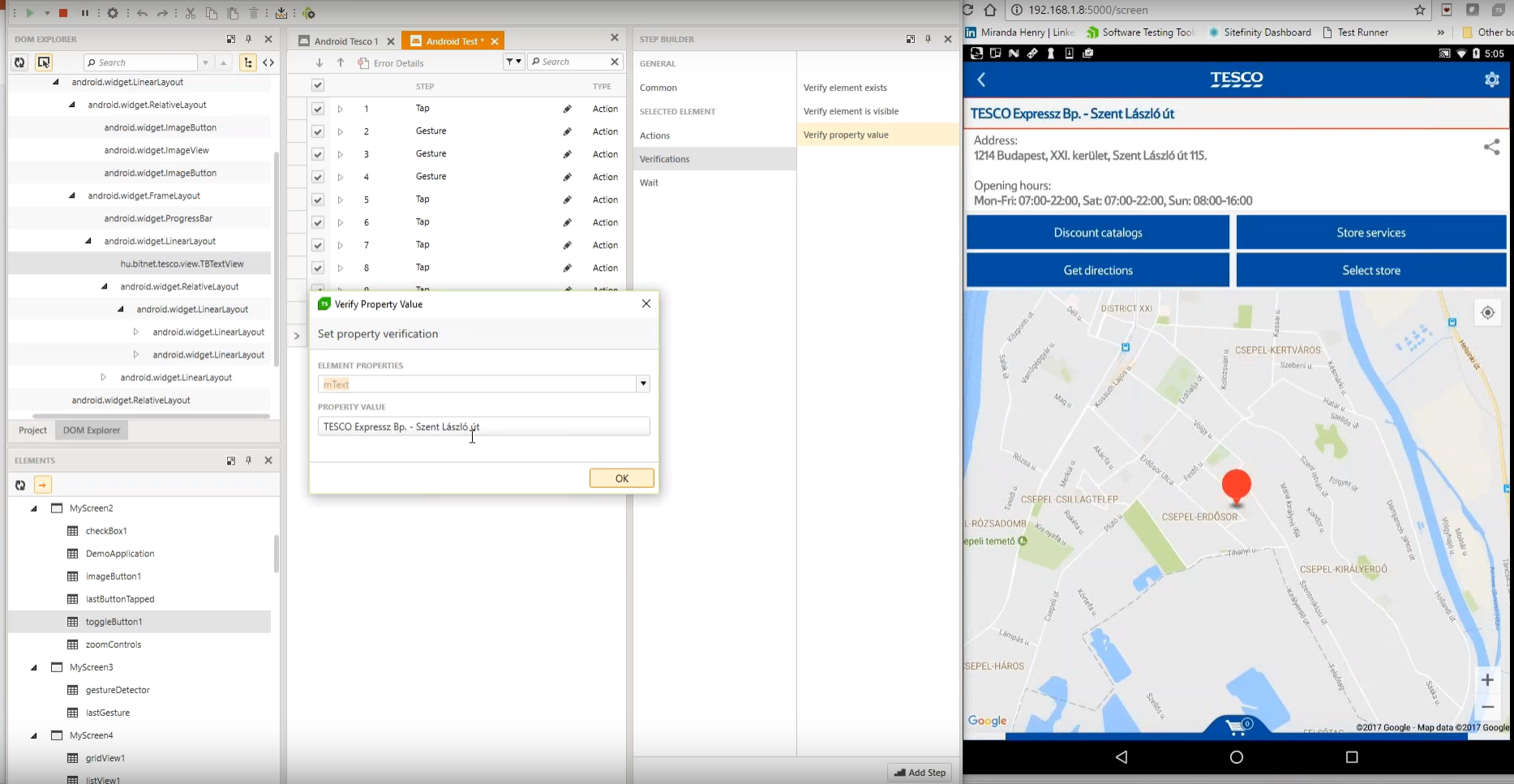
Screenshot of Test Studio Mobile – Codeless Test Automation for iOS and Android: Native, Hybrid, and Mobile Web applications. Including sophisticated find logic for test re-use across multiple devices. The Android Instrumentation Wizard will get you testing in no time.  And codeless maintenance will empower your QA’s.Screenshot of Test Studio Ultimate - makes it easy to reuse your functional tests as Performance tests, and in Load tests. This saves you many hours of extra maintenance. The Test Studio Runtime and Full License include the Profiler for tracking windows performance counter data. Combined this data will help you pinpoint the bottlenecks in your application.Screenshot of Test Studio allows you to customize the element find logic to custom fit each application. With a focus on ease-of-use a tester can quickly record their manual test and execute it back as automation. The Test Studio Element Highlighter will help you quickly add Verifications on-the-fly as you record your test. There are 4 different ways to automate applications with Test Studio, and only 1 way requires code.Screenshot of Test Studio for API’s – Codelessly capture and assemble your api calls into intricate tests with GoTo conditional operations and verifications, and of course it integrates with Fiddler. You can easily integrate Test Studio into your Continuous Integration process as well.