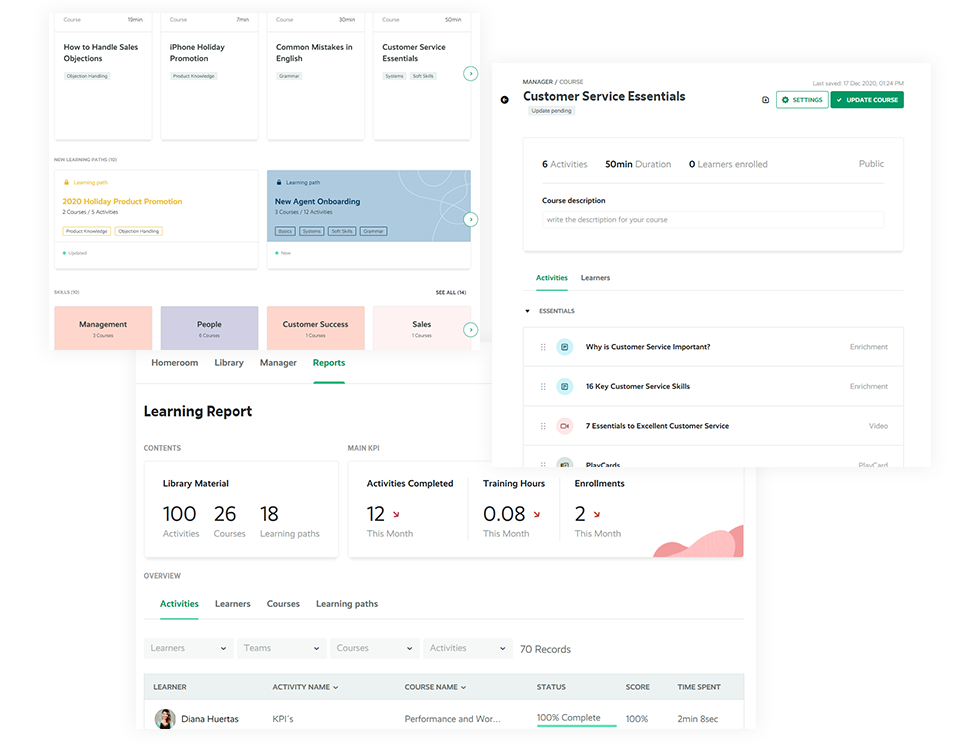
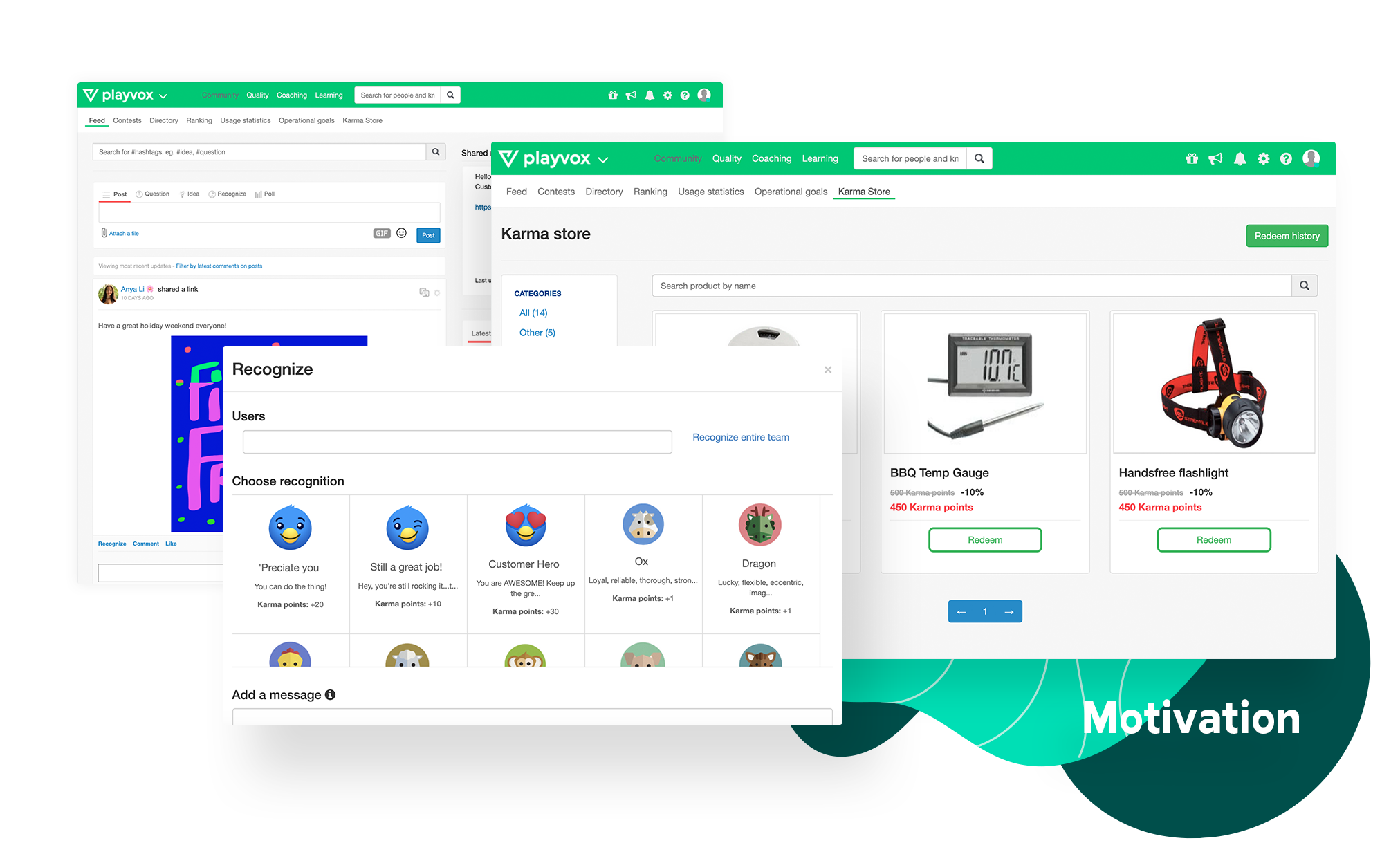
Playvox, headquartered in Sunnyvale, California, offers their call center agent monitoring, coaching and QA platform, designed to motivate and improve the performance of call center agents and reps.
N/A
Zendesk Suite
Score8.8 out of 10
N/A
Zendesk is a customer support solution with built-in ticketing, conversational messaging, and live chat, designed to help businesses of all sizes and industries deliver personalized service at scale. Zendesk's AI agents are trained in CX to help Service teams resolve customer issues faster and more accurately while still providing a human-centered experience. Zendesk ultimately aims to help businesses improve time to value, reduce effort per ticket, and keep costs low.
A de minimis incentive was given to thank the reviewer for their time. The incentive was not used to bias or drive a particular response, nor was the incentive contingent on a positive endorsement. More Info
Verified User
Chose Playvox
Before Playvox, we used spreadsheets. We spent about 2 months testing another product on the market before even looking at Playvox. It was clunky, and in two months of "testing" we were still unable to implement it fully in the way that we wanted. We contacted Playvox for a …
A de minimis incentive was given to thank the reviewer for their time. The incentive was not used to bias or drive a particular response, nor was the incentive contingent on a positive endorsement. More Info
Contact Center Manager in Customer Service at Rush Order (Consumer Electronics, 51-200 employees)
Chose Playvox
We didn't evaluate many before finding Playvox. We checked out Bridge but while it was good for HR it wasn't as good for customer service. It didn't offer the services we love with Playvox like the reward system, evaluating email, chat etc.
A de minimis incentive was given to thank the reviewer for their time. The incentive was not used to bias or drive a particular response, nor was the incentive contingent on a positive endorsement. More Info
Verified User
Chose Playvox
Playvox is one of the leaders in the industry. It has lots of good reviews on different sources. Playvox is nearly the first tool that appears on the first page when you Google "tool for service quality assurance". We needed a tool that would be easy to use and not only for the …
A de minimis incentive was given to thank the reviewer for their time. The incentive was not used to bias or drive a particular response, nor was the incentive contingent on a positive endorsement. More Info
Director of Customer Experience in Customer Service at Dorm Room Movers (Logistics and Supply Chain, 11-50 employees)
Chose Playvox
MaestroQA is one that we evaluated at the same time as Playvox. What we found is that MaestroQA wasn't as user-friendly. With how we ramp up so quickly every season, we needed a platform that new team could get into and understand quickly.
A de minimis incentive was given to thank the reviewer for their time. The incentive was not used to bias or drive a particular response, nor was the incentive contingent on a positive endorsement. More Info
Manager of Self-Service and Content at ShipStation (Internet, 51-200 employees)
Chose Playvox
We liked the UI of Maestro, but it lacked several of the additional features provided by PlayVox (esp. the social elements, recognition, coaching collaboration, and karma points). Also, PlayVox support has been amazing. They've actually implemented several feature requests we …
A de minimis incentive was given to thank the reviewer for their time. The incentive was not used to bias or drive a particular response, nor was the incentive contingent on a positive endorsement. More Info
Zendesk
Verified User
Chose Zendesk Suite
Zendesk Suite is very similar to the companies we listed, but, in my opinion, there are a lot of things that these companies do right that Zendesk Suite fails at. Particularly reporting and phone systems. We have looked into Five9 in great detail to replace our current phone …
A de minimis incentive was given to thank the reviewer for their time. The incentive was not used to bias or drive a particular response, nor was the incentive contingent on a positive endorsement. More Info
Verified User
Chose Zendesk Suite
Zendesk support is your one-stop shop for managing customers via the customer support portal that has a slew of products available for use via several channels, depending on your particular need may it be email messaging, chat messaging, or voice, and it is quite superior …
A de minimis incentive was given to thank the reviewer for their time. The incentive was not used to bias or drive a particular response, nor was the incentive contingent on a positive endorsement. More Info
Contact Center Manager in Customer Service at Rush Order (Consumer Electronics, 51-200 employees)
Chose Zendesk Suite
While using Desk.com we were only able to use one client per account. We migrated over to Zendesk Suites so we could have an unlimited amount of clients in one portal. This has been a game-changer for our company. While Desk.com had great reporting and capabilities for tags, …
A de minimis incentive was given to thank the reviewer for their time. The incentive was not used to bias or drive a particular response, nor was the incentive contingent on a positive endorsement. More Info
Playvox is well suited to rate and track process adherence and work quality percentual. It is also great to document coaching and track advisors' development, as well as to do knowledge checks through quizzes. It is not so appropriate if you need to see the previous coachings made, since those cannot be opened when they finished.
A de minimis incentive was given to thank the reviewer for their time. The incentive was not used to bias or drive a particular response, nor was the incentive contingent on a positive endorsement. More Info
Being a customer support agent, I found it very good when it comes to send an email or call or chat- with the user. I can do all that from the one single platform which is so easy and time saving for you. It does not take much time to use this, We can chat- with the user and at the same time we can send an email to them as well.
A de minimis incentive was given to thank the reviewer for their time. The incentive was not used to bias or drive a particular response, nor was the incentive contingent on a positive endorsement. More Info
A de minimis incentive was given to thank the reviewer for their time. The incentive was not used to bias or drive a particular response, nor was the incentive contingent on a positive endorsement. More Info
A de minimis incentive was given to thank the reviewer for their time. The incentive was not used to bias or drive a particular response, nor was the incentive contingent on a positive endorsement. TR verified that a representative sample of customers was invited. More Info
The speed of loading the chat that I am evaluating for the customer service representative because sometimes it shows that there is an error in the load.
A de minimis incentive was given to thank the reviewer for their time. The incentive was not used to bias or drive a particular response, nor was the incentive contingent on a positive endorsement. More Info
Is there a way for AEs and CSMs to be informed in a weekly summary of all their accounts and any tickets? Example: Disney submitted a ticket on XYZ. Google has an urgent issue on X still unresolved.
Is there a way for CSMs or AEs to have a Dashboard that's specific to their accounts instead of seeing all the tickets in the queue that are not relevant to them?
A de minimis incentive was given to thank the reviewer for their time. The incentive was not used to bias or drive a particular response, nor was the incentive contingent on a positive endorsement. More Info
I do not think my organization has and 2nd thought of changing the Playvox because I am sure they cannot find another option that is as easy and smooth. There is no other option at all. Playvox is being used here in every department and the company cannot run without this. Now it is a basic need of this business
A de minimis incentive was given to thank the reviewer for their time. The incentive was not used to bias or drive a particular response, nor was the incentive contingent on a positive endorsement. More Info
Zendesk is an amazing tool for communicating with your customers easily. The communication tickets from sellers to us or from us to sellers are stored, and there are statuses used to make communication easy. We have internal conversations between departments, linked with useful software such as Zingtree, Talkdesk, and Webs.
A de minimis incentive was given to thank the reviewer for their time. The incentive was not used to bias or drive a particular response, nor was the incentive contingent on a positive endorsement. TR verified that a representative sample of customers was invited. More Info
Playvox is an easy-to-use platform, all features are intuitive, which makes navigation easy. I never found navigation problems, I was always able to find all the items I needed, all the information is well separated, what could improve is the possibility of moving some items, putting the ones that I use the most in evidence.
Pros: The agent interface is sleek, contemporary, and relatively easy to learn compared to many other enterprise tools. For common tasks, admins are given point-and-click options- adding fields, modifying workflows, constructing macros. The knowledge base (Guide) editor is easy to use for non-developers. Drawbacks: Once you move past the initial things - complex automations, reporting/analytics in Explore, and/or customizations integrating the API, it requires much more advanced training to use successfully. Navigating between the different modules (Support, Explore, Chat, Guide) can feel very disconnected; often you are reminded that it really is a "suite" of products brought together -not really one unified platform. If you're using multiple brands managing simultaneous support tickets, or heavily customizing workflows to meet your brand, you may run into a bit of struggle with usability. So: it's a lot more user friendly than the palaces (Salesforce Service Cloud, ServiceNow), but is not used as quickly or with as much streamlined flow as a product made for a small shop. So if you are looking for a great balance, this is a good option if you are a net new organization or an organization on their way to scaling from 15 - 50 employee. Expect some elbow grease from the admin team once learning, adapting, and working efficiently once you move past the basics with your support tickets and initial customizations.
A de minimis incentive was given to thank the reviewer for their time. The incentive was not used to bias or drive a particular response, nor was the incentive contingent on a positive endorsement. More Info
A de minimis incentive was given to thank the reviewer for their time. The incentive was not used to bias or drive a particular response, nor was the incentive contingent on a positive endorsement. More Info
do pages load quickly? yes / Do reports complete in a reasonable time frame, given their complexity? yes i think / If Playvox integrates with any other software or systems, does it tend to slow them down? i don't know
A de minimis incentive was given to thank the reviewer for their time. The incentive was not used to bias or drive a particular response, nor was the incentive contingent on a positive endorsement. More Info
We have had multiple live trainings (Zoom). The training at the beginning of the set up was top notch. We had some additional questions about coaching and they jumped on the opportunity to help us. We have a designated trainer and account manager.
A de minimis incentive was given to thank the reviewer for their time. The incentive was not used to bias or drive a particular response, nor was the incentive contingent on a positive endorsement. More Info
We rarely need to contact their support team, but when we do they are responsive. However there have been notable times when communication between myself and the support rep was challenging despite me providing clear explanation of the issue, screenshots, and a thorough explanation of the goal we hope to achieve. It took several back and forth attempt, on a few occasions, to get resolution on an otherwise simple request
Zendesk has tons of available material for training - videos, webinars, articles, etc. The only reason this is not a 10 is because it can be hard to figure out how to navigate to these things and find what you are looking for.
From the day first, we were active on Playvox and happy with the features. It does not take much time to understand its features and its performance. A few training sessions with 'How to use' and we are experts using Playvox.
A de minimis incentive was given to thank the reviewer for their time. The incentive was not used to bias or drive a particular response, nor was the incentive contingent on a positive endorsement. More Info
I was very satisfied. They have a free trial for 30 days and I recommend you do that and use it. It is very easy to get started with the basics and the build on over time.
The only thing technically complex was single sign-on and integration to Salesforce.com required some tweaks – otherwise setting up system was very easy
I selected Playvox as it is the platform my organization uses. I've never worked with another platform like this. In other companies I worked, procedures, communications, and training were not saved, they were only communicated verbally and sometimes a document with what should be done, but nothing compared to the ease of using a Playvox.
A de minimis incentive was given to thank the reviewer for their time. The incentive was not used to bias or drive a particular response, nor was the incentive contingent on a positive endorsement. More Info
The customisable reporting every time. Our leadership reply on me to run my team and want to know what customers are telling us so they can elevate our products. We have extensive custom reports that tie up all aspects of our product and customer journeys. I've not found another product that allows me as much freedom as Zendesk Suite explore does, so far.
A de minimis incentive was given to thank the reviewer for their time. The incentive was not used to bias or drive a particular response, nor was the incentive contingent on a positive endorsement. More Info
A de minimis incentive was given to thank the reviewer for their time. The incentive was not used to bias or drive a particular response, nor was the incentive contingent on a positive endorsement. More Info
A de minimis incentive was given to thank the reviewer for their time. The incentive was not used to bias or drive a particular response, nor was the incentive contingent on a positive endorsement. More Info
Playvox directly impacts our Happiness ratings. From an average of 85% great ratings to 90% great ratings in a matter of 3-6 months.
Playvox impacts the number of responses our team has to send in order to find a solution for the customer. Dropping average replies to solution from 3 to 2.
A de minimis incentive was given to thank the reviewer for their time. The incentive was not used to bias or drive a particular response, nor was the incentive contingent on a positive endorsement. More Info
Integrating other AI solutions for an organization with high volumes can cost about USD5000 monthly. With Zendesk AI and by building onto the same with AI powered apps built for Zendesk Suite we save a projected USD4000 monthly.
Robust Zendesk APIs have enabled us to integrate our internal system with a customized app saving us hundreds of hours every quarter spent loading customer profiles that are not loaded instantly from the app.
Plug and play apps like Round robin save us weeks of sprint delay timelines as they do not require additional coding or developer support to install and start using.
A de minimis incentive was given to thank the reviewer for their time. The incentive was not used to bias or drive a particular response, nor was the incentive contingent on a positive endorsement. More Info