Planview Portfolios is an end-to-end project portfolio management and enterprise architecture management tool. It includes two components: Portfolio and Resource Management and Capability and Technology Management. The platform is available as a cloud-based or on-premise service.
N/A
Planview ProjectPlace
Score8.4 out of 10
N/A
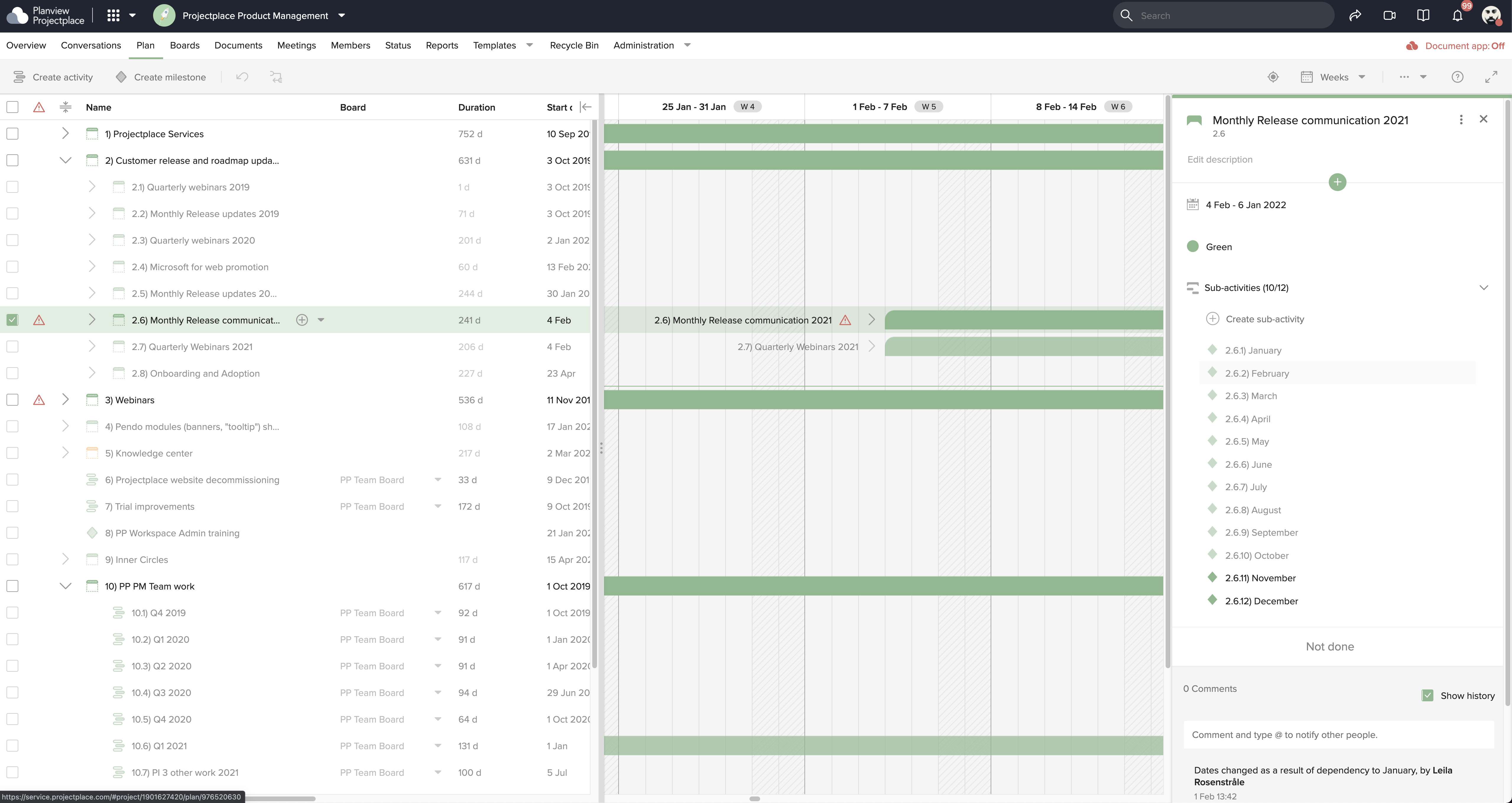
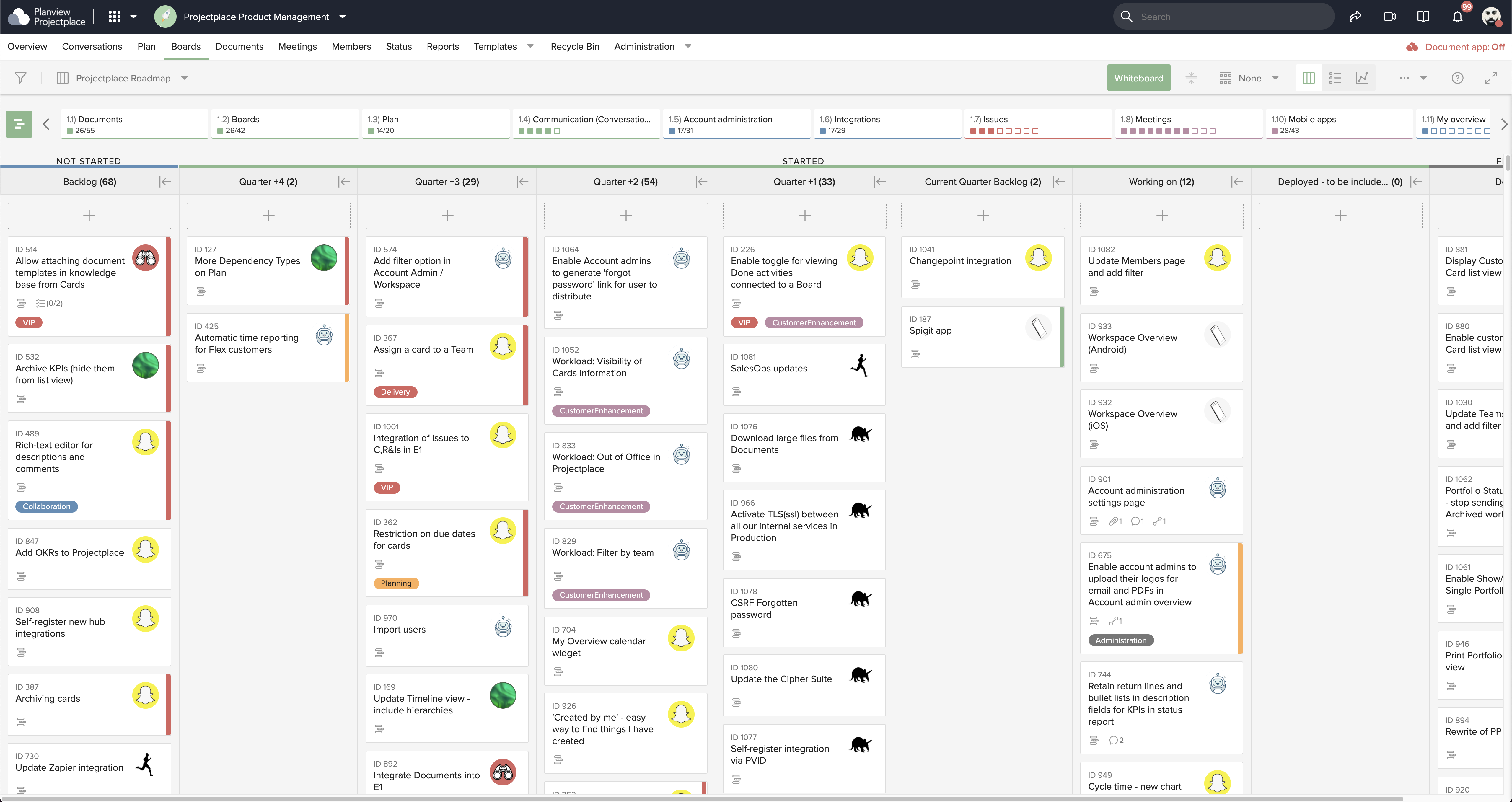
Projectplace is a collaborative work management solution. The vendor says the product is built with teams of all sizes and complexity in mind, from virtual teams of five to entire global enterprises with tens of thousands of active users. It is also designed to incorporate waterfall and agile workflows.
IT Project Manager in Corporate at Scottish Government (Government Administration, 10,001+ employees)
Chose Planview Portfolios
We find Planview Portfolios gives us a better platform to work with projects and with the use of Planview ProjectPlace can run our stand-ups and interact with the cards on the boards more readily.
A de minimis incentive was given to thank the reviewer for their time. The incentive was not used to bias or drive a particular response, nor was the incentive contingent on a positive endorsement. More Info
Sr. Analyst, Resource Management in Information Technology at Corning Incorporated (Information Technology & Services, 10,001+ employees)
Chose Planview Portfolios
Planview and Microsoft Project have many similar features. However, the direct contact with the Planview team for questions, tech support, and training is unprecedented and appreciated. Microsoft Project: -Weaknesses: Limited to single project management, lacks risk and time …
A de minimis incentive was given to thank the reviewer for their time. The incentive was not used to bias or drive a particular response, nor was the incentive contingent on a positive endorsement. TR verified that a representative sample of customers was invited. More Info
Platform Owner in Information Technology at Fonterra (Dairy, 10,001+ employees)
Chose Planview Portfolios
Planview Portfolios is the market leader in the area, the flexibility of the product and the continuous investment by Planview makes Planview Portfolios currently the best in the market. The support organisation for implementation and run of Planview Portfolios rounds off the …
A de minimis incentive was given to thank the reviewer for their time. The incentive was not used to bias or drive a particular response, nor was the incentive contingent on a positive endorsement. TR verified that a representative sample of customers was invited. More Info
A de minimis incentive was given to thank the reviewer for their time. The incentive was not used to bias or drive a particular response, nor was the incentive contingent on a positive endorsement. TR verified that a representative sample of customers was invited. More Info
Verified User
Chose Planview Portfolios
Planview has been growing continuously in the last decade or so, and its acquisitions of some big players in the market have imparted much-needed confidence in the tool. The ability to integrate Planview using APIs, Snap Logic, or Planview's own tool, 'Hub,' makes it stand out …
A de minimis incentive was given to thank the reviewer for their time. The incentive was not used to bias or drive a particular response, nor was the incentive contingent on a positive endorsement. TR verified that a representative sample of customers was invited. More Info
A de minimis incentive was given to thank the reviewer for their time. The incentive was not used to bias or drive a particular response, nor was the incentive contingent on a positive endorsement. More Info
Verified User
Chose Planview Portfolios
I think Planview Portfolios is having very user friendly UI and easily navigate to different modules and proper naming conventions
A de minimis incentive was given to thank the reviewer for their time. The incentive was not used to bias or drive a particular response, nor was the incentive contingent on a positive endorsement. More Info
Verified User
Chose Planview Portfolios
In our organization we selected Planview Portfolios for the capabilities it offered.
A de minimis incentive was given to thank the reviewer for their time. The incentive was not used to bias or drive a particular response, nor was the incentive contingent on a positive endorsement. More Info
A de minimis incentive was given to thank the reviewer for their time. The incentive was not used to bias or drive a particular response, nor was the incentive contingent on a positive endorsement. More Info
Verified User
Chose Planview Portfolios
I think ProjectPlace is a little more user friendly. But both serve the needs at this time.
A de minimis incentive was given to thank the reviewer for their time. The incentive was not used to bias or drive a particular response, nor was the incentive contingent on a positive endorsement. More Info
PM Systems Analyst in Information Technology at Horizon BCBS of NJ (Insurance, 1001-5000 employees)
Chose Planview Portfolios
We are currently using Planview AgilePlace. Also we use Tasktop Hub for integrating with other applications within the organization. We would like to use ProjectPlace which is integrated with Planview Portfolios in the future.
A de minimis incentive was given to thank the reviewer for their time. The incentive was not used to bias or drive a particular response, nor was the incentive contingent on a positive endorsement. More Info
Planview
Verified User
Chose Planview ProjectPlace
Though monday.com is a great tool, but Planview ProjectPlace beats it by a fraction when it comes to ease of use and navigations. On top of that, ability to connect Projects in Planview ProjectPlace to Planview Portfolios open up whole new horizons for the Projects, like …
A de minimis incentive was given to thank the reviewer for their time. The incentive was not used to bias or drive a particular response, nor was the incentive contingent on a positive endorsement. TR verified that a representative sample of customers was invited. More Info
Verified User
Chose Planview ProjectPlace
We use Projectplace because it is connected to Planview Portfolios. The functionalities within ProjectPlace enable collaboration with different teams.
A de minimis incentive was given to thank the reviewer for their time. The incentive was not used to bias or drive a particular response, nor was the incentive contingent on a positive endorsement. More Info
A de minimis incentive was given to thank the reviewer for their time. The incentive was not used to bias or drive a particular response, nor was the incentive contingent on a positive endorsement. More Info
Sr. Analyst in Product Management at GM Financial (Automotive, 10,001+ employees)
Chose Planview ProjectPlace
Notion is an open book that allows you to create whatever you want... nice but having some bumpers makes creating and implementing a solution a bit easier. ProjectPlace is simple to get started and use. You might miss out on a cool feature or two, but I think the lack of a …
A de minimis incentive was given to thank the reviewer for their time. The incentive was not used to bias or drive a particular response, nor was the incentive contingent on a positive endorsement. More Info
Verified User
Chose Planview ProjectPlace
We utilize all of these products for different use cases.
A de minimis incentive was given to thank the reviewer for their time. The incentive was not used to bias or drive a particular response, nor was the incentive contingent on a positive endorsement. More Info
Verified User
Chose Planview ProjectPlace
Organization went with ProjectPlace so we followed suit.
A de minimis incentive was given to thank the reviewer for their time. The incentive was not used to bias or drive a particular response, nor was the incentive contingent on a positive endorsement. More Info
A de minimis incentive was given to thank the reviewer for their time. The incentive was not used to bias or drive a particular response, nor was the incentive contingent on a positive endorsement. More Info
Lead Technology Services Consultant in Information Technology at ADP (Human Resources, 10,001+ employees)
Chose Planview ProjectPlace
I prefer the way ProjectPlace is layed out and it is way easier to navigate than Clarizen. However, Clarizen does allow you to add fields to a project (i.e. configure it for your use case) while there is very little configurability in Project Place. Additional reporting out …
A de minimis incentive was given to thank the reviewer for their time. The incentive was not used to bias or drive a particular response, nor was the incentive contingent on a positive endorsement. More Info
A de minimis incentive was given to thank the reviewer for their time. The incentive was not used to bias or drive a particular response, nor was the incentive contingent on a positive endorsement. More Info
Planview Portfolios is well suited to provide a single, central, view of the truth. There is clear expansion capabilities to integrate it as a true Enterprise toolset with existing organisation wide (not just delivery) - you can pick and choose what you need to implement and that list gets longer. The ability to quickly gain an understanding of resources within the overall portfolio and some really clever tools regarding capacity and demand modelling. I think the only challenge we have encountered is modelling our Business as Usual activity to a level of detail - this is due to other tools being very embedded not just in the organisation but across a lot of industries.
A de minimis incentive was given to thank the reviewer for their time. The incentive was not used to bias or drive a particular response, nor was the incentive contingent on a positive endorsement. TR verified that a representative sample of customers was invited. More Info
Planview ProjectPlace is a vibrant platform that manages all activities and schedules different roles based on their urgency, importance, and requests. Further, Planview ProjectPlace outlines the need for proper documentation with the aim of accurate referencing. Tasks are credibly shared, and proper reporting is enhanced to transform firms' work environment. ; Lastly, Planview ProjectPlace brings sustainable email integration for enterprises.
A de minimis incentive was given to thank the reviewer for their time. The incentive was not used to bias or drive a particular response, nor was the incentive contingent on a positive endorsement. More Info
A de minimis incentive was given to thank the reviewer for their time. The incentive was not used to bias or drive a particular response, nor was the incentive contingent on a positive endorsement. TR verified that a representative sample of customers was invited. More Info
A de minimis incentive was given to thank the reviewer for their time. The incentive was not used to bias or drive a particular response, nor was the incentive contingent on a positive endorsement. More Info
A de minimis incentive was given to thank the reviewer for their time. The incentive was not used to bias or drive a particular response, nor was the incentive contingent on a positive endorsement. TR verified that a representative sample of customers was invited. More Info
Under the time tracking, it would be nice to have a set template that would load each week and not have to click a button to load the previous week's template.
Somehow making it more intuitive.
Having to add in each service line and each detail that I cover for every service line each week is a bit ridiculous.
A de minimis incentive was given to thank the reviewer for their time. The incentive was not used to bias or drive a particular response, nor was the incentive contingent on a positive endorsement. More Info
We have been a Planview customer since 1999 and have seen it grow and mature as a tool. We have looked at other tools and have found that PV continues to meet our needs and is easy for our resources to use. They work to stay up on the project management industry and the direction it is going, keep on on current technology so that we can work more effectively, provide excellent customer support and have great pricing for what they offer. We can purchase only the modules we need versus buying a tool where we would only use a portion of the functionality.
We're committed now & have >50 users on Projectplace. All our projects are now tracked in the tool. We this investment of time & training, the cost of maintaining Projectplace is relatively low for the benefit. So we will renew, even if there are some idiosyncrasies in the tool & there are opportunities for improvement.
A de minimis incentive was given to thank the reviewer for their time. The incentive was not used to bias or drive a particular response, nor was the incentive contingent on a positive endorsement. More Info
Perfect tool for planning resource time management. Giving flexibility with ease in uptodate . Team collabration . Team aligment. Top management aligment. Close the project with feed back . Team aligment. Expert contribution in task . Task management easy for project manager . Nice tool to have for project manager. Cost contol & project management is very easy with Planview
A de minimis incentive was given to thank the reviewer for their time. The incentive was not used to bias or drive a particular response, nor was the incentive contingent on a positive endorsement. More Info
Easy to use platform and provides the user with an amazing experience and straightforward tools that empower and help execute tasks with fast performances that allow quick and easy service delivery. Easy on implementation and get started immediately with enterprise-ready Planview Projectplace and start to connect with teams and departments at once.
A de minimis incentive was given to thank the reviewer for their time. The incentive was not used to bias or drive a particular response, nor was the incentive contingent on a positive endorsement. More Info
We are long time Planview users and its availability is only limited to our internal SLAs for nightly backups. I have never experienced any unexpected or prolonged software downtime from Planview itself.
A de minimis incentive was given to thank the reviewer for their time. The incentive was not used to bias or drive a particular response, nor was the incentive contingent on a positive endorsement. More Info
There are occasions when the system is a bit sluggish. However, it may not always be on the Planview side. We are investing in better tools to monitor our network performance, which will help us diagnose issues more effectively in the future.
A de minimis incentive was given to thank the reviewer for their time. The incentive was not used to bias or drive a particular response, nor was the incentive contingent on a positive endorsement. TR verified that a representative sample of customers was invited. More Info
Going through proper channels of support is fine for minor to moderate issues. However, lately the critical issues that arise have been frequent and the standard support cases do not always seem to relay just how critical these issues are and we have to utilize our customer rep to help escalate. Fortunate to have that escalation method.
A de minimis incentive was given to thank the reviewer for their time. The incentive was not used to bias or drive a particular response, nor was the incentive contingent on a positive endorsement. More Info
I haven't needed to get in touch with support because the product is quite well structured and understandable. There were no issues initially when making payments or later for monthly payments. The project manager using the software is quite skilled in the software and has not needed much help. New licenses are easy to acquire, and there is no delay in getting them. I know there are several ways of support available, so that's a plus.
A de minimis incentive was given to thank the reviewer for their time. The incentive was not used to bias or drive a particular response, nor was the incentive contingent on a positive endorsement. More Info
A de minimis incentive was given to thank the reviewer for their time. The incentive was not used to bias or drive a particular response, nor was the incentive contingent on a positive endorsement. TR verified that a representative sample of customers was invited. More Info
Always have a pre-implementation meeting or conference call with Planview to ensure all are on the same page, disclosure of all and any customization (including reports) and plan for support after implementation of a specified amount of time with the assigned implementation resource. And document everything
We are currently using Planview AgilePlace. Also we use Tasktop Hub for integrating with other applications within the organization. We would like to use ProjectPlace which is integrated with Planview Portfolios in the future.
A de minimis incentive was given to thank the reviewer for their time. The incentive was not used to bias or drive a particular response, nor was the incentive contingent on a positive endorsement. More Info
[In my experience] Jira is more refined, better looking, and easier to become familiar with. Also, the massive market share of Jira helps in consultancy as you can switch between clients easily. Projectplace has many powerful tools but so does Jira, and Jira integrates with our suite of software much easier compared to Projectplace.
A de minimis incentive was given to thank the reviewer for their time. The incentive was not used to bias or drive a particular response, nor was the incentive contingent on a positive endorsement. More Info
A de minimis incentive was given to thank the reviewer for their time. The incentive was not used to bias or drive a particular response, nor was the incentive contingent on a positive endorsement. TR verified that a representative sample of customers was invited. More Info
We are constantly growing and expanding. It is challenging to accommodate different user needs, but the system does provide means of doing that as we desire.
A de minimis incentive was given to thank the reviewer for their time. The incentive was not used to bias or drive a particular response, nor was the incentive contingent on a positive endorsement. TR verified that a representative sample of customers was invited. More Info
A de minimis incentive was given to thank the reviewer for their time. The incentive was not used to bias or drive a particular response, nor was the incentive contingent on a positive endorsement. More Info
A de minimis incentive was given to thank the reviewer for their time. The incentive was not used to bias or drive a particular response, nor was the incentive contingent on a positive endorsement. More Info
The positive impact is the ability to manage our projects enterprise wide.
Managing and reporting on projects and programs via portfolios makes it easy to identify troubled projects/programs that need immediate attention.
The negative is that pushing too much change too quickly is hard for us. We need to get our users focused on the basics of PM before we can adopt everything else. We need to introduce change to different companies based on their maturity level. Too much change too quickly is not always beneficial. We need to focus on core competencies.
A de minimis incentive was given to thank the reviewer for their time. The incentive was not used to bias or drive a particular response, nor was the incentive contingent on a positive endorsement. TR verified that a representative sample of customers was invited. More Info
[We have the] ability to support remote work through projects that scale across multiple groups
We have large-scale quarterly projects, so the ability to save and duplicate project templates are helpful for us to keep track of tasks down to the specific card
A de minimis incentive was given to thank the reviewer for their time. The incentive was not used to bias or drive a particular response, nor was the incentive contingent on a positive endorsement. More Info