Planview AgilePlace vs. WorkOtter PPM

Overview
ProductRatingMost Used ByProduct SummaryStarting Price
Planview AgilePlace
Score 9.8 out of 10
N/A
AgilePlace is a project management solution built around flexibility, data-driven analytics, and workflow automation. The software was acquired by Planview in December 2017 to expand that company's capabilities.
$19
per user, per month
WorkOtter PPM
Score 9.1 out of 10
Mid-Size Companies (51-1,000 employees)
WorkOtter is presented by the vendor as a simple, flexible, and scalable project portfolio management (PPM) solution for IT, Engineering, and Professional Service PMOs. The software manages the lifecycle of work from ideas through project planning, control, lessons learned, and close. Projects can then be rolled up to Programs (multi project efforts) or Portfolios (Roadmaps with What If Scenarios). All features were designed to support Project Teams with simplicity and usability in mind.…
$10
per user per month
Pricing
Planview AgilePlaceWorkOtter PPM
Editions & Modules
Teams
$19
per user, per month
Scaled Teams
$29
per user, per month
Custom
Contact Sales for Quote
per user, per month
Time/Status
$10
per user per month
Team
$20
per user, per month
Manager
$35
per user, per month
Offerings
Pricing Offerings
Planview AgilePlaceWorkOtter PPM
Free Trial
YesYes
Free/Freemium Version
NoNo
Premium Consulting/Integration Services
NoYes
Entry-level Setup FeeNo setup feeNo setup fee
Additional DetailsAll editions include unlimited boards.Time/Status Tier is BEST FOR: Contractors, Consultants, Limited Team Members FUNCTIONALITY AVAILABLE:Timesheets, Adjust Estimate To Complete, Create Notes for PM and Team Members Team Tier is BEST FOR: Customers, Suppliers, Contractors, Consultants, Team Members FUNCTIONALITY INCLUDES TIME/STATUS PLUS: My Home Dashboards, Support Log Updates, Issue Updates, Changes, Timesheet & Expenses, Risks, Action Items Limited, Reporting, E-Mail Updates, Chat & Collaboration Manager Tier is BEST FOR: Project Managers, Program Managers, Executives, PMO Department Managers, Administrators FUNCTIONALITY INCLUDES TEAM PLUS: Project Management, Microsoft Project -Way Sync, Dashboard Reporting, Program Management, Resource Management, Portfolio Management, Workflow Management, Estimating and Templates
More Pricing Information
Community Pulse
Planview AgilePlaceWorkOtter PPM
Features
Planview AgilePlaceWorkOtter PPM
Project Management
Comparison of Project Management features of Product A and Product B
Planview AgilePlace
7.4
25 Ratings
3% below category average
WorkOtter PPM
9.9
2 Ratings
26% above category average
Task Management10.025 Ratings10.01 Ratings
Resource Management9.921 Ratings10.02 Ratings
Gantt Charts10.014 Ratings10.02 Ratings
Scheduling9.919 Ratings10.02 Ratings
Support for Agile Methodology9.220 Ratings10.01 Ratings
Support for Waterfall Methodology4.014 Ratings00 Ratings
Document Management6.57 Ratings00 Ratings
Email integration7.419 Ratings00 Ratings
Mobile Access2.114 Ratings00 Ratings
Timesheet Tracking6.44 Ratings10.01 Ratings
Change request and Case Management7.19 Ratings10.01 Ratings
Visual planning tools7.39 Ratings00 Ratings
Workflow Automation00 Ratings10.01 Ratings
Team Collaboration00 Ratings9.01 Ratings
Agile Development
Comparison of Agile Development features of Product A and Product B
Planview AgilePlace
8.8
8 Ratings
7% above category average
WorkOtter PPM
-
Ratings
DevOps Tool Integrations8.15 Ratings00 Ratings
Dependencies and Blockers9.68 Ratings00 Ratings
Best Alternatives
Planview AgilePlaceWorkOtter PPM
Small Businesses
GitLab
GitLab
Score 8.6 out of 10
Stackby
Stackby
Score 9.0 out of 10
Medium-sized Companies
GitLab
GitLab
Score 8.6 out of 10
InEight
InEight
Score 8.3 out of 10
Enterprises
Miro
Miro
Score 9.2 out of 10
InEight
InEight
Score 8.3 out of 10
All AlternativesView all alternativesView all alternatives
User Ratings
Planview AgilePlaceWorkOtter PPM
Likelihood to Recommend
10.0
(31 ratings)
10.0
(2 ratings)
Likelihood to Renew
8.6
(5 ratings)
-
(0 ratings)
Usability
8.2
(5 ratings)
-
(0 ratings)
Availability
8.3
(2 ratings)
-
(0 ratings)
Performance
8.0
(2 ratings)
-
(0 ratings)
Support Rating
10.0
(2 ratings)
-
(0 ratings)
Implementation Rating
7.7
(3 ratings)
-
(0 ratings)
Configurability
7.0
(2 ratings)
-
(0 ratings)
Ease of integration
8.0
(1 ratings)
-
(0 ratings)
Product Scalability
8.0
(2 ratings)
-
(0 ratings)
Vendor post-sale
9.3
(2 ratings)
-
(0 ratings)
Vendor pre-sale
9.3
(2 ratings)
-
(0 ratings)
User Testimonials
Planview AgilePlaceWorkOtter PPM
Likelihood to Recommend
Planview
This tool enables the visual management needed in many offshore teams to easily and quickly see the pending work, work in progress and completed work.For teams that work with a waterfall methodology and do not have AGILE internalized, I believe there are other solutions from Planview or other providers.
Read full review
WorkOtter
I know it works well for IT but not sure how it would work for construction. I think construction has a different set of needs.
Read full review
Pros
Planview
  • Visual kanban board that is easy to customize as the team's needs change
  • Real time collaboration allowing teams working remotely to stay up to date on current status
  • Allows versatility for how a team needs to capture details on the work at hand by utilizing card icons, card types and custom data points
  • Card scoring is easy to setup and provides the team the ability to set values to better prioritize their backlog
  • Ability to add card automation to take out some of the repetitive manual actions
Read full review
WorkOtter
  • Users find it easy to use which is important if you have a large number of users who don't have time for a lot of training or when new hires come on-board.
  • WorkOtter has a lot of advanced features that we don't use but when we do need one, it is nice to know the feature is waiting for us. We have used several of these features for special projects.
  • It does a good job with resource management.
Read full review
Cons
Planview
  • Ability to add more than 1 visual cue to the card. We use custom icons and sometimes more than 1 is appropriate but you have to choose which is most important since only 1 can be applied.
  • Better visibility to board access from the user administration screens. Currently have to run 1-2 reports to see this information. Would like to be able to click on a user within Configure Users and see what boards they have access to quickly.
Read full review
WorkOtter
  • Nothing significant. Maybe could be faster at times but I'm not sure if that is our own internet connection.
Read full review
Likelihood to Renew
Planview
we are happy with the tool and the service and continuos improvement of the tool so there is no need yet to change to another one.
Read full review
WorkOtter
No answers on this topic
Usability
Planview
LeanKit isn't the best designed Kanban system I've seen, but overall it's pretty usable. The boards I've used are pretty complex, so it can be difficult to find things. I found that searching and filtering for specific cards was somewhat of a challenge. Dragging a card from one lane to another is kind of a fun way to get things done though.
Read full review
WorkOtter
No answers on this topic
Reliability and Availability
Planview
Not experienced any outage
Read full review
WorkOtter
No answers on this topic
Performance
Planview
Larger boards take longer to load
Read full review
WorkOtter
No answers on this topic
Support Rating
Planview
Every time I have reached out to the AgilePlace support team I have received a timely response in addition to professional & personal feedback. Their consultants are knowledgeable and the management team is happy to jump in and help when needed.
Read full review
WorkOtter
No answers on this topic
Implementation Rating
Planview
Very easy.
Read full review
WorkOtter
No answers on this topic
Alternatives Considered
Planview
Originally, we had evaluated two other tools next to Planview LeanKit: Kanbantool and Kanbanflow. The latter was a close contestant for productive use, as it was also very customizable and a joy to work with and look at. It also had lower user fees and a mobile integration. In the end, we picked Planview LeanKit because of several reasons: Aesthetics: The look was much more clean and professional. Reporting: It was obvious from the start that we could use Planview LeanKit as a tool for improvement. API: We needed to integrate the Kanban into our central systems and Planview LeanKit API was (and still is) a way to do it. Card Headers: This sounds like a simple thing, but the headers above the titles fit our work perfectly and looked perfect, which helped the decision.
Read full review
WorkOtter
No answers on this topic
Scalability
Planview
Good use cases for small/large teams
Read full review
WorkOtter
No answers on this topic
Return on Investment
Planview
  • LeanKit has made it easier for new employees to understand other employees' roles in the company by seeing their workload.
  • It makes it clear who is responsible for what project so that there is more accountability at our company.
  • It helps our project manager schedule new projects in a way that we all can see.
Read full review
WorkOtter
  • I think it has really helped us make sure we are using resources effectively but I think it is hard to prove. Although we don't have hard ROI numbers, I believe the general feeling is that you really need a good PPM tool or will waste a lot of time and money.
  • It helps with communication since we have a standard process.
Read full review
ScreenShots

Planview AgilePlace Screenshots

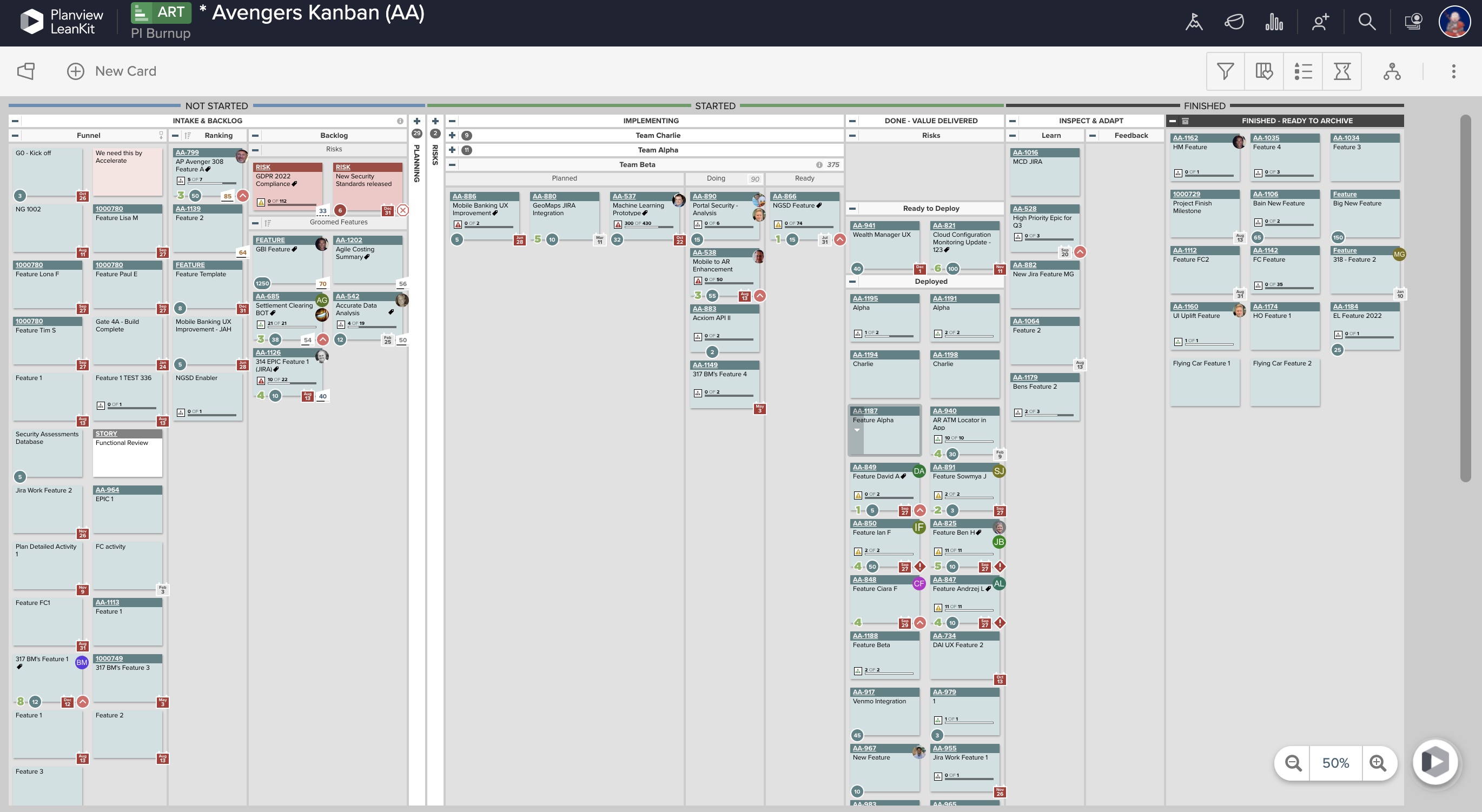
Screenshot of Real-Time Analytics: Utilize board health metrics involving bottlenecks, WIP, and throughput to guide the optimization of workflows, improve velocity, and better prioritize efforts for more predictable delivery. Lean and Agile metrics can be used to assess team performance and promote continuous improvement.Screenshot of PI Planning: Offers enterprise Kanban boards to visualize the work of teams regardless of the methodologies they apply or workflows they follow, and insights into progress and create opportunities for better alignment.Screenshot of Dependency Visualization and Management: Surfaces risks to plans resulting from cross-team dependency conflicts, blockers, and capacity constraints, and helps drive proactive measures to enable teams to deliver on time.Screenshot of Team Planning and Coordination: Boards can be used to breakdown work, build and manage plans, and execute against strategy to deliver more value to customers, faster.

WorkOtter PPM Screenshots

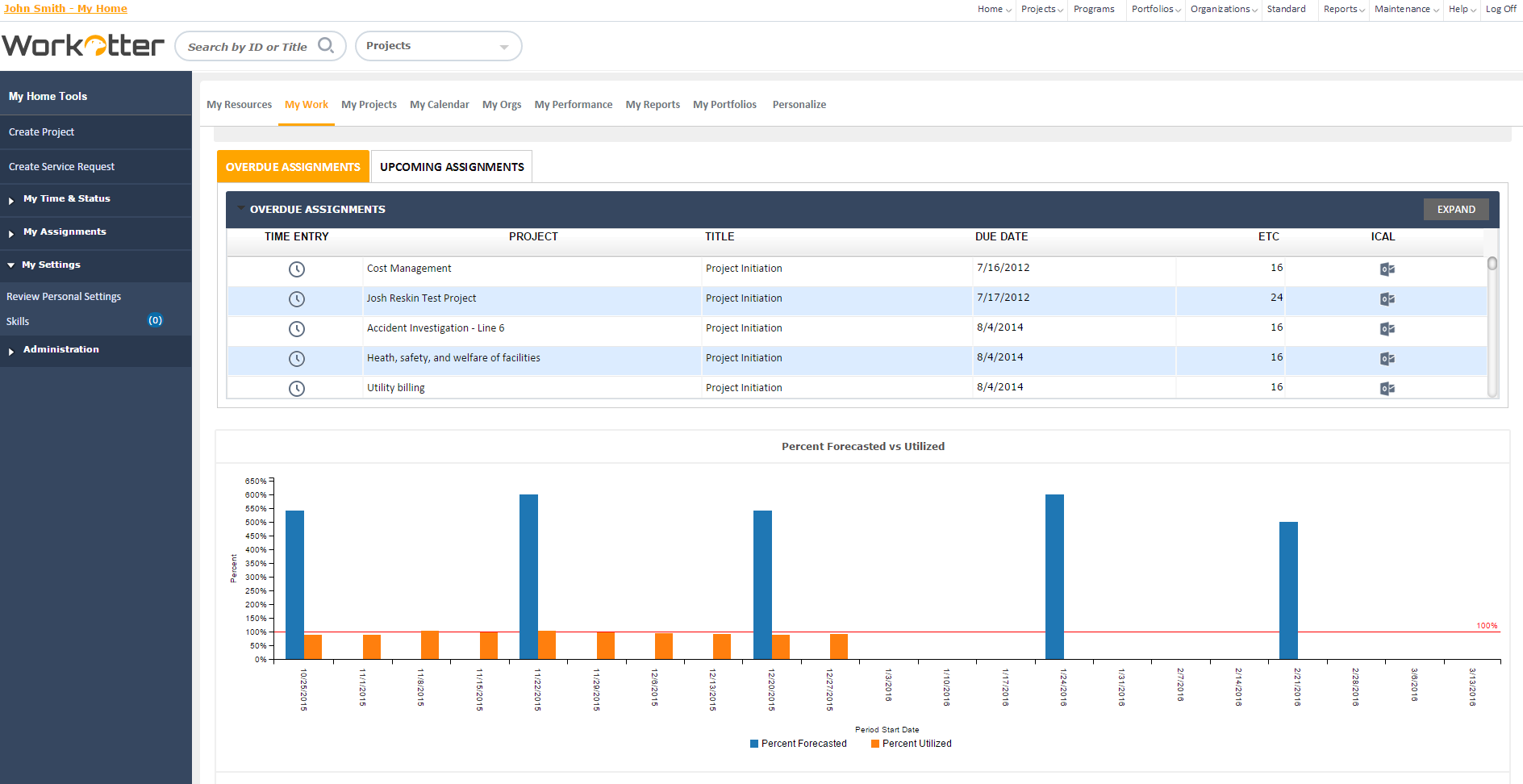
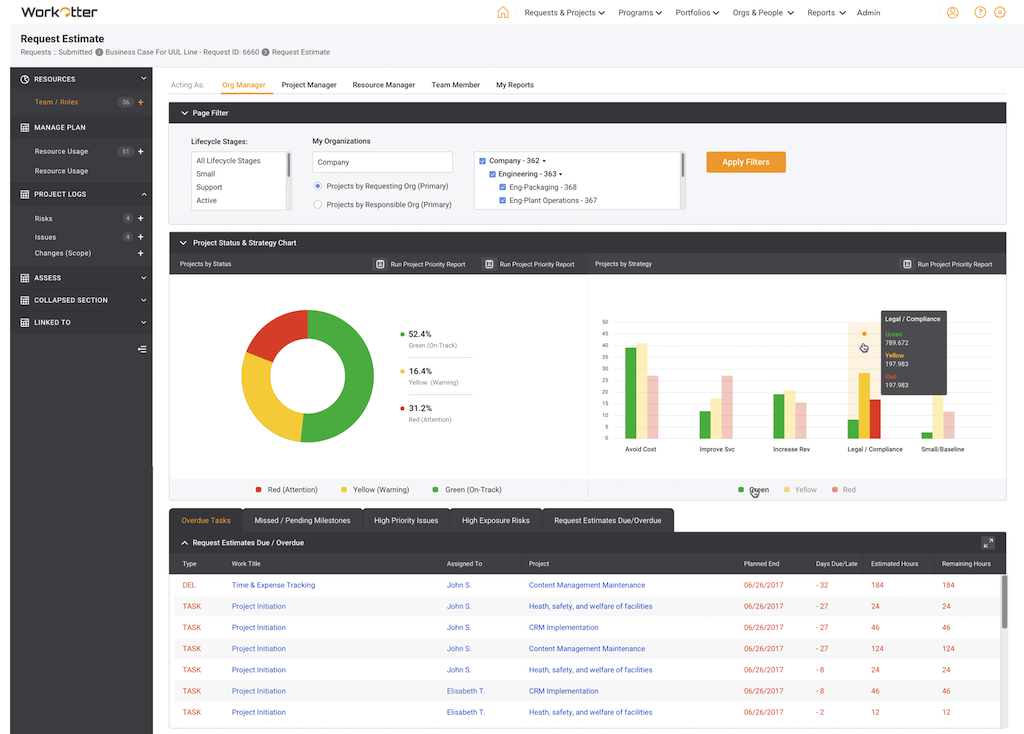
Screenshot of Dashboard viewScreenshot of WorkOtter MyWork viewScreenshot of Dashboard OverviewScreenshot of Resource Usage for People, Tasks, Time, BudgetScreenshot of Over/Under resource allocation viewScreenshot of Project Management Workflow - Customizable