Planview AgilePlace vs. Unfuddle

Overview
ProductRatingMost Used ByProduct SummaryStarting Price
Planview AgilePlace
Score 9.9 out of 10
N/A
AgilePlace is a project management solution built around flexibility, data-driven analytics, and workflow automation. The software was acquired by Planview in December 2017 to expand that company's capabilities.
$19
per user, per month
Unfuddle
Score 0.0 out of 10
N/A
Unfuddle is a full-stack software project management tool that brings together bug and issue tracking, git and Subversion hosting and collaboration tools. It supports agile team in developing games, mobile apps, or in doing client-driven website development.N/A
Pricing
Planview AgilePlaceUnfuddle
Editions & Modules
Teams
$19
per user, per month
Scaled Teams
$29
per user, per month
Custom
Contact Sales for Quote
per user, per month
No answers on this topic
Offerings
Pricing Offerings
Planview AgilePlaceUnfuddle
Free Trial
YesNo
Free/Freemium Version
NoNo
Premium Consulting/Integration Services
NoNo
Entry-level Setup FeeNo setup feeNo setup fee
Additional DetailsAll editions include unlimited boards.
More Pricing Information
Features
Planview AgilePlaceUnfuddle
Project Management
Comparison of Project Management features of Product A and Product B
Planview AgilePlace
7.4
Ratings
3% below category average
Unfuddle
-
Ratings
Task Management10.00 Ratings00 Ratings
Resource Management9.90 Ratings00 Ratings
Gantt Charts10.00 Ratings00 Ratings
Scheduling9.90 Ratings00 Ratings
Support for Agile Methodology9.30 Ratings00 Ratings
Support for Waterfall Methodology4.00 Ratings00 Ratings
Document Management6.50 Ratings00 Ratings
Email integration7.30 Ratings00 Ratings
Mobile Access2.10 Ratings00 Ratings
Timesheet Tracking6.40 Ratings00 Ratings
Change request and Case Management7.20 Ratings00 Ratings
Visual planning tools7.30 Ratings00 Ratings
Agile Development
Comparison of Agile Development features of Product A and Product B
Planview AgilePlace
8.8
Ratings
7% above category average
Unfuddle
-
Ratings
DevOps Tool Integrations8.10 Ratings00 Ratings
Dependencies and Blockers9.60 Ratings00 Ratings
User Ratings
Planview AgilePlaceUnfuddle
Likelihood to Recommend
10.0
(0 ratings)
-
(0 ratings)
Likelihood to Renew
8.6
(0 ratings)
-
(0 ratings)
Usability
8.2
(0 ratings)
-
(0 ratings)
Availability
8.3
(0 ratings)
-
(0 ratings)
Performance
8.0
(0 ratings)
-
(0 ratings)
Support Rating
10.0
(0 ratings)
-
(0 ratings)
Implementation Rating
7.7
(0 ratings)
-
(0 ratings)
Configurability
7.0
(0 ratings)
-
(0 ratings)
Ease of integration
8.0
(0 ratings)
-
(0 ratings)
Product Scalability
8.0
(0 ratings)
-
(0 ratings)
Vendor post-sale
9.3
(0 ratings)
-
(0 ratings)
Vendor pre-sale
9.3
(0 ratings)
-
(0 ratings)
User Testimonials
Planview AgilePlaceUnfuddle
Likelihood to Recommend
AgilePlace is a great way for teams, or individuals, to bring visibility to the work in process and in their backlog. The color coding and icon use helps to quickly analyze the type of work or status of the work. The product team is doing a good job at listening to their user's feedback and implementing improvements. Where it falls short is when reporting needs to occur.
Read full review
No answers on this topic
Pros
  • Okta Integration: We love using SSO for all our SaaS apps, and as new team members join, they can be automatically joined to the appropriate LeanKit boards.
  • Filtering and viewing: Can filter and refine by several fields as well as custom fields. Assigned Users, Tagged, Card Type, Date, etc
  • Their analytics and reporting can be helpful for PMs, especially if they have several teams they oversee.
Read full review
No answers on this topic
Cons
  • The formatting of what they call "cards" could be better. They can be clunky if you have a lot of text in just one.
  • Needs better support for media, attachments.
  • Not the most pretty interface in my opinion, though it works.
Read full review
No answers on this topic
Likelihood to Renew
we are happy with the tool and the service and continuos improvement of the tool so there is no need yet to change to another one.
Read full review
No answers on this topic
Usability
LeanKit isn't the best designed Kanban system I've seen, but overall it's pretty usable. The boards I've used are pretty complex, so it can be difficult to find things. I found that searching and filtering for specific cards was somewhat of a challenge. Dragging a card from one lane to another is kind of a fun way to get things done though.
Read full review
No answers on this topic
Reliability and Availability
Not experienced any outage
Read full review
No answers on this topic
Performance
Larger boards take longer to load
Read full review
No answers on this topic
Support Rating
Every time I have reached out to the AgilePlace support team I have received a timely response in addition to professional & personal feedback. Their consultants are knowledgeable and the management team is happy to jump in and help when needed.
Read full review
No answers on this topic
Implementation Rating
Very easy.
Read full review
No answers on this topic
Alternatives Considered
Originally, we had evaluated two other tools next to Planview LeanKit: Kanbantool and Kanbanflow. The latter was a close contestant for productive use, as it was also very customizable and a joy to work with and look at. It also had lower user fees and a mobile integration. In the end, we picked Planview LeanKit because of several reasons: Aesthetics: The look was much more clean and professional. Reporting: It was obvious from the start that we could use Planview LeanKit as a tool for improvement. API: We needed to integrate the Kanban into our central systems and Planview LeanKit API was (and still is) a way to do it. Card Headers: This sounds like a simple thing, but the headers above the titles fit our work perfectly and looked perfect, which helped the decision.
Read full review
No answers on this topic
Scalability
Good use cases for small/large teams
Read full review
No answers on this topic
Return on Investment
  • Our team meetings are more direct and quick to get through thanks to the better visibility of the workload
  • Easily being able to move cards between team lanes gives instant visibility to where the responsibility for the next step is needed.
Read full review
No answers on this topic
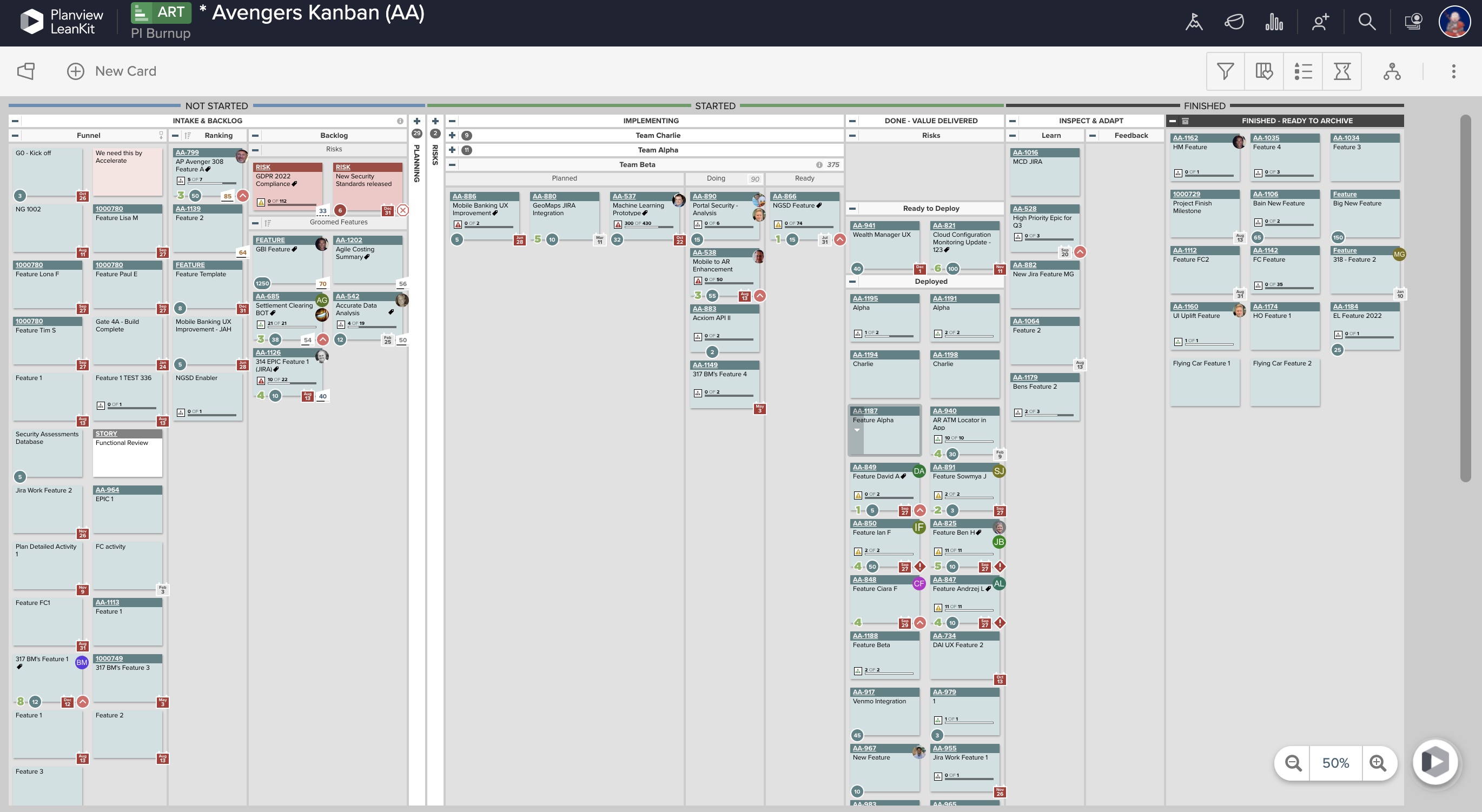
ScreenShots

Planview AgilePlace Screenshots

Screenshot of Real-Time Analytics: Utilize board health metrics involving bottlenecks, WIP, and throughput to guide the optimization of workflows, improve velocity, and better prioritize efforts for more predictable delivery. Lean and Agile metrics can be used to assess team performance and promote continuous improvement.Screenshot of PI Planning: Offers enterprise Kanban boards to visualize the work of teams regardless of the methodologies they apply or workflows they follow, and insights into progress and create opportunities for better alignment.Screenshot of Dependency Visualization and Management: Surfaces risks to plans resulting from cross-team dependency conflicts, blockers, and capacity constraints, and helps drive proactive measures to enable teams to deliver on time.Screenshot of Team Planning and Coordination: Boards can be used to breakdown work, build and manage plans, and execute against strategy to deliver more value to customers, faster.