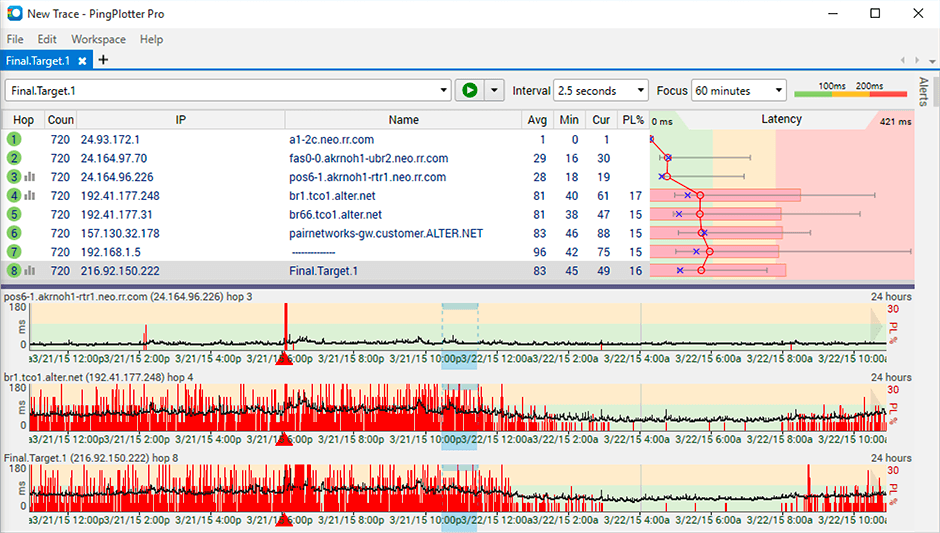
PingPlotter is a graphical traceroute and ping tool that visualizes network performance in a way that makes identifying the source of problems quicker and easier for everyone from online gamers and video streamers to VoIP admins and IT pros. Features for remote deployment, network monitoring, scripting, and a web interface are included along with several additional capabilities.
$0
per user
Wireshark
Score 9.5 out of 10
N/A
Wireshark is a free and open source network troubleshooting tool.
N/A
Pricing
PingPlotter
Wireshark
Editions & Modules
PingPlotter Free
$0.00
per user
PingPlotter Free
$0.00
per user
PingPlotter Standard
$6.99
per user per month
PingPlotter Professional
$29.00
per user per month
PingPlotter Standard
$39.99
per user
PingPlotter Professional
$349.00
per user
Wireshark
Free
Offerings
Pricing Offerings
PingPlotter
Wireshark
Free Trial
Yes
No
Free/Freemium Version
Yes
Yes
Premium Consulting/Integration Services
No
No
Entry-level Setup Fee
No setup fee
No setup fee
Additional Details
—
—
More Pricing Information
Community Pulse
PingPlotter
Wireshark
Features
PingPlotter
Wireshark
Network Performance Monitoring
Comparison of Network Performance Monitoring features of Product A and Product B
The best scenario and best results are seen when the path does not reuse the same device for the "next hop". It is less well suited in situations where the path is being tricked by the re-use of devices for the next interface. This is seen required in many networks where the proper type of connection is not on an end device and the core device is used to provide a fiber to copper sort of "pass-through" connection.
Wireshark is great for enterprise networks with large amounts of data traversing the network that need a way to filter and inspect specific traffic by specific parameters (i.e. destination / source IP address, host, or type). There are use-cases for smaller environments, but the amount of time needed to learn how to effectively use the tool may not be beneficial for home / small office users.
Its a little confusing to see which targets are currently running pings and which ones are displayed in the plots.
Starting and stopping pings requires a right click and that would be better with a play/pause button I think.
Ability to drag and drop the graphs to reorder them.
more columns to show which targets are running and which are displayed. Currently this is done with symbols so you cant sort by just the running targets for example I've found.
It is beginner-friendly as far as installation, but it could use a tutorial.
Perhaps there is a way to do this already, but I haven't yet seen it. It would be nice if it could be integrated with a network package that could detect network anomalies, fire up an automated packet analysis, and send a report to an administrator.
I installed it and it just started working. I realized I could then tweak it to show what I needed but didn't have to spend a long time configuring it before use, editing YAML files etc. Maybe that's fine for a network professional, but I only need this software if something goes wrong, and then need it to work quickly out of the box.
It's very simple and easy to use, although individuals not used to managing and administering networks would take some time to get familiar with it. Once they have mastered use of the application, it's easy to stay knowledgeable about it, iteration after iteration. It is well supported online through an open-source community network of professionals who are helpful in imparting knowledge and in providing assistance.
I have not had much contact with the PingPlotter support, only one time have I went to them and it was a positive experience. The questions I had were answered quickly and professionally. I have no issue with the experience I had with the Support team. This was from before and after the purchase of the product.
I don't believe Wireshark has "true" support as the software is open source. However, there is an active & friendly community around Wireshark that are more than happy to help answer questions. From a comprehensive Wiki and FAQ section on the site to the Ask a Question forum and bug tracker section, there's plenty of support options to make sure your questions and issues are addressed.
PingPlotter has better visualizations and a stronger ability to capture historical data than other tools I've used. This makes it easier to find the root cause by looking back in the log data to find where latency or packet loss occurred.
[Wireshark] is just the go-to application. It's the tool that is taught with in school and at trade conferences. We have not had a need to even look at other tools. It's free, it had a ton of functionality, and it just works without complaint.