Oracle Enterprise Manager vs. VMware Tanzu CloudHealth

Overview
ProductRatingMost Used ByProduct SummaryStarting Price
Oracle Enterprise Manager
Score 7.4 out of 10
N/A
Oracle’s Enterprise Manager is an on-premises monitoring and management tool. The console is designed primarily to manage other Oracle products, it but can integrate to manage non-Oracle components as well.N/A
VMware Tanzu CloudHealth
Score 7.7 out of 10
N/A
Tanzu CloudHealth (formerly VMware Aria Cost Powered by CloudHealth) simplifies financial management, streamlines operations, and improves organizational collaboration across your multi-cloud environment.N/A
Pricing
Oracle Enterprise ManagerVMware Tanzu CloudHealth
Editions & Modules
No answers on this topic
Offerings
Pricing Offerings
Oracle Enterprise ManagerVMware Tanzu CloudHealth
Free Trial
NoYes
Free/Freemium Version
NoYes
Premium Consulting/Integration Services
NoNo
Entry-level Setup FeeNo setup feeNo setup fee
Additional Details
More Pricing Information
Community Pulse
Oracle Enterprise ManagerVMware Tanzu CloudHealth
Best Alternatives
Oracle Enterprise ManagerVMware Tanzu CloudHealth
Small Businesses
DBeaver
DBeaver
Score 9.2 out of 10
VMware Cloud Director
Score 8.5 out of 10
Medium-sized Companies
DBeaver
DBeaver
Score 9.2 out of 10
IBM Turbonomic
IBM Turbonomic
Score 9.3 out of 10
Enterprises
DBeaver
DBeaver
Score 9.2 out of 10
vRealize Operations (discontinued)
Score 10.0 out of 10
All AlternativesView all alternativesView all alternatives
User Ratings
Oracle Enterprise ManagerVMware Tanzu CloudHealth
Likelihood to Recommend
7.7
(0 ratings)
-
(0 ratings)
Usability
7.3
(0 ratings)
-
(0 ratings)
Support Rating
7.3
(0 ratings)
-
(0 ratings)
User Testimonials
Oracle Enterprise ManagerVMware Tanzu CloudHealth
Likelihood to Recommend
I wish I had an option to give it a 9.5 :) OEM Cloud Control is very well suited if you have a system with multiple implementations of Oracle Database Enterprise Edition. If you are willing to pay for the huge license cost which is typical with Oracle, then you will love to use OEM Cloud Control to monitor your entire ERP solution including web servers, applications, network, storage, and physical servers. It is not worth the buck if your's is a small implementation. Your DBA's should be able to work without depending on OEM Cloud Control.
Read full review
No answers on this topic
Pros
  • Oracle Enterprise Manager is a "one stop shop" for all of our management needs. This is helpful because it minimizes the management of the management software itself. There are less upgrades and connectivity issues to handle. And there are "plug-ins" for additional products we use like Blue Medora's one for PostgreSQL.
  • Managing administrative jobs can be burdensome in a shop with dozens of servers and databases. OEM Cloud Control makes it easy since you can view all the jobs for all servers in one place. It is easy to filter on jobs with problems or the like so that you can quickly look at the logs and fix the issues.
  • Tuning PL/SQL is much easier using OEM Cloud Control. Most DBAs are familiar with trace files and TKPROF, but not having to do those things at a command line smooths the process out. The graphical interface makes it easier to show developers exactly what the issues are. This makes for less finger-pointing and quicker resolution of performance problems.
  • Proactive management is easier using OEM Cloud Control. Before having the gui, I had a collection of scripts that I would have to install on each database server, then set up cron jobs to run them. When Oracle was upgraded, those scripts might have to be updated on each and every server. OEM Cloud Control has those things built in. You can choose exactly which metrics are important to you. And you can keep performance graphs up all day on a second monitor to let you instantly see when something might cause a problem.
Read full review
No answers on this topic
Cons
  • We also use OEM to monitor SQL Server. However, OEM only provided limited features for SQL Server. It would be nice if we can schedule backup jobs for SQL Server in OEM.
  • The ability to run SQL queries. You can't run queries in OEM. I have to go to SQL Developer or SQL PLUS to run. queries.
Read full review
No answers on this topic
Usability
It's great! It does everything and anything you would want it to do. It can monitor things which doesn't comes out of the box by adding plug ins to it, for example, you can even monitor Oracle GoldenGate Replication by adding a plug-in to OEM Cloud Control.
Read full review
No answers on this topic
Support Rating
I still rate OEM as a must-have tool for central management of Oracle fleet. The pros and cons of the product is prominent. Meanwhile, I also acknowledge that OEM was design about a decade ago. At that time, it did not have the landscape we have today, such as cloud, DEVOPS, machine learning, etc. I hope in future releases, the design will incorporate those features.
Read full review
No answers on this topic
Alternatives Considered
Kibana from Elastic is another monitoring tool that claims to provide very similar information to OEM. It seems to be an information tool rather than a tool that can actually make changes within a database. I think Kibana is more robust for hardware versus database software so it is more suited to that purpose and does to compare to the Oracle Database monitoring attributes of OEM.
Read full review
No answers on this topic
Return on Investment
  • Positive: Alerting features. Without this we would have to be a 24x7 shop with someone always manning the helm. With the alerting feature we can define levels of alerts and only get the most pressing alerts sent out.
  • ROI: OEM is free, so the ROI is whatever you make of it.
Read full review
No answers on this topic
ScreenShots

VMware Tanzu CloudHealth Screenshots

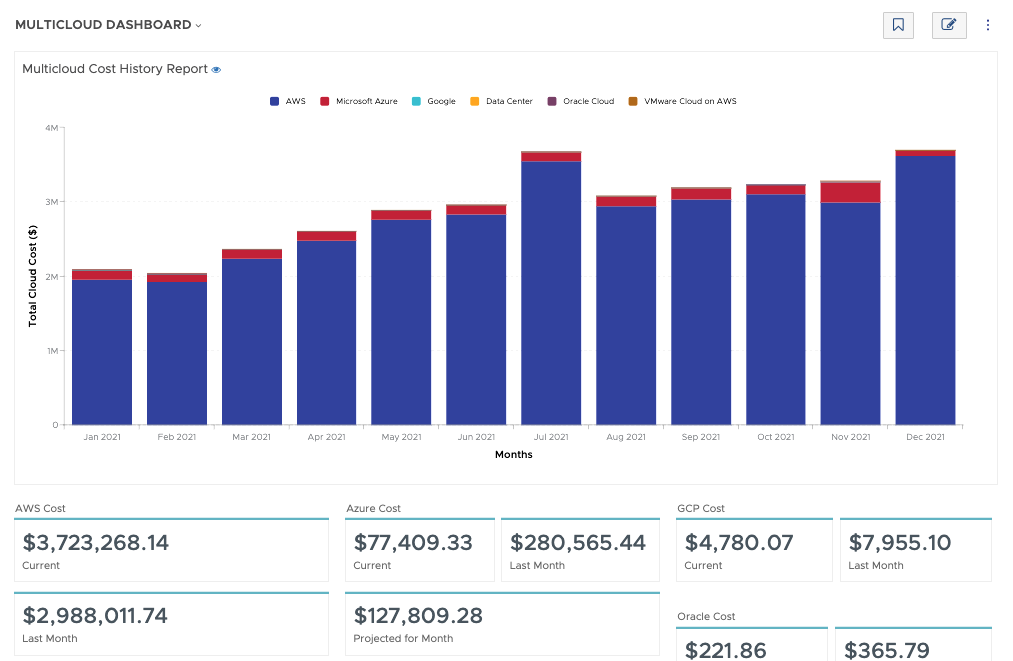
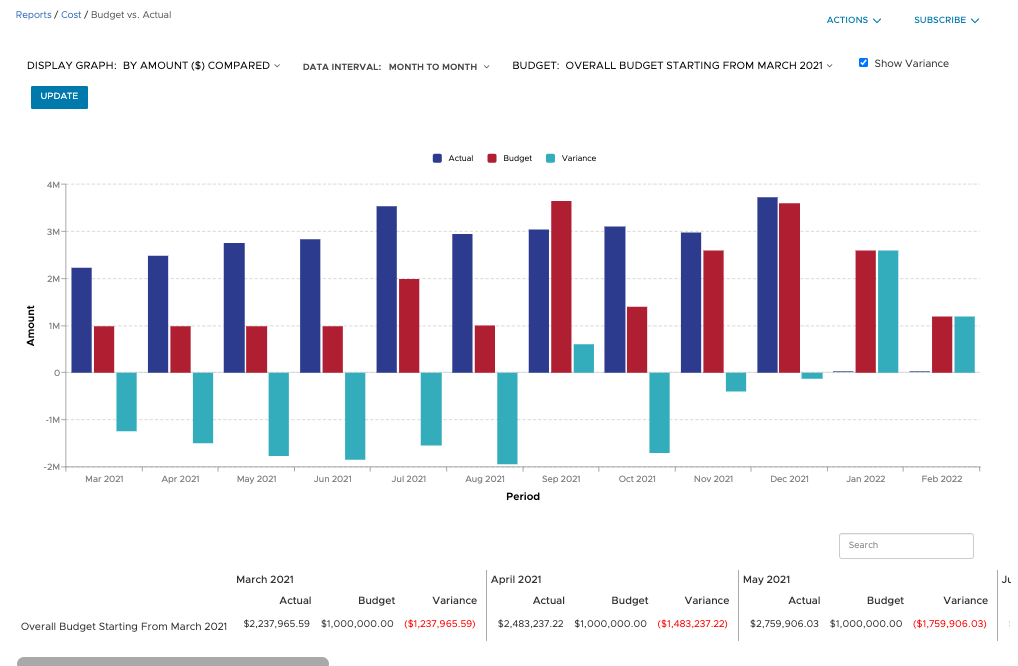
Screenshot of Filter and refine out-of-the-box graphical and tabular reports to correlate datasets for analysis against your business objectives. Create custom dashboards across clouds and easily build detailed reports from scratch, known as CloudHealth FlexReports, across various dimensions to perform more granular analysis on cost, usage, and asset data.Screenshot of Configure budgets to visualize your expected costs for the year in advance and compare it with actual spend as the year progresses. Create as many overall and categorized budgets as you need to run your business, aligned to your company’s fiscal year. Proactively alert stakeholders when costs are forecasted to exceed pre-defined budgets. Toggle on forecasting for reports to predict future values based on historical data for the interval you define.Screenshot of Use CloudHealth’s dynamic policy engine to drive consistent operations and continuously monitor your environment. Quickly identify opportunities to proactively reduce spend, remediate risks, and streamline configuration. Get alerted when conditions deviate from your desired state and enable automated actions to execute changes in your environment—stop, start, resize, or terminate infrastructure—all at the frequency you define.Screenshot of Align cloud data to your business with CloudHealth FlexOrgs and benefit from greater control over user access, sharing, and delegation across multiple levels of organizational hierarchy. Further fine tune the platform by dynamically allocating assets to business groups known as CloudHealth Perspectives. View and analyze your cloud environment by project, application, line of business, cost center, and more, to drive accountability for cost and usage.