Whether launching a first test or scaling a sophisticated experimentation program, Optimizely Web Experimentation aims to deliver the insights needed to craft high-performing digital experiences that drive engagement, increase conversions, and accelerate growth.
N/A
UserTesting
Score 8.0 out of 10
N/A
UserTesting helps UX researchers, designers, product teams, and marketers gather actionable insights through research, testing, and feedback. With a network of real people ready to share their perspectives, UserTesting enables organizations to make customer-first decisions at scale.
I think it can serve the whole spectrum of experiences from people who are just getting used to web experimentation. It's really easy to pick up and use. If you're more experienced then it works well because it just gets out of the way and lets you really focus on the experimentation side of things. So yeah, strongly recommend. I think it is well suited both to small businesses and large enterprises as well. I think it's got a really low barrier to entry. It's very easy to integrate on your website and get results quickly. Likewise, if you are a big business, it's incrementally adoptable, so you can start out with one component of optimizing and you can build there and start to build in things like data CMS to augment experimentation as well. So it's got a really strong a pathway to grow your MarTech platform if you're a small company or a big company.
When working with general market customers. For example, a person between the ages of 30 and 60 who has a checking account and a mortgage with their primary bank, as long as they don't get too specific about a particular bank.
The Platform contains drag-and-drop editor options for creating variations, which ease the A/B tests process, as it does not require any coding or development resources.
Establishing it is so simple that even a non-technical person can do it perfectly.
It provides real-time results and analytics with robust dashboard access through which you can quickly analyze how different variations perform. With this, your team can easily make data-driven decisions Fastly.
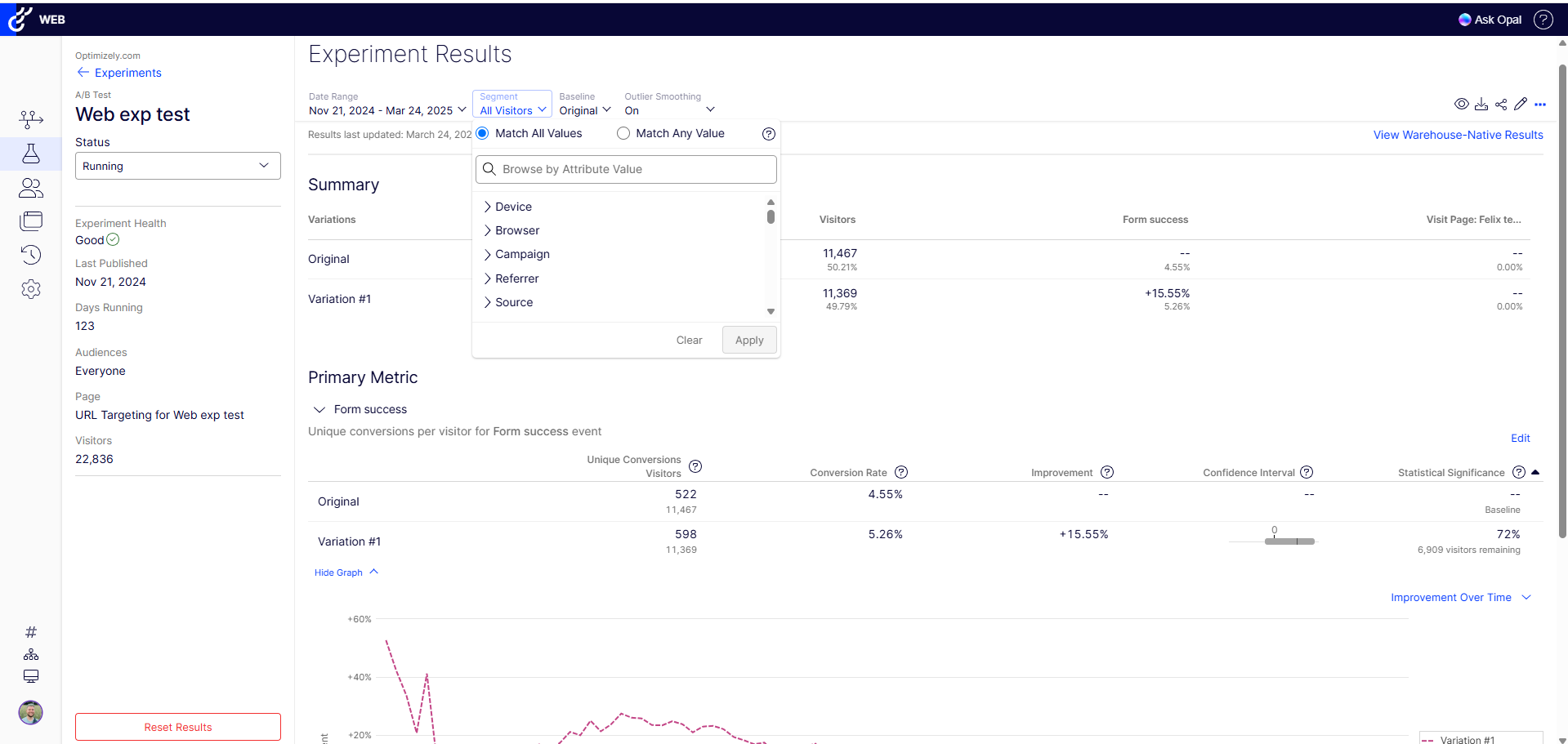
The results view is dense and difficult to package easily for leadership, and when filtering by segment it's hard to read comparative outcomes without clearing or swapping filters
The organization of experiments and statuses is a cluttered list and the search is limited in use - would love to see that improve with time
There are so many other MarTech products out there, would love to see more dedicated integrations so we don't have to invest in something like Zapier or Tray to build hacky automations
Because it's an incredible and essential tool for my line of work as a conversion optimization specialist. Really couldn't do my job nearly as effectively without it. It's paid for itself many times over and I feel like I'm only beginning to unlock the tools potential.
I'm actually trying to get a license for my current job at my current company (recently moved to a new company). I gave it this rating because I am about to go to our executive to ask that we purchase it! I know that there will be value because we are forecasting a high volume of research next year
Optimizely Web Experimentation's visual editor is handy for non-technical or quick iterative testing. When it comes to content changes it's as easy as going into wordpress, clicking around, and then seeing your changes live--what you see is what you get. The preview and approval process for sharing built experiments is also handy for sharing experiments across teams for QA purposes or otherwise.
It can be difficult to organize our tests and go back and find information. I think the AI tools are helping and will help with this, but for now it is time consuming to sort through all of the tests and information and then synthesize it and share it with others. It just takes a lot of time.
I would rate Optimizely Web Experimentation's availability as a 10 out of 10. The software is reliable and does not experience any application errors or unplanned outages. Additionally, the customer service and technical support teams are always available to help with any issues or questions.
I would rate Optimizely Web Experimentation's performance as a 9 out of 10. Pages load quickly, reports are complete in a reasonable time frame, and the software does not slow down any other software or systems that it integrates with. Additionally, the customer service and technical support teams are always available to help with any issues or questions.
They always are quick to respond, and are so friendly and helpful. They always answer the phone right away. And [they are] always willing to not only help you with your problem, but if you need ideas they have suggestions as well.
I've used the "power hour," as I think it's called. This really helped me gain a greater understanding of my specific needs and wants from the platform. This excellent service points to the excellent relationship UserTesting provides its clients. I would recommend this service to any of my colleagues.
The tool itself is not very difficult to use so training was not very useful in my opinion. It did not also account for success events more complex than a click (which my company being ecommerce is looking to examine more than a mere click).
The implementation through the tag management system took a bit of trial and error at first, mostly due to the asynchronous nature of the TMS. We had to manipulate the implementation to assure that the Optimizely code was written to the page at the right time to allow the experiment content load in the browser without showing any of the original content first. We also needed to make some adjustments to the TMS code to get the integration with Site Catalyst timed appropriately.
From a technical perspective, the implementation was extremely smooth. Most of the change management / implementation hurdles were clearing use of the tool through our various security, legal, and information privacy teams. Once these concerns were addressed (UserTesting.com was very helpful in providing all the needed documentation), the implementation process was very simple and we were able to get going right away.
The ability to do A/B testing in Optimizely along with the associated statistical modelling and audience segmentation means it is a much better solution than using something like Google Analytics were a lot more effort is required to identify and isolate the specific data you need to confidently make changes
UserTesting is probably the most polished with the largest tester pool, fastest turnaround, and great tools for both moderated and unmoderated tests. Userlytics is a solid alternative, especially for the budget-conscious. It supports usability testing on lots of devices, and you can do both moderated and unmoderated sessions. The UI isn’t as seamless as UserTesting’s, but it gets the job done and it's pretty flexible in terms of study setup and participant targeting. Trymata is the most basic, but it’s relatively straightforward and affordable. You still get session recordings and written responses, but lacks dashboard polish or advanced features. It’s great for smaller teams or one-off tests.
It's incredibly flexible and adapts well to organizations of all sizes, whether you’re running a single site or managing multiple departments and platforms. The ability to deploy experiments seamlessly across different environments is a huge plus, especially for growing businesses. While it’s highly scalable, the last point would depend on the right team leveraging its full potential.
We can build tests and gather the insights from those tests to validate our products at a breakneck pace.
By quickly validating our assumptions, we can adjust or refine our designs to ensure the final results are more user-focused.
Recently, by testing and comparing two different flows for a form, we were able to create the right solution that gave us better leads compared to the former form. This results in better leads, better data about the user, and better support at the end for this user.